
How to Extract a React Custom Hook and Test It with renderHook
This article was translated from the Japanese original with AI. 日本語の原文を読む
When you extract logic from a component into a custom hook, you can test just the hook with renderHook from React Testing Library, without writing a display component of your own. I extracted a hook that waits for input to settle from a search box component, and I checked the steps by writing and running the tests in TypeScript.
I deliberately wrote four common mistakes as failing tests to confirm them: destructuring the return value before checking it, changing state without wrapping it in act, advancing fake timers outside act, and forgetting to pass an argument to rerender. For each one, I include only the result line for that test from the Vitest output.
The test environment was Ubuntu 24.04 and Node.js 22.22.0. I used vitest 5.0.5, jsdom 30.1.3, @testing-library/react 16.3.3, @testing-library/dom 10.4.2, @testing-library/jest-dom 7.0.1, react / react-dom 19.3.1, and typescript 7.0.2. Vitest is configured with the environment set to jsdom, and a setup file calls cleanup() in afterEach (the Vitest globals setting stays at its default of false).
- 1. Extracting a custom hook from a component
- 2. The basics of renderHook: read result.current after act
- 3. Changing arguments: initialProps and rerender
- 4. Checking cleanup: unmount
- 5. Hooks that read context: pass a Provider with wrapper
- 6. When to use renderHook and when to use render
- 7. Quick reference for common mistakes
Extracting a custom hook from a component
Before the change, the search box confirms the search term and calls onSearch once the input has been idle for 300ms. The logic that waits for input is written directly inside the component.
import { useEffect, useState } from 'react';

export function SearchBox({ onSearch }: { onSearch: (q: string) => void }) {
  const [text, setText] = useState('');
  const [query, setQuery] = useState('');

  // Wait until input has been idle for 300ms, then confirm the search term
  useEffect(() => {
    const id = setTimeout(() => setQuery(text), 300);
    return () => clearTimeout(id);
  }, [text]);

  useEffect(() => {
    if (query) onSearch(query);
  }, [query, onSearch]);

  return <input aria-label="検索" value={text} onChange={(e) => setText(e.target.value)} />;
}
I move the waiting logic into a hook called useDebouncedValue. Following React's official naming rule for hooks, the name starts with use, followed by a capital letter. The same page's guidance on when to use custom hooks suggests that once you write an effect, you consider whether wrapping it in a custom hook would make the code clearer.
// useDebouncedValue.ts
import { useEffect, useState } from 'react';

// Returns value once it has stayed unchanged for delayMs
export function useDebouncedValue<T>(value: T, delayMs: number): T {
  const [debounced, setDebounced] = useState(value);
  useEffect(() => {
    const id = setTimeout(() => setDebounced(value), delayMs);
    return () => clearTimeout(id);
  }, [value, delayMs]);
  return debounced;
}
In the component, the waiting logic becomes a single line that calls the hook (imports omitted).
export function SearchBox({ onSearch }: { onSearch: (q: string) => void }) {
  const [text, setText] = useState('');
  const query = useDebouncedValue(text, 300);

  useEffect(() => {
    if (query) onSearch(query);
  }, [query, onSearch]);

  return <input aria-label="検索" value={text} onChange={(e) => setText(e.target.value)} />;
}
The basics of renderHook: read result.current after act
Following the rules of hooks, a hook must be called from a component or another custom hook. So renderHook creates a test-only component that just calls the callback you pass it and renders it. The return value ends up in result.current.
First, I checked the shape with useCounter, which counts up to a maximum.
// useCounter.ts
import { useCallback, useState } from 'react';

export function useCounter({ initial = 0, max }: { initial?: number; max: number }) {
  const [count, setCount] = useState(initial);
  const increment = useCallback(() => setCount((c) => Math.min(c + 1, max)), [max]);
  const reset = useCallback(() => setCount(initial), [initial]);
  return { count, increment, reset };
}
I call the functions that change state inside act, then read result.current. The React act reference recommends using act with await and async functions, so I use the form await act(async () => { ... }).
import { act, renderHook } from '@testing-library/react';
import { expect, test } from 'vitest';
import { useCounter } from './useCounter';

test('increment で1つ増える', async () => {
  const { result } = renderHook(() => useCounter({ max: 3 }));
  expect(result.current.count).toBe(0);

  await act(async () => {
    result.current.increment();
  });
  expect(result.current.count).toBe(1);
});

test('max より大きくならない', async () => {
  const { result } = renderHook(() => useCounter({ max: 3 }));
  await act(async () => {
    for (let i = 0; i < 5; i++) result.current.increment();
  });
  expect(result.current.count).toBe(3);
});
Destructuring the return value leaves you with the old value
When I pulled values out of result.current first, as below, the test failed (imports omitted).
test('落とし穴1:result.current を分割代入してから確かめる', async () => {
  const { result } = renderHook(() => useCounter({ max: 3 }));
  const { count, increment } = result.current;
  await act(async () => {
    increment();
  });
  expect(count).toBe(1);
}); × src/useCounter.pitfall.test.ts > 落とし穴1:result.current を分割代入してから確かめる 24ms
→ expected +0 to be 1 // Object.is equalityAccording to the React Testing Library description of the renderHook return value, result works like a ref that holds the last committed return value of the callback. When I looked inside the installed package, I found that the test component updates result.current inside a useEffect on every render. After a re-render, result.current points to the new return value, but the count I had destructured earlier is still 0 from the previous return value (see the diagram below).
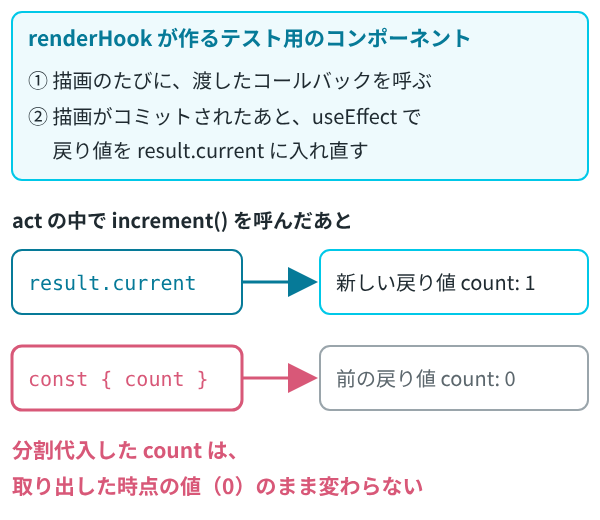
When checking values, always read them from result.current each time.
Without act, the update has not yet been applied
When I called increment() without wrapping it in act, this test also failed (imports omitted).
test('落とし穴2:act で包まずに increment を呼ぶ', async () => {
  const { result } = renderHook(() => useCounter({ max: 3 }));
  result.current.increment();
  expect(result.current.count).toBe(1);
}); × src/useCounter.pitfall.test.ts > 落とし穴2:act で包まずに increment を呼ぶ 4ms
→ expected +0 to be 1 // Object.is equalityRight after calling increment(), count was still 0. When I waited with waitFor, it became 1, so the update was applied later. According to the act reference, act processes the updates that happen inside it and applies them to the DOM before your assertions run.
I ran a test that calls increment() without act and waits with waitFor. With the default globals: false setting, React printed no warning. When I removed the setup file and set globals: true, the warning "An update to TestComponent inside a test was not wrapped in act(…)." appeared.
The troubleshooting section of the act reference says that to use act, the test environment must set IS_REACT_ACT_ENVIRONMENT to true, and that React Testing Library already does this.
However, when I looked inside the installed package, I found that React Testing Library's act sets IS_REACT_ACT_ENVIRONMENT to true only while it is running, and restores the previous value afterward. The code that sets it to true for the whole test run only works when the global beforeAll and afterAll exist. With Vitest's globals set to false, that code does not run. That is why the update outside act produced no warning. If you want the warning without changing globals, set it yourself in a setup file.
// vitest.setup.ts
import '@testing-library/jest-dom/vitest';
import { cleanup } from '@testing-library/react';
import { afterEach } from 'vitest';

declare global {
  var IS_REACT_ACT_ENVIRONMENT: boolean | undefined;
}

// Make React warn when state changes outside act
globalThis.IS_REACT_ACT_ENVIRONMENT = true;

afterEach(() => {
  cleanup();
});
With this setup file, running the same check test as in the note above printed the same warning as with globals: true. Without the declare global block, tsc reported the error "Element implicitly has an 'any' type because type 'typeof globalThis' has no index signature."
Changing arguments: initialProps and rerender
For a hook whose behavior depends on its arguments, like useDebouncedValue, pass the first arguments through initialProps, and pass new arguments with rerender. As described in the renderHook initialProps documentation, the callback receives initialProps. In TypeScript, the argument types were inferred from initialProps.
I replaced timers with fakes using Vitest's vi.useFakeTimers and advanced them with vi.advanceTimersByTime(). Advancing timers changes state, so I wrap that in act too.
import { act, renderHook } from '@testing-library/react';
import { afterEach, beforeEach, expect, test, vi } from 'vitest';
import { useDebouncedValue } from './useDebouncedValue';

beforeEach(() => {
  vi.useFakeTimers();
});
afterEach(() => {
  vi.useRealTimers();
});

test('300ms たつまでは前の値のまま', async () => {
  const { result, rerender } = renderHook(
    ({ value }) => useDebouncedValue(value, 300),
    { initialProps: { value: 'ね' } },
  );
  expect(result.current).toBe('ね');

  rerender({ value: 'ねこ' });
  expect(result.current).toBe('ね');

  await act(async () => {
    vi.advanceTimersByTime(299);
  });
  expect(result.current).toBe('ね');

  await act(async () => {
    vi.advanceTimersByTime(1);
  });
  expect(result.current).toBe('ねこ');
});
At 299ms the previous value remained, and at 300ms it changed to the new value. I omit the code, but in a test that changed the value twice with 200ms in between, the first value remained until 300ms after the last change.
Advancing fake timers outside act leaves the previous value
When I called vi.advanceTimersByTime(300) without wrapping it in act, the test failed. This test is also in a file that calls vi.useFakeTimers() in beforeEach (imports omitted).
test('落とし穴3:advanceTimersByTime を act で包まない', async () => {
  const { result, rerender } = renderHook(
    ({ value }) => useDebouncedValue(value, 300),
    { initialProps: { value: 'ね' } },
  );
  rerender({ value: 'ねこ' });
  vi.advanceTimersByTime(300);
  expect(result.current).toBe('ねこ');
}); × src/useDebouncedValue.pitfall.test.ts > 落とし穴3:advanceTimersByTime を act で包まない 34ms
→ expected 'ね' to be 'ねこ' // Object.is equalityWrap the timer advancing in act as well, as in the 299ms and 300ms tests above.
Calling rerender() without arguments makes the argument undefined
The renderHook initialProps documentation says that calling rerender() with no arguments does not pass initialProps. When I tried this with a callback whose argument is optional, the argument the callback received was undefined, and after 300ms result.current was undefined rather than the previous value. This test is also in a file that calls vi.useFakeTimers() in beforeEach (imports omitted).
test('落とし穴4:rerender に props を渡し忘れる', async () => {
  const { result, rerender } = renderHook(
    (props?: { value: string }) => useDebouncedValue(props?.value, 300),
    { initialProps: { value: 'ね' } },
  );
  rerender();
  await act(async () => {
    vi.advanceTimersByTime(300);
  });
  expect(result.current).toBe('ね');
}); × src/useDebouncedValue.pitfall.test.ts > 落とし穴4:rerender に props を渡し忘れる 8ms
→ expected undefined to be 'ね' // Object.is equalityPass every argument to rerender each time, including the ones that do not change.
Checking cleanup: unmount
You can remove the test component with the unmount returned by renderHook. To confirm that the effect cleanup (here, clearTimeout) runs, I counted the pending timers with vi.getTimerCount. This test is also in a file that calls vi.useFakeTimers() in beforeEach (imports omitted).
test('unmount するとタイマーが片づく', async () => {
  const { rerender, unmount } = renderHook(
    ({ value }) => useDebouncedValue(value, 300),
    { initialProps: { value: 'ね' } },
  );
  rerender({ value: 'ねこ' });
  expect(vi.getTimerCount()).toBe(1);

  unmount();
  expect(vi.getTimerCount()).toBe(0);
});
Hooks that read context: pass a Provider with wrapper
A hook that reads a value from a Provider also needs the test to wrap it in that Provider. useCart, which reads the cart contents, gets null without a Provider, so I made it throw an error in that case.
// cart.tsx
import { createContext, useContext, useState, type ReactNode } from 'react';

type Cart = { items: string[]; add: (item: string) => void };

const CartContext = createContext<Cart | null>(null);

export function CartProvider({ initialItems = [], children }: { initialItems?: string[]; children: ReactNode }) {
  const [items, setItems] = useState(initialItems);
  const add = (item: string) => setItems((prev) => [...prev, item]);
  return <CartContext value={{ items, add }}>{children}</CartContext>;
}

export function useCart(): Cart {
  const cart = useContext(CartContext);
  if (!cart) throw new Error('useCart は CartProvider の中で使ってください');
  return cart;
}
Pass a component that wraps the Provider to the wrapper option of renderHook. As the render wrapper documentation explains, the component passed as wrapper is rendered outside the component under test. In the next test, imports such as ReactNode, CartProvider, and useCart are omitted.
test('wrapper で CartProvider を渡すと、カートに入れられる', async () => {
  const wrapper = ({ children }: { children: ReactNode }) => <CartProvider>{children}</CartProvider>;
  const { result } = renderHook(() => useCart(), { wrapper });

  await act(async () => {
    result.current.add('かつおぶし');
  });
  expect(result.current.items).toEqual(['かつおぶし']);
});
initialProps is not passed to wrapper (see the note in the initialProps documentation). If you want to pass a value into the Provider, write a function that creates the wrapper, as in the documentation example (imports omitted).
test('wrapper に値を渡したいときは、wrapper を作る関数を用意する', async () => {
  const createWrapper = (initialItems: string[]) =>
    function Wrapper({ children }: { children: ReactNode }) {
      return <CartProvider initialItems={initialItems}>{children}</CartProvider>;
    };
  const { result } = renderHook(() => useCart(), { wrapper: createWrapper(['ねこじゃらし']) });
  expect(result.current.items).toEqual(['ねこじゃらし']);
});
Without a Provider, the error was thrown from the renderHook call itself. You can confirm it with expect(() => renderHook(() => useCart())).toThrow('useCart は CartProvider の中で使ってください').
When to use renderHook and when to use render
React Testing Library's renderHook documentation says that renderHook is mainly for libraries that expose hooks, and that you should normally use render. The reasoning is that when you write your own test component and call render, the thing you are testing is not hidden behind the renderHook abstraction, so the test is easier to read and less likely to break.
Even after extracting the hook, I kept the component tests written with render. The following test passed both before and after the extraction of the search box. As in the useDebouncedValue tests, it calls vi.useFakeTimers() in beforeEach (imports and beforeEach/afterEach omitted).
test('入力が 300ms 止まったら、1回だけ検索する', async () => {
  const onSearch = vi.fn();
  render(<SearchBox onSearch={onSearch} />);
  const input = screen.getByLabelText('検索');

  fireEvent.change(input, { target: { value: 'ね' } });
  fireEvent.change(input, { target: { value: 'ねこ' } });
  await act(async () => {
    vi.advanceTimersByTime(300);
  });
  expect(onSearch).toHaveBeenCalledTimes(1);
  expect(onSearch).toHaveBeenCalledWith('ねこ');
});As in this article, I use renderHook to check the fine-grained behavior of a hook (the boundary at 299ms and 300ms, the limit, and cleanup), and I check what users can see by rendering the component with render.
Note that @testing-library/react-hooks was a separate package that provided renderHook in the past. The README for that package says that from React 18 onward, you should switch to renderHook from @testing-library/react.
Quick reference for common mistakes
| Mistake | Result | Fix |
|---|---|---|
Destructuring result.current and checking the value |
Still the previous value | Always read the value from result.current |
Calling a state-changing function outside act |
Still the previous value right after the call | Wrap it in await act(async () => { ... }) |
Advancing fake timers outside act |
Still the previous value | Wrap vi.advanceTimersByTime() in act |
Calling rerender() with no arguments |
The argument becomes undefined |
Pass every argument on each call |