
React useId: Linking Form Labels and Inputs
This article was translated from the Japanese original with AI. 日本語の原文を読む
If you make an input a component and hardcode its id as id="email", the ids collide when the same component appears twice on one page. Clicking the second label then moves focus to the first input, and the name that assistive technology reports for the input is also wrong. Creating an id per component with useId links each label and input one-to-one.
In a test environment, I placed two components with hardcoded ids and two using useId side by side, and compared them in jsdom and Chromium. I also checked how this differs from generating ids by counting when HTML is produced on the server.
The test environment was Ubuntu 24.04 and Node.js 22.22.0. I used react / react-dom 19.3.1, @types/react 19.3.0, typescript 7.0.2, esbuild 0.28.2, and jsdom 29.1.1. I type-checked the .tsx files with tsc, transpiled them with esbuild, and ran them in jsdom and Chromium 141 (driven with Playwright 1.56.1). I used ffmpeg 6.1.1 to convert the GIF. I did not test identifierPrefix, which is used to change the id prefix per app when several React apps are on one page.
With hardcoded ids, the second label points to the first input
Writing an input's id in a <label>'s for attribute (htmlFor in React) links the label to the input. According to MDN's description of the label element, clicking a label moves focus to the input it is linked to. Screen readers read the label when the input has focus.
For the test, I used a component that groups an email input and a hint. The input's id is hardcoded as email and the hint's id as email-hint.
// An input with a hardcoded string id (the ids collide if two are placed on the same page)
export function HardcodedEmailField({ label }: { label: string }) {
  return (
    <div className="field">
      <label htmlFor="email">{label}</label>
      <input id="email" type="email" aria-describedby="email-hint" />
      <p id="email-hint">確認のメールが届きます</p>
    </div>
  );
}
I placed two of this component side by side, one labeled "Email address" and one labeled "Backup email address" (excerpt from the test file, only the form part):
export function HardcodedForm() {
  return (
    <form>
      <HardcodedEmailField label="メールアドレス" />
      <HardcodedEmailField label="予備のメールアドレス" />
    </form>
  );
}
These are the results from rendering it in jsdom and checking which input each label is linked to (label.control).
--- Hardcode the id (HardcodedForm) ---
label 1「メールアドレス」 for=email → つながる入力欄: 1つ目
label 2「予備のメールアドレス」 for=email → つながる入力欄: 1つ目
input 1 id=email 同じ id の要素の数=2 説明文=同じ部品の中
input 2 id=email 同じ id の要素の数=2 説明文=ほかの部品の中
The second label is also linked to the first input. As the same MDN page explains, when several elements share the id in for, the label is linked only to the first such element in the document. The aria-describedby of the second input also pointed to the hint inside the first component.
Chromium behaves the same way. The following shows which input received focus when the "Backup email address" label was clicked, and the name and description of each input from Chromium's accessibility tree.
--- hardcoded ---
「予備のメールアドレス」をクリック → フォーカスした入力欄: 1つ目
入力欄 1: 名前=「メールアドレス 予備のメールアドレス」 説明=「確認のメールが届きます」
入力欄 2: 名前=「」 説明=「確認のメールが届きます」
The name of the first input combined the text of both labels. MDN notes that when several labels point to the same input, the input has all of them as labels. The second input has no name. If assistive technology moves to this field, it gets no information about what to enter. (I did not test the actual speech output of screen readers.)
Creating a unique id per component with useId
The official reference's example of generating ids for accessibility attributes also states that hardcoding ids is a bad idea, because a component may be rendered many times on one page. useId is a hook that returns a different string for each call. Call it at the top level of the component function (not inside a loop or a condition), and pass the returned value to htmlFor, id, and aria-describedby.
import { useId } from 'react';

// Reuse the id from useId for the label, the input, and the hint
export function EmailField({ label }: { label: string }) {
  const id = useId();
  const hintId = `${id}-hint`;
  return (
    <div className="field">
      <label htmlFor={id}>{label}</label>
      <input id={id} type="email" aria-describedby={hintId} />
      <p id={hintId}>確認のメールが届きます</p>
    </div>
  );
}
I created the hint's id by appending -hint to the value from useId. These are the results after placing two of this component side by side, as before.
--- useId(UseIdForm) ---
label 1「メールアドレス」 for=_r_0_ → つながる入力欄: 1つ目
label 2「予備のメールアドレス」 for=_r_1_ → つながる入力欄: 2つ目
input 1 id=_r_0_ 同じ id の要素の数=1 説明文=同じ部品の中
input 2 id=_r_1_ 同じ id の要素の数=1 説明文=同じ部品の中
In Chromium too, clicking the "Backup email address" label moved focus to the second input, and each input had the name of its own label.
--- useId ---
「予備のメールアドレス」をクリック → フォーカスした入力欄: 2つ目
入力欄 1: 名前=「メールアドレス」 説明=「確認のメールが届きます」
入力欄 2: 名前=「予備のメールアドレス」 説明=「確認のメールが届きます」
I placed the two forms one above the other on a single page and clicked the "Backup email address" label in each.
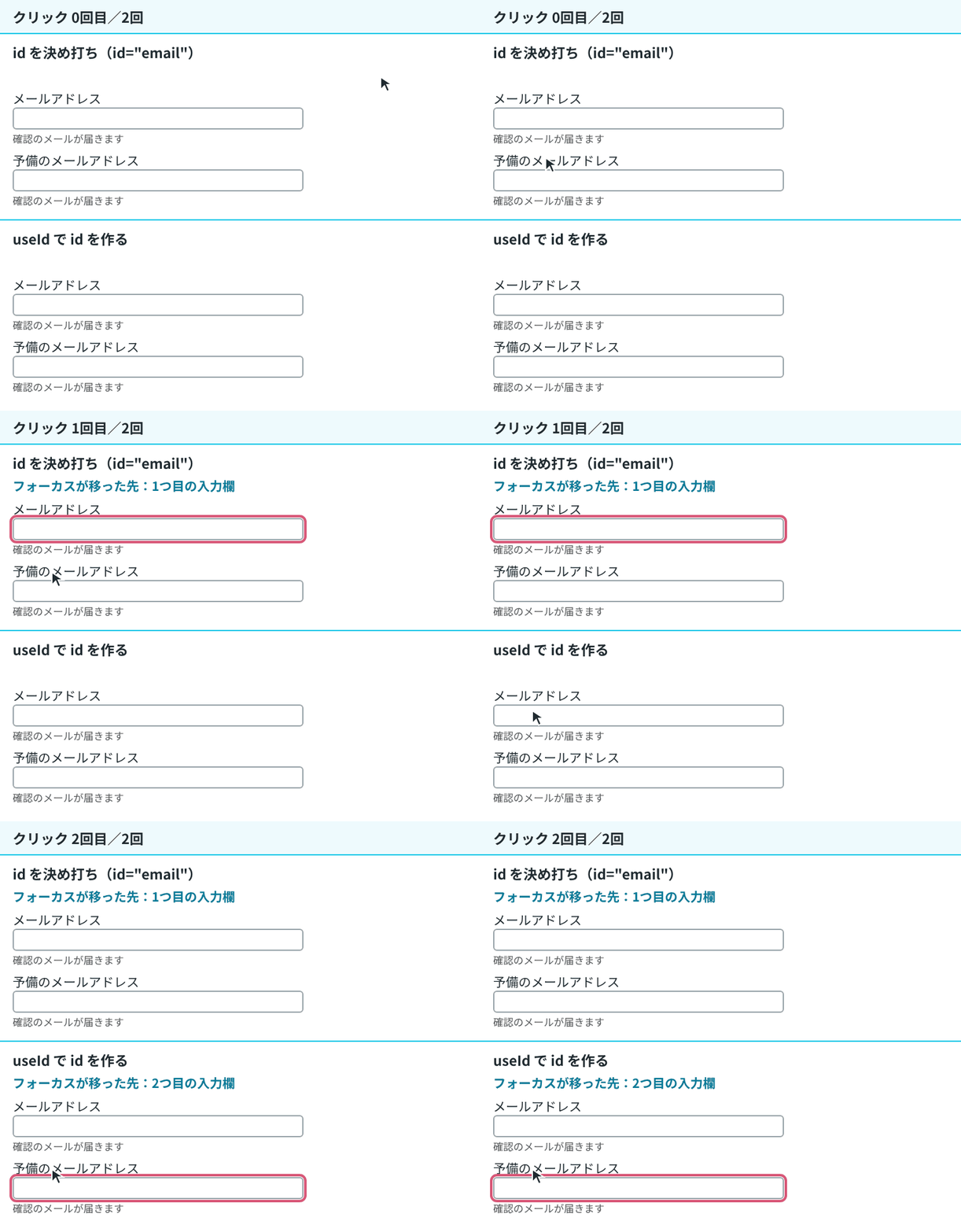
A <label> that wraps an <input> is linked to it without for and id. However, MDN recommends linking with for and id, because some assistive technologies do not support the wrapping form. As the MDN description of aria-describedby explains, aria-describedby refers to the describing element by its id. To link a description, you need an id in either approach.
Calling useId once for a component with several inputs
When a component has several inputs, such as family name and given name, you do not need to call useId once per input. As in the official reference's example of giving ids to several related elements, call it once, use the value as a shared prefix, and append a suffix for each input.
import { useId } from 'react';

// Call useId once and append a suffix to make an id for each input
export function NameFields() {
  const id = useId();
  return (
    <fieldset>
      <legend>お名前</legend>
      <label htmlFor={`${id}-family`}>姓</label>
      <input id={`${id}-family`} />
      <label htmlFor={`${id}-given`}>名</label>
      <input id={`${id}-given`} />
    </fieldset>
  );
}--- Call useId only once (NameFields) ---
label 1「姓」 for=_r_2_-family → つながる入力欄: 1つ目
label 2「名」 for=_r_2_-given → つながる入力欄: 2つ目
input 1 id=_r_2_-family 同じ id の要素の数=1
input 2 id=_r_2_-given 同じ id の要素の数=1Generating ids by counting breaks between server and browser
To give each component a different id, you might think it is enough to increment a module-level variable.
// Generate ids by counting a module-level variable (without useId)
let nextId = 0;

export function CounterEmailField({ label }: { label: string }) {
  const id = `email-${nextId++}`;
  return (
    <div className="field">
      <label htmlFor={id}>{label}</label>
      <input id={id} type="email" />
    </div>
  );
}
If you render only once, the ids are email-0 and email-1 as shown in the first result below, and they do not collide. The problem appears when a Node.js server handles many requests in the same process and generates HTML each time, because the variable keeps increasing. Here I reproduced that by calling renderToString twice. The results compare the ids from rendering a form with two of this component and a form using useId, each rendered twice.
counter: 1回目の id = email-0, email-1 / 2回目の id = email-2, email-3
useId: 1回目の id = _R_1_, _R_2_ / 2回目の id = _R_1_, _R_2_
I opened the second HTML in Chromium and ran hydrateRoot to hydrate it (attach the browser-side React to the server HTML). The counter in the browser starts from 0, so the browser creates email-0 and email-1. In the development build, the following errors appeared in the console (excerpt):
A tree hydrated but some attributes of the server rendered HTML didn't match the client properties. This won't be patched up. This can happen if a SSR-ed Client Component used:
    <form>
      <CounterEmailField label="メールアドレス">
          <label
+           htmlFor="email-0"
-           htmlFor="email-2"
+ is the value created in the browser, and - is the value in the server HTML. As the message says, React does not fix this mismatch. After hydration, the DOM ids remained email-2 and email-3. The useId version produced no errors, and the same ids were generated when rendering twice on the server.
The official reference's explanation of why useId is better than an incrementing counter says that useId builds the id from where the calling component sits in the component tree. So if the server and the browser render the same tree, the ids match even if the rendering order differs. Conversely, if the server and the browser render different trees, the useId ids also differ.
Create the ids for labels and descriptions by calling useId once inside the component. If you create them with a counter variable, they will mismatch when HTML is generated on the server.
Things to watch for when using useId
Do not rely on the format of the id string
In this test, the browser-only render produced ids like _r_0_, and the server render produced ids like _R_1_. According to the React changelog, the format changed from :r123: to «r123» in 19.1.0, and then to the underscore format in 19.2.0 (_r_0_ in the 19.3.1 used in this test). Do not write code that depends on the id format. Pass the value returned by useId directly to the attributes.
Do not use it for list keys
The official reference's caveats say not to use useId to create list keys. Build keys from the data being displayed. The same caveats also note that useId is a hook, so it cannot be called inside loops or conditions.
When placing several React apps on one page
If you put separate React apps on the same page, you can pass identifierPrefix to createRoot or hydrateRoot to change the id prefix for each app (official reference on adding a shared prefix to all generated ids). If you have only one app, you do not need to pass it.