
How to Read the Latest Values in a React useEffectEvent Without Re-running Effects
This article was translated from the Japanese original with AI. 日本語の原文を読む
useEffectEvent lets an effect read the latest props and state without re-running the effect when those values change. Until now, the usual options were either adding the value to the dependency array and re-running the effect too often, or silencing the lint rule and leaving the value out, which reads stale values.
In a test environment, I wrote the same chat room component in TypeScript (.tsx) in three ways. I measured how many times it reconnected when the theme was switched, and which theme was used in the notifications. I combined those results with the intended use cases and constraints from the official documentation.
The test environment was Ubuntu 24.04 and Node.js 22.22.0. I used react / react-dom 19.3.1, @types/react 19.3.0, typescript 6.0.3, esbuild 0.28.2, jsdom 29.1.1, eslint 10.13.0, eslint-plugin-react-hooks 7.1.1, and typescript-eslint 8.72.0. I type-checked the .tsx files with tsc, transformed them with esbuild, and rendered them on jsdom. The GIF was recorded by running the same components in Chromium with Playwright 1.56.1. The chat server was a fake built for the test.
The problem: an effect calls a function that also reads other values
useEffectEvent is a hook added in React 19.2 (React 19.2 announcement). The announcement explains the problem with an example that shows a notification when the chat room connects.
If the notification uses the theme (theme), theme has to go into the effect's dependency array. Then changing only the theme reconnects the chat. Reconnecting when roomId changes is correct, but reconnecting when only the theme changes is not.
According to the announcement, a common workaround is to disable the lint rule and remove theme from the dependency array. However, that means the lint rule will no longer warn about missing dependencies when the effect is changed later.
I ran the three approaches with the same steps
For the test, I prepared a fake chat server. It counts how many times connect() is called. When the server sends a message, the component calls showNotification(text, theme), and the notification text and theme are recorded.
I refer to the three approaches as ①, ②, and ③, matching the labels in the GIF shown later.
① puts theme in the dependency array.
export function ChatRoom({ roomId, theme }: Props) {
  useEffect(() => {
    const connection = createConnection(roomId);
    connection.on('message', (text) => {
      showNotification(text, theme);
    });
    connection.connect();
    return () => connection.disconnect();
  }, [roomId, theme]); // reconnects every time theme changes
  return <h1>{roomId}</h1>;
}
② keeps the effect body the same as ① but changes the dependency array to [roomId]. It silences the lint warning with // eslint-disable-next-line react-hooks/exhaustive-deps on the line before the dependency array.
③ uses useEffectEvent. It moves the notification logic into an "Effect Event" and the effect only calls that event.
import { useEffect, useEffectEvent } from 'react';

export function ChatRoom({ roomId, theme }: Props) {
  const onMessage = useEffectEvent((text: string) => {
    showNotification(text, theme); // always reads the latest theme
  });

  useEffect(() => {
    const connection = createConnection(roomId);
    connection.on('message', (text) => {
      onMessage(text);
    });
    connection.connect();
    return () => connection.disconnect();
  }, [roomId]);
  return <h1>{roomId}</h1>;
}
All three were run with the same steps. First I rendered the general room with theme light and sent the message msg1. Then I changed the theme to dark and sent msg2, and changed it back to light and sent msg3. Finally, I changed the room to travel and the theme to dark, and sent msg4. In the output, ChatWithDeps is ①, ChatStale is ②, and ChatEffectEvent is ③.
$ node run.mjs ./out/ChatWithDeps.mjs
./out/ChatWithDeps.mjs: connects=4 disconnects=3
  notes: msg1(light) msg2(dark) msg3(light) msg4(dark)

$ node run.mjs ./out/ChatStale.mjs
./out/ChatStale.mjs: connects=2 disconnects=1
  notes: msg1(light) msg2(light) msg3(light) msg4(dark)

$ node run.mjs ./out/ChatEffectEvent.mjs
./out/ChatEffectEvent.mjs: connects=2 disconnects=1
  notes: msg1(light) msg2(dark) msg3(light) msg4(dark)
① used the correct theme in its notifications, but it connected four times. Only two connections were needed: the initial one and the one after the room changed. The other two were unnecessary reconnects caused by theme changes.
② reduced the connections to two. However, msg2 was notified with light. The theme was already dark, but the effect kept reading the theme from when it was created. After the room changed and the effect was recreated, msg4 used the correct theme again.
③ connected twice and used the correct theme in every notification. It reconnected only when the room changed. The notifications used the latest theme at the time they were sent.
The next GIF shows the same three components, stacked vertically in Chromium. The top "Switch theme" button was pressed three times. The room was not changed in this GIF, and each press sent one message.
Right after a press, the field whose value changed is shown in pink. In ①, the "connection count" went up with each press and reached 4. In ③ it stayed at 1. In ②, the "last notification" also turned pink with each press, but even when the theme became dark, the notification still showed (light).
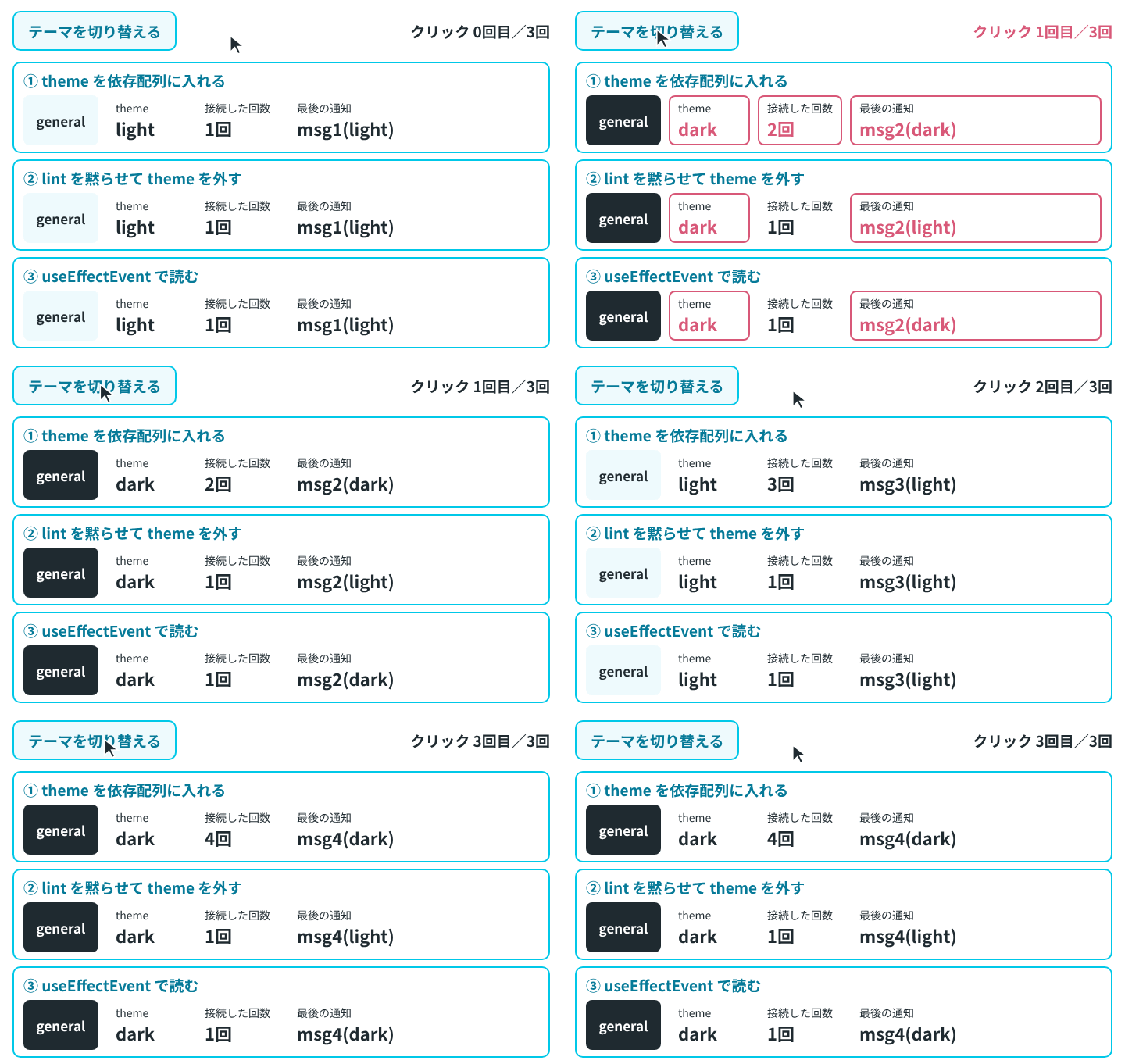
With useEffectEvent, the values read by a function called from an effect can be removed from the things that re-run the effect. Those values are still always the latest when read.
Silencing lint makes the warning disappear; useEffectEvent passes without silencing
The official page on separating events from effects advises against silencing the dependency linter. The reason is that once you silence it, you no longer get warnings when you later use new values in the effect.
In the test environment, eslint-plugin-react-hooks 7.1.1 reported nothing for ② (with the eslint-disable comment). When I removed only the comment from the same code, it produced this warning:
./src/MissingDep.tsx
  15:6  warning  React Hook useEffect has a missing dependency: 'theme'. Either include it or remove the dependency array  react-hooks/exhaustive-deps
③ also produced no warning. The function created by useEffectEvent is treated as something that should not go in the dependency array, and the effect does not read theme directly.
Constraints on effect events, and what happens when they are broken
The caveats in the useEffectEvent reference describe the constraints on use. Three points are specific to effect events:
- Call it only from inside an effect (
useEffect,useLayoutEffect, oruseInsertionEffect) or from another effect event in the same component. Do not call it during rendering, and do not pass it to other components or hooks. - Do not use it as a way to leave out a value that belongs in the dependency array. If a value change should re-run the effect, keep it in the dependency array.
- The function returned is intentionally a new function on every render.
I wrote code that deliberately breaks these constraints and checked both the lint output and the runtime behavior. The ways I broke them were: putting it in the dependency array, calling it from an event handler, passing it to a child component, and calling it during rendering.
./src/Misuse.tsx
  20:15  warning  Functions returned from `useEffectEvent` must not be included in the dependency array. Remove `onMessage` from the list                                                                              react-hooks/exhaustive-deps
  23:5   error    `onMessage` is a function created with React Hook "useEffectEvent", and can only be called from Effects and Effect Events in the same component                                                      react-hooks/rules-of-hooks
  29:25  error    `onMessage` is a function created with React Hook "useEffectEvent", and can only be called from Effects and Effect Events in the same component. It cannot be assigned to a variable or passed down  react-hooks/rules-of-hooks

./src/RenderCall.tsx
  5:13  error  `onLog` is a function created with React Hook "useEffectEvent", and can only be called from Effects and Effect Events in the same component  react-hooks/rules-of-hooks
Putting it in the dependency array produced a warning. The other three cases (calling from an event handler, passing to a child, and calling during rendering) produced errors. When I ran the code that calls it during rendering, ignoring the lint errors, React itself threw this error:
RenderCall error: A function wrapped in useEffectEvent can't be called during rendering.I also confirmed that the function returned by useEffectEvent changes on every render. I pressed the button twice to cause three renders in total, and compared each render's function with the previous one. Both comparisons showed a different function.
Identity: renders=3 sameAsPrevious=false,falseAs a result, if you put an effect event in the dependency array, the effect re-runs on every render. When I ran the version with onMessage in the dependency array using the same steps as before, it connected four times, the same as ①. The fact that the function returned by useEffectEvent changes every time is intentional. The reference's explanation of why says this is to make the mistake of putting it in the dependency array visible.
If you silence lint and remove a value from the dependency array, no error appears, but the effect reads a stale value. This is a mismatch that is hard to notice, like msg2(light) in the test.
When to use it
According to the React 19.2 announcement's explanation of when to use useEffectEvent, event handling includes functions called by user actions, such as button clicks, and functions called from effects. useEffectEvent wraps the latter. In a chat room, this is the processing that runs when the room connects or when a message arrives. The announcement's example shows a notification when connecting. The code in this article's test shows a notification when a message arrives.
The reference's caveats also say that useEffectEvent should be used only for event handling called from effects. The announcement also warns that wrapping everything in useEffectEvent, or using it only to clear a lint error, leads to bugs.
Effect events can also be used inside custom hooks. The reference's custom hook example wraps the callback in useInterval(callback, delay) with an effect event. This way, a new callback can be passed on each render without recreating the timer. I did not run this example in the test environment.
For the chat room example used in the test, the split would be: keep roomId, the value that should trigger a reconnect, in the dependency array, and read theme, which only affects how the notification looks, inside the effect event. Asking "should a change to this value re-run the effect?" tells you which side each value belongs on.