
How to Catch Errors with React Error Boundary
This article was translated from the Japanese original with AI. 日本語の原文を読む
When a React component throws an error during rendering, React removes the entire screen. If you wrap the part that might fail in an Error Boundary, you can replace only the broken part with a fallback such as "Could not display this," and the rest of the page stays as it is.
In my test environment, I ran a hand-written Error Boundary and react-error-boundary through 12 scenarios. I checked which places an error can be thrown from and still be caught, how to pass an error from an event handler, and how to render again after an error has been caught.
The test environment was Ubuntu 24.04 and Node.js 22.22.0. I used react / react-dom 19.3.1, react-error-boundary 6.1.6, @types/react 19.3.0, typescript 7.0.2, esbuild 0.28.2, and jsdom 29.1.1. I type-checked the .tsx files with tsc, transpiled them with esbuild, and ran them on jsdom. React was the development build. Only the GIF was recorded with Playwright 1.56.1 running Chromium 141.
- 1. Without an Error Boundary, the whole screen disappears
- 2. Write an Error Boundary as a class component
- 3. Only the wrapped part changes to the fallback
- 4. Errors that are caught and errors that are not
- 5. Passing an event handler error to an Error Boundary
- 6. An error thrown in fallback propagates outward
- 7. Rendering again after an error
- 8. Where to record errors
Without an Error Boundary, the whole screen disappears
First, I tried it without an Error Boundary. The page was just a Header heading next to a Profile component that throws an error during rendering.
export function Header() {
  return <h1>マイページ</h1>;
}

export function Profile() {
  if (flags.profileBroken) {
    throw new Error('プロフィールを表示できません');
  }
  return <p>プロフィール: ねこ</p>;
}

export function NoBoundary() {
  return (
    <>
      <Header />
      <Profile />
    </>
  );
}
The code is excerpted, and I left out the imports and the declaration of flags. flags.profileBroken is a value I could switch from outside for testing. When I rendered it with true, the output was:
--- 1. Without Error Boundary ---
  [onUncaughtError] プロフィールを表示できません
  画面: (空)
Only Profile threw, but Header, which has no problem, also disappeared, and the screen became empty. The Error Boundary section of the Component reference also says that when an error is thrown during rendering, React removes the UI from the screen.
The [onUncaughtError] line shows that the onUncaughtError function, which I passed as the second argument to createRoot, was called. As described in the createRoot reference's parameters section, this function is called for errors that no Error Boundary caught.
Write an Error Boundary as a class component
An Error Boundary is a class component that has a static getDerivedStateFromError method. When something inside it throws an error during rendering, React calls this method. The state it returns switches the next render to the fallback. Side effects such as logging the error go in componentDidCatch (getDerivedStateFromError reference).
There is still no way to do this with function components (the note about function components in the Component reference). So you either write one class and reuse it, or use react-error-boundary, which I cover later.
The ErrorBoundary I used for testing is shown below.
import { Component, type ErrorInfo, type ReactNode } from 'react';

type FallbackProps = { error: unknown; reset: () => void };

type Props = {
  children: ReactNode;
  fallback: (props: FallbackProps) => ReactNode;
  onError?: (error: unknown, info: ErrorInfo) => void;
};

// error can sometimes be null or a string, so track whether there was an error separately
type State = { hasError: boolean; error: unknown };

export class ErrorBoundary extends Component<Props, State> {
  state: State = { hasError: false, error: null };

  // If an error is thrown during rendering somewhere in a child, show the fallback on the next render
  static getDerivedStateFromError(error: unknown): State {
    return { hasError: true, error };
  }

  // Side effects such as logging errors are handled here
  componentDidCatch(error: unknown, info: ErrorInfo) {
    this.props.onError?.(error, info);
  }

  reset = () => {
    this.setState({ hasError: false, error: null });
  };

  render() {
    if (this.state.hasError) {
      return this.props.fallback({ error: this.state.error, reset: this.reset });
    }
    return this.props.children;
  }
}
I typed error as unknown because JavaScript code can throw values other than Error objects. The getDerivedStateFromError reference also notes that the argument can be a string or null. To handle a null error correctly, I kept whether an error exists in a separate hasError flag.
fallback takes a function that receives the error and a reset function for rendering again. In the test, I passed a Fallback component that shows the error message and a "Try again" button.
function Fallback({ error, reset }: { error: unknown; reset: () => void }) {
  return (
    <div role="alert">
      <p>表示できませんでした({error instanceof Error ? error.message : String(error)})</p>
      <button id="retry" onClick={reset}>もう一度試す</button>
    </div>
  );
}

export function WithBoundary({ log }: { log: (s: string) => void }) {
  return (
    <>
      <Header />
      <ErrorBoundary
        fallback={(p) => <Fallback {...p} />}
        onError={(error, info) => {
          log(`componentDidCatch: ${(error as Error).message}`);
          log(`componentStack:${info.componentStack}`);
        }}
      >
        <Profile />
      </ErrorBoundary>
    </>
  );
}
This code is also excerpted, and I left out the imports. Here is the result of rendering with only Profile wrapped:
--- 2. With Error Boundary ---
  [onCaughtError] プロフィールを表示できません
  [componentDidCatch] プロフィールを表示できません
  [componentStack]
    at Profile
    at ErrorBoundary
    at WithBoundary
  画面: <h1>マイページ</h1><div role="alert"><p>表示できませんでした(プロフィールを表示できません)</p><button id="retry">もう一度試す</button></div>
Header stayed, and only the place where Profile was shown changed to the fallback. As described in the componentDidCatch reference, info.componentStack lists the parent components from Profile, where the error was thrown, up to the root. (The file paths are omitted from the output.) The onCaughtError I passed to createRoot was also called. That function is called for errors that an Error Boundary caught.
Only the wrapped part changes to the fallback
I also checked in the browser that only the wrapped part is replaced. I wrapped the "likes" box at the top of the page in an ErrorBoundary and left the "memo" box at the bottom outside it. The component that shows the like count throws an error during rendering when the count reaches 3.
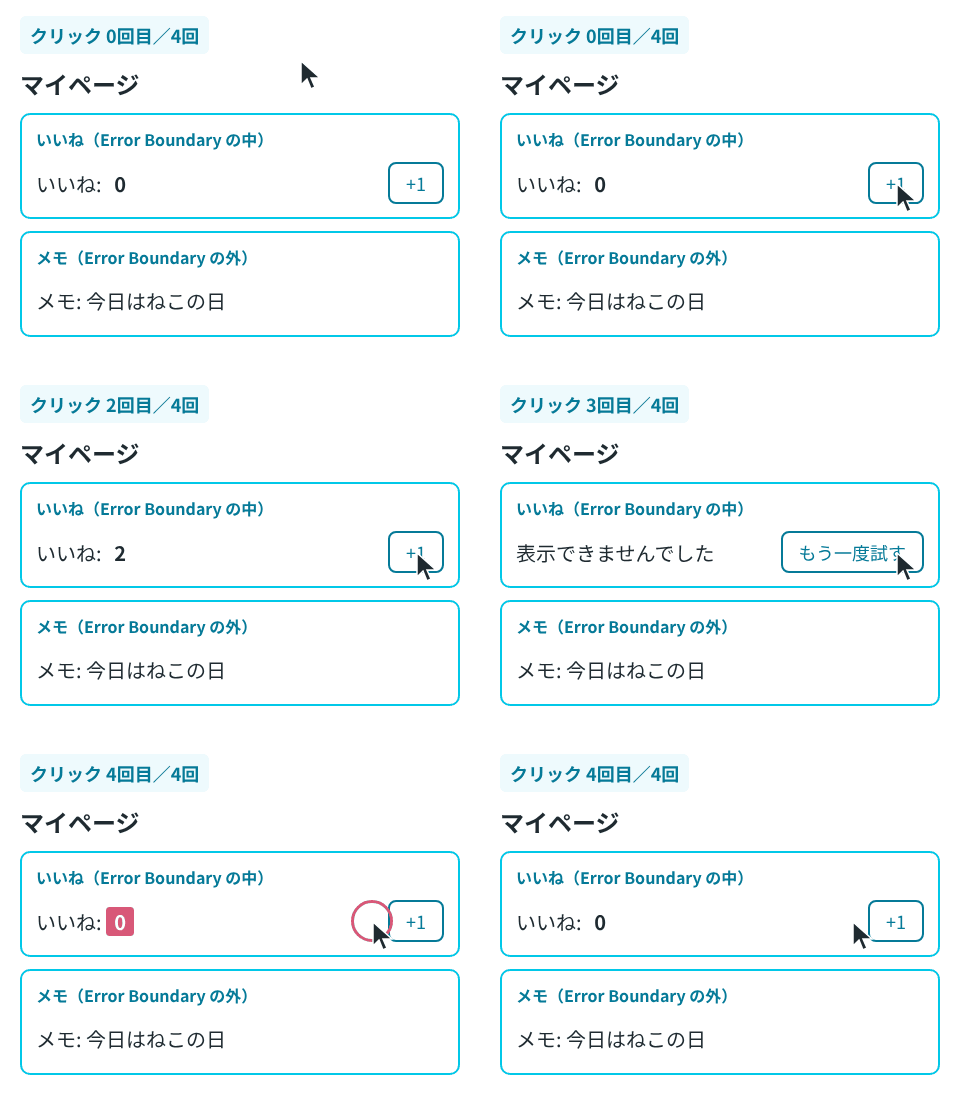
On the third click, only the likes box changed to "Could not display this," and the memo box stayed. When I pressed "Try again," the likes count rendered again from 0. The component inside the boundary was removed from the tree when the fallback appeared. As described in the section on preserving and resetting state, which explains that state is tied to a position in the tree, when React removes a component, its state is also discarded. So when reset restores the Error Boundary's state, the child component is created again, and the old state is not kept.
The Error Boundary section of the Component reference does not require you to wrap every component separately. Instead, it suggests placing boundaries where showing an error message makes sense. For example, in a messaging app, it makes sense to wrap the conversation list or each message, but wrapping every avatar image individually is not useful.
Errors that are caught and errors that are not
According to the official description, an Error Boundary catches errors thrown during rendering. The note in the Component reference lists event handlers, server rendering, errors thrown by the Error Boundary itself, and asynchronous code such as setTimeout as cases it does not catch. The exception is errors thrown inside a function passed to startTransition from useTransition, which are caught.
The table below shows the results when I wrapped each case in an ErrorBoundary. The code from here on is also excerpted, with imports omitted except where an import line is shown. For each case in the table, the part that wraps the component in ErrorBoundary and Fallback is omitted as well.
| Where the error was thrown | Error Boundary | Screen |
|---|---|---|
During rendering (Profile) |
Caught | Fallback |
Inside useEffect |
Caught | Fallback |
Inside onClick |
Not caught | Unchanged |
Inside setTimeout |
Not caught | Unchanged |
Caught in onClick, then rethrown inside a state updater function |
Caught | Fallback |
Inside an async function passed to startTransition |
Caught | Fallback |
Here is the output when the error was thrown in onClick:
--- 3. Throw in an event handler ---
  画面: <h1>マイページ</h1><button id="btn">送る</button>
  > #btn をクリック
  [window error] クリックで失敗
  画面: <h1>マイページ</h1><button id="btn">送る</button>
The screen did not change, and the error reached the error event on jsdom's window. Neither onCaughtError nor onUncaughtError was called. With setTimeout, the screen also did not change, and the error appeared as a Node.js uncaughtException. Both are cases the note above lists as not caught.
An error thrown inside useEffect was caught and replaced the screen with the fallback. The note doesn't list useEffect among the cases it doesn't catch, but it doesn't say anything about effects either. The fact that the error was caught is simply what I observed in this test.
Even when they are wrapped in an Error Boundary, errors from event handlers and setTimeout do not show a fallback. Pressing the button seems to do nothing, so you need to pass the error to the Error Boundary with one of the methods below, or display the error yourself inside the handler.
Passing an event handler error to an Error Boundary
If you want to show a fallback for an error that happened in an event handler, bring the error into the rendering flow. I tested three methods in my environment, and all of them were caught.
The first method is to catch the error in the handler and rethrow it inside a state updater function. As described in the useState reference section on updating state based on the previous state, an updater function is called during the next render. So an error thrown there reaches the Error Boundary.
function RethrowInSetState() {
  const [, setState] = useState(0);
  return (
    <button
      id="btn"
      onClick={() => {
        try {
          throw new Error('クリックで失敗');
        } catch (e) {
          setState(() => { throw e; });
        }
      }}
    >
      送る
    </button>
  );
}--- 6. Catch in handler, rethrow inside state updater ---
画面: <h1>マイページ</h1><button id="btn">送る</button>
> #btn をクリック
[onCaughtError] クリックで失敗
画面: <h1>マイページ</h1><div role="alert"><p>表示できませんでした(クリックで失敗)</p><button id="retry">もう一度試す</button></div>The second method is to pass the work to startTransition. As in the useTransition reference example for displaying errors with an Error Boundary, an error thrown by the function you pass, or a rejected Promise it returns, reaches the Error Boundary. In my test, an error thrown after an await was also caught.
function ThrowInTransition() {
  const [isPending, startTransition] = useTransition();
  return (
    <button
      id="btn"
      disabled={isPending}
      onClick={() => {
        startTransition(async () => {
          await new Promise((r) => setTimeout(r, 10));
          throw new Error('送信に失敗');
        });
      }}
    >
      送る
    </button>
  );
}--- 7. Throw inside startTransition (async) ---
画面: <h1>マイページ</h1><button id="btn">送る</button>
> #btn をクリック
[onCaughtError] 送信に失敗
画面: <h1>マイページ</h1><div role="alert"><p>表示できませんでした(送信に失敗)</p><button id="retry">もう一度試す</button></div>The third method is to use useErrorBoundary, which the react-error-boundary README section on event handler and async errors recommends. Passing an error to the returned showBoundary switches the nearest Error Boundary to its fallback. This method works only with the ErrorBoundary from react-error-boundary.
import { ErrorBoundary as LibBoundary, useErrorBoundary } from 'react-error-boundary';

function ShowBoundaryButton() {
  const { showBoundary } = useErrorBoundary();
  return (
    <button
      id="btn"
      onClick={() => {
        fetchLike().catch((e) => showBoundary(e));
      }}
    >
      送る
    </button>
  );
}

export function LibShowBoundary() {
  return (
    <>
      <Header />
      <LibBoundary
        fallbackRender={({ error, resetErrorBoundary }) => (
          <Fallback error={error} reset={resetErrorBoundary} />
        )}
      >
        <ShowBoundaryButton />
      </LibBoundary>
    </>
  );
}
fetchLike is a test function that waits 10 milliseconds and then throws an error whose message means "communication failed."
--- 8. react-error-boundary showBoundary ---
  画面: <h1>マイページ</h1><button id="btn">送る</button>
  > #btn をクリック
  [onCaughtError] 通信に失敗
  画面: <h1>マイページ</h1><div role="alert"><p>表示できませんでした(通信に失敗)</p><button id="retry">もう一度試す</button></div>
An error thrown in fallback propagates outward
An Error Boundary does not catch errors thrown by its own component. To see what happens when an error occurs while rendering the fallback, I nested two Error Boundaries.
export function BrokenFallback() {
  return (
    <ErrorBoundary fallback={() => <p>外側: 何かがうまくいきませんでした</p>}>
      <Header />
      <ErrorBoundary
        fallback={() => {
          throw new Error('fallback も失敗');
        }}
      >
        <Profile />
      </ErrorBoundary>
    </ErrorBoundary>
  );
}--- 9. Throw inside fallback ---
[onCaughtError] fallback も失敗
画面: <p>外側: 何かがうまくいきませんでした</p>The outer Error Boundary caught the error thrown by the inner fallback. Header, which was inside the outer boundary, was also replaced by the outer fallback. If you put one Error Boundary around the whole app, an error that the inner boundaries can't handle won't leave the screen blank.
Rendering again after an error
If the fallback stays on screen, the user can't continue. I tried two ways to render again.
Restore the state with reset
The "Try again" button in Fallback calls the ErrorBoundary's reset, which sets hasError back to false. When I pressed it while the cause was still present, the same error occurred again and the fallback stayed. After I fixed the cause and pressed it, Profile was displayed. The output below continues from the earlier example in section 2.
  (原因を直さずに「もう一度試す」)
  > #retry をクリック
  [onCaughtError] プロフィールを表示できません
  [componentDidCatch] プロフィールを表示できません
(中略)
  画面: <h1>マイページ</h1><div role="alert"><p>表示できませんでした(プロフィールを表示できません)</p><button id="retry">もう一度試す</button></div>
  (原因を直してから「もう一度試す」)
  > #retry をクリック
  画面: <h1>マイページ</h1><p>プロフィール: ねこ</p>
Remount with key or resetKeys
Sometimes changing a prop fixes the problem, for example when the displayed user changes. However, once an ErrorBoundary has caught an error, it keeps hasError even when props change. I tested this by causing an error for a user called broken, then changing the displayed user to neko.
export function KeyReset({ userId }: { userId: string }) {
  return (
    <>
      <Header />
      <ErrorBoundary key={userId} fallback={(p) => <Fallback {...p} />}>
        <UserProfile userId={userId} />
      </ErrorBoundary>
    </>
  );
}
function UserProfile({ userId }: { userId: string }) {
  if (userId === 'broken') throw new Error(`${userId} は表示できません`);
  return <p>ユーザー: {userId}</p>;
}
In the version without a key (NoKeyReset), the fallback stayed even after switching to neko.
--- 10b. Without key (broken → neko) ---
  [onCaughtError] broken は表示できません
  画面: <h1>マイページ</h1><div role="alert"><p>表示できませんでした(broken は表示できません)</p><button id="retry">もう一度試す</button></div>
  > userId を neko に変える
  画面: <h1>マイページ</h1><div role="alert"><p>表示できませんでした(broken は表示できません)</p><button id="retry">もう一度試す</button></div>
When I added key={userId} to the ErrorBoundary, the page showed the neko profile after the switch.
--- 10. Remount with key (broken → neko) ---
  [onCaughtError] broken は表示できません
  画面: <h1>マイページ</h1><div role="alert"><p>表示できませんでした(broken は表示できません)</p><button id="retry">もう一度試す</button></div>
  > userId を neko に変える
  画面: <h1>マイページ</h1><p>ユーザー: neko</p>
When key changes, React remounts that component and starts its state from scratch (the section on resetting state with a key in the state preservation and reset page). The Error Boundary's hasError is discarded just like any other state.
In react-error-boundary's ErrorBoundary, passing an array of values to resetKeys makes it render again when those values change, as described in the README section on optional props. In the version with resetKeys={[userId]}, the page also showed the profile after switching to neko.
--- 11. react-error-boundary resetKeys (broken → neko) ---
  [onCaughtError] broken は表示できません
  画面: <h1>マイページ</h1><div role="alert"><p>表示できませんでした(broken は表示できません)</p><button id="retry">もう一度試す</button></div>
  > userId を neko に変える
  画面: <h1>マイページ</h1><p>ユーザー: neko</p>
Where to record errors
To record a caught error, use componentDidCatch in the Error Boundary or the onCaughtError option you pass to createRoot. The production error logging section of the createRoot reference shows an example that uses onCaughtError, onUncaughtError, and onRecoverableError to build an error reporting setup. If you pass none of these, React logs every error to the console.
The caveats section of the componentDidCatch reference says that in development builds, caught errors also propagate to window, but in production builds they do not. However, in my test environment (React 19.3.1 development build, jsdom, with onCaughtError passed), no error event fired on window for errors caught by an Error Boundary. I did not test the behavior in a browser or with a production build.
An Error Boundary catches errors thrown during rendering, inside useEffect, and inside startTransition. It does not catch errors from event handlers or setTimeout, so rethrow them in a state updater function, or pass them through startTransition or showBoundary. To render again after an error, either restore the state with reset or change the key to remount the component.