
How to Prevent Input Lag from a Heavy List with React’s useDeferredValue
This article was translated from the Japanese original with AI. 日本語の原文を読む
If you pass the input's value directly to a heavy list, the characters you type don't appear on screen until the list finishes re-rendering on every keystroke. When you pass a value deferred with useDeferredValue to the list and wrap the list in memo, only the input updates first, and the list catches up afterward.
In my test environment, I prepared three ways to write this. One passes the value directly, one uses only useDeferredValue, and one combines useDeferredValue with memo. For each, I measured the time from a key press until the character appeared on screen.
The test environment was Ubuntu 24.04, Node.js 22.22.0, and a 4-core CPU. I used react / react-dom 19.3.1, @types/react 19.3.0, typescript 7.0.2, esbuild 0.28.2, jsdom 29.1.1, and playwright 1.56.1. I type-checked the .tsx files with tsc and then converted them with esbuild. The timing measurements were done in Chromium 141 (headless) driven by Playwright, and for the browser measurements I used the production build of React. When I ran with jsdom, I did not specify a build, so it used the development build.
- 1. Preparing a deliberately slow list
- 2. Three ways to write it
- 3. Comparing the display right after typing one character
- 4. Measuring the time while typing continuously in the browser
- 5. Why memo is required
- 6. Why the list changed only once while typing
- 7. How this differs from debouncing and throttling
Preparing a deliberately slow list
Following the example of deferred re-rendering of a list in the useDeferredValue reference, I made a list of 250 items where each item takes 1 millisecond to render. Rendering the list once takes about 250 milliseconds.
import { memo } from 'react';

// Deliberately slow list. Rendering one item takes 1 millisecond.
function SlowItem({ text }: { text: string }) {
  const start = performance.now();
  while (performance.now() - start < 1) {
    // Wait without doing anything
  }
  return <li className="item">Text: {text}</li>;
}

export function SlowList({ text }: { text: string }) {
  const items = [];
  for (let i = 0; i < 250; i++) {
    items.push(<SlowItem key={i} text={text} />);
  }
  return <ul className="items">{items}</ul>;
}

// Version that skips rendering when props are the same as last time
export const MemoSlowList = memo(SlowList);
MemoSlowList is SlowList wrapped in memo. As described in the memo reference, even when the parent re-renders, it skips rendering if the props are the same as last time.
Three ways to write it
The first passes the input's value text directly to the list.
import { useState } from 'react';
import { SlowList } from './SlowList';

export function App() {
  const [text, setText] = useState('');
  return (
    <>
      <input value={text} onChange={(e) => setText(e.target.value)} />
      <SlowList text={text} />
    </>
  );
}
The second passes deferredText, deferred with useDeferredValue. The list is not wrapped in memo.
import { useDeferredValue, useState } from 'react';
import { SlowList } from './SlowList';

export function App() {
  const [text, setText] = useState('');
  const deferredText = useDeferredValue(text);
  return (
    <>
      <input value={text} onChange={(e) => setText(e.target.value)} />
      <SlowList text={deferredText} />
    </>
  );
}
The third replaces the list in the second with MemoSlowList, which is wrapped in memo. While the list is behind the input, it displays the list faintly.
import { useDeferredValue, useState } from 'react';
import { MemoSlowList } from './SlowList';

export function App() {
  const [text, setText] = useState('');
  const deferredText = useDeferredValue(text);
  const isStale = text !== deferredText;
  return (
    <>
      <input value={text} onChange={(e) => setText(e.target.value)} />
      <div style={{ opacity: isStale ? 0.5 : 1 }}>
        <MemoSlowList text={deferredText} />
      </div>
    </>
  );
}
According to the Returns section of the reference, when the value changes, React first re-renders with the old value. Then it re-renders again in the background with the new value. So while text and deferredText differ, the list shows content that is still old. Showing it faintly uses the same approach as the reference's way to indicate stale content.
Comparing the display right after typing one character
First, I rendered all three under jsdom and compared the display right after entering "a" and one second later. "Event handling" is the time from sending the input event until React finishes rendering that event.
$ node run.mjs ./out/AppPlain.mjs
./out/AppPlain.mjs
  最初の表示: 入力欄「」 / 一覧の先頭「Text: 」
  「a」を入れた直後(イベントの処理に 286ms): 入力欄「a」 / 一覧の先頭「Text: a」
  1秒後: 入力欄「a」 / 一覧の先頭「Text: a」

$ node run.mjs ./out/AppDeferredNoMemo.mjs
./out/AppDeferredNoMemo.mjs
  最初の表示: 入力欄「」 / 一覧の先頭「Text: 」
  「a」を入れた直後(イベントの処理に 280ms): 入力欄「a」 / 一覧の先頭「Text: 」
  1秒後: 入力欄「a」 / 一覧の先頭「Text: a」

$ node run.mjs ./out/AppDeferred.mjs
./out/AppDeferred.mjs
  最初の表示: 入力欄「」 / 一覧の先頭「Text: 」
  「a」を入れた直後(イベントの処理に 8ms): 入力欄「a」 / 一覧の先頭「Text: 」
  1秒後: 入力欄「a」 / 一覧の先頭「Text: a」
In the first, which passes the value directly, the input and the list both became "a" at the same time. However, event handling took 286 milliseconds. The input also had to wait until the list finished rendering.
In the third, only the input became "a" first, and the list stayed at "Text: ". The time taken was 8 milliseconds. After one second, the list had caught up to "Text: a".
The second also showed the same order of display as the third. However, event handling took 280 milliseconds. Even though it used a deferred value, the render that updates the input first also re-rendered the list with the old value.
Measuring the time while typing continuously in the browser
Next, I opened all three in Chromium and typed the eight characters "abcdefgh" at 60-millisecond intervals. I pressed keys at fixed intervals without waiting for the previous key's processing to finish. I took the difference between the time the key was pressed and the time of the next frame (requestAnimationFrame) after the character was in the state as the time until the character appeared on screen. The measurement code was outside React. I measured each way three times.
$ node measure.mjs
Chromium 141.0.7390.37
plain 1回目: 入力欄に出るまで(ms) [1288, 1228, 1168, 1105, 1044, 1753, 1693, 1632] / 入力欄が変わったフレーム 2回・一覧が変わったフレーム 2回 / 最後のキーから一覧が「abcdefgh」になるまで 1632ms
(中略)
deferred-nomemo 1回目: 入力欄に出るまで(ms) [1264, 1204, 1144, 1084, 1023, 1718, 1657, 1596] / 入力欄が変わったフレーム 2回・一覧が変わったフレーム 1回 / 最後のキーから一覧が「abcdefgh」になるまで 1869ms
(中略)
deferred 1回目: 入力欄に出るまで(ms) [4, 10, 2, 6, 12, 4, 8, 14] / 入力欄が変わったフレーム 8回・一覧が変わったフレーム 1回 / 最後のキーから一覧が「abcdefgh」になるまで 284ms
(中略)

中央値(3回×8キーの24個から)
plain: 入力欄に出るまで 中央値 1279ms・最大 1763ms / 一覧が追いつくまで 中央値 1632ms
deferred-nomemo: 入力欄に出るまで 中央値 1263ms・最大 1745ms / 一覧が追いつくまで 中央値 1878ms
deferred: 入力欄に出るまで 中央値 7ms・最大 19ms / 一覧が追いつくまで 中央値 280ms
plain is the first way, deferred-nomemo is the second, and deferred is the third. I made a graph of the median values.
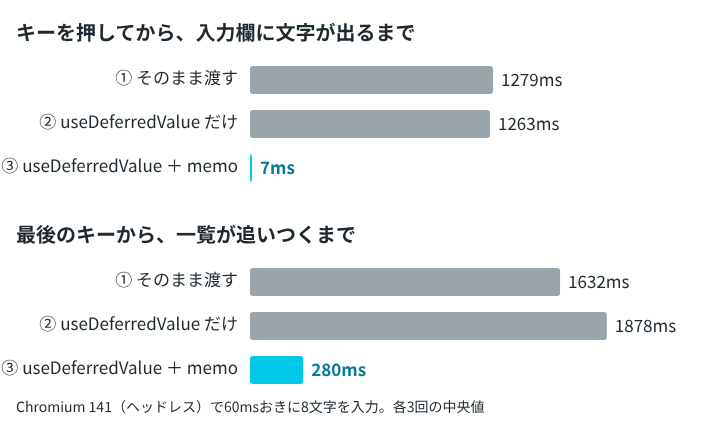
In the first and second, the input display changed only twice while the eight characters were typed. The first character appeared on screen about 1.3 seconds after the key press, and by then up to the fifth character had appeared all at once.
In the third, the input updated for each character, and every character appeared within 20 milliseconds. The list display, on the other hand, changed only once, after typing finished. The list caught up about 280 milliseconds after the last key press, which is almost the same as the time to render the list once.
Using useDeferredValue does not make rendering the list itself faster. By finishing the input update first and postponing the list re-render, the input is no longer kept waiting.
Why memo is required
The note in the reference on deferring re-rendering for a part of the UI says that this optimization requires wrapping the list in memo. In the render that updates the input first, deferredText is still the previous value. If the list is wrapped in memo, its props have not changed, so React can skip rendering it. Without the wrapper, the list is re-rendered in this render too.
The results for the second way matched this explanation. Because the list is rendered even in the render that updates the input first, the input waits almost as long as in the way that passes the value directly. On top of that, the list is rendered again with the new value, so the time until the list caught up was longer than in the first way (median 1878 milliseconds, versus 1632 milliseconds for the first).
memo compares each prop with its previous value using Object.is (the memo reference's section on minimizing prop changes). According to the same reference's guidance on where to use memo, if you pass an object or function created during rendering, the props are different every time, and memo is not useful. The caveats for useDeferredValue also say to pass primitive values such as strings or numbers, or objects created outside rendering, to useDeferredValue. If you pass an object created during rendering, it is treated as a new value each time, and unnecessary re-renders occur.
Why the list changed only once while typing
In the third way, the list did not change until typing finished. According to the reference, this is because the background re-render is interrupted. The caveats in the reference say that if the value changes again during a background re-render, React restarts that re-render from the beginning. They also say that if typing is faster than the list's rendering, the list is re-rendered only after typing stops.
In this test, the list takes about 250 milliseconds to render, and characters were typed every 60 milliseconds. If the reference's explanation holds, each background re-render during typing was interrupted, and only the final render for "abcdefgh" appeared on screen. The measurement agreed: the list changed in only one frame.
According to the same caveats, useDeferredValue itself has no fixed waiting time. React starts re-rendering with the new value as soon as it finishes the render that updates the input first.
How this differs from debouncing and throttling
Debouncing, which waits until input stops, and throttling, which updates only at fixed intervals, can also reduce re-renders of the list. According to the reference's explanation of how this differs from debouncing and throttling, there are two differences.
First, you don't need to choose a wait time. On a fast device, the list catches up right away, and on a slow device, it catches up later by that much. Second, the background re-render can be interrupted. With debouncing or throttling, once the list starts rendering, input is kept waiting until rendering finishes. What differs is only the timing of when that wait happens.
However, the reference says that debouncing and throttling are useful when you want to reduce work done outside rendering, such as network requests. The caveats also state that useDeferredValue alone does not prevent extra network requests. You can also use both together.
The times measured here are results from headless Chromium in the test environment. The time until the list catches up depends on the speed of the device. The times were measured using when requestAnimationFrame was called, not the time the actual screen painting occurred.