
React Controlled vs Uncontrolled Inputs: Differences in Form Handling
This article was translated from the Japanese original with AI. 日本語の原文を読む
A React input can be written in two ways: "controlled," where the value is held in state with value and onChange, and "uncontrolled," where only an initial value is passed with defaultValue and the value is left to the browser. In my test, a controlled input re-rendered on every keystroke, while an uncontrolled input did not re-render until the form was submitted. How the reset button behaves and how changing the initial value later works also differed.
I built the same text input in both styles in a test environment, ran the same operations on each, and compared the results.
The test environment was Ubuntu 24.04 and Node.js 22.22.0. I used react / react-dom 19.3.1, @types/react 19.3.0, typescript 7.0.2, esbuild 0.28.2, and jsdom 29.1.1. I type-checked the .tsx files with tsc, converted them with esbuild (a development build), and ran them in jsdom and in Chromium 141 (operated with Playwright 1.56.1). I used ffmpeg 6.1.1 to convert to GIF.
- 1. Building a name input in two ways
- 2. If you transform the typed value before storing it in state, the caret jumps
- 3. In an uncontrolled input, changing the initial value later does not change the display
- 4. Without onReset, a reset button only restores uncontrolled inputs
- 5. Warnings when you mistakenly write a controlled input
- 6. Which one to choose
Building a name input in two ways
In the controlled style, value takes state and onChange updates it. As the official reference's explanation of controlling an input with a state variable says, the input always displays the value passed to value. Because the value lives in state, a character count can also be derived from state.
import { useState, type FormEvent } from 'react';
import { renders } from './renders';

// Controlled: the input's value is held in state
export function ControlledName() {
  renders.controlled++;
  const [name, setName] = useState('');
  const [sent, setSent] = useState<string | null>(null);
  function handleSubmit(e: FormEvent<HTMLFormElement>) {
    e.preventDefault();
    setSent(name);
  }
  return (
    <form onSubmit={handleSubmit}>
      <input name="name" value={name} onChange={(e) => setName(e.target.value)} />
      <p className="info">{name.length} 文字</p>
      <button type="submit">送信</button>
      {sent !== null && <p className="sent">送信した値:「{sent}」</p>}
    </form>
  );
}
In the uncontrolled style, you pass only an initial value with defaultValue (official reference: providing an initial value for an input). As the opening of the controlling-an-input section notes, defaultValue only sets the starting value and does not control the current one. The value is read with FormData when the form is submitted (official reference: reading input values when submitting a form). The FormData key is the input's name.
// Uncontrolled: the input's value is held by the browser (the DOM) and read on submit
export function UncontrolledName() {
  renders.uncontrolled++;
  const [sent, setSent] = useState<string | null>(null);
  function handleSubmit(e: FormEvent<HTMLFormElement>) {
    e.preventDefault();
    const formData = new FormData(e.currentTarget);
    setSent(String(formData.get('name')));
  }
  return (
    <form onSubmit={handleSubmit}>
      <input name="name" defaultValue="" />
      <button type="submit">送信</button>
      {sent !== null && <p className="sent">送信した値:「{sent}」</p>}
    </form>
  );
}
renders is an object that counts how many times each component function is called. In jsdom, I typed "neko" one character at a time and then submitted, counting the renders. The test did not wrap the components in <StrictMode>.
--- controlled (value and onChange) ---
最初: 描画 1回
「neko」と入力した後: 描画 5回 入力欄=「neko」 4 文字
送信した後: 描画 6回 送信した値:「neko」
--- uncontrolled (defaultValue and FormData) ---
最初: 描画 1回
「neko」と入力した後: 描画 1回 入力欄=「neko」
送信した後: 描画 2回 送信した値:「neko」
Both submitted "neko." The controlled input re-rendered four times while four characters were typed. The uncontrolled input did not re-render until submission, when sent was updated. The number of renders during typing was the same when I pressed real keys in Chromium.
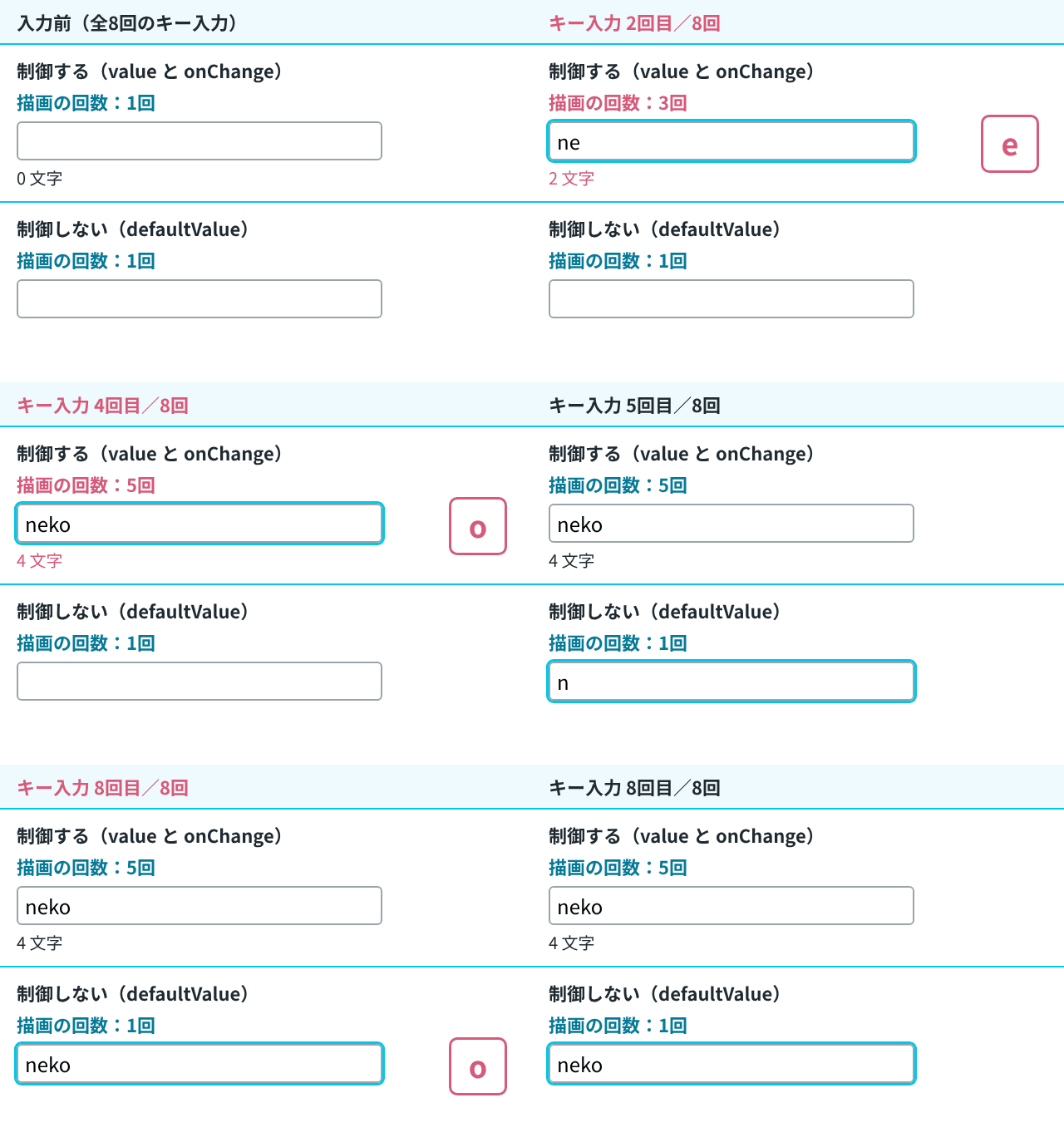
The official reference's section on reducing re-renders on every keystroke says that when a component holding state re-renders a large area, typing can become slow. It suggests splitting the input and its state into a small component, or using useDeferredValue. I did not test these approaches.
If you transform the typed value before storing it in state, the caret jumps
A controlled input lets you change the value received in onChange before putting it in state. However, the official reference's troubleshooting entry for the caret jumping treats storing something other than e.target.value in state as a bug, and gives an example that uses toUpperCase() to convert to uppercase. To see what happens, I built one input that removes non-digits and one that converts to uppercase.
// Remove non-digits before putting the value in state
export function DigitsOnly() {
  const [zip, setZip] = useState('');
  return <input className="digits" value={zip} onChange={(e) => setZip(e.target.value.replace(/\D/g, ''))} />;
}

// Convert to uppercase before putting the value in state
export function UpperCase() {
  const [code, setCode] = useState('');
  return <input className="upper" value={code} onChange={(e) => setCode(e.target.value.toUpperCase())} />;
}
In Chromium, I typed four characters, placed the caret after the second character, and typed one more. For comparison, I also tested an input that stores the received value in state unchanged. The caret position is the number of characters from the start.
--- stored unchanged ---
「abcd」と打った後: 値=「abcd」 カーソル=4
カーソルを2の位置に置いて「x」を打った後: 値=「abxcd」 カーソル=3
--- remove non-digits (typed a digit) ---
「1234」と打った後: 値=「1234」 カーソル=4
カーソルを2の位置に置いて「5」を打った後: 値=「12534」 カーソル=3
--- remove non-digits (typed a non-digit) ---
「1234」と打った後: 値=「1234」 カーソル=4
カーソルを2の位置に置いて「a」を打った後: 値=「1234」 カーソル=4
--- convert to uppercase ---
「abcd」と打った後: 値=「ABCD」 カーソル=4
カーソルを2の位置に置いて「x」を打った後: 値=「ABXCD」 カーソル=5
The non-digit "a" did not stay in the digits input, and the lowercase "x" became uppercase. However, when the stored value differed from what was typed, the caret moved to the end in Chromium. In "ABXCD," the caret was at position 5 (the end), not at position 3 right after the "X." When the typed value was stored unchanged, the caret stayed right after the character that was typed.
The linked troubleshooting entry is titled "caret jumps to the beginning," which points the opposite way from the move-to-the-end I saw. It does, however, list storing a value other than e.target.value in state as one cause (it also covers other causes, such as updating asynchronously). The fix it gives is to store e.target.value in state synchronously, unchanged, inside onChange.
In an uncontrolled input, changing the initial value later does not change the display
I tested an input whose defaultValue is the name of a selected cat. Buttons switch between "Tama" and "Mike."
type Cat = { id: number; name: string };
const cats: Cat[] = [
  { id: 1, name: 'たま' },
  { id: 2, name: 'みけ' },
];

// Pass the selected cat's name as defaultValue
function NameField({ cat }: { cat: Cat }) {
  return <input className="cat-name" name="name" defaultValue={cat.name} />;
}

export function CatEditor({ useKey }: { useKey: boolean }) {
  const [cat, setCat] = useState(cats[0]);
  return (
    <div>
      {cats.map((c) => (
        <button key={c.id} type="button" onClick={() => setCat(c)}>{c.name}</button>
      ))}
      {useKey ? <NameField key={cat.id} cat={cat} /> : <NameField cat={cat} />}
    </div>
  );
}
When useKey is false, the component renders without a key. These results are from jsdom after selecting "Mike."
--- no key ---
最初: 入力欄=「たま」
「みけ」を選んだ後: 入力欄=「たま」 defaultValue=「みけ」 同じ input 要素か: true
--- with key={cat.id} ---
最初: 入力欄=「たま」
「みけ」を選んだ後: 入力欄=「みけ」 defaultValue=「みけ」 同じ input 要素か: false
Without a key, the input's defaultValue changed to "Mike," but the display stayed at "Tama." In Chromium, selecting "Mike" without typing anything also left the display at "Tama."
With key={cat.id}, the input element was recreated and displayed "Mike." In Chromium, I typed "-chan" after "Tama" and then selected "Mike." The typed "Tamachan" disappeared and the input showed "Mike." This follows the same idea as the official documentation on resetting a form with a key.
Without onReset, a reset button only restores uncontrolled inputs
A type="reset" button restores the form's inputs to their initial values, as described in MDN's documentation of HTMLFormElement.reset(). In Chromium, I placed a controlled and an uncontrolled input in the same form, typed "neko" into both, and pressed reset.
// A type="reset" button restores both a controlled and an uncontrolled input
export function ResetForm() {
  const [controlled, setControlled] = useState('');
  return (
    <form className="reset">
      <input className="r-controlled" value={controlled} onChange={(e) => setControlled(e.target.value)} />
      <input className="r-uncontrolled" defaultValue="" />
      <p className="r-state">state:「{controlled}」</p>
      <button type="reset">リセット</button>
    </form>
  );
}--- reset button (no onReset) ---
両方に「neko」と打った後: 制御する入力欄=「neko」 制御しない入力欄=「neko」 state:「neko」
制御する入力欄の value 属性: 「neko」
リセットを押した後: 制御する入力欄=「neko」 制御しない入力欄=「」 state:「neko」Only the uncontrolled input was cleared. The controlled input still showed "neko." For this input, the HTML value attribute was also "neko." As MDN's description of defaultValue explains, an input's default value is its value attribute. That is likely why the display did not change after the reset.
If you also want to reset the controlled input, add onReset to the <form> and clear the state. The rest is the same as in ResetForm.
<form className="reset-handler" onReset={() => setControlled('')}>--- reset button (empty state in onReset) ---
両方に「neko」と打った後: 制御する入力欄=「neko」 制御しない入力欄=「neko」 state:「neko」
制御する入力欄の value 属性: 「neko」
リセットを押した後: 制御する入力欄=「」 制御しない入力欄=「」 state:「」Warnings when you mistakenly write a controlled input
If you pass value but forget onChange, the input becomes one whose value does not change when you type. In jsdom, typing "Tamako" into the input returned the display to "Tama." In the development build, a warning was written to console.error on the first render.
// Passed value but forgot onChange
export function NoOnChange() {
  const [name] = useState('たま');
  return <input className="no-onchange" value={name} />;
}console.error: You provided a `value` prop to a form field without an `onChange` handler. This will render a read-only field. If the field should be mutable use `defaultValue`. Otherwise, set either `onChange` or `readOnly`.
「たまこ」と入力した後: 入力欄=「たま」If you forget the initial value of state, no warning appears on the first render. Once you type one character and a string is stored in state, a warning appears saying that an uncontrolled input has become controlled. tsc did not report an error for this code.
// No initial value for state, so the first value is undefined
export function StartsUndefined() {
  const [name, setName] = useState<string>();
  return <input className="starts-undefined" value={name} onChange={(e) => setName(e.target.value)} />;
}最初の描画の console.error: なし
「み」と入力した後: 入力欄=「み」
console.error: A component is changing an uncontrolled input to be controlled. This is likely caused by the value changing from undefined to a defined value, which should not happen. Decide between using a controlled or uncontrolled input element for the lifetime of the component. More info: https://react.dev/link/controlled-componentsThe official reference's troubleshooting entry for this warning says that using an empty string '' as the initial value, or passing something like value={name ?? ''}, ensures the value is always a string. I did not test this fix.
Which one to choose
Here are the test results in a table. I did not test transforming the typed value with the uncontrolled style, so that cell is "―."
| What was compared | Controlled (value and onChange) | Uncontrolled (defaultValue) |
|---|---|---|
| Where the value lives | State | The browser's input element |
| How the value is read in this article | Always from state | With FormData on submit |
| Typing one character | Re-renders | Does not re-render |
| Storing a transformed typed value in state | In Chromium, the caret moved to the end (the official docs treat this as a bug) | ― |
| Changing the initial value later | Changing the state passed to value also changes the display |
Does not change unless you recreate the input with key |
| Reset button | Needs onReset to restore the state |
Returns to the initial value |
If you need other parts of the screen to change with each keystroke, use the controlled style and store e.target.value in state unchanged inside onChange. If the form only needs its values when submitted, use the uncontrolled style with a name attribute and read the values with FormData.