
“React 19: How to Pass a Function to a form action and Submit”
This article was translated from the Japanese original with AI. 日本語の原文を読む
In React 19, you can pass a function to the action of a <form>. That function is called with the FormData of the submitted form. The <form> reference's example of handling submission with an onSubmit event handler calls e.preventDefault() and creates new FormData(e.target). If you pass a function to action, neither is needed. To know whether a submission is pending, you can use useFormStatus to read it from a button inside the form, without any props.
In my test environment, I wrote the function passed to action in both synchronous and asynchronous forms, and changed where I called useFormStatus. This article summarizes the results and the caveats in the official documentation. I do not use useActionState. I only cover the function passed to action and useFormStatus.
The test environment is Ubuntu 24.04 and Node.js 22.22.0. I used react / react-dom 19.3.1, @types/react / @types/react-dom 19.3.0, typescript 7.0.2, esbuild 0.28.2, and jsdom 29.1.1. I type-checked the .tsx files with tsc, transpiled them with esbuild, and ran them on jsdom. The GIF was recorded by running the same components in Chromium via Playwright 1.56.1. The server was a fake built for testing, and it does not respond until I signal it to.
- 1. The function passed to action is called with FormData
- 2. Make it asynchronous and read the pending state in a child button
- 3. Calling it in the same component as the form: pending never becomes true
- 4. Different functions per button: formAction
- 5. Writing method on a form with a function action produces a warning
- 6. Throwing an error in action switches to the Error Boundary display
- 7. Combining with Server Functions (not verified)
The function passed to action is called with FormData
According to the React 19 release post's explanation of <form> Actions, starting with React 19, you can pass a function to the action and formAction of <form>, <input>, and <button>.
I started with the simplest synchronous function. There are two inputs. q is an input with no value prop (an uncontrolled input), and tag is an input with value and onChange props (a controlled input).
import { useState } from 'react';

export function SyncAction() {
  const [controlled, setControlled] = useState('');
  const [last, setLast] = useState('(まだ)');

  function search(formData: FormData) {
    setLast(`${formData.get('q')} / ${formData.get('tag')}`);
  }

  return (
    <form action={search}>
      <input name="q" />
      <input name="tag" value={controlled} onChange={(e) => setControlled(e.target.value)} />
      <button type="submit">検索</button>
      <p id="last">{last}</p>
    </form>
  );
}
I entered "react" in q and "form" in tag, then pressed the Search button. In the output, 受け取った値 (received value) is the value that search read from FormData. The last line shows the defaultPrevented value of the submit event and the page URL after the press. jsdom does not navigate pages, so the URL is only for reference.
$ node run.mjs SyncAction
  送信前: q="react" tag="form" ボタン=["検索"] | 受け取った値=(まだ) | サーバー=[]
  検索を押したあと: q="" tag="form" ボタン=["検索"] | 受け取った値=react / form | サーバー=[]
  submit イベント: defaultPrevented=true URL=about:blank
search received the values of both inputs through FormData. I did not write e.preventDefault(), but defaultPrevented=true shows that the default behavior of the submit event (the page navigation) was prevented. The <form> reference's explanation of handling submission with an action also says that, unlike onSubmit, you do not need e.preventDefault().
After the press, q was empty, and tag stayed "form". The same explanation says that when the function passed to action finishes successfully, uncontrolled inputs in the form are reset. The value of a controlled input is held in state, so it is not reset and remains.
Make it asynchronous and read the pending state in a child button
The function passed to action can also be asynchronous. According to the props explanation in the <form> reference, the passed function runs inside a Transition.
You do not need useState to show whether a submission is pending. Instead, call useFormStatus from react-dom in a component placed inside the form. In this test, I made the submit button a component called SubmitButton, and displayed the four values returned by useFormStatus next to the button.
import { useFormStatus } from 'react-dom';

export function SubmitButton({ label = '保存' }: { label?: string }) {
  const { pending, data, method, action } = useFormStatus();
  return (
    <>
      <button type="submit" disabled={pending}>
        {pending ? '保存中…' : label}
      </button>
      <span className="status">
        pending={String(pending)} data={data ? `"${data.get('title')}"` : 'null'} method={String(method)} action=
        {typeof action === 'function' ? action.name : String(action)}
      </span>
    </>
  );
}
On the form side, I pass an asynchronous function to action and place SubmitButton inside. saveTitle is a function that sends data to the fake server.
import { saveTitle } from './server';
import { SubmitButton } from './SubmitButton';

export function Basic() {
  async function save(formData: FormData) {
    const title = String(formData.get('title') ?? '');
    await saveTitle(title);
  }

  return (
    <form action={save}>
      <input name="title" defaultValue="" />
      <SubmitButton />
    </form>
  );
}
I entered a test string meaning "cat's paw" in the input, pressed the Save button, and recorded the screen before and after the server's response.
$ node run.mjs Basic
  送信前: title="" ボタン=["保存"] | pending=false data=null method=null action=null | サーバー=[]
  保存を押した直後: title="猫の手" ボタン=["保存中…"(押せない)] | pending=true data="猫の手" method=get action=save | サーバー=[受付:猫の手]
  返事のあと: title="" ボタン=["保存"] | pending=false data=null method=null action=null | サーバー=[受付:猫の手 → 保存:猫の手]
Until the server responded, pending was true, the button showed "Saving…", and it could not be pressed. data held the FormData being submitted, and I could read the text I had entered. action was the save function itself, passed to <form>. method was get. According to the return value explanation in the useFormStatus reference, the method of a <form> is GET unless you specify otherwise.
When the response arrived, pending returned to false, and data, method, and action became null. The input was empty because the submission succeeded.
SubmitButton receives no form props. According to the explanation of useFormStatus in the release post, useFormStatus reads the state as if the parent <form> were the provider of a Context. It is a Hook for components, such as design system buttons, that need to know the form's state without passing props down through several levels.
In TypeScript, the return type of useFormStatus is split depending on whether pending is true or false (@types/react-dom 19.3.0). The type of action while submitting is string | ((formData: FormData) => void | Promise<void>), so when I tried to read action.name directly, tsc reported an error. That is why the code above checks typeof action === 'function'.
Calling it in the same component as the form: pending never becomes true
What happens if you call useFormStatus in the same component that returns the <form>? I wrote it like this.
import { useFormStatus } from 'react-dom';
import { saveTitle } from './server';

export function SameComponent() {
  // Call useFormStatus in the same component as the form
  const { pending } = useFormStatus();

  async function save(formData: FormData) {
    await saveTitle(String(formData.get('title') ?? ''));
  }

  return (
    <form action={save}>
      <input name="title" />
      <button type="submit" disabled={pending}>
        {pending ? '保存中…' : '保存'}
      </button>
    </form>
  );
}$ node run.mjs SameComponent
送信前: title="" ボタン=["保存"] | サーバー=[]
保存を押した直後: title="猫の手" ボタン=["保存"] | サーバー=[受付:猫の手]
返事のあと: title="" ボタン=["保存"] | サーバー=[受付:猫の手 → 保存:猫の手]While the server accepted the request and waited for its response, the button stayed "Save" and could still be pressed. In other words, pending never became true. The type check passed, and no error or warning appeared.
If you call useFormStatus in the same component as the <form>, it does not return the state of that form. The type check passes and no warning appears, so it is easy to miss that the button can still be pressed during submission.
According to the caveats in the useFormStatus reference, useFormStatus returns only the state of the parent <form>. It does not return the state of a <form> rendered by the same component or by its child components. As described in the reference's section on what to do when pending is never true, call useFormStatus from a different component placed inside the <form>.
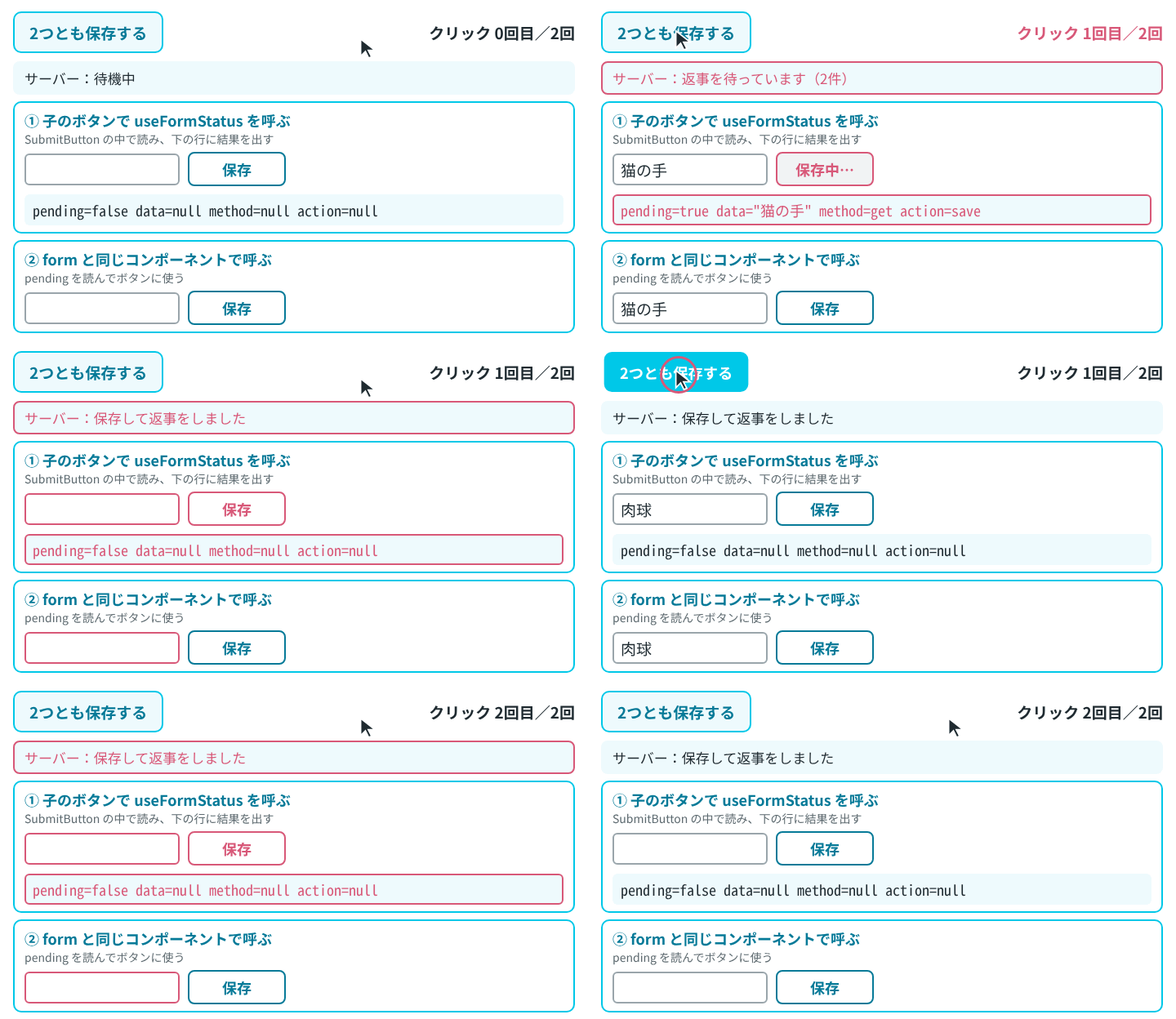
The following GIF shows the two approaches stacked vertically, one above the other, in Chromium. The top one, "① useFormStatus called in a child button" (labels in Japanese), uses Basic with SubmitButton inside. The bottom one, "② useFormStatus called in the same component as form" (labels in Japanese), uses SameComponent. I typed one character at a time into each input, then used the "Save both" button at the top to press each form's save button. I did this twice, once with "cat's paw" and once with "paw pad" (both test strings in Japanese).
The top of the screen shows the press count (labeled in Japanese, roughly "Click 1st / 2"), and the band below shows the server state. Right after a press and right after the server responds, fields whose values changed are shown with a pink border and text. In ①, the button changes to "Saving…" while waiting for the response, and the pending value in the line below becomes true. In ②, the button stays "Save". When the response arrives, both ① and ② clear their inputs.
Different functions per button: formAction
If you want a form to have buttons that perform different actions, pass a function to formAction on the <button>. According to the props explanation in the <form> reference, the action of a <form> can be overridden by formAction on <button>, <input type="submit">, and <input type="image">.
import { saveTitle } from './server';
import { SubmitButton } from './SubmitButton';

export function TwoButtons() {
  async function save(formData: FormData) {
    await saveTitle(String(formData.get('title') ?? ''));
  }
  async function saveDraft(formData: FormData) {
    await saveTitle(`下書き:${formData.get('title')}`);
  }

  return (
    <form action={save}>
      <input name="title" />
      <SubmitButton />
      <button type="submit" formAction={saveDraft}>下書き保存</button>
    </form>
  );
}
I pressed the Save draft button first, then the Save button.
$ node run.mjs TwoButtons
  下書き保存を押した直後: title="猫の手" ボタン=["保存中…"(押せない) "下書き保存"] | pending=true data="猫の手" method=get action=saveDraft | サーバー=[受付:下書き:猫の手]
  返事のあと: title="" ボタン=["保存" "下書き保存"] | pending=false data=null method=null action=null | サーバー=[受付:下書き:猫の手 → 保存:下書き:猫の手]
  保存を押した直後: title="猫の手" ボタン=["保存中…"(押せない) "下書き保存"] | pending=true data="猫の手" method=get action=save | サーバー=[受付:下書き:猫の手 → 保存:下書き:猫の手 → 受付:猫の手]
  返事のあと: title="" ボタン=["保存" "下書き保存"] | pending=false data=null method=null action=null | サーバー=[受付:下書き:猫の手 → 保存:下書き:猫の手 → 受付:猫の手 → 保存:猫の手]
When I pressed Save draft, the button's saveDraft was called, not the form's save. At that time, SubmitButton's useFormStatus returned pending=true, and action held saveDraft. This means SubmitButton can show the pending state no matter which button submitted the form.
The Save draft button, on the other hand, could still be pressed during submission. That button does not call useFormStatus; it is a plain <button>.
Writing method on a form with a function action produces a warning
When I put method="get" on a <form> that has a function passed to action, the development build of React printed this warning.
$ node run.mjs GetMethod
Cannot specify a encType or method for a form that specifies a function as the action. React provides those automatically. They will get overridden.
  送信前: title="" ボタン=["保存"] | pending=false data=null method=null action=null | サーバー=[]
  保存を押した直後: title="猫の手" ボタン=["保存中…"(押せない)] | pending=true data="猫の手" method=get action=save | サーバー=[受付:猫の手]
  返事のあと: title="" ボタン=["保存"] | pending=false data=null method=null action=null | サーバー=[受付:猫の手 → 保存:猫の手]
The warning says that you cannot specify encType or method on a form that has a function as its action, because React sets them automatically and overrides them. The caveats in the <form> reference also say that when a function is passed to action or formAction, the HTTP method is always POST regardless of the method value. Do not write method on a form that uses a function.
Although the warning appeared, the submission behavior and the useFormStatus values were the same as in Basic, where I did not write method. The method reported by useFormStatus was get in both cases. Because no actual HTTP request was made in this test, I did not verify how the "always POST" statement in the reference relates to this value.
Throwing an error in action switches to the Error Boundary display
According to the <form> reference's explanation of handling submission errors, when the function passed to action throws an error, the Error Boundary wrapping the <form> switches to its fallback display.
In this test, I wrapped the <form> in a class component with getDerivedStateFromError, and threw an error inside the asynchronous action function.
export function Throwing() {
  async function save(formData: FormData) {
    await Promise.resolve();
    throw new Error(`保存できません: ${formData.get('title')}`);
  }

  return (
    <ErrorBoundary>
      <form action={save}>
        <input name="title" />
        <button type="submit">保存</button>
      </form>
    </ErrorBoundary>
  );
}$ node run.mjs Throwing
[onCaughtError] 保存できません: 猫の手
保存を押したあと: form なし ボタン=[] | 送信に失敗しました(保存できません: 猫の手) | サーバー=[]The form disappeared, and the ErrorBoundary displayed its "Submission failed" message. The [onCaughtError] line shows that the onCaughtError passed to createRoot was called. According to the arguments explanation in the createRoot reference, onCaughtError is called when an Error Boundary catches an error. ErrorBoundary is a short class I wrote for this test, and I have omitted its code here.
When the form itself disappears, whatever was typed into it disappears too. You may want to show an expected error, such as "too many characters", next to the form. The <form> reference's explanation of showing errors without JavaScript has an example that returns the error without throwing it and displays it as state from useActionState.
Combining with Server Functions (not verified)
You can also pass a Server Function marked with 'use server' to action. According to the <form> reference's explanation of handling submission with a Server Function, when you pass a Server Function, the form can be submitted even before JavaScript has loaded or when JavaScript is disabled. I did not test this, because my test environment does not have a setup for running Server Functions.
The function in <form action={function}> is called with FormData. You do not need e.preventDefault(), and uncontrolled inputs are cleared on success. To know whether a submission is pending, call useFormStatus from a child component placed inside the <form>. If you call it in the same component as the <form>, pending never becomes true.