
Fixing “cannot lock ref” in Git When Branch Names Collide
This article was translated from the Japanese original with AI. 日本語の原文を読む
The error fatal: cannot lock ref 'refs/heads/feature/login': 'refs/heads/feature' exists appears when branch names collide, for example when a branch named feature exists and you try to create feature/login. Rename one of the two branches, and you can create the other.
It appears not only when you create a new branch (git switch -c, git checkout -b), but also when you fetch a remote branch with git fetch or push with git push.
I tested on Ubuntu 24.04, Git 2.43.0, and bash 5.2. I ran the commands with LANG=C so that the messages are in English. The remote was a local bare repository created in the same environment and registered with the relative path ../remote.git. I did not test on hosting services such as GitHub, or on Windows or macOS (where file names are case-insensitive).
You cannot create feature/login when feature exists
In a repository that had a branch named feature, I tried to create feature/login. git switch -c, git branch, and git checkout -b all stopped with the same message. The exit code was 128.
$ git branch feature

$ git switch -c feature/login
fatal: cannot lock ref 'refs/heads/feature/login': 'refs/heads/feature' exists; cannot create 'refs/heads/feature/login'

$ git branch feature/login
fatal: cannot lock ref 'refs/heads/feature/login': 'refs/heads/feature' exists; cannot create 'refs/heads/feature/login'

$ git checkout -b feature/login
fatal: cannot lock ref 'refs/heads/feature/login': 'refs/heads/feature' exists; cannot create 'refs/heads/feature/login'
The second half of the message means "refs/heads/feature exists, so refs/heads/feature/login cannot be created." As described in the ref entry of gitglossary, a Git ref is a name that starts with refs/. The branch you usually call feature is a short form of refs/heads/feature.
As described in the refs section of gitrepository-layout, branches are recorded under .git/refs/heads/ as one file per name. In the test environment, .git/refs/heads contained two files, feature and main.
$ ls .git/refs/heads
feature
main
To record feature/login, Git needs a folder named feature. But a file named feature already exists in the same place. Thinking in terms of files and folders, you cannot create a folder with the same name where a file named feature exists, so feature/login cannot be created either.
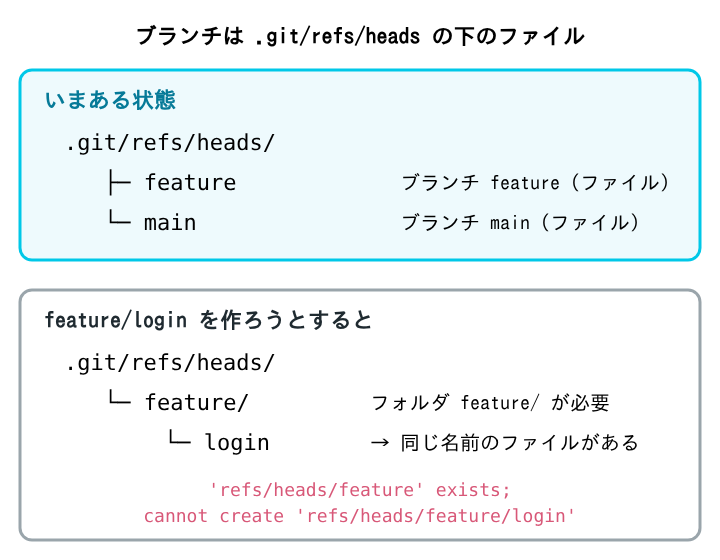
Fix: rename the existing branch
Rename feature to a name under feature/, such as feature/base. You can rename a branch with git branch -m old-name new-name. After the rename, the same git switch -c feature/login created the branch.
$ git branch -m feature feature/base

$ git switch -c feature/login
Switched to a new branch 'feature/login'

$ git branch --list
  feature/base
* feature/login
  main

$ ls .git/refs/heads/feature
base
login
.git/refs/heads/feature is now a folder, and it contains two files, base and login. If you do not want to rename anything, you can create the new branch with a name that does not use /, such as feature-login, and there is no collision.
You cannot create feature when feature/ branches exist
The reverse case is the same. When feature/base and feature/login existed, trying to create feature failed. The message names feature/base as the conflicting ref.
$ git branch feature
fatal: cannot lock ref 'refs/heads/feature': 'refs/heads/feature/base' exists; cannot create 'refs/heads/feature'
To list the branches under feature/, pass 'feature/*' to git branch --list.
$ git branch --list 'feature/*'
  feature/base
  feature/login
According to the git pack-refs documentation, branches may be recorded not as one file per name but together in a single file called .git/packed-refs. So I ran git pack-refs --all to move the branches into .git/packed-refs and then tried again. .git/refs/heads became empty, but the error was the same. Even when there was no file-and-folder conflict on disk, Git still did not allow feature and feature/… to exist at the same time.
$ git pack-refs --all

$ ls .git/refs/heads

$ cat .git/packed-refs
# pack-refs with: peeled fully-peeled sorted
44320213e72058592f0058101b5c69e554f3cfa1 refs/heads/feature/base
44320213e72058592f0058101b5c69e554f3cfa1 refs/heads/feature/login
44320213e72058592f0058101b5c69e554f3cfa1 refs/heads/main
44320213e72058592f0058101b5c69e554f3cfa1 refs/remotes/origin/main

$ git branch feature
fatal: cannot lock ref 'refs/heads/feature': 'refs/heads/feature/base' exists; cannot create 'refs/heads/feature'
When I used a name that does not collide (here, feature-main), the branch was created.
$ git branch feature-main

$ git branch --list
  feature-main
  feature/base
  feature/login
* main
git push shows it together with remote rejected
Name collisions also happen on the remote repository. When the remote had a branch named fix, pushing my local fix/typo was rejected because the remote could not create the branch. Lines that start with remote: are errors reported by the remote side.
$ git push origin fix/typo
remote: error: cannot lock ref 'refs/heads/fix/typo': 'refs/heads/fix' exists; cannot create 'refs/heads/fix/typo'
To ../remote.git
 ! [remote rejected] fix/typo -> fix/typo (failed to update ref)
error: failed to push some refs to '../remote.git'

$ git ls-remote --heads origin
44320213e72058592f0058101b5c69e554f3cfa1	refs/heads/fix
44320213e72058592f0058101b5c69e554f3cfa1	refs/heads/main
git ls-remote is a command that shows the refs on a remote. With --heads, it shows only branches (refs/heads). fix/typo was not created.
There are two ways to fix this. The first is to push under a different name on the remote. As described in the git push reference, writing local-name:remote-name lets you specify the name of the branch to update on the remote. With fix/typo:fix-typo, the remote branch fix-typo was created.
$ git push origin fix/typo:fix-typo
To ../remote.git
 * [new branch]      fix/typo -> fix-typo
The second is to delete the remote fix branch, if you do not need it, and then push. After deleting it, the same git push origin fix/typo succeeded.
$ git push origin --delete fix
To ../remote.git
 - [deleted]         fix

$ git push origin fix/typo
To ../remote.git
* [new branch] fix/typo -> fix/typogit push origin --delete deletes the branch on the remote. Before you run it, check that no one else is working on that branch and that there are no commits you forgot to merge.
git fetch shows unable to update local ref
When the error appears during git fetch, the conflict is with an old remote-tracking branch (origin/…) that is still stored locally.
In the test, I first fetched a branch named fix, so that origin/fix existed locally. Then, from a different working directory, I deleted the remote fix branch and pushed fix/typo in its place. The remote had only fix/typo, but origin/fix was still stored locally.
$ git branch -r
  origin/HEAD -> origin/main
  origin/fix
  origin/main

$ git ls-remote --heads origin
44320213e72058592f0058101b5c69e554f3cfa1	refs/heads/fix/typo
44320213e72058592f0058101b5c69e554f3cfa1	refs/heads/main
In this state, git fetch failed because it could not create origin/fix/typo. The exit code was 1.
$ git fetch
error: cannot lock ref 'refs/remotes/origin/fix/typo': 'refs/remotes/origin/fix' exists; cannot create 'refs/remotes/origin/fix/typo'
From ../remote
 ! [new branch]      fix/typo   -> origin/fix/typo  (unable to update local ref)
error: some local refs could not be updated; try running
 'git remote prune origin' to remove any old, conflicting branches
As the last line of the message suggests, cleaning up the records of branches that were deleted on the remote fixes it. According to the description of --prune in git fetch, --prune removes remote-tracking branches that no longer exist on the remote before fetching. After I ran it, origin/fix was removed and origin/fix/typo was created.
$ git fetch --prune
From ../remote
 - [deleted]         (none)     -> origin/fix
 * [new branch]      fix/typo   -> origin/fix/typo

$ git branch -r
  origin/HEAD -> origin/main
  origin/fix/typo
  origin/main
After that, git fetch finished with no output and exit code 0, and the error no longer appeared.
git remote prune origin, which the error message suggests, also fixed it. I created the same state again before testing it. As described in the git remote prune documentation, this command only removes records of branches that were deleted on the remote, and it does not fetch new branches. So I ran git fetch afterward.
$ git remote prune origin
Pruning origin
URL: ../remote.git
 * [pruned] origin/fix

$ git fetch
From ../remote
 * [new branch]      fix/typo   -> origin/fix/typo
--prune removes only remote-tracking branches under origin/…. Working branches that you created locally are left alone. For a setting that cleans these up automatically on every fetch, see the separate article "Using git fetch –prune to clean up branches deleted on the remote".
When the cause is a .lock file, not a cannot lock ref name collision
If cannot lock ref is followed by Unable to create '….lock': File exists., the cause is not a name collision. A file named .lock already exists, so Git stops because it cannot update the branch. According to the message, either another Git process is running, or a Git process stopped earlier and left the file behind. In the test environment, I created .git/refs/heads/main.lock and then tried to commit. It stopped with the following message. (The repository path is replaced with /path/to/repo.)
$ git commit -q -m 追記
fatal: cannot lock ref 'HEAD': Unable to create '/path/to/repo/.git/refs/heads/main.lock': File exists.

Another git process seems to be running in this repository, e.g.
an editor opened by 'git commit'. Please make sure all processes
are terminated then try again. If it still fails, a git process
may have crashed in this repository earlier:
remove the file manually to continue.
First, check whether any other Git command or editor is still running. After you confirm that nothing is running, delete the .lock file. In the test environment, the commit succeeded after I deleted it.
$ rm .git/refs/heads/main.lock

$ git commit -q -m 追記

$ git log --oneline -1
6cf6ca6 追記If you see cannot lock ref '…/feature/login': '…/feature' exists, compare the two names in the message. For refs/heads/…, rename the local branch. For refs/remotes/…, use git fetch --prune to clean up the old remote-tracking branch. If the error appears on a remote: line, push under a different name on the remote.