
Gitでブランチ名がぶつかるcannot lock refの直し方
fatal: cannot lock ref 'refs/heads/feature/login': 'refs/heads/feature' exists というエラーは、feature というブランチがあるところに feature/login を作ろうとしたときのように、ブランチ名がぶつかると出ます。どちらかの名前を変えれば、ブランチを作れるようになります。
新しいブランチを作るとき(git switch -c、git checkout -b)だけでなく、git fetch でリモートのブランチを取り込むときや、git push のときにも出ます。
検証環境は Ubuntu 24.04、Git 2.43.0、bash 5.2 です。英語のメッセージにそろえるため LANG=C で実行しました。リモートは、同じ環境に作ったローカルの bare リポジトリ(../remote.git という相対パスで登録)です。GitHub などのホスティングサービスや、Windows・macOS(ファイル名の大文字と小文字を区別しない環境)での動作は試していません。
feature があると feature/login は作れない
feature というブランチがあるリポジトリで、feature/login を作ろうとしました。git switch -c、git branch、git checkout -b のどれでも、同じメッセージで止まりました。終了コードは 128 です。
$ git branch feature

$ git switch -c feature/login
fatal: cannot lock ref 'refs/heads/feature/login': 'refs/heads/feature' exists; cannot create 'refs/heads/feature/login'

$ git branch feature/login
fatal: cannot lock ref 'refs/heads/feature/login': 'refs/heads/feature' exists; cannot create 'refs/heads/feature/login'

$ git checkout -b feature/login
fatal: cannot lock ref 'refs/heads/feature/login': 'refs/heads/feature' exists; cannot create 'refs/heads/feature/login'メッセージの後半は「refs/heads/feature があるので、refs/heads/feature/login は作れない」という意味です。gitglossary の ref の項にあるとおり、Git の参照(ref)は refs/ で始まる名前です。ふだん feature と呼んでいるブランチは、refs/heads/feature を短く書いたものです。
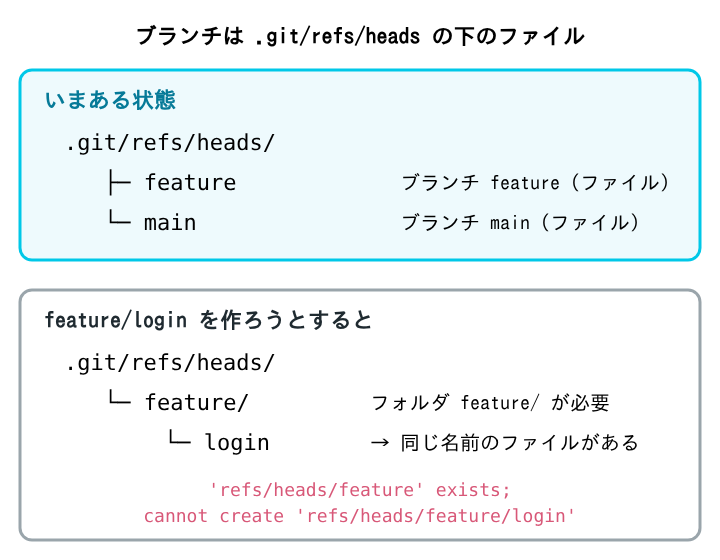
gitrepository-layout の refs の説明のとおり、ブランチは .git/refs/heads/ の下に、名前ごとのファイルとして記録されます。検証環境でも、.git/refs/heads の中に feature と main という2つのファイルがありました。
$ ls .git/refs/heads
feature
main
feature/login を記録するには、feature という名前のフォルダが必要です。ところが、同じ場所にはもう feature というファイルがあります。ファイルとフォルダの形で考えると、feature というファイルがある場所に同じ名前のフォルダは作れないので、feature/login も作れないことになります。
直し方:先にあるブランチの名前を変える
feature を feature/base のように、feature/ の下の名前に変えます。ブランチの名前は git branch -m 古い名前 新しい名前 で変えられます。名前を変えたあとは、同じ git switch -c feature/login でブランチを作れました。
$ git branch -m feature feature/base

$ git switch -c feature/login
Switched to a new branch 'feature/login'

$ git branch --list
  feature/base
* feature/login
  main

$ ls .git/refs/heads/feature
base
login
.git/refs/heads/feature がフォルダになり、その中に base と login の2つのファイルができています。名前を変えたくないときは、feature-login のように / を使わない名前で新しいブランチを作れば、ぶつかりません。
feature/ の下にブランチがあると feature は作れない
逆向きも同じです。feature/base と feature/login があるところに、feature を作ろうとするとエラーになりました。このときのメッセージには、ぶつかっている相手として feature/base が出ています。
$ git branch feature
fatal: cannot lock ref 'refs/heads/feature': 'refs/heads/feature/base' exists; cannot create 'refs/heads/feature'
feature/ の下にほかにどんなブランチがあるかは、git branch --list に 'feature/*' を渡すと一覧にできます。
$ git branch --list 'feature/*'
  feature/base
  feature/login
git pack-refs の説明によると、ブランチは、名前ごとのファイルではなく .git/packed-refs という1つのファイルにまとめて記録されていることもあります。そこで git pack-refs --all を実行し、ブランチを .git/packed-refs にまとめてから試しました。.git/refs/heads は空になりましたが、エラーは同じでした。ファイルとフォルダがぶつかる形になっていなくても、Git は feature と feature/… を同時には作らせませんでした。
$ git pack-refs --all

$ ls .git/refs/heads

$ cat .git/packed-refs
# pack-refs with: peeled fully-peeled sorted
44320213e72058592f0058101b5c69e554f3cfa1 refs/heads/feature/base
44320213e72058592f0058101b5c69e554f3cfa1 refs/heads/feature/login
44320213e72058592f0058101b5c69e554f3cfa1 refs/heads/main
44320213e72058592f0058101b5c69e554f3cfa1 refs/remotes/origin/main

$ git branch feature
fatal: cannot lock ref 'refs/heads/feature': 'refs/heads/feature/base' exists; cannot create 'refs/heads/feature'
ぶつからない別の名前(ここでは feature-main)にすれば、作れました。
$ git branch feature-main

$ git branch --list
  feature-main
  feature/base
  feature/login
* main
git push で remote rejected と一緒に出る
名前のぶつかりは、リモートのリポジトリでも起きます。リモートに fix というブランチがあるとき、手元で作った fix/typo を push すると、リモート側でブランチを作れずに断られました。remote: で始まる行が、リモート側で出たエラーです。
$ git push origin fix/typo
remote: error: cannot lock ref 'refs/heads/fix/typo': 'refs/heads/fix' exists; cannot create 'refs/heads/fix/typo'
To ../remote.git
 ! [remote rejected] fix/typo -> fix/typo (failed to update ref)
error: failed to push some refs to '../remote.git'

$ git ls-remote --heads origin
44320213e72058592f0058101b5c69e554f3cfa1	refs/heads/fix
44320213e72058592f0058101b5c69e554f3cfa1	refs/heads/main
git ls-remote はリモートにある参照を表示するコマンドで、--heads を付けるとブランチ(refs/heads)だけに絞れます。fix/typo は作られていません。
直し方は2つあります。1つ目は、リモートでは別の名前にして push する方法です。git push の公式リファレンスのとおり、手元の名前:リモートの名前 と書くと、リモートで更新するブランチの名前を指定できます。fix/typo:fix-typo とすると、リモートに fix-typo ができました。
$ git push origin fix/typo:fix-typo
To ../remote.git
 * [new branch]      fix/typo -> fix-typo
2つ目は、リモートの fix が要らないときに、fix を消してから push する方法です。消したあとは、同じ git push origin fix/typo が通りました。
$ git push origin --delete fix
To ../remote.git
 - [deleted]         fix

$ git push origin fix/typo
To ../remote.git
* [new branch] fix/typo -> fix/typogit push origin --delete は、リモートのブランチを消します。ほかの人がそのブランチで作業していないか、マージし忘れたコミットがないかを確かめてから実行してください。
git fetch で unable to update local ref と出る
git fetch で出るときは、手元に残っている古いリモート追跡ブランチ(origin/…)とぶつかっています。
検証では、まず fix というブランチを fetch して、手元に origin/fix ができた状態にしました。そのあと、別の作業フォルダからリモートの fix を消し、代わりに fix/typo を push しました。リモートには fix/typo しかありませんが、手元には origin/fix が残っています。
$ git branch -r
  origin/HEAD -> origin/main
  origin/fix
  origin/main

$ git ls-remote --heads origin
44320213e72058592f0058101b5c69e554f3cfa1	refs/heads/fix/typo
44320213e72058592f0058101b5c69e554f3cfa1	refs/heads/main
この状態で git fetch を実行すると、origin/fix/typo を作れずにエラーになりました。終了コードは 1 です。
$ git fetch
error: cannot lock ref 'refs/remotes/origin/fix/typo': 'refs/remotes/origin/fix' exists; cannot create 'refs/remotes/origin/fix/typo'
From ../remote
 ! [new branch]      fix/typo   -> origin/fix/typo  (unable to update local ref)
error: some local refs could not be updated; try running
'git remote prune origin' to remove any old, conflicting branchesメッセージの最後にあるとおり、リモートで消えたブランチの記録を片付ければ直ります。git fetch の --prune の説明によると、--prune を付けると、取り込む前に、リモートにもうないリモート追跡ブランチを消します。実行すると、origin/fix が消えて origin/fix/typo ができました。
$ git fetch --prune
From ../remote
 - [deleted]         (none)     -> origin/fix
 * [new branch]      fix/typo   -> origin/fix/typo

$ git branch -r
  origin/HEAD -> origin/main
  origin/fix/typo
  origin/main
そのあと git fetch を実行すると、何も表示されずに終了コード 0 で終わり、エラーは出なくなりました。
エラーメッセージで案内されている git remote prune origin でも直りました。同じ状態をもう一度作ってから試しています。git remote の prune の説明のとおり、こちらはリモートで消えたブランチの記録を消すだけで、新しいブランチは取り込みません。そのため、続けて git fetch を実行します。
$ git remote prune origin
Pruning origin
URL: ../remote.git
 * [pruned] origin/fix

$ git fetch
From ../remote
 * [new branch]      fix/typo   -> origin/fix/typo
--prune で消えるのは origin/… のリモート追跡ブランチだけで、手元で作った作業用のブランチはそのまま残ります。毎回の fetch で自動で片付ける設定は、別の記事「git fetch –pruneでリモートで消えたブランチを片付ける」で扱っています。
同じ cannot lock ref でも、.lock ファイルが原因のとき
cannot lock ref のあとに Unable to create '….lock': File exists. と続くときは、名前のぶつかりではありません。.lock という名前のファイルがすでにあるため、Git がブランチを更新できずに止まっています。メッセージによると、ほかの Git のプロセスが動いているか、以前に途中で止まった Git のプロセスがファイルを残しています。検証環境で .git/refs/heads/main.lock を作ってからコミットすると、次のメッセージで止まりました(リポジトリのパスは /path/to/repo に置き換えています)。
$ git commit -q -m 追記
fatal: cannot lock ref 'HEAD': Unable to create '/path/to/repo/.git/refs/heads/main.lock': File exists.

Another git process seems to be running in this repository, e.g.
an editor opened by 'git commit'. Please make sure all processes
are terminated then try again. If it still fails, a git process
may have crashed in this repository earlier:
remove the file manually to continue.
まず、ほかに動いている Git のコマンドやエディターがないかを確かめます。何も動いていないことを確かめたら、.lock ファイルを消します。検証環境では、消したあとにコミットできました。
$ rm .git/refs/heads/main.lock

$ git commit -q -m 追記

$ git log --oneline -1
6cf6ca6 追記cannot lock ref '…/feature/login': '…/feature' exists と出たら、メッセージに出ている2つの名前を見比べます。refs/heads/… なら手元のブランチの名前を変え、refs/remotes/… なら git fetch --prune で古いリモート追跡ブランチを片付けます。remote: の行に出たときは、リモートでの名前を変えて push します。