
Fixing “adding embedded git repository” warning in Git
This article was translated from the Japanese original with AI. 日本語の原文を読む
warning: adding embedded git repository is printed when git add runs on a folder that contains another Git repository (a folder with its own .git folder). If you commit it this way, the contents of that folder are not recorded, and anyone who clones the project gets an empty folder.
This happens when you run git clone on a library inside a project and then run git add. If you only ran git init inside the inner folder and there is no commit yet, you get an error instead of a warning (covered in the last section). Below, I reproduce the warning, copy the message exactly, and confirm that the warning goes away with three fixes for different goals. The git rm --cached suggested in the warning does not work as is before the first commit, so I cover that as well.
The test environment is Ubuntu 24.04, Git 2.43.0, and bash 5.2. I ran everything with LANG=C to get the English messages, and I fixed the commit dates so that commit IDs stay the same on each run. The inner repository was cloned from a bare repository (lib.git) created on the same machine, not from a server such as GitHub. I did not test on Windows or macOS, and I did not test git submodule add with HTTPS or SSH URLs.
- 1. Reproducing the warning
- 2. What was recorded
- 3. Removing it from the records: -f is required before the first commit
- 4. When you want to add it as ordinary files
- 5. When you want to add it as a submodule
- 6. When you do not want the outer repository to track it
- 7. Settings that only hide the warning do not fix anything
- 8. If the inner repository has no commits, you get an error and it stops
Reproducing the warning
I cloned another repository into the app repository as vendor/lib. At this point, git status --short shows vendor/ only as an untracked folder (??), with no warning.
$ git status --short
?? README.md
?? vendor/
When I ran git add ., the following warning and hints were printed. The exit code was 0, so git add itself succeeded.
$ git add .
warning: adding embedded git repository: vendor/lib
hint: You've added another git repository inside your current repository.
hint: Clones of the outer repository will not contain the contents of
hint: the embedded repository and will not know how to obtain it.
hint: If you meant to add a submodule, use:
hint:
hint: 	git submodule add <url> vendor/lib
hint:
hint: If you added this path by mistake, you can remove it from the
hint: index with:
hint:
hint: 	git rm --cached vendor/lib
hint:
hint: See "git help submodule" for more information.
The hints say: "You have added another Git repository inside the current repository. Clones of the outer repository will not contain the contents of the inner repository, and they will not know where to get it." They then suggest git submodule add if you want a submodule, or git rm --cached if you added the path by mistake.
The same warning appeared when I named the folder directly with git add vendor/lib instead of git add ..
What was recorded
Looking at what was recorded with git ls-files --stage, vendor/lib is not a normal file (100644). It has the type 160000, and it is a single line. The index.js inside is not included.
$ git ls-files --stage
100644 e2bd1550b11947a1bcbec6a139dc428f93a47d33 0	README.md
160000 b155414084e930c5b89d5908c3df93cd784b2833 0	vendor/lib
The value in the 160000 line is the commit ID of the inner repository. The same ID appeared in the output of git submodule status after I converted it to a submodule later. The outer repository only records "this folder should contain the content of this commit." It does not store the files themselves.
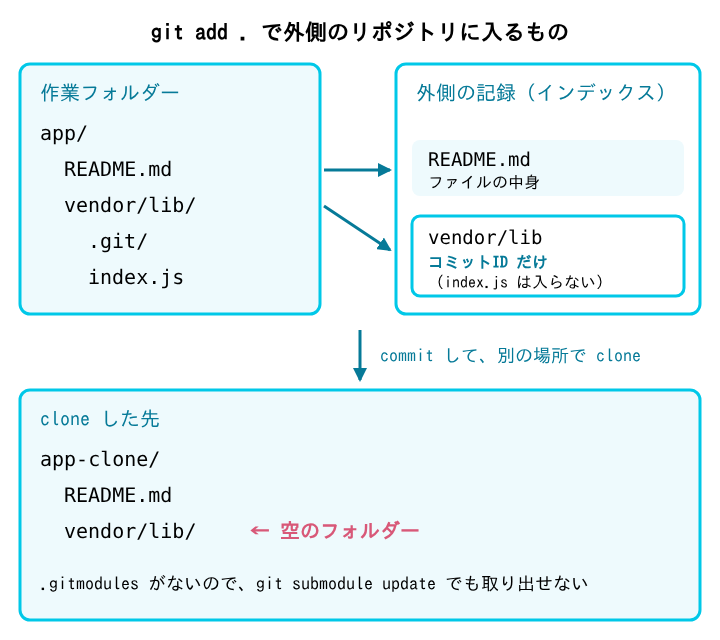
When I committed this and cloned it to another location, vendor/lib was an empty folder. There is no submodule configuration (.gitmodules), so git submodule update --init could not fetch it either.
$ git clone -q app app-clone
$ ls -A app-clone/vendor/lib
$ cd app-clone && git submodule update --init; cd ..
fatal: No url found for submodule path 'vendor/lib' in .gitmodules
The fix depends on how you want to handle the inner folder. There are three options. All of them start by removing vendor/lib from the records.
Removing it from the records: -f is required before the first commit
I ran git rm --cached vendor/lib, the command suggested in the hint, right after git add . (before any commit), and it stopped with an error.
$ git rm --cached vendor/lib
error: the following file has staged content different from both the
file and the HEAD:
    vendor/lib
(use -f to force removal)
According to the official git rm reference, when you use --cached, the content being staged must match either the latest commit on the branch (HEAD) or the file in the working tree. Otherwise, the removal is refused. The message in this case says that the staged content differs from both HEAD and the file in the working tree. Adding -f as the message suggests removed it. Because --cached was used, the vendor/lib in the working tree was not deleted.
$ git rm --cached -f vendor/lib
rm 'vendor/lib'

$ git status --short
A  README.md
?? vendor/
vendor/lib went back to being an untracked folder (??).
After you have made at least one commit, you can remove it without -f, as the hint suggests. In that case, the next commit deletes the record of vendor/lib, so it shows as D.
$ git rm --cached vendor/lib
rm 'vendor/lib'

$ git status --short
D  vendor/lib
?? vendor/
When you want to add it as ordinary files
If you want to put the contents of the inner folder into the outer repository as regular files, delete the inner .git folder and then run git add. Use this option if you never meant to manage the folder as a separate repository.
$ git rm --cached -f -q vendor/lib
$ rm -rf vendor/lib/.git
$ git add .
$ git status --short
A  README.md
A  vendor/lib/index.js
No warning was printed, and vendor/lib/index.js was added as a normal file (100644).
$ git ls-files --stage
100644 e2bd1550b11947a1bcbec6a139dc428f93a47d33 0	README.md
100644 d0f87bf2ef282c7a997d8c88e5d2539bbfe562db 0	vendor/lib/index.js
When I ran git add . again while keeping .git, the same warning appeared again. Removing the record alone does not fix it.
As described in the repository layout documentation, the .git folder holds the commits and branches of the inner repository. If you delete it, that history is gone from your local machine. If you have made commits inside it that have not been pushed anywhere, push them first, or copy the whole folder to another location.
When you want to add it as a submodule
If you want to keep the other repository as it is, pull it in, and let others retrieve it when they clone, use a submodule, for example for a shared library. After removing the record, I ran git submodule add without deleting the folder.
$ git rm --cached -f -q vendor/lib
$ git submodule add ../lib.git vendor/lib
Adding existing repo at 'vendor/lib' to the index

$ git status --short
A  .gitmodules
A  README.md
A  vendor/lib

$ cat .gitmodules
[submodule "vendor/lib"]
	path = vendor/lib
	url = ../lib.git
According to the official git submodule reference, if the specified folder is already a Git repository, it is added as is without being cloned again. This time I wrote ../lib.git, a bare repository on the same machine, but normally you would write a URL such as one on GitHub. The record for vendor/lib is still 160000, but the fetch URL is now in .gitmodules, so the contents can be retrieved on the cloning side too.
When I ran git submodule add without removing the record first, it stopped and said the path was already in the index.
$ git submodule add ../lib.git vendor/lib
fatal: 'vendor/lib' already exists in the index
After committing, cloning with --recurse-submodules also retrieved the contents of vendor/lib.
$ git -c protocol.file.allow=always clone -q --recurse-submodules app app-clone
$ ls -A app-clone/vendor/lib
.git
index.js
I added -c protocol.file.allow=always because I used a local path as the submodule source in this test. Without it, the command failed with fatal: transport 'file' not allowed. According to the protocol.allow documentation, https and ssh are allowed by default, but local paths (file) are disabled for automatic cloning such as when fetching submodules. With URLs such as GitHub, you do not need this option.
For how to use submodules, see the separate article "How to include another repository with git submodule."
When you do not want the outer repository to track it
If you manage the inner repository separately and want nothing from it in the outer repository, write it in .gitignore.
$ cat .gitignore
/vendor/lib/

$ git add .
$ git status --short
A  .gitignore
A  README.md
No warning was printed, and vendor/lib was not recorded at all.
If you wrote it in .gitignore after already running git add, running git add . again did not remove the existing record of vendor/lib. As described in the gitignore reference, .gitignore has no effect on files that Git is already tracking. After I removed the record, only .gitignore and README.md remained.
$ git add .
$ git ls-files --stage
100644 1d55cc3f9bdcd79bfb0254eb06f7393a05447d4c 0	.gitignore
100644 e2bd1550b11947a1bcbec6a139dc428f93a47d33 0	README.md
160000 b155414084e930c5b89d5908c3df93cd784b2833 0	vendor/lib

$ git rm --cached -f -q vendor/lib
$ git status --short
A  .gitignore
A  README.md
Settings that only hide the warning do not fix anything
There is one setting and one option that suppress the warning, but neither changes what gets recorded.
Setting advice.addEmbeddedRepo to false, described in the git config documentation, removes only the hint: lines. The one-line warning: remained. vendor/lib was still recorded as 160000.
$ git -c advice.addEmbeddedRepo=false add .
warning: adding embedded git repository: vendor/lib

$ git ls-files --stage
100644 e2bd1550b11947a1bcbec6a139dc428f93a47d33 0	README.md
160000 b155414084e930c5b89d5908c3df93cd784b2833 0	vendor/lib
With --no-warn-embedded-repo for git add, no warning was printed at all, but again only the single 160000 line was recorded. The official reference describes this option as one for handling submodules manually. The person who clones the project still cannot get the contents, so in normal use, fix it with one of the three options above.
If the inner repository has no commits, you get an error and it stops
If you only ran git init in the inner folder and have never made a commit, you get an error instead of a warning, and the outer git add . stops without adding anything.
$ git add .
error: 'sub/' does not have a commit checked out
fatal: adding files failed

$ git status --short
?? README.md
?? sub/
git status --short shows that README.md was not added either. If you want to add it as ordinary files, delete sub/.git and run git add . again. This added sub/a.txt.
$ rm -rf sub/.git
$ git add .
$ git status --short
A  README.md
A  sub/a.txt