
Fix ReactDOM.render Error in React 19 (createRoot)
This article was translated from the Japanese original with AI. 日本語の原文を読む
After upgrading from React 18 to React 19, if the screen goes blank and the console shows ReactDOM.render is not a function, the cause is that ReactDOM.render was removed in React 19. Rewriting the rendering code to use createRoot from react-dom/client removes the error, and the page displays.
I reproduced this error on purpose in a test environment and copied the text shown in the browser. I confirmed that after the rewrite, the error goes away and the page works. I also checked how to fix unmountComponentAtNode, which stopped working for the same reason.
The test environment was Ubuntu 24.04 and Node.js 22.23.5. I tried it in a project created with the react-ts template of npm create vite@latest (react / react-dom 19.3.1, @types/react-dom 19.3.0, Vite 8.3.8, TypeScript 7.0.2). I opened the page by operating Chromium 157 with Playwright 1.63.0. The DevTools screenshots were taken by running Chromium with a display on a virtual display (Xvfb). I did not test frameworks such as Next.js, browsers other than Chromium, or running the codemod that the official docs suggest.
Calling ReactDOM.render leaves the screen blank
I wrote the entry file src/main.tsx in the style used through React 17. The content is an App that only shows a button that counts how many times it has been clicked.
// Wrong: rendering with ReactDOM.render, as in React 17 and earlier
import { StrictMode } from 'react';
import ReactDOM from 'react-dom';
import App from './App.tsx';

ReactDOM.render(
  <StrictMode>
    <App />
  </StrictMode>,
  document.getElementById('root'),
);
When I opened the page with the dev server (the same vite as npm run dev), nothing was shown, and the following error appeared in the DevTools console.
Uncaught TypeError: ReactDOM.render is not a function
    at main.tsx:6:10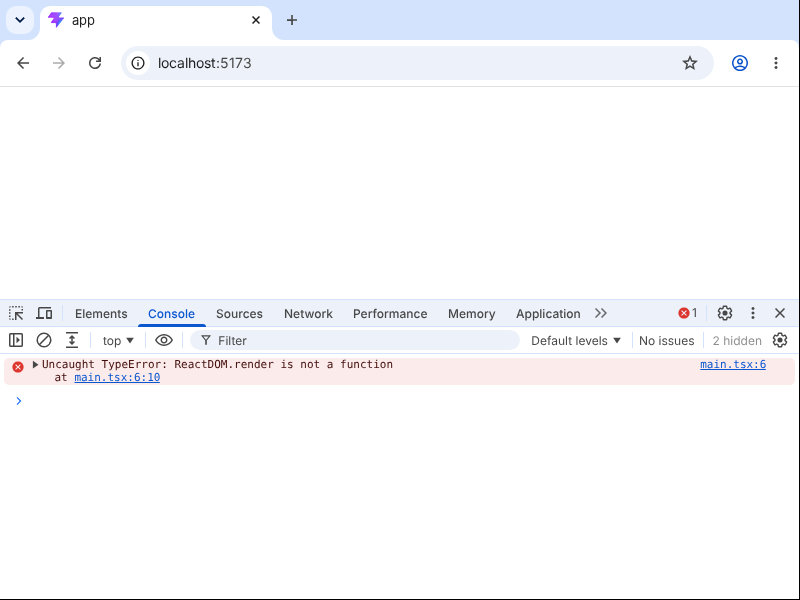
This means "ReactDOM.render is not a function." The inside of #root stayed empty. The terminal running the dev server showed the same TypeError: ReactDOM.render is not a function and the line where the error occurred.
I also tried the named-import style, import { render } from 'react-dom' (src/named.tsx). The screen went blank in the same way, and only the error text changed slightly.
Uncaught TypeError: render is not a functionThe react-dom package in React 19 has no render
According to the React 19 upgrade guide, ReactDOM.render was deprecated in React 18 and removed in React 19. At the same time, ReactDOM.hydrate and unmountComponentAtNode were also removed.
In the test environment, I listed the names that react-dom 19.3.1 exports, using Node.js.
__DOM_INTERNALS_DO_NOT_USE_OR_WARN_USERS_THEY_CANNOT_UPGRADE
browser
createPortal
flushSync
preconnect
prefetchDNS
preinit
preinitModule
preload
preloadModule
requestFormReset
unstable_batchedUpdates
useFormState
useFormStatus
versionrender, hydrate, and unmountComponentAtNode are not in the list. When I checked them with typeof, all three were undefined. Because ReactDOM.render is undefined, calling it as a function throws a TypeError. The replacements createRoot and hydrateRoot are in react-dom/client.
Render with the render() method of a root created by createRoot
Import createRoot from react-dom/client, create a root from the element where the content will be shown, and then pass what you want to display to that root's render(). This is the usage in the official createRoot reference.
// Fixed: rendering with createRoot from react-dom/client
import { StrictMode } from 'react';
import { createRoot } from 'react-dom/client';
import App from './App.tsx';

createRoot(document.getElementById('root')!).render(
  <StrictMode>
    <App />
  </StrictMode>,
);
There are two changes. The import source changed from react-dom to react-dom/client, and the target element is now passed to createRoot() instead of being given as the second argument of render(). The ! after getElementById tells TypeScript that the element is not null.
When I opened the page with the same dev server, no error appeared, and the button was displayed. After three clicks, the display read "Number of pets: 3."
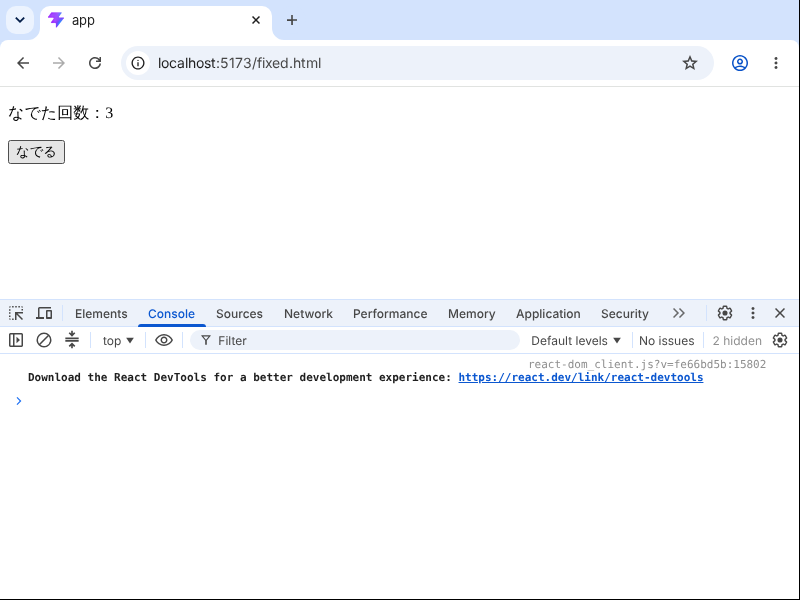
The one line left in the console is a suggestion to install React DevTools. It is not an error.
Replace unmountComponentAtNode with root.unmount()
If you change only ReactDOM.render to createRoot and leave unmountComponentAtNode in the code that clears the screen, it still fails. The following example (src/unmount-bad.tsx) tries to remove the React screen when a "close" button on the page is pressed.
// Wrong: rendering with createRoot, but using unmountComponentAtNode to clean up
import { StrictMode } from 'react';
import ReactDOM from 'react-dom';
import { createRoot } from 'react-dom/client';
import App from './App.tsx';

const container = document.getElementById('root')!;
const root = createRoot(container);
root.render(
  <StrictMode>
    <App />
  </StrictMode>,
);

document.getElementById('close')!.addEventListener('click', () => {
  ReactDOM.unmountComponentAtNode(container);
});
The first render works, but the moment "close" is pressed, TypeError: ReactDOM.unmountComponentAtNode is not a function appears, and the screen keeps showing "Number of pets: 3."
As described in the upgrade guide section on unmountComponentAtNode, I changed the code to call root.unmount() on the root that createRoot returned. To be able to call root.unmount(), keep the return value of createRoot in a variable.
document.getElementById('close')!.addEventListener('click', () => {
  root.unmount();
});
On the fixed page, no error appeared, and pressing "close" emptied the inside of #root. If you use ReactDOM.hydrate to take over HTML generated on the server, the official guide says to replace it with hydrateRoot.
With TypeScript, the type checker catches this first
In a TypeScript project, you can notice the problem before opening the browser. With the three files before the fix still in place, I ran npx tsc -p tsconfig.app.json --noEmit, and the following errors appeared (I replaced the path with /path/to/app).
src/main.tsx(6,10): error TS2339: Property 'render' does not exist on type 'typeof import("/path/to/app/node_modules/@types/react-dom/index")'.
src/named.tsx(3,10): error TS2305: Module '"react-dom"' has no exported member 'render'.
src/unmount-bad.tsx(16,12): error TS2339: Property 'unmountComponentAtNode' does not exist on type 'typeof import("/path/to/app/node_modules/@types/react-dom/index")'.
npm run build runs tsc -b first, so the build stopped with the same errors. On the other hand, with the vite dev server, the page was served even though there were type errors. Nothing points to the error until you open the browser. Right after an upgrade, running npm run build or tsc once gives you a list of the places that need to be rewritten.
When I ran only vite build for a production build, without passing the type check, the build succeeded. When I opened this file with vite preview, the error text became TypeError: o.default.render is not a function, where the name ReactDOM had been replaced with a short name. If you see an error of this form in the production console, search for any remaining render or unmountComponentAtNode calls.
The official upgrade guide suggests the codemod npx codemod@latest react/19/replace-reactdom-render as a way to rewrite calls such as ReactDOM.render.