
Fixing “is unrecognized in this browser” in React
This article was translated from the Japanese original with AI. 日本語の原文を読む
The message "The tag <…> is unrecognized in this browser" appears in the browser console during React development when React creates an element with a tag name the browser doesn't recognize. If your custom component renders nothing, first check whether the component's name starts with a lowercase letter. Starting the name with an uppercase letter, or correcting the tag name, makes the message go away.
In my test environment, I reproduced four ways of writing code that produce this message. I copied the console output exactly as it appeared, and confirmed that the message stopped appearing after each fix.
The test environment was Ubuntu 24.04 with Node.js 22.23.5. I used a project created with the react-ts template from npm create vite@latest (react and react-dom 19.3.1, Vite 8.3.8, TypeScript 7.0.2, oxlint 1.94.0). The components were wrapped in StrictMode, as in the template. I opened the pages by operating Chromium 157 with Playwright 1.63.0. I took the DevTools screenshots by running a headed Chromium on a virtual display (Xvfb). I did not test Next.js or other frameworks, and I did not test browsers other than Chromium.
The full message in the console
I opened the following component with the development server (the same vite that npm run dev runs). The component was meant to display a cat card, but I wrote catCard with a lowercase first letter in JSX.
// Wrong: the component name starts with a lowercase letter
function catCard() {
  return <p className="card">ミケ(3歳)</p>;
}

export default function LowerComponent() {
  return <catCard />;
}
The page stayed blank, and the console showed two red lines.
<catCard /> is using incorrect casing. Use PascalCase for React components, or lowercase for HTML elements.
The tag <catCard> is unrecognized in this browser. If you meant to render a React component, start its name with an uppercase letter.
The second line is the message this article covers. It means "The tag <catCard> is not recognized in this browser. If you meant to render a React component, start its name with an uppercase letter." The first line means "The casing is incorrect. Use PascalCase for React components and lowercase for HTML elements." It appears only when the tag name contains uppercase letters.
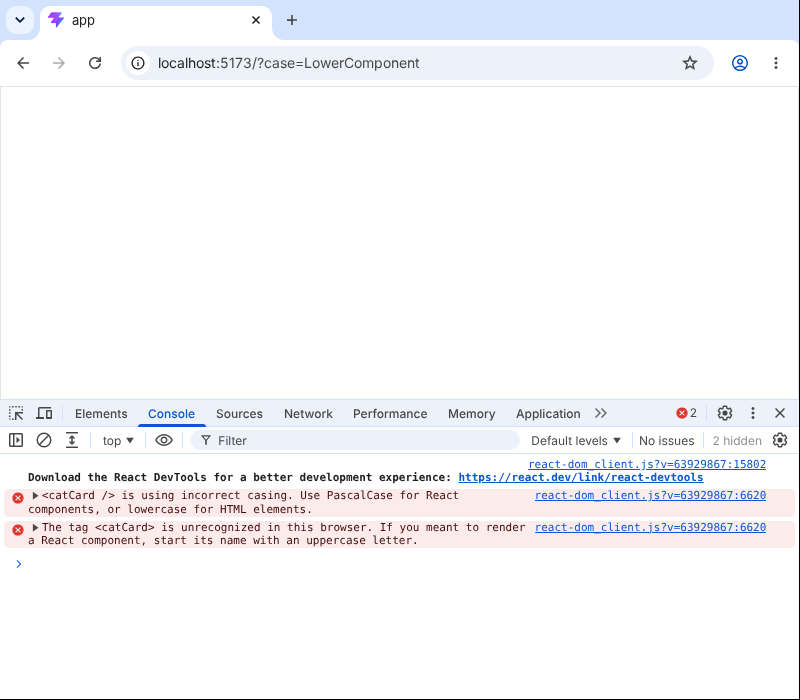
At this point, the page contained an empty <catcard></catcard> element. The body of the catCard function was not rendered, and the text "Mike (3 years old)" did not appear anywhere.
Tags that start with a lowercase letter are treated as HTML elements
As the official "Your First Component" documentation explains in its section on what the browser sees, in JSX a tag name that starts with a lowercase letter is treated as an HTML tag, and one that starts with an uppercase letter is treated as a component. So <catCard /> tells React to create an HTML element named catCard, even when a function with that name exists. The step on defining the function on the same page also warns that a component's name must start with an uppercase letter or it won't work.
The browser creates an unknown element as an HTMLUnknownElement, the interface that represents an invalid HTML element. In the development build of react-dom 19.3.1, the message is logged when the created element is an HTMLUnknownElement. React remembers each tag name it has already reported, so the message appears only once per tag name.
How to fix each cause
I tried four ways of writing code that produce this message. In each case, the fix brought the console.error count to zero.
The component name starts with a lowercase letter
This is the first example. Start the function name with an uppercase letter, and match the JSX tag to it.
// Fixed: start the name with an uppercase letter
function CatCard() {
  return <p className="card">ミケ(3歳)</p>;
}

export default function LowerComponentFixed() {
  return <CatCard />;
}
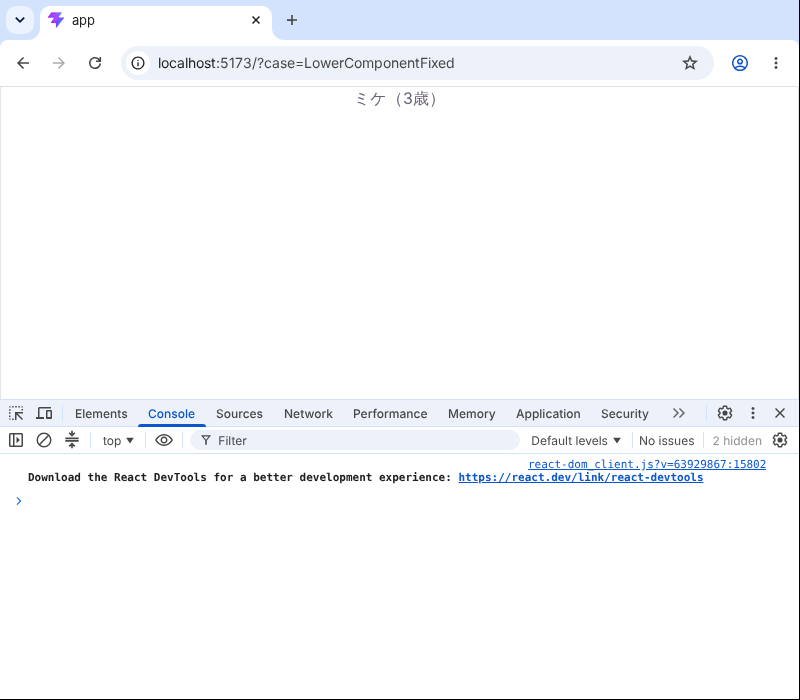
After the change, the card text (Mike, 3 years old) displayed, and the console errors disappeared.
A tag name received as a prop is used as a lowercase variable
The same message appears in a component that switches its heading level based on a prop, when the received value is used directly as a lowercase variable in a tag.
type Props = { as: 'h2' | 'h3'; children: string };

// Wrong: a lowercase variable is used directly as the tag
function Heading({ as: tag, children }: Props) {
  return <tag className="heading">{children}</tag>;
}

export default function DynamicTag() {
  return <Heading as="h2">保護猫の一覧</Heading>;
}
Even when tag holds 'h2', the JSX <tag> creates an element named tag. The page contained <tag class="heading">, and the console showed this one line. Because every letter in the tag name is lowercase, the casing warning did not appear.
The tag <tag> is unrecognized in this browser. If you meant to render a React component, start its name with an uppercase letter.If you put the value in a variable whose name starts with an uppercase letter and then use that variable as the tag, the value is used as the tag name.
// Fixed: put it in a variable that starts with an uppercase letter, then use it as the tag
function Heading({ as: Tag, children }: Props) {
  return <Tag className="heading">{children}</Tag>;
}
After the change, the page contained <h2 class="heading">.
The HTML tag name is misspelled
This also happens with a typo, such as writing <buton> instead of <button>.
// Wrong: "button" is misspelled
export default function Typo() {
  return <buton type="button">なでる</buton>;
}The tag <buton> is unrecognized in this browser. If you meant to render a React component, start its name with an uppercase letter.After I corrected it to <button>, the message disappeared.
An SVG shape is written outside the svg element
<circle> and <path> are elements used inside SVG. If you write them outside <svg>, React creates them as HTML elements, and the browser treats them as unknown elements.
// Wrong: circle is written outside svg
export default function SvgOutside() {
  return <circle cx="12" cy="12" r="10" fill="#00c8e8" />;
}The tag <circle> is unrecognized in this browser. If you meant to render a React component, start its name with an uppercase letter.When I wrote it inside <svg>, React created it as an SVG element, and the message disappeared.
// Fixed: write it inside svg
export default function SvgOutsideFixed() {
  return (
    <svg width="24" height="24" viewBox="0 0 24 24">
      <circle cx="12" cy="12" r="10" fill="#00c8e8" />
    </svg>
  );
}
Tag names with a hyphen do not trigger this message
With tags whose names contain a hyphen, such as <cat-badge>, this message did not appear. As the official reference on custom HTML elements explains, React treats a tag with a hyphen as a custom element (an element you define yourself with Web Components). As MDN explains, custom element names must contain a hyphen. The react-dom code also excludes tag names that contain a hyphen from this check.
The reverse is also true: if you misspell a custom element's name, this message will not catch it.
With TypeScript, three of the four cases are caught before you open the page
If you write .tsx files, the type check (tsc -b, which runs first in the template's npm run build) caught three of the four cases before I opened the page.
src/DynamicTag.tsx(5,10): error TS2339: Property 'tag' does not exist on type 'JSX.IntrinsicElements'.
src/LowerComponent.tsx(7,10): error TS2339: Property 'catCard' does not exist on type 'JSX.IntrinsicElements'.
src/Typo.tsx(3,10): error TS2339: Property 'buton' does not exist on type 'JSX.IntrinsicElements'.
JSX.IntrinsicElements is the type that lists the tag names you write in lowercase. As the TypeScript Handbook's section on JSX explains, a lowercase tag name is looked up in this list, and a name that isn't in the list is an error. The message "catCard is not in this list" points to the same cause. The output above shows only the first TS2339 line for each file. In practice, the same error also appears at the closing tag, and TS6133 lines appear for unused functions and parameters.
The <circle> written outside <svg> passed the type check, because circle is included in this list as an SVG tag name. The template's oxlint (npm run lint) reported only warnings that catCard and tag were unused. It did not flag the tag names.
As the Vite documentation explains, the Vite development server does not perform type checking, so the page opens even when there are type errors. If you first notice this message, run tsc -b to find the file name and line number. It will not find the <circle> written outside <svg>.
In a production build (opened with vite preview after vite build), I saw no errors or warnings in the console even with the same mistakes. The page still contained unknown elements such as <catcard> and <buton>. This message only appears during development, so check with the development server.