
How to Read the OS Dark Mode Setting in a React Custom Hook
This article was translated from the Japanese original with AI. 日本語の原文を読む
You can read whether the OS is in dark mode with window.matchMedia('(prefers-color-scheme: dark)'). Wrapping this in a custom hook with useSyncExternalStore lets a React component receive the correct value from its first render, and re-render when the OS setting changes.
The test environment was Ubuntu 24.04 and Node.js 22.22.0. I used react / react-dom 19.3.1, @types/react 19.3.0, typescript 7.0.2, and esbuild 0.28.2. I type-checked the .ts / .tsx files with tsc, converted them for development with esbuild, and drove Chrome for Testing 153 (Chromium) with Playwright 1.64.1. I did not change the OS setting through the actual OS screen. I switched the value by using a Playwright feature that sets prefers-color-scheme in the browser. I did not test Firefox, Safari, real smartphones, or production builds. This article also does not cover a theme that the user picks on the site (where the chosen value is saved).
- 1. A hook that returns the OS setting as true / false
- 2. Using it in a component
- 3. How it differs from reading it again in useEffect
- 4. subscribe should be defined outside the component or wrapped in useCallback
- 5. When rendering on the server, pass getServerSnapshot
- 6. Use CSS for colors, and the hook where you need the value
A hook that returns the OS setting as true / false
Here is the whole hook.
import { useSyncExternalStore } from 'react';

const QUERY = '(prefers-color-scheme: dark)';

// When the OS setting changes, notify React
function subscribe(onChange: () => void) {
  const mql = window.matchMedia(QUERY);
  mql.addEventListener('change', onChange);
  return () => mql.removeEventListener('change', onChange);
}

// Read the current setting
function getSnapshot() {
  return window.matchMedia(QUERY).matches;
}

// The server cannot know the OS setting, so render as light
function getServerSnapshot() {
  return false;
}

export function usePrefersDark() {
  return useSyncExternalStore(subscribe, getSnapshot, getServerSnapshot);
}
As described on the MDN page for matchMedia, the matches property of the MediaQueryList returned by matchMedia tells you whether the condition currently matches. When whether the condition matches changes, the MediaQueryList change event fires.
According to the MDN page for prefers-color-scheme, the value comes from the OS setting or the browser setting. light covers not only "the user chose light" but also "the user has not chosen anything in particular." So a false from this hook means "not dark."
The hook for reading a value that changes outside React is useSyncExternalStore. The official reference also has an example that reads a value the browser holds. It takes three functions. subscribe receives a function to call when the value changes, registers it, and returns a function that unregisters it. getSnapshot returns the current value. getServerSnapshot returns the value used when rendering on the server.
While the value has not changed, getSnapshot must return the same value. React compares returned values with Object.is. Because this hook returns true or false, calling matchMedia on every call still returns the same value as long as the setting does not change.
Using it in a component
In the component, you call the hook and change the display based on the returned value. Here is the component used for testing (I omit the test logging lines).
import { usePrefersDark } from './usePrefersDark';

export function ThemeCard() {
  const dark = usePrefersDark();
  return (
    <div className={dark ? 'card dark' : 'card'} id="card">
      <p>OS の設定:<b id="value">{dark ? 'ダーク' : 'ライト'}</b></p>
    </div>
  );
}
The screen below shows the browser's prefers-color-scheme switched to dark, light, dark, and light, using Playwright's page.emulateMedia().
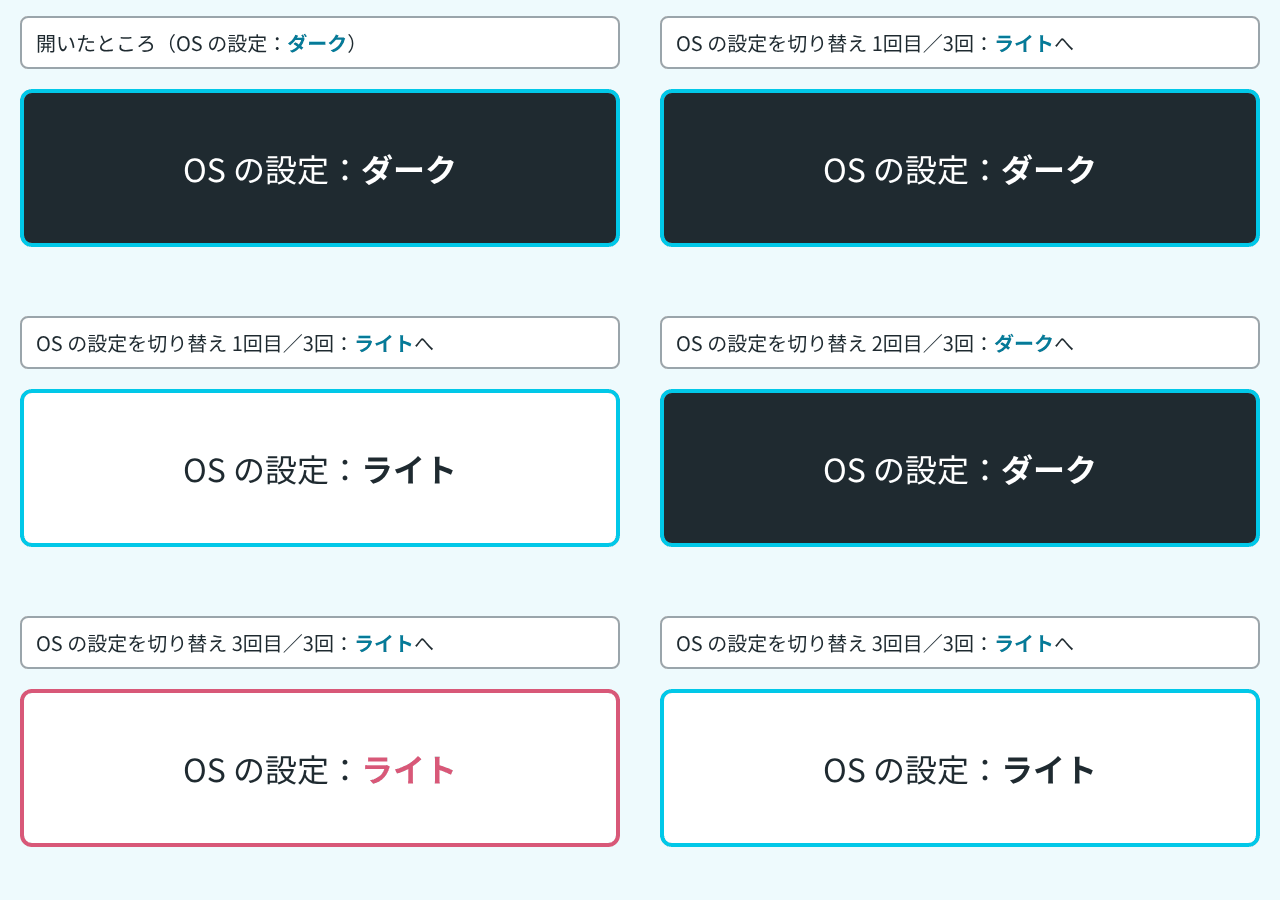
The following record comes from a separate test screen, not the GIF screen. This screen places a component that uses usePrefersDark (sync) side by side with a component that uses the useEffect approach compared in the next section (effect). I opened the page with the OS setting in dark, and without reloading, I switched the OS setting to light, dark, and light. add and remove count how many times the change event was registered and unregistered, active is how many are registered right now, and events is the total number of change events received by the two components.
light に切り替え: sync=ライト effect=ライト 描画の回数 sync=2 effect=3 change={"add":2,"remove":0,"active":2,"events":2}
dark に切り替え: sync=ダーク effect=ダーク 描画の回数 sync=3 effect=4 change={"add":2,"remove":0,"active":2,"events":4}
light に切り替え: sync=ライト effect=ライト 描画の回数 sync=4 effect=5 change={"add":2,"remove":0,"active":2,"events":6}
Each switch delivered a change event, and both components re-rendered once to catch up with the setting.
How it differs from reading it again in useEffect
Another option is to render false at first and re-read matchMedia inside useEffect.
import { useEffect, useState } from 'react';

// For comparison: render false first, then re-read inside an effect
export function usePrefersDarkEffect() {
  const [dark, setDark] = useState(false);

  useEffect(() => {
    const mql = window.matchMedia('(prefers-color-scheme: dark)');
    setDark(mql.matches);
    const onChange = (e: MediaQueryListEvent) => setDark(e.matches);
    mql.addEventListener('change', onChange);
    return () => mql.removeEventListener('change', onChange);
  }, []);

  return dark;
}
I opened the same test screen with the OS setting in dark, placed the two approaches side by side, and recorded the order in which the display entered the DOM and the values that were rendered.
DOM に入った順: ["sync=ダーク effect=ライト","sync=ダーク effect=ダーク"]
描画した値: {"sync":["dark"],"effect":["light","dark"]}
usePrefersDark was dark from its first render. The useEffect approach rendered light once, put it into the DOM, and then re-rendered as dark. The official useEffect caveats say that effects not caused by an interaction such as a click generally run after the browser has painted the screen. For a user with the dark setting, this can mean a light display is briefly visible. This test only recorded changes in the DOM. I did not check the moment the screen was actually painted.
subscribe should be defined outside the component or wrapped in useCallback
If you write subscribe directly inside the hook as (onChange) => { ... }, it becomes a new function on every render. As noted in the official useSyncExternalStore caveats, when a different subscribe is passed, React subscribes again. I also checked this point in an earlier article, "Reading an external store outside React safely with useSyncExternalStore." Here I checked the same thing with the registration of the matchMedia change event. I pressed a button (+1) in the parent component, which only increments a count, three times to re-render it, and counted how many times the change event was registered (add) and unregistered (remove). generic is useMediaQuery, introduced later in this section.
sync: マウント直後 {"add":1,"remove":0,"active":1,"events":0} / +1 を3回押したあと {"add":1,"remove":0,"active":1,"events":0}
inline: マウント直後 {"add":1,"remove":0,"active":1,"events":0} / +1 を3回押したあと {"add":4,"remove":3,"active":1,"events":0}
generic: マウント直後 {"add":1,"remove":0,"active":1,"events":0} / +1 を3回押したあと {"add":1,"remove":0,"active":1,"events":0}
When subscribe was written directly inside the hook (inline), it unregistered and registered again on every re-render. usePrefersDark (sync), which puts subscribe at the top level of the module, registered only once at the beginning.
If you want to use a media query other than (prefers-color-scheme: dark), take the query as an argument and wrap subscribe in useCallback. The useMediaQuery below (generic in the results above) also registered only once.
import { useCallback, useSyncExternalStore } from 'react';

// Works with any media query. Re-subscribes only when query changes
export function useMediaQuery(query: string, serverValue = false) {
  const subscribe = useCallback(
    (onChange: () => void) => {
      const mql = window.matchMedia(query);
      mql.addEventListener('change', onChange);
      return () => mql.removeEventListener('change', onChange);
    },
    [query],
  );

  return useSyncExternalStore(
    subscribe,
    () => window.matchMedia(query).matches,
    () => serverValue,
  );
}
When rendering on the server, pass getServerSnapshot
When rendering on the server, the component runs outside the browser, so there is no window, and the OS setting is unknown. If you do not pass getServerSnapshot, rendering on the server fails (I confirmed this in the earlier article "Reading an external store outside React safely with useSyncExternalStore"). When I rendered usePrefersDark with renderToString, it used the false from getServerSnapshot and produced light HTML.
usePrefersDark: <div class="card" id="card"><p>OS の設定:<b id="value">ライト</b></p></div>According to the official explanation of server rendering, getServerSnapshot is used when creating HTML on the server and when hydrating that HTML in the browser. I passed this light HTML to hydrateRoot in a browser with the OS setting in dark.
OS の設定 dark: DOM の変化 ["value=ライト","value=ダーク"] 描画した値 {"card":["light","dark"]} class="card dark"
  コンソール: []
OS の設定 light: DOM の変化 ["value=ライト"] 描画した値 {"card":["light"]} class="card"
  コンソール: []
With the dark setting, hydration rendered light, the same as the server, and then re-rendered as dark. The console showed no mismatch error between the server and the client. With the light setting, there was no re-render.
However, because the server HTML arrives showing light, a user with the dark setting still sees the light display until hydration finishes. (I did not check the moment the screen was actually painted.) If you want to match colors without waiting for JavaScript, switch the colors themselves with CSS @media (prefers-color-scheme: dark). The MDN page for prefers-color-scheme also has an example that uses light colors as the base and overrides them for dark.
Use CSS for colors, and the hook where you need the value
Read the OS dark mode setting with a hook that wraps matchMedia('(prefers-color-scheme: dark)') in useSyncExternalStore. Define subscribe outside the component or wrap it in useCallback, and pass getServerSnapshot if you render on the server. If you only need to change colors, a CSS media query is enough, so use the hook where JavaScript needs the value, such as colors passed to a chart or components that switch what they display.