
Adopting React Compiler Incrementally in an Existing Project
This article was translated from the Japanese original with AI. 日本語の原文を読む
You don't have to enable React Compiler across an existing project all at once. You can start with part of the codebase and expand from there. The official incremental adoption guide describes three approaches. You can limit the compiler to specific folders, compile only functions marked with "use memo", or switch between compiled and original code with a runtime flag (gating).
In a test environment, I built a small app that stands in for an existing project with Vite 8 and tried each of the three approaches in turn. In every case, I checked which functions were compiled by looking at the output of the compiler's logger. When you limit the compiler to folders in a Babel config file, there is a pitfall: if you write the pattern exactly as in the official example, the compiler silently does nothing.
Test environment: Ubuntu 24.04 and Node.js 22.22.0. I used babel-plugin-react-compiler 1.0.0, React 19.3.1, Vite 8.3.5, @vitejs/plugin-react 6.1.2, @rolldown/plugin-babel 0.2.4, and eslint-plugin-react-hooks 7.1.1. To check the Babel config file behavior, I used @babel/core 8.0.7 and 7.29.7.
- 1. The test app
- 2. Before enabling the compiler, use ESLint to find what will be skipped
- 3. Expanding folder by folder (Vite)
- 4. In a Babel config file, the official example left the compiler doing nothing
- 5. Excluding a single function: "use no memo"
- 6. Keep panicThreshold at 'none'
- 7. Choosing individual functions (compilationMode 'annotation')
- 8. Switching at runtime: gating
- 9. What order to go in
The test app
The app has seven functions in total, counting both components and hooks. src/features/cart contains three cart pieces, src/features/profile contains one, and src/legacy contains two old pieces. App, which puts everything together, sits directly under src.
I deliberately put a rule violation in legacy/OrderTable.tsx. The component modifies the props object during render.
export function OrderTable({ rows, options }: { rows: Row[]; options: Options }) {
  options.renderedCount = (options.renderedCount ?? 0) + 1; // Mutates props during render (rule violation)
  return (
    <table>
      <tbody>
        {rows.map((r) => <tr key={r.id}><td>{r.amount}</td></tr>)}
      </tbody>
    </table>
  );
}
To see which functions were compiled, I used the compiler's logger option. The logger prints one line for each of three event kinds: CompileSuccess (compiled), CompileError (skipped because of an error), and CompileSkip (skipped for another reason). There are other event kinds, which this logger ignores.
import { relative } from 'node:path';
import type { Logger } from 'babel-plugin-react-compiler';

// Print one line per function showing whether it was compiled (or not)
export const logger: Logger = {
  logEvent(filename, event) {
    if (event.kind === 'CompileSuccess' || event.kind === 'CompileError' || event.kind === 'CompileSkip') {
      const name = 'fnName' in event ? (event.fnName ?? '') : '';
      console.log(`[compiler] ${event.kind} ${relative(process.cwd(), filename ?? '')} ${name}`);
    }
  },
};
You can also use this log to measure how far the rollout has progressed.
Before enabling the compiler, use ESLint to find what will be skipped
Before adding the compiler, I first ran the linter with the recommended config from eslint-plugin-react-hooks. The config is below. To parse TypeScript files, I set the parser from typescript-eslint.
import reactHooks from 'eslint-plugin-react-hooks';
import tseslint from 'typescript-eslint';
import { defineConfig } from 'eslint/config';

export default defineConfig([
  { files: ['src/**/*.{ts,tsx}'], languageOptions: { parser: tseslint.parser } },
  reactHooks.configs.flat.recommended,
]);
The mutation in OrderTable was reported as a react-hooks/immutability error. This is the beginning of the output:
./src/legacy/OrderTable.tsx
  5:3  error  Error: This value cannot be modified
Modifying component props or hook arguments is not allowed. Consider using a local variable instead.
According to the section on ESLint integration on the installation page, the compiler skips optimizing any component or hook for which these rules report an error. The rest of the code is still optimized, so the docs say you don't need to fix every violation right away. Knowing in advance which parts will be skipped makes it easier to decide which folder to start with.
Expanding folder by folder (Vite)
In Vite, you add the compiler with @rolldown/plugin-babel and reactCompilerPreset, as described in the Vite section of the installation page. @rolldown/plugin-babel has an include option that limits which files are transformed. I started with only src/features/cart.
import { defineConfig } from 'vite';
import react, { reactCompilerPreset } from '@vitejs/plugin-react';
import babel from '@rolldown/plugin-babel';
import { logger } from './compiler-logger.ts';

export default defineConfig({
  plugins: [
    react(),
    babel({
      include: [/\/src\/features\/cart\//], // Start with this folder only
      presets: [reactCompilerPreset({ logger })],
    }),
  ],
});
After a build, only the three cart functions had been compiled.
[compiler] CompileSuccess src/features/cart/CartSummary.tsx CartSummary
[compiler] CompileSuccess src/features/cart/PriceRow.tsx PriceRow
[compiler] CompileSuccess src/features/cart/useCartTotal.ts useCartTotal
I built with --minify false so the bundle would be readable. In the output, CartSummary sets up a memoization cache through the compiler runtime (import_compiler_runtime.c). ProfileCard, which was outside the included folder, has no caching code.
function CartSummary(t0) {
	const $ = (0, import_compiler_runtime.c)(8);
	const { items } = t0;
	const [note, setNote] = (0, import_react.useState)("");
--
function ProfileCard({ name }) {
	return /* @__PURE__ */ (0, import_jsx_runtime.jsx)("div", {
		className: "card",
		children: name
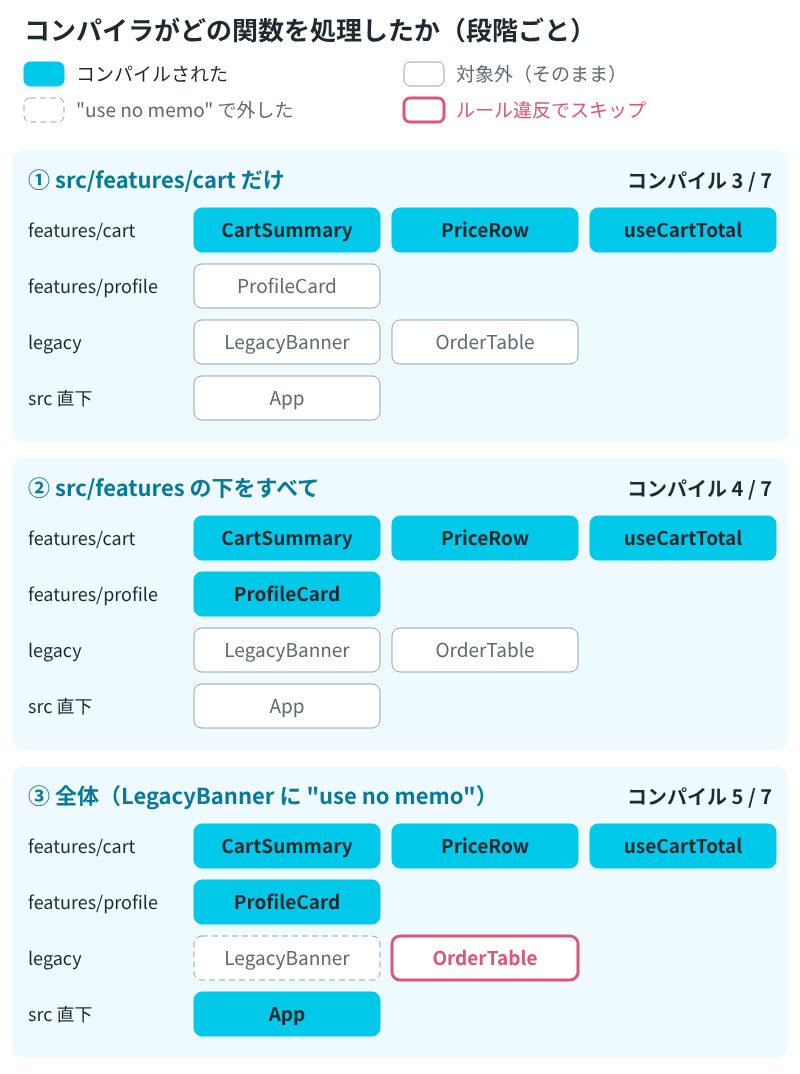
Next, I widened include to [/\/src\/features\//]. That added ProfileCard, for four functions in total. Finally, I removed include to cover the whole project, and six of the seven functions were compiled. Only OrderTable was skipped with CompileError, and the build still succeeded.
[compiler] CompileSuccess src/App.tsx App
[compiler] CompileSuccess src/features/cart/CartSummary.tsx CartSummary
[compiler] CompileSuccess src/legacy/LegacyBanner.tsx LegacyBanner
[compiler] CompileError src/legacy/OrderTable.tsx
[compiler] CompileSuccess src/features/profile/ProfileCard.tsx ProfileCard
[compiler] CompileSuccess src/features/cart/useCartTotal.ts useCartTotal
[compiler] CompileSuccess src/features/cart/PriceRow.tsx PriceRow
The diagram below summarizes each stage. Stage ③ shows the build with "use no memo" added to LegacyBanner, which is covered later in the section "Excluding a single function: "use no memo"".
In a Babel config file, the official example left the compiler doing nothing
Some projects don't use Vite and add the compiler through a Babel config file instead. In the official guide's example of folder-by-folder configuration, the test field of Babel's overrides is set to './src/modern/**/*.{js,jsx,ts,tsx}'.
In the test app, I set test to the equivalent pattern './src/features/**/*.{js,jsx,ts,tsx}'. Here is the config file:
// babel.config.cjs (logger definition omitted; the test value was changed for each run)
module.exports = {
  presets: [
    '@babel/preset-typescript',
    ['@babel/preset-react', { runtime: 'automatic' }],
  ],
  overrides: [
    {
      test: './src/features/**/*.{js,jsx,ts,tsx}',
      plugins: [['babel-plugin-react-compiler', { logger }]],
    },
  ],
};
With this config, I ran a script (babel-all.mjs) that transforms the 11 files under src. With both Babel 8.0.7 and 7.29.7, the compiler did not process a single function. There were no errors or warnings, and all 11 files were transformed. In the output below, the script's last line reports that 11 files were transformed, and no [compiler] lines appear.
--- test: './src/features/**/*.{js,jsx,ts,tsx}'(Babel 8)
$ node babel-all.mjs
変換したファイル:11個
According to the explanation of path patterns on Babel's options page, string patterns do not support full glob syntax. Only **, *, and *.ext are supported, and braces {…} are not. In my test, too, the brace pattern matched no files at all. With either of the following two forms, both Babel versions compiled the four functions under src/features.
// Specify the folder (every file under it matches)
test: './src/features',

// List each extension separately
test: ['./src/features/**/*.ts', './src/features/**/*.tsx'],
With only './src/features/**/*.tsx', the hook useCartTotal, which is in a .ts file, was left out.
Babel does not report an error when a test pattern matches nothing. You may think you've enabled the compiler when nothing has actually changed. After configuring it, use logger or a similar method to confirm that at least some functions were compiled.
Note that, according to the @rolldown/plugin-babel README, this plugin does not load config files such as babel.config.js. If you use this plugin with Vite, pass the Babel settings as plugin options, as in the previous section. The include patterns use the same format as Babel's.
Excluding a single function: "use no memo"
If a component within the expanded scope worries you because you're not sure how it will behave after compilation, you can exclude it by adding "use no memo" at the top of the function. In my test, I added it to LegacyBanner.
export function LegacyBanner({ text }: { text: string }) {
  "use no memo"; // TODO: Remove after checking how it renders when compiled
  return <p className="banner">{text}</p>;
}
When I rebuilt with the whole project in scope, LegacyBanner was reported as CompileSkip.
[compiler] CompileSkip src/legacy/LegacyBanner.tsx The "use no memo" reference describes this directive as a temporary way to exclude code from the compiler, and recommends leaving a comment that explains why it was excluded. The reference also shows that you can put the directive at the top of a file to exclude the whole file. I did not test the file-level form.
Keep panicThreshold at 'none'
The build succeeded despite the rule violation in OrderTable because panicThreshold defaults to 'none'. When I tried setting it to 'all_errors', the build failed at OrderTable. Here is part of the error output:
✗ Build failed in 313ms
error during build:
Build failed with 1 error:
[plugin @rolldown/plugin-babel] ./src/legacy/OrderTable.tsx
RolldownError: [BabelError] Found 1 error:
Error: This value cannot be modified
The panicThreshold reference says to always use 'none' for production builds. The stricter values are meant only for temporary use while you hunt for problems during development. While you're adopting the compiler incrementally, I think the safe approach is to let the compiler skip the code with violations and fix it based on the ESLint results.
Choosing individual functions (compilationMode 'annotation')
If you want to try the compiler at a finer level than folders, choosing functions one at a time, use the 'annotation' mode described in the compilationMode reference. In this mode, only functions marked with "use memo" are compiled.
babel({ presets: [reactCompilerPreset({ compilationMode: 'annotation', logger })] })export function ProfileCard({ name }: { name: string }) {
"use memo";
return <div className="card">{name}</div>;
}After a build, ProfileCard was the only compiled function.
[compiler] CompileSuccess src/features/profile/ProfileCard.tsx ProfileCardAccording to the section of the official guide on using the directive, in this mode you must add "use memo" to every component and custom hook you want optimized. Remember to add it to new components you write later, too.
Switching at runtime: gating
With the gating option, both the compiled version and the original version go into the bundle. The return value of a function called at runtime decides which one is used. In my test, the compiled version is used only when the URL contains ?compiler=on.
// src/compilerFlags.ts
// Use the compiled version only when the URL contains ?compiler=on
export function isCompilerEnabled(): boolean {
  return new URLSearchParams(window.location.search).get('compiler') === 'on';
}babel({
presets: [
reactCompilerPreset({
gating: { source: '/src/compilerFlags.ts', importSpecifierName: 'isCompilerEnabled' },
logger,
}),
],
}),I wrote source in the form /src/… and confirmed that it works in a Vite build. I did not test other build tools. The examples in the gating reference use './src/utils/feature-flags' or a package name.
In the built bundle, each of the six functions that compiled successfully was wrapped so that isCompilerEnabled() chooses the version. Here is the ProfileCard part, with the middle omitted:
var ProfileCard = isCompilerEnabled() ? function ProfileCard(t0) {
	const $ = (0, import_compiler_runtime.c)(2);
	...
} : function ProfileCard({ name }) {
	return /* @__PURE__ */ (0, import_jsx_runtime.jsx)("div", {
To confirm that the switch actually works, I opened the built app with vite preview and used Playwright to type three characters into the cart's note field. I counted how many times PriceRow, the child component that displays the cart total, rendered. In the output, PriceRow の描画回数 means "PriceRow render count".
URL=/  input="abc"  PriceRow の描画回数=4
URL=/?compiler=on  input="abc"  PriceRow の描画回数=1
Without the flag, PriceRow rendered four times: once initially and once for each of the three keystrokes. With ?compiler=on, it rendered only once, initially. The compiled CartSummary did not re-render PriceRow when the note field changed, because the total stayed the same.
According to the gating reference, the flag function is evaluated only once, when the module loads. So the version does not switch after the page has loaded. The reference also says the bundle gets larger because both versions are included (I did not compare sizes). The gating section of the official guide says gating is useful for A/B testing and for gradual rollouts to specific user groups.
What order to go in
Based on my test results and the official guide, I think the following order works well for an existing project:
- Use the ESLint recommended config to find out in advance which parts will be skipped
- Enable the compiler for folders without violations using
include(in Babel, thetestfield ofoverrides), and count the compiled functions withlogger - Widen the scope, and temporarily add
"use no memo"to any function you're worried about - Finally, remove
includeto enable the compiler for the whole project
If you want to pick functions one at a time, use 'annotation' mode. If you want to compare the effect in production, use gating.
As long as panicThreshold is 'none', incremental adoption won't break your build: code with rule violations is simply skipped. However, a wrong folder pattern also produces no error, so each time you widen the scope, check the number of compiled functions with logger.