
Splitting React Context to Reduce Unnecessary Re-renders
This article was translated from the Japanese original with AI. 日本語の原文を読む
If you put the theme, the counter, and the update functions all in one Context, every component that reads that Context re-renders whenever any one of those values changes. If you split values that change at different times into separate Contexts, only the components that read the changed value re-render.
In a test environment, I built the same screen in five different ways. I pressed a button and counted how many times each component rendered. I also checked why wrapping the value in useMemo and wrapping the consumers in memo were not enough.
The test environment was Ubuntu 24.04 and Node.js 22.22.0. I used react / react-dom 19.3.1, @types/react 19.3.0, typescript 7.0.2, esbuild 0.28.2, and jsdom 29.1.1. I type-checked the .tsx files with tsc, transformed them with esbuild, and ran them on jsdom. The render count is the number of times each component's function was called (I added a counter at the top of each function). I did not measure how long the screen took to display. I did not use StrictMode. I did not check the render counts when using the React Compiler.
Putting everything in one Context
First, I put the theme (theme), the counter (count), and the functions that update them into one AppContext. Four components read the Context: ThemeLabel, which displays the theme; CountLabel, which displays the count; IncrementButton, which increases the count; and ThemeButton, which toggles the theme. I also added a Header that does not read the Context.
import { createContext, useContext, useState, type ReactNode } from 'react';
import { countRender } from './renders';

type AppValue = {
  theme: 'light' | 'dark';
  count: number;
  increment: () => void;
  toggleTheme: () => void;
};

// Put the theme, the counter, and the update functions all in one Context
const AppContext = createContext<AppValue | null>(null);

function useApp() {
  const value = useContext(AppContext);
  if (!value) throw new Error('AppProvider の中で使ってください');
  return value;
}

function AppProvider({ children }: { children: ReactNode }) {
  const [theme, setTheme] = useState<'light' | 'dark'>('light');
  const [count, setCount] = useState(0);
  const value: AppValue = {
    theme,
    count,
    increment: () => setCount((c) => c + 1),
    toggleTheme: () => setTheme((t) => (t === 'light' ? 'dark' : 'light')),
  };
  return <AppContext value={value}>{children}</AppContext>;
}

function ThemeLabel() {
  countRender('ThemeLabel');
  const { theme } = useApp();
  return <p id="theme">テーマ: {theme}</p>;
}

function IncrementButton() {
  countRender('IncrementButton');
  const { increment } = useApp();
  return <button id="inc" onClick={increment}>+1</button>;
}

// Write CountLabel, ThemeButton, and Header the same way (omitted)

export function App() {
  return (
    <AppProvider>
      <Header />
      <ThemeLabel />
      <CountLabel />
      <IncrementButton />
      <ThemeButton />
    </AppProvider>
  );
}
In React 19, you can write <AppContext> directly as the Provider instead of <AppContext.Provider> (the Provider section of the createContext reference).
On this screen, I pressed "+1" three times and then pressed the theme toggle once. I reset the render counts to 0 after the initial render and again before pressing the theme toggle.
$ node run.mjs ./out/AppOne.mjs
./out/AppOne.mjs
  最初の表示: 「テーマ: light」「カウント: 0」
    描画回数: Header 1 / ThemeLabel 1 / CountLabel 1 / IncrementButton 1 / ThemeButton 1
  +1 を3回押したあと: 「テーマ: light」「カウント: 3」
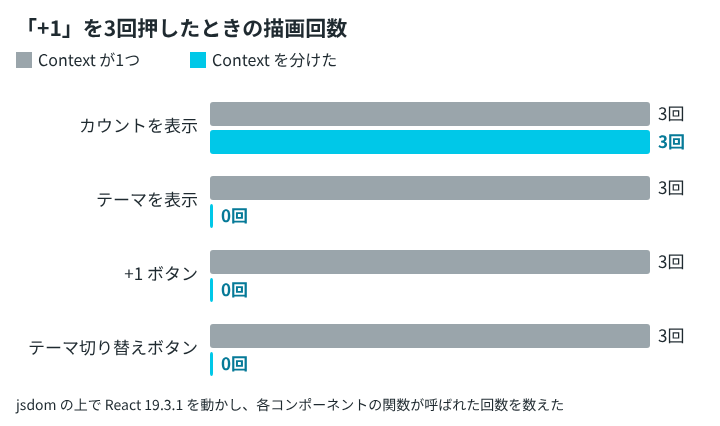
    描画回数: Header 0 / ThemeLabel 3 / CountLabel 3 / IncrementButton 3 / ThemeButton 3
  テーマ切り替えを1回押したあと: 「テーマ: dark」「カウント: 3」
    描画回数: Header 0 / ThemeLabel 1 / CountLabel 1 / IncrementButton 1 / ThemeButton 1
Only the count changed, but ThemeLabel, which displays the theme, and both buttons each re-rendered three times. When I switched the theme, all four components re-rendered once each.
According to the caveats in the useContext reference, when the value passed to a Provider changes, React re-renders every component that reads that Context. React decides whether the value has changed by comparing it with the previous value using Object.is. As the results above show, even if a component uses only part of an object, the component re-renders when the object changes.
Wrapping the value in useMemo doesn't help in this case
The section on optimizing objects and functions passed through Context in the useContext reference explains wrapping functions in useCallback and the value object in useMemo. I also tried a version that fixes things this way, changing only the Provider.
function AppProvider({ children }: { children: ReactNode }) {
  const [theme, setTheme] = useState<'light' | 'dark'>('light');
  const [count, setCount] = useState(0);
  const increment = useCallback(() => setCount((c) => c + 1), []);
  const toggleTheme = useCallback(
    () => setTheme((t) => (t === 'light' ? 'dark' : 'light')),
    [],
  );
  // Wrap the value object in useMemo. It is recreated when theme or count changes
  const value = useMemo(
    () => ({ theme, count, increment, toggleTheme }),
    [theme, count, increment, toggleTheme],
  );
  return <AppContext value={value}>{children}</AppContext>;
}$ node run.mjs ./out/AppOneMemo.mjs
(前略)
+1 を3回押したあと: 「テーマ: light」「カウント: 3」
描画回数: Header 0 / ThemeLabel 3 / CountLabel 3 / IncrementButton 3 / ThemeButton 3
テーマ切り替えを1回押したあと: 「テーマ: dark」「カウント: 3」
描画回数: Header 0 / ThemeLabel 1 / CountLabel 1 / IncrementButton 1 / ThemeButton 1The results were exactly the same as without the wrapping. When count changes, useMemo creates a new object. When the object changes, every component that reads it re-renders.
useMemo helps when the Provider re-renders but the Context's contents have not changed. To confirm this, I made a separate small sample with a Context that holds only the count and the increment function. I compared a Provider without useMemo and a Provider with it.
// Provider without useMemo (creates a new object and function on every render)
function InlineProvider({ children }: { children: ReactNode }) {
  const [count, setCount] = useState(0);
  const value = { count, increment: () => setCount((c) => c + 1) };
  return <CountContext value={value}>{children}</CountContext>;
}

// Provider that wraps the value in useMemo (recreated only when count changes)
function MemoProvider({ children }: { children: ReactNode }) {
  const [count, setCount] = useState(0);
  const value = useMemo(
    () => ({ count, increment: () => setCount((c) => c + 1) }),
    [count],
  );
  return <CountContext value={value}>{children}</CountContext>;
}

// This CountContext is a separate Context holding { count, increment }. CountLabel, Page, and the parent App are omitted
I put each Provider under a parent that has state unrelated to the Context, and re-rendered only the parent three times. Under the Provider, I placed a Page that contains CountLabel, which displays the count. I wrapped Page in memo. Without that, Page would re-render along with the parent, and I could not tell whether the re-render of CountLabel came from the Context.
$ node run-parent.mjs
AppParentInline: 親を3回描き直したあと「親を描き直す(3)」 / 描画回数: Page 0 / CountLabel 3
AppParentMemo: 親を3回描き直したあと「親を描き直す(3)」 / 描画回数: Page 0 / CountLabel 0
In the version without useMemo (AppParentInline), Page did not re-render, but CountLabel, which reads the Context inside it, re-rendered three times. Each time the Provider re-rendered, it passed a new object as value. In the version with the Provider wrapped in useMemo (AppParentMemo), CountLabel re-rendered zero times.
useMemo prevents re-renders caused by an object becoming new even though its contents are the same. It does not prevent components that are unrelated from re-rendering when part of the contents really changes.
Wrapping the consumer in memo doesn't help
I also tried wrapping ThemeLabel in memo (the Provider was the same as the useMemo version).
// Checking whether wrapping the component that reads the Context itself in memo helps
const ThemeLabel = memo(function ThemeLabel() {
  countRender('ThemeLabel');
  const { theme } = useApp();
  return <p id="theme">テーマ: {theme}</p>;
});$ node run.mjs ./out/AppMemoConsumer.mjs
(前略)
+1 を3回押したあと: 「テーマ: light」「カウント: 3」
描画回数: Header 0 / ThemeLabel 3 / CountLabel 3 / IncrementButton 3 / ThemeButton 3
(後略)ThemeLabel re-rendered three times, the same as without memo. As the memo reference explains, memo compares only the props passed from the parent. If the Context a component reads changes, the component re-renders even when it is wrapped in memo.
Splitting the Context re-renders only the affected components
I split the Context by the values that change at different times. The theme goes into ThemeContext, the count into CountContext, and the update functions into ActionsContext. I wrapped the object that groups the functions in useMemo so that it is not recreated. According to the caveats for set functions in the useState reference, update functions such as setCount do not change between renders. That is why the dependency array is empty.
import { createContext, useContext, useMemo, useState, type ReactNode } from 'react';
import { countRender } from './renders';

type Theme = 'light' | 'dark';
type Actions = { increment: () => void; toggleTheme: () => void };

// Split values that change at different times into separate Contexts
const ThemeContext = createContext<Theme>('light');
const CountContext = createContext(0);
const ActionsContext = createContext<Actions | null>(null);

function useActions() {
  const actions = useContext(ActionsContext);
  if (!actions) throw new Error('AppProvider の中で使ってください');
  return actions;
}

function AppProvider({ children }: { children: ReactNode }) {
  const [theme, setTheme] = useState<Theme>('light');
  const [count, setCount] = useState(0);
  // Create the object that groups only the update functions once, on the first render
  const actions = useMemo<Actions>(
    () => ({
      increment: () => setCount((c) => c + 1),
      toggleTheme: () => setTheme((t) => (t === 'light' ? 'dark' : 'light')),
    }),
    [],
  );
  return (
    <ActionsContext value={actions}>
      <ThemeContext value={theme}>
        <CountContext value={count}>{children}</CountContext>
      </ThemeContext>
    </ActionsContext>
  );
}

function ThemeLabel() {
  countRender('ThemeLabel');
  const theme = useContext(ThemeContext);
  return <p id="theme">テーマ: {theme}</p>;
}

function CountLabel() {
  countRender('CountLabel');
  const count = useContext(CountContext);
  return <p id="count">カウント: {count}</p>;
}

function IncrementButton() {
  countRender('IncrementButton');
  const { increment } = useActions();
  return <button id="inc" onClick={increment}>+1</button>;
}

// ThemeButton reads toggleTheme from useActions(). Header and App are the same as in the single-Context version (omitted)$ node run.mjs ./out/AppSplit.mjs
./out/AppSplit.mjs
最初の表示: 「テーマ: light」「カウント: 0」
描画回数: Header 1 / ThemeLabel 1 / CountLabel 1 / IncrementButton 1 / ThemeButton 1
+1 を3回押したあと: 「テーマ: light」「カウント: 3」
描画回数: Header 0 / ThemeLabel 0 / CountLabel 3 / IncrementButton 0 / ThemeButton 0
テーマ切り替えを1回押したあと: 「テーマ: dark」「カウント: 3」
描画回数: Header 0 / ThemeLabel 1 / CountLabel 0 / IncrementButton 0 / ThemeButton 0When I pressed "+1" three times, only CountLabel re-rendered. When I switched the theme, only ThemeLabel re-rendered. Neither button re-rendered in either case. This is because the value of ActionsContext, which the buttons read, stayed the same object that was created first in this test.
However, the caveats in the useMemo reference state that React may throw away cached values if there is a reason to. Use useMemo as a performance optimization, and make sure your code still works if the cached value is discarded.
Splitting values and the functions that update them into separate Contexts is also used in the official learning page's example that combines a reducer with Context. In that example, the task list goes into TasksContext, and the dispatch function goes into TasksDispatchContext. According to the caveats in the useReducer reference, dispatch also does not change between renders, just like the update functions from useState.
The Header, which does not read a Context, did not re-render in any of the versions (zero times). In this setup, the <Header /> element is created inside App and passed to the Provider as children. Only the state inside AppProvider changed, and Header kept receiving the same element that App created as children. That is why I believe it did not re-render.
Options when you can't split the Context
You can also keep one Context and avoid re-rendering only the expensive part. The memo reference describes splitting a component into two: the outer one reads the Context and passes only the necessary values as props to an inner component wrapped in memo. The Provider is the same as in the useMemo version.
// The outer component reads the Context and passes only the needed values as props
function ThemeLabel() {
  countRender('ThemeLabel');
  const { theme } = useApp();
  return <ThemeLabelView theme={theme} />;
}

// The inner component is wrapped in memo and skips rendering when props are the same
const ThemeLabelView = memo(function ThemeLabelView({ theme }: { theme: string }) {
  countRender('ThemeLabelView');
  return <p id="theme">テーマ: {theme}</p>;
});$ node run.mjs ./out/AppMemoChild.mjs
(前略)
+1 を3回押したあと: 「テーマ: light」「カウント: 3」
描画回数: Header 0 / ThemeLabel 3 / ThemeLabelView 0 / CountLabel 3 / IncrementButton 3 / ThemeButton 3
テーマ切り替えを1回押したあと: 「テーマ: dark」「カウント: 3」
描画回数: Header 0 / ThemeLabel 1 / ThemeLabelView 1 / CountLabel 1 / IncrementButton 1 / ThemeButton 1The outer ThemeLabel re-rendered three times, but the inner ThemeLabelView re-rendered zero times. When I switched the theme, the inner component re-rendered once. If you keep the outer component light, only reading the Context, and put the expensive rendering in the inner component, you can avoid re-rendering the expensive part without splitting the Context.
Which approach to choose
The results are summarized below.
| Approach | When the count changes, does the component that reads only the theme re-render? |
|---|---|
| Everything in one Context | Re-renders |
| One Context + useMemo | Re-renders |
| One Context + memo on the consumer | Re-renders |
| One Context + outer component and memoized inner component | Only the outer component re-renders; the inner one is skipped |
| Split Contexts | Does not re-render |
If values that change often and values that rarely change are in the same Context, splitting the Context is effective. A component that reads only an update function, like a button, also stops re-rendering if you move the function into a separate Context. When you put objects or functions into a split Context, wrap them in useMemo or useCallback. Otherwise, every time the Provider re-renders, the value becomes new.
However, the useContext reference also says that in small apps, passing a new object every time the Provider re-renders is not a problem. Splitting a Context adds more Providers and types, so I think it is best to start with the cases where re-renders are actually expensive.