
CSPで止まるJavaScriptのインラインスクリプトの直し方
Content Security Policy(CSP)の script-src を付けたページでは、HTML に直接書いた <script> や onclick が動かなくなり、コンソールにエラーが出ます。スクリプトを外部の .js ファイルに移すか、<script> に nonce やハッシュを使い、onclick は addEventListener() に書き換えると、エラーは消えてスクリプトが動きます。
セキュリティ対策でサーバーに CSP のヘッダーを足したら、ボタンが反応しなくなった、スクリプトで書き換える表示が変わらない、という場面で出るエラーです。Chromium のソース(141.0.7390.0 のタグ)では、このエラーを「Refused to execute inline script because it violates the following Content Security Policy directive」という文で作っていました。私は検証環境でこのエラーをわざと起こし、出たメッセージと、直すと消えることを確かめました。
検証環境は Ubuntu 24.04、Node.js 22.23.4、Playwright 1.63.0 で起動した Chromium 153.0.8010.12(ヘッドレス)です。ページは Node.js で書いた検証用のサーバーから http://localhost:8080 で返し、CSP は Content-Security-Policy ヘッダーで付けました。メッセージは Playwright でコンソールから取り出したもので、Chrome の DevTools の画面での見え方や、Firefox・Safari のメッセージは確かめていません。
インラインの script と onclick があるページで、エラーを起こす
次の broken.html を、Content-Security-Policy: script-src 'self' のヘッダーを付けて返しました。'self' は「ページと同じオリジンから読み込むスクリプトだけを許す」という指定です。
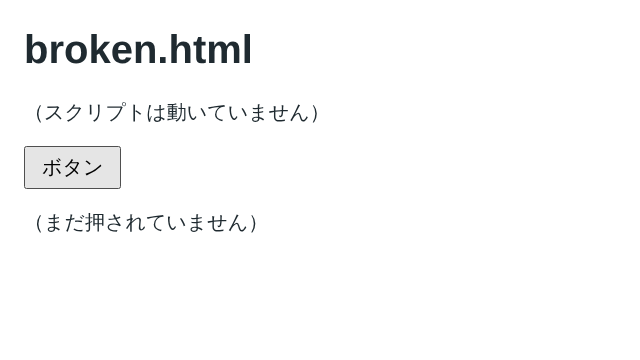
<p id="out">(スクリプトは動いていません)</p>
<button id="btn" onclick="document.getElementById('clicked').textContent = 'ボタンが押されました'">ボタン</button>
<p id="clicked">(まだ押されていません)</p>
<script>
  document.getElementById('out').textContent = 'スクリプトが動きました';
</script>
ヘッダーが本当に付いているかは、curl で確かめられます。
$ curl -sS -I http://localhost:8080/broken.html | grep -i -e '^HTTP' -e '^content-security-policy'
HTTP/1.1 200 OK
Content-Security-Policy: script-src 'self'
ページを開くと、コンソールに次のエラーが出ました。
Executing inline script violates the following Content Security Policy directive 'script-src 'self''. Either the 'unsafe-inline' keyword, a hash ('sha256-HbGjIW3pP4wWCAVWeu+PBNF7e06r32fT6AClHkdbkRQ='), or a nonce ('nonce-...') is required to enable inline execution. The action has been blocked.「インラインのスクリプトの実行は、script-src 'self' に違反する。動かすには 'unsafe-inline'、ハッシュ、nonce のどれかが必要。実行は止めた」という意味です。<script> の中身は実行されず、画面は「(スクリプトは動いていません)」のままでした。
ボタンを押すと、onclick に書いた処理についても、次のエラーが出ました。
Executing inline event handler violates the following Content Security Policy directive 'script-src 'self''. Either the 'unsafe-inline' keyword, a hash ('sha256-...'), or a nonce ('nonce-...') is required to enable inline execution. Note that hashes do not apply to event handlers, style attributes and javascript: navigations unless the 'unsafe-hashes' keyword is present. The action has been blocked.こちらは「インラインのイベントハンドラー」の実行を止めたというメッセージです。末尾近くに「ハッシュは、'unsafe-hashes' がなければイベントハンドラーには効かない」と添えられています。
「Refused to execute inline script」は古い Chrome でのメッセージ
検索でよく見る「Refused to execute inline script」は、同じエラーの、以前の言い回しです。Chromium のソースを GitHub のミラーで比べると、141.0.7390.0 のタグでは "Refused to " に "execute inline script" と " because it violates the following Content Security Policy " をつないでメッセージを作っていました。142.0.7400.0 のタグでは、"Executing inline script" で始まる、今回出た形に変わっています。言い回しが違うだけで、止めている理由と直し方は同じです。
直し方1:スクリプトを外部ファイルに移す
いちばん素直な直し方は、<script> の中身を .js ファイルに移し、onclick の代わりに addEventListener() でボタンに処理を付けることです。app.js を次の内容で作りました。
document.getElementById('out').textContent = 'スクリプトが動きました';
document.getElementById('btn').addEventListener('click', () => {
  document.getElementById('clicked').textContent = 'ボタンが押されました';
});
HTML のほうは、onclick を外し、<script src> で読み込みます。
<button id="btn">ボタン</button>
<p id="clicked">(まだ押されていません)</p>
<script src="/app.js"></script>
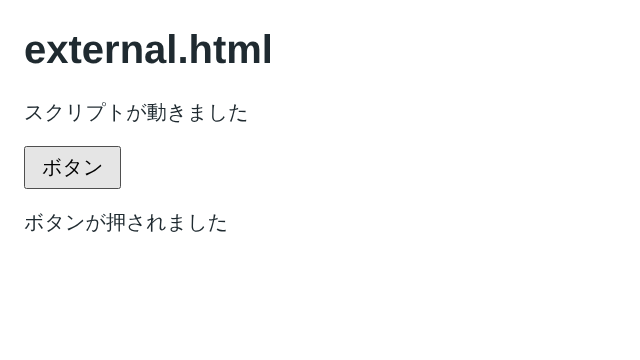
同じ script-src 'self' のヘッダーのまま開くと、コンソールにはエラーが出ず、読み込み後に「スクリプトが動きました」、ボタンを押すと「ボタンが押されました」と表示されました。app.js はページと同じオリジン(http://localhost:8080)から読むので、'self' で許されます。
MDN の CSP のガイドでも、インラインのイベントハンドラーは、ふつう addEventListener() の呼び出しに置き換えるべきだと書かれています。後で説明する nonce やハッシュを使う場合でも、onclick のような属性はこの書き換えが必要です。
直し方2:nonce を付ける
HTML の中に <script> を残したいときは、nonce を使います。サーバーがリクエストのたびに推測できない値を作り、ヘッダーと <script> の nonce 属性の両方に入れます。
<script nonce="(サーバーが入れた値)">
  document.getElementById('out').textContent = 'スクリプトが動きました';
  document.getElementById('btn').addEventListener('click', () => {
    document.getElementById('clicked').textContent = 'ボタンが押されました';
  });
</script>
検証用のサーバーでは、Node.js の crypto.randomBytes(16) を Base64 にした値を、HTML の {{NONCE}} と置き換えて返しました。同じページを curl で2回取ると、ヘッダーの nonce は、1回目と2回目で違う値でした。
$ curl -sS -I http://localhost:8080/nonce.html | grep -i -e '^HTTP' -e '^content-security-policy'
HTTP/1.1 200 OK
Content-Security-Policy: script-src 'nonce-82NGLKn9yUqHgragvmzIfA=='
$ curl -sS -I http://localhost:8080/nonce.html | grep -i -e '^HTTP' -e '^content-security-policy'
HTTP/1.1 200 OK
Content-Security-Policy: script-src 'nonce-64FHAAgbo8emA0ZVuJcJIQ=='
ブラウザーで開くと、エラーは出ずに、スクリプトもボタンも動きました。MDN の CSP のガイドには、nonce は攻撃者が推測できないように、HTTP の応答ごとに違う、予測できない値にする必要があると書かれています。そのため、静的な HTML に決まった値を書いておく使い方はできません。
直し方3:ハッシュをポリシーに入れる
<script> の中身が変わらないなら、中身の SHA-256 ハッシュをポリシーに入れる方法もあります。エラーのメッセージには、止めたスクリプトのハッシュが 'sha256-…' の形で出ています。
hash.html(nonce の版と同じ <script> で、nonce 属性がないもの)を、script-src 'self' のヘッダーで開くと、次のエラーが出ました。
Executing inline script violates the following Content Security Policy directive 'script-src 'self''. Either the 'unsafe-inline' keyword, a hash ('sha256-UEw0ycKEMFbbZZ0QKLfVw7tsn+Gb79xH/Zxu/+VjYYo='), or a nonce ('nonce-...') is required to enable inline execution. The action has been blocked.同じハッシュは、<script> と </script> の間の文字列から、コマンドでも計算できます(検証では、openssl base64 -A の後に | tee hash.txt を付けて、ファイルにも保存しました)。
$ node -e "process.stdout.write(require('fs').readFileSync('hash.html','utf8').match(/<script>([\\s\\S]*?)<\\/script>/)[1])" | openssl dgst -sha256 -binary | openssl base64 -A; echo
UEw0ycKEMFbbZZ0QKLfVw7tsn+Gb79xH/Zxu/+VjYYo=
この値を入れた次のヘッダーで返すと、エラーは出ずに、スクリプトもボタンも動きました。
Content-Security-Policy: script-src 'sha256-UEw0ycKEMFbbZZ0QKLfVw7tsn+Gb79xH/Zxu/+VjYYo='MDN の script-src のページによると、ハッシュには <script> のタグを含めず、大文字と小文字、前後の空白や改行も区別されます。今回の2つのハッシュが違うのも、broken.html と hash.html で <script> の中身が違うためです。中身を1文字でも書き換えたら、ハッシュも計算し直します。
'unsafe-inline' を足しても止まるとき
ヘッダーに 'unsafe-inline' を足すと、インラインの <script> はすべて許されます。script-src 'self' 'unsafe-inline' で hash.html と同じ HTML を開くと、エラーは出ずに動きました。ただ、MDN の script-src のページでは、インラインのスクリプトをすべて許すのは危険なので、nonce かハッシュを使うよう勧めています。
'unsafe-inline' と nonce を両方書くと、nonce 属性のない <script> は動きませんでした。script-src 'self' 'unsafe-inline' 'nonce-…' のヘッダーで、nonce 属性のない <script> があるページを開くと、次のエラーが出ました。
Executing inline script violates the following Content Security Policy directive 'script-src 'self' 'unsafe-inline' 'nonce-l/fQ/VfpSwTnvjS6Uf/j4A==''. Note that 'unsafe-inline' is ignored if either a hash or nonce value is present in the source list. The action has been blocked.メッセージのとおり、ポリシーにハッシュか nonce が1つでもあると、'unsafe-inline' は無視されます。'unsafe-inline' を足したのに直らないときは、同じ script-src に nonce やハッシュが入っていないかを見ます。
なお、MDN の CSP のガイドにあるとおり、CSP はヘッダーのほかに、HTML の <meta http-equiv="Content-Security-Policy"> でも指定できます。コンソールに出たポリシーが、自分で付けたヘッダーに見当たらないときは、HTML の <head> の <meta> も見てください。