
Lighthouseで入力欄にラベルがないと指摘されたときの直し方
Lighthouse のアクセシビリティの監査で「Form elements do not have associated labels」(日本語のレポートでは「フォームの要素にラベルが関連付けられていません」)と出たら、ページの中に label と結びついていない入力欄があるということです。label の for に入力欄の id を書くか、label で入力欄を囲むと、指摘は消えます。お問い合わせフォームや会員登録、ログインの画面のように入力欄が並ぶページで、項目名の文字を入力欄の横に置いただけのときに出る指摘です。
私は検証環境で、ラベルが結びついていない入力欄が並ぶお問い合わせフォームに Lighthouse を実行し、指摘が出ることと、直すと消えることを確かめました。
検証環境は Ubuntu 24.04、Node.js 22.23.4、Lighthouse 13.6.0(npm で入れた CLI。中で使われている axe-core は 4.14.0)、ブラウザは Google Chrome for Testing 153 のヘッドレスです。入力欄の名前は Playwright 1.63.0 の ariaSnapshot() で書き出しました。アクセシビリティの項目だけ(--only-categories=accessibility)を、初期設定のモバイル向けの条件で実行しました。ページは検証環境で作り、127.0.0.1 から配信しました。Chrome の DevTools の Lighthouse パネルや PageSpeed Insights、実際のスクリーンリーダーでの読み上げは試していません。
指摘が出るフォーム
検証に使ったのは、次の4つの部品が並ぶお問い合わせフォームです。どれも画面には項目名が出ていますが、入力欄とは結びついていません(form の中の部品の部分だけを載せています)。
<!-- 1. 文字を並べただけで、入力欄と結びついていない -->
<p><span>お名前</span><input type="text" name="name"></p>
<!-- 2. label はあるが for がなく、入力欄を囲んでもいない -->
<p><label>メールアドレス</label><input type="email" name="email"></p>
<!-- 3. for の値と id が違う -->
<p><label for="msg">お問い合わせの内容</label><textarea id="message" name="message"></textarea></p>
<!-- 4. ラベルのない select -->
<p><select name="kind"><option>種類を選んでください</option><option>不具合</option><option>要望</option></select></p>
このページを python3 -m http.server で配信し、次のように Lighthouse を実行しました。
npx lighthouse http://127.0.0.1:8000/bad.html \
  --only-categories=accessibility \
  --output=json --output=html --output-path=./out/bad \
  --chrome-flags="--headless=new --no-sandbox" --quiet
HTML のレポートを開くと、input 2つと textarea が「Failing Elements」に並びました。
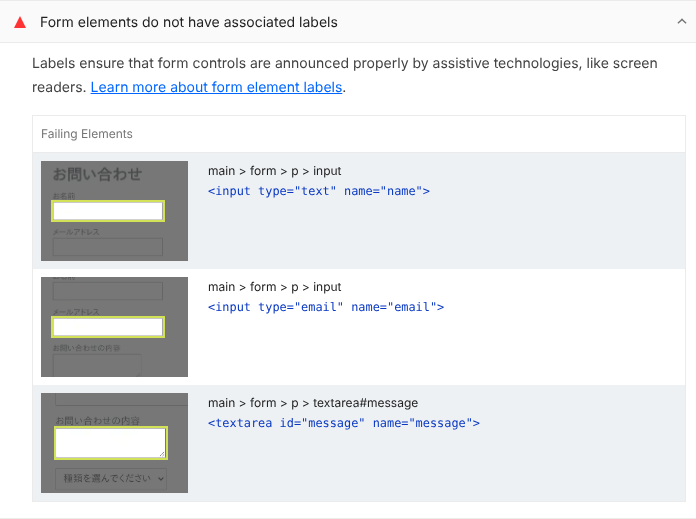
select は、この監査ではなく、別の「Select elements do not have associated label elements.」(select-name。日本語のレポートでは「一部の要素にラベル要素が関連付けられていません。」)で指摘されました。JSON のレポートから、点数と2つの監査の結果を取り出すと次のとおりです(3つの入力欄の理由は同じなので、1つ目だけ載せています。点数の内訳などの行も省いています)。
accessibility score: 78
label title: Form elements do not have associated labels
label score: 0 (binary)
- main > form > p > input | <input type="text" name="name">
   Fix any of the following:
     Element does not have an implicit (wrapped) <label>
     Element does not have an explicit <label>
     aria-label attribute does not exist or is empty
     aria-labelledby attribute does not exist, references elements that do not exist or references elements that are empty
     Element has no title attribute
     Element has no placeholder attribute
     Element's default semantics were not overridden with role="none" or role="presentation"
select-name title: Select elements do not have associated label elements.
select-name score: 0 (binary)
- main > form > p > select | <select name="kind">
   Fix any of the following:
     Element does not have an implicit (wrapped) <label>
     Element does not have an explicit <label>
     aria-label attribute does not exist or is empty
     aria-labelledby attribute does not exist, references elements that do not exist or references elements that are empty
     Element has no title attribute
     Element's default semantics were not overridden with role="none" or role="presentation"
failed accessibility audits: label, select-name
「Fix any of the following」の下に並んでいるのが、入力欄に名前を付ける方法の一覧です。どれか1つを満たせば合格になります。この判定は、Lighthouse が中で使っている axe-core の label のルールと select-name のルールで決められています。label のルールは input と textarea が対象で、select は select-name のルールが受け持ちます。合格の条件の違いは、placeholder 属性を名前として認めるかどうかだけです。
3つ目の textarea は、label for="msg" を書いていても指摘されました。for の値が textarea の id(message)と違うため、どの入力欄とも結びついていません。
label を for と id で結びつける
次のように直すと、2つの指摘は消えました。
<!-- 1. for と id で結びつける -->
<p><label for="name">お名前</label><input type="text" id="name" name="name"></p>
<!-- 2. label で入力欄を囲む -->
<p><label>メールアドレス<input type="email" name="email"></label></p>
<!-- 3. for の値を id に合わせる -->
<p><label for="message">お問い合わせの内容</label><textarea id="message" name="message"></textarea></p>
<!-- 4. select にも label を付ける -->
<p><label for="kind">お問い合わせの種類</label><select id="kind" name="kind"><option>種類を選んでください</option><option>不具合</option><option>要望</option></select></p>
label と入力欄を結びつける方法は、for と id を使う書き方と、label で入力欄を囲む書き方の2つです。MDN の <label> の説明では、囲む書き方に対応していない支援技術もあるとして、for を使う書き方を勧めています。囲んだうえで for と id も書くことができる、とも書かれています。
同じ条件で Lighthouse を実行し直すと、指摘は消え、点数は100になりました(点数の内訳などの行は省いています)。
accessibility score: 100
label title: Form elements have associated labels
label score: 1 (binary)
select-name title: Select elements have associated label elements.
select-name score: 1 (binary)
failed accessibility audits: (none)
Playwright の ariaSnapshot() で、フォームの部品の名前も書き出しました。直す前は、項目名の文字は入力欄の外の text として出るだけで、textbox(入力欄)と combobox(select)には名前がありません。直した後は、label の文字がそれぞれの名前になりました(select の option の行と、送信ボタンの行は省いています)。
--- bad.html
- paragraph:
  - text: お名前
  - textbox
- paragraph:
  - text: メールアドレス
  - textbox
- paragraph:
  - text: お問い合わせの内容
  - textbox
- paragraph:
  - combobox:
--- good.html
- paragraph:
  - text: お名前
  - textbox "お名前"
- paragraph:
  - text: メールアドレス
  - textbox "メールアドレス"
- paragraph:
  - text: お問い合わせの内容
  - textbox "お問い合わせの内容"
- paragraph:
  - text: お問い合わせの種類
  - combobox "お問い合わせの種類":
見た目にラベルを出したくないとき
デザインの都合で、画面に項目名を出さないフォームもあります。その場合の書き方を4つ試しました。
<!-- 1. placeholder だけ -->
<p><input type="text" name="name" placeholder="お名前"></p>
<!-- 2. display: none の label を for で結びつける -->
<p><label for="email" style="display: none">メールアドレス</label><input type="email" id="email" name="email"></p>
<!-- 3. aria-label を付ける -->
<p><textarea name="message" aria-label="お問い合わせの内容"></textarea></p>
<!-- 4. 画面に出さない label を付けた select -->
<p><label for="kind" class="visually-hidden">お問い合わせの種類</label><select id="kind" name="kind"><option>種類を選んでください</option><option>不具合</option><option>要望</option></select></p>
4つ目の visually-hidden は、文字を1ピクセルの枠に押し込めて、画面では見えなくする CSS です。
.visually-hidden {
  position: absolute; width: 1px; height: 1px; padding: 0; margin: -1px;
  overflow: hidden; clip: rect(0, 0, 0, 0); white-space: nowrap; border: 0;
}
Lighthouse の結果は次のとおりです(点数の内訳などの行は省いています)。
accessibility score: 93
label title: Form elements do not have associated labels
label score: 0 (binary)
- main > form > p > input#email | <input type="email" id="email" name="email">
   Fix all of the following:
     Form element has explicit <label> that is hidden
select-name title: Select elements have associated label elements.
select-name score: 1 (binary)
failed accessibility audits: label指摘が残ったのは、display: none の label を結びつけたメールアドレスの欄だけでした。理由は「Form element has explicit
一方、Playwright の ariaSnapshot() で書き出すと、このメールアドレスの欄にも「メールアドレス」という名前が付いていました(select の option の行と、送信ボタンの行は省いています)。
--- hidden.html
- paragraph:
  - textbox "お名前"
- paragraph:
  - textbox "メールアドレス"
- paragraph:
  - textbox "お問い合わせの内容"
- paragraph:
  - text: お問い合わせの種類
  - combobox "お問い合わせの種類":
Playwright が計算した名前と Lighthouse の判定とで、結果が分かれました。そこで、メールアドレスの欄の label を display: none から visually-hidden に替え、お問い合わせの内容の textarea も aria-label の代わりに visually-hidden の label を付けたフォームでも試しました(替えた2行だけを載せています)。
<p><label for="email" class="visually-hidden">メールアドレス</label><input type="email" id="email" name="email"></p>
<p><label for="message" class="visually-hidden">お問い合わせの内容</label><textarea id="message" name="message"></textarea></p>
このフォームでは指摘は出ず、点数は100になりました(点数の内訳などの行は省いています)。
accessibility score: 100
label title: Form elements have associated labels
label score: 1 (binary)
select-name title: Select elements have associated label elements.
select-name score: 1 (binary)
failed accessibility audits: (none)
画面に出さずに label を付けたいときは、display: none ではなく、visually-hidden のような CSS で隠します。aria-label を付けた textarea も、display: none の label を試したフォームで合格しています。
placeholder だけの欄は、Lighthouse では指摘されず、名前も「お名前」になりました。axe-core の label のルールが、placeholder 属性を名前の付け方の1つとして認めているためです。ただし MDN の <input> の説明では、placeholder はラベルの代わりにはならず、入力欄に名前を付けるなら label を使うように書かれています。Lighthouse の指摘が消えることと、label の代わりになることは別の話です。
ariaSnapshot() に出る text: お問い合わせの種類 は、visually-hidden で隠した label の文字です。画面には出ていません。
ラベルのない欄が1つでも残ると満点にならない
Lighthouse のアクセシビリティの点数は、監査ごとの重みを使った加重平均です(Lighthouse の点数の計算のソース)。Lighthouse 13.6.0 の設定では、label と select-name の重みはどちらも10です。それぞれの監査は、axe-core で1つでも違反が見つかれば0点、なければ1点になります(Lighthouse の axe の監査のソース)。display: none の label を含むフォームでは、指摘された入力欄は3つのうち1つだけでしたが、それでも label は0点でした。
検証で出た点数を、JSON のレポートの重みから計算し直すと次のようになりました。
| フォーム | 落ちた監査 | 計算 | 点数 |
|---|---|---|---|
| 直す前 | label、select-name |
71 / 91 | 78 |
display: none の label を含むフォーム |
label |
125 / 135 | 93 |
visually-hidden の label だけにしたフォーム |
なし | 91 / 91 | 100 |
| 直した後 | なし | 91 / 91 | 100 |
display: none の label を含むフォームだけ、ARIA 属性の監査(aria-allowed-attr など5つ、重みは合わせて44)が計算に加わり、分母が大きくなりました。このフォームから aria-label をなくし、visually-hidden の label だけにしたフォームでは、これらの監査は計算から外れ、分母は91に戻りました。JSON のレポートでも、ARIA 属性の5つの監査が「該当なし」(notApplicable)にならず判定されたのは、4つのフォームのうち aria-label を使ったフォームだけでした。