
“React: Why State Copied from Props Doesn’t Update and How to Fix It”
This article was translated from the Japanese original with AI. 日本語の原文を読む
In React, if you copy a prop received from the parent into state with something like useState(name), the child keeps showing the first value even after the parent changes it. This is because the value passed to useState as the initial value is used only on the first render. If you use the props as they are, the display follows the parent's value. This bug happens when the parent's value is shown in a child, such as when an item selected from a list is shown in a detail view or an edit form.
The test environment was Ubuntu 24.04, Node.js 22.23.4, React 19.3.1, TypeScript 7.0.2, Playwright 1.63.0, and Chromium 153. I bundled the code with esbuild, loaded it into Chromium with Playwright, and checked the behavior by pressing buttons. I did not use StrictMode. I did not test Firefox or Safari, and I did not test the same thing with class components.
- 1. When props are copied into state, the value stays at the first one
- 2. The initial value of useState is used only on the first render
- 3. The fix: use props directly
- 4. Copying into state with useEffect causes one extra render with the old value
- 5. Use a key to reset a local value that you want to edit
When props are copied into state, the value stays at the first one
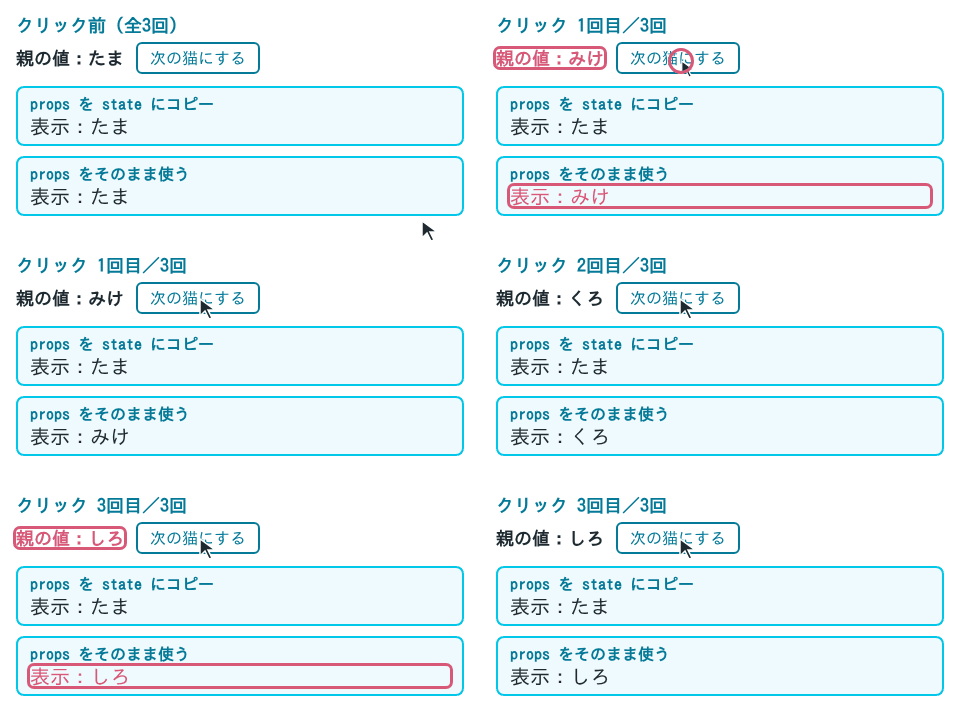
To test this, I used a child component that only displays a cat's name. The parent passes the cat's name as name. The 次の猫にする button (Next cat) switches the name through Tama, Mike, Kuro, and Shiro in order.
The following code copies the received name into state in the child component.
import { useState } from 'react';

export function NameCopy({ name }: { name: string }) {
  const [label, setLabel] = useState(name);
  return <p>表示:{label}</p>;
}
In my test environment, the first display was 表示:たま (Display: Tama). I pressed the parent's button, and the parent's value changed to Mike, but the child still showed 表示:たま. When I pressed the button a second time and the parent's value became Kuro, the child still showed Tama.
I logged the render of each component along with the values of name and label. The child was re-rendered every time the parent's value changed, and the new name did arrive. Only label, which is used for the display, stayed at the old value.
--- Press the "Make it the next cat" button (1st time)
  [描画 NameCopy name=みけ label=たま]
--- Press the "Make it the next cat" button (2nd time)
  [描画 NameCopy name=くろ label=たま]
The initial value of useState is used only on the first render
The useState reference says that initialState (the initial value passed to useState) is ignored after the initial render. From the second render onward, React returns the state it is holding.
State is kept as long as the same component is rendered at the same position (explanation of preserving and resetting state). If the parent only changes name, the child is still the same component at the same position. So label keeps the first value, Tama, and the new name passed to useState(name) is never used.
The page Choosing the State Structure: Don't mirror props in state also explains, using an example that copies messageColor into useState in the same way, that if the parent later passes a different value, the state variable is not updated.
The fix: use props directly
If you only need to display a value, you don't need state. Use the received name as it is.
export function NameDirect({ name }: { name: string }) {
  const label = name;
  return <p>表示:{label}</p>;
}
If you want a different name, put the value in a constant, like label in this example. The section on not mirroring props in state, which I cited above, also recommends using props directly and, if you want a shorter name, using a constant.
In my test, pressing the parent's button changed the child's display to Mike and then Kuro, the same names as the parent. Values you want to derive from the parent's value, such as adding the honorific "-san" to a name or filtering a list, should also be computed on each render instead of being stored in state. The explanation of when you don't need an Effect says that values you can calculate from existing props or state should not go into state and should be computed during rendering.
Copying into state with useEffect causes one extra render with the old value
You can also keep the state and update label in a useEffect when name changes.
import { useEffect, useState } from 'react';

export function NameEffect({ name }: { name: string }) {
  const [label, setLabel] = useState(name);
  useEffect(() => {
    setLabel(name);
  }, [name]);
  return <p>表示:{label}</p>;
}
In my test, this version also ended up showing the same name as the parent. However, the render log shows that after the button is pressed, the component first renders with the old label. Then the useEffect changes label, and the component renders again. The following log shows only the NameEffect lines.
--- Press the "Make it the next cat" button (1st time)
  [描画 NameEffect name=みけ label=たま]
  (中略:ほかのコンポーネントの描画)
  [描画 NameEffect name=みけ label=みけ]
When rendering with the old value, the displayed text was the same 表示:たま as before. So the text on screen changed only once, to 表示:みけ. Even so, the extra render happens. The example of changing state in an Effect when a prop changes also shows that the component first renders with the old value and then renders again, and it recommends avoiding this approach. NameDirect, which uses props as they are, rendered only once per button press, and it doesn't need useEffect either.
Use a key to reset a local value that you want to edit
Sometimes, as in an edit form for a name, you want to use the parent's value as the initial value but let the user change it locally in an input. In that case, the draft being typed has to be held in state.
The section on not mirroring props in state introduces a convention: when you intentionally want to ignore updates to a prop and copy it into state, start the prop name with initial or default so that this is clear. In my test, I wrote NameEditor, which receives initialName and puts it into a draft state.
export function NameEditor({ initialName }: { initialName: string }) {
  const [draft, setDraft] = useState(initialName);
  return <input value={draft} onChange={(e) => setDraft(e.target.value)} />;
}
This component does not reload the draft when the parent's value changes. I changed Tama's name to たま★, then switched the parent to Mike, and the input still showed たま★. The field for editing Mike was showing Tama's draft.
If you want to recreate the draft when the cat being edited changes, pass the cat's id from the parent as the key.
<NameEditor key={cat.id} initialName={cat.name} />When key changes, React treats the NameEditor with the new key as a different component and creates its state again (explanation of resetting state with a key). In my test, the same operation changed the input to Mike, and switching again changed it to Kuro.
If you want to keep some state and reset only the rest to their initial values, you can store the previous props in state and adjust the state during rendering by comparing values (example of adjusting some state when a prop changes). However, the same section says that most components don't need this either. You should first consider whether key can reset everything, or whether everything can be computed during rendering.