
How to Render a Modal Outside the Parent Element with createPortal in React
This article was translated from the Japanese original with AI. 日本語の原文を読む
With React's createPortal, a modal opened inside a component can be rendered directly under document.body in the DOM. This avoids the problem where a CSS rule on a parent element clips the dialog inside a small box. Even though the DOM location changes, clicks and context still connect to the parent as they do in the React tree.
In a test environment, I rendered the same dialog with and without a portal, and compared its DOM location, how it looked on screen, and how clicks propagated.
The test environment was Ubuntu 24.04 and Node.js 22.22.0. I used react and react-dom 19.3.1, @types/react 19.3.0, typescript 7.0.2, esbuild 0.28.2, and jsdom 29.1.1. I type-checked the .tsx files with tsc, transpiled them with esbuild, and ran them on jsdom. To check how things looked on screen, I drove Chromium 141 with Playwright 1.56.1.
What I tested was where the dialog is rendered, how it looks on screen, and how clicks and context propagate. I did not test other things a modal needs, such as moving focus when it opens, closing it with the Esc key, or preventing interaction outside the dialog.
When you return createPortal(JSX, document.body), that JSX is rendered directly under body. It is no longer affected by the parent's CSS, but clicks still travel up the React tree to the parent's onClick. If you don't want that, call stopPropagation inside the portal.
Code that renders the dialog into document.body
First, I wrote InlineModal, a dialog without a portal, and then PortalModal, which wraps it in createPortal. The first argument to createPortal is the JSX to render, and the second is the DOM element to render it into (the official reference on createPortal's parameters).
import { type ReactNode } from 'react';
import { createPortal } from 'react-dom';

type Props = { title: string; onClose: () => void; children: ReactNode };

// Dialog overlaid on the screen (version without a portal)
export function InlineModal({ title, onClose, children }: Props) {
  return (
    <div className="backdrop">
      <div className="modal" role="dialog" aria-modal="true" aria-label={title}>
        <h3>{title}</h3>
        {children}
        <button className="close" onClick={onClose}>閉じる</button>
      </div>
    </div>
  );
}

// The same dialog, rendered into document.body with createPortal
export function PortalModal(props: Props) {
  return createPortal(<InlineModal {...props} />, document.body);
}
I placed the button that opens the dialog inside a card with overflow: hidden. A usePortal flag switches between the two dialogs.
export function Card({ usePortal }: { usePortal: boolean }) {
  const [open, setOpen] = useState(false);
  const Modal = usePortal ? PortalModal : InlineModal;

  return (
    <div className="card">
      <p>{usePortal ? 'createPortal あり' : 'createPortal なし'}</p>
      <button className="open" onClick={() => setOpen(true)}>ダイアログを開く</button>
      {open && (
        <Modal title="確認" onClose={() => setOpen(false)}>
          <p>この内容で保存しますか?</p>
        </Modal>
      )}
    </div>
  );
}
Where the dialog ends up in the DOM
In the test environment (jsdom), I rendered both versions of the card, then pressed "open the dialog" and "close" in order. I recorded the parent of the outer element of the dialog (.backdrop) and the child elements of body.
=== createPortal なし
開いたあと: .backdrop の親=div.card / .card の中か=true
body の子要素: div#root
閉じたあと: ダイアログなし
=== createPortal あり
開いたあと: .backdrop の親=body / .card の中か=false
body の子要素: div#root, div.backdrop
閉じたあと: ダイアログなし
Without a portal, the dialog went inside the card's div. With a portal, it went directly under body, next to #root. In both versions, the dialog's elements were removed from the DOM when it closed (when open became false and it stopped rendering). You don't need to clean up anything you rendered into body yourself.
Without a portal, a dialog gets clipped when the parent has a transform
I used Chromium to check how the DOM location difference shows up on screen. The dialog is placed in the center of the screen with position: fixed, and the dark backdrop (.backdrop) is also position: fixed and covers the whole screen. In both cases, the card has overflow: hidden.
overflow だけ / card-inline: {"modal":"300x128 @(90,96)","backdrop":"480x320 @(0,0)","centerIsModal":true}
overflow だけ / card-portal: {"modal":"300x128 @(90,96)","backdrop":"480x320 @(0,0)","centerIsModal":true}
overflow + transform / card-inline: {"modal":"300x128 @(90,42)","backdrop":"444x92 @(18,60)","centerIsModal":false}
overflow + transform / card-portal: {"modal":"300x128 @(90,96)","backdrop":"480x320 @(0,0)","centerIsModal":true}
modal and backdrop are the element sizes and positions. centerIsModal indicates whether the dialog is at the center point of the screen. With only overflow: hidden on the card, the backdrop without a portal still covered the whole screen (480×320), and the dialog appeared in the center. When I added transform: translateX(0) to the card, the backdrop without a portal shrank to the card's size (444×92), and the dialog was no longer at the center of the screen. The portal version did not change with either CSS setup.
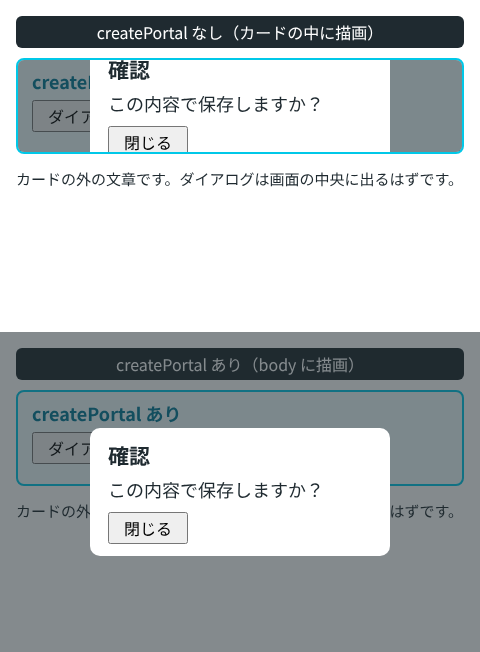
According to MDN's page on position, the section on fixed positioning, an element with position: fixed is normally placed relative to the viewport. However, if an ancestor has transform, perspective, or filter, that ancestor becomes the reference. The dialog without a portal was positioned relative to the card, and the card's overflow: hidden clipped it.
The official modal example also explains that, because the dialog is placed outside the parent element in the DOM, it is not affected by CSS on the parent that would interfere with it, such as overflow: hidden. Note that the official example uses position: absolute for the dialog. I did not test position: absolute in this article.
Clicks travel up the React tree to the parent
Even though the portal changes the DOM location, events still propagate along the React tree. The official caveats for createPortal state that clicking inside a portal calls the onClick of the <div onClick> that wraps the portal.
To verify this, I rendered a button into a portal inside a parent div with onClick. For comparison, the same div also receives clicks through DOM addEventListener. The parent puts dark into a context, and the button reads it and records it.
const logs: string[] = [];
const Theme = createContext('light');

// Button inside the portal. If stop is true, the click's propagation stops here.
function PortalButton({ stop }: { stop: boolean }) {
  const theme = useContext(Theme);
  return createPortal(
    <div className="modal">
      <button
        className="inner"
        onClick={(e) => {
          logs.push(`ポータルの中のボタン onClick(テーマ=${theme})`);
          if (stop) e.stopPropagation();
        }}
      >
        OK
      </button>
    </div>,
    document.body,
  );
}

function Parent({ stop }: { stop: boolean }) {
  const divRef = useRef<HTMLDivElement>(null);
  const [clicks, setClicks] = useState(0);
  useEffect(() => {
    // For comparison, also listen for clicks on the same div with DOM addEventListener
    const div = divRef.current!;
    const onNative = () => logs.push('親の div の addEventListener');
    div.addEventListener('click', onNative);
    return () => div.removeEventListener('click', onNative);
  }, []);
  return (
    <Theme value="dark">
      <div className="parent" ref={divRef} onClick={() => { logs.push('親の div の onClick'); setClicks((c) => c + 1); }}>
        <p className="clicks">親が受け取ったクリック:{clicks}回</p>
        <PortalButton stop={stop} />
      </div>
    </Theme>
  );
}
Here are the results of one button press. I tested without calling stopPropagation and with it called.
=== stopPropagation なし
ボタンは .parent の中か: false
ポータルの中のボタン onClick(テーマ=dark)
親の div の onClick
親の div の addEventListener が呼ばれた回数: 0
親が受け取ったクリック:1回
=== stopPropagation あり
ボタンは .parent の中か: false
ポータルの中のボタン onClick(テーマ=dark)
親の div の addEventListener が呼ばれた回数: 0
親が受け取ったクリック:0回
In the DOM, the button is not inside the parent div. Even so, the click still reached React's onClick. The DOM addEventListener was never called. On the DOM, a click only bubbles from the button up to body and document, not through the parent div. When stopPropagation was called inside the portal, the click also stopped reaching React's onClick.
The following GIF shows the same behavior in Chromium. On this screen, the dialog's "OK" button does nothing, and only the Close button calls stopPropagation and then closes the dialog.
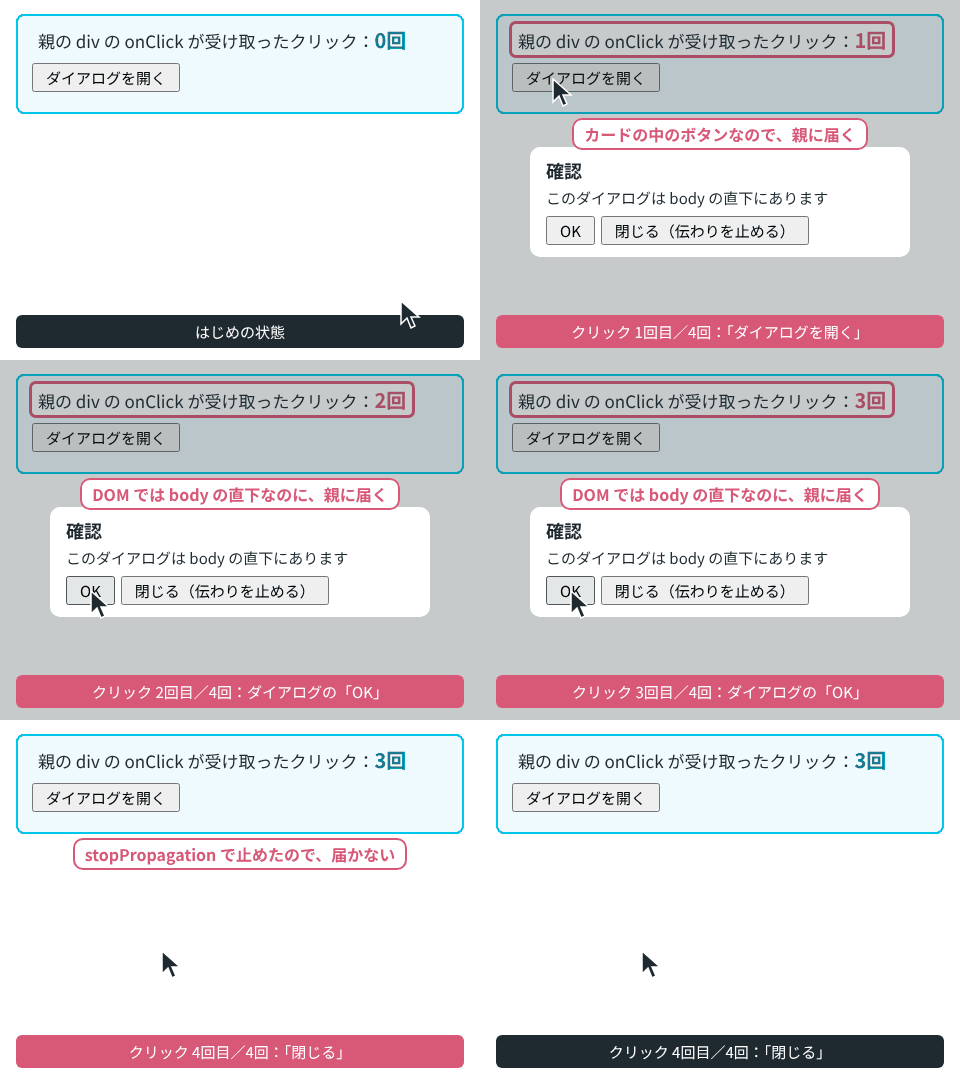
If you put logic in the parent's onClick, that logic also runs when you click inside the dialog. The official caveats suggest either stopping propagation inside the portal when this is a problem, or moving the portal higher up in the React tree.
Context also reaches inside the portal
As the result above shows, the button inside the portal could read the theme value (dark) that the parent provided through context. The official description of createPortal also says that a portal changes only the DOM location, and in other respects behaves as a child of the component that rendered it. Even if you pass a theme or the logged-in user through context, you can use it the same way inside the dialog.
The target element must exist beforehand
Instead of document.body, you can render into an element you prepared in the HTML, such as <div id="modal-root">. In that case, the target element must already be in the DOM when createPortal is called (the official reference on the parameters). When I passed the result of document.getElementById('modal-root') without the element existing, this is what happened in the test environment:
#modal-root があるか: false
エラー: Target container is not a DOM element.
#modal-root を作ったあと: true
#modal-root の中身: <p>ダイアログ</p>
When the element was missing, getElementById returned null, and rendering threw an error. After I created the element and rendered again, the content appeared inside it. In TypeScript, adding ! satisfies the type checker, but it does not prevent this runtime error.
createPortal changes only where the content is rendered. Behaviors such as moving focus when the dialog opens, closing it with the Esc key, and preventing interaction outside the dialog must be implemented separately. The official reference's notes recommend following the WAI-ARIA modal dialog pattern.