
How to Test React 19 Components with Vitest and Testing Library
This article was translated from the Japanese original with AI. 日本語の原文を読む
By combining Vitest and React Testing Library, you can test React 19 components the way users interact with them: clicking buttons and typing into forms. From the config file setup, through a form that uses useActionState, to testing a component that reads data with use and Suspense, I wrote and checked everything in TypeScript (.tsx).
While verifying this, I ran into three pitfalls. The first is that the second test fails if you don't register cleanup. The second is that searching for an async result with getBy sometimes passes and sometimes fails, depending on how fast the server responds. The third is that just calling render on a component that suspends does not show the list. For each one, I show the code that fails and the fixed version.
The test environment was Ubuntu 24.04 with Node.js 22.22.0. I used vitest 5.0.5, jsdom 30.1.3, @testing-library/react 16.3.3, @testing-library/dom 10.4.2, @testing-library/user-event 14.6.8, @testing-library/jest-dom 7.0.1, react / react-dom 19.3.1, and typescript 7.0.2. I took the screenshots of the UI by opening @vitest/ui 5.0.5 in Chromium from Playwright 1.56.1. Communication with the server is replaced with mock functions inside the tests.
- 1. Packages to install
- 2. Configuration: set the environment to jsdom and register cleanup
- 3. Testing a button click: operate with userEvent.setup()
- 4. A useActionState form: wait for the result with findBy
- 5. A use and Suspense component: wrap render in await act
- 6. Quick reference for the three pitfalls
Packages to install
React Testing Library declares @testing-library/dom as a peerDependency. As described on the React Testing Library introduction page, you need to install it alongside. If you write in TypeScript, also install @types/react and @types/react-dom.
In my verification, I installed the following packages. jsdom provides a DOM to stand in for a browser, @testing-library/user-event reproduces user interactions, and @testing-library/jest-dom provides matchers such as toBeInTheDocument().
npm i -D vitest@5.0.5 jsdom@30.1.3 @testing-library/react@16.3.3 @testing-library/dom@10.4.2 @testing-library/user-event@14.6.8 @testing-library/jest-dom@7.0.1 typescript@7.0.2 @types/react @types/react-dom @types/node@22 react@19.3.1 react-dom@19.3.1The .tsx tests ran without installing @vitejs/plugin-react (the tsconfig jsx is react-jsx). Also, without "type": "module" in package.json, Vite printed a warning when I ran Vitest: "ESM syntax in a file loaded as CommonJS". The tests still passed, but adding "type": "module" removed the warning.
Configuration: set the environment to jsdom and register cleanup
The default Vitest environment is Node.js, which has no DOM. Specify jsdom using the Vitest environment setting. Also list the file to load before the tests in setupFiles.
// vitest.config.ts
import { defineConfig } from 'vitest/config';

export default defineConfig({
  test: {
    environment: 'jsdom',
    setupFiles: ['./vitest.setup.ts'],
  },
});
In the setup file, load the jest-dom matchers and register cleanup (cleanup) to run after each test. As described in the jest-dom README's section on using it with Vitest, import jest-dom from @testing-library/jest-dom/vitest.
// vitest.setup.ts
import '@testing-library/jest-dom/vitest';
import { cleanup } from '@testing-library/react';
import { afterEach } from 'vitest';

// When globals: false (the default), register cleanup yourself
afterEach(() => {
  cleanup();
});
Without cleanup, the second test finds two elements
React Testing Library automatically registers per-test cleanup in test frameworks that expose afterEach globally. However, Vitest does not expose afterEach and similar functions globally by default (Vitest globals setting). As a result, cleanup does not run unless you set it up. This is also covered in the React Testing Library setup page, in the section on automatic cleanup in Vitest.
As a test, I removed afterEach from the setup file and ran two tests in a row that each render a button. The second test then failed with the following error, because the button rendered by the first test was still on the screen.
 FAIL  src/Counter.test.tsx > 押すと1回になる
TestingLibraryElementError: Found multiple elements with the role "button"
There are two ways to fix this. You can call cleanup() in afterEach, as in the setup file above, or add globals: true to the config. In my verification, both approaches made both tests pass. This article keeps globals at the default and calls cleanup() explicitly.
The matcher types come in through the setup file
The types for toBeInTheDocument() and the other matchers come in through import '@testing-library/jest-dom/vitest' in the setup file. For that reason, include the setup file in the tsconfig include.
{
  "compilerOptions": {
    "target": "ES2024",
    "module": "ESNext",
    "moduleResolution": "Bundler",
    "jsx": "react-jsx",
    "strict": true,
    "noEmit": true,
    "skipLibCheck": true,
    "types": ["node"]
  },
  "include": ["src", "vitest.setup.ts", "vitest.config.ts"]
}
When I removed the setup file from include, tsc reported the error "Property 'toBeInTheDocument' does not exist on type 'Assertion<void, HTMLElement>'". The reason target is ES2024 is the types for Promise.withResolvers(), which I use later. With ES2023, tsc reported the error "Property 'withResolvers' does not exist on type 'PromiseConstructor'.".
With this combination (vitest 5.0.5 and @testing-library/jest-dom 7.0.1), when I set skipLibCheck to false, tsc reported the error "All declarations of 'Assertion' must have identical type parameters." in the type definitions of the two packages. Looking at the type definitions, jest-dom declares Assertion with one type parameter (T), while vitest declares it with two (R and T). In my verification, I set skipLibCheck: true to get the type check to pass. This is the same setting as the tsconfig.app.json in Vite's React + TypeScript template.
Testing a button click: operate with userEvent.setup()
First, I'll check the shape of the test with a button that only displays the number of clicks.
import { useState } from 'react';

export function Counter() {
  const [count, setCount] = useState(0);
  return <button onClick={() => setCount(count + 1)}>押した回数 {count}</button>;
}
For the interactions, I use userEvent.setup(), as recommended on the user-event setup page. As in the example on the user-event introduction page, put await in front of operations such as user.click().
import { render, screen } from '@testing-library/react';
import userEvent from '@testing-library/user-event';
import { expect, test } from 'vitest';
import { Counter } from './Counter';

test('最初は0回', () => {
  render(<Counter />);
  expect(screen.getByRole('button')).toHaveTextContent('押した回数 0');
});

test('押すと1回になる', async () => {
  const user = userEvent.setup();
  render(<Counter />);
  await user.click(screen.getByRole('button'));
  expect(screen.getByRole('button')).toHaveTextContent('押した回数 1');
});
Find elements by their visible role or label, using getByRole or getByLabelText. This is the first query method listed in the Testing Library query priority.
A useActionState form: wait for the result with findBy
Next is a registration form that uses React 19's useActionState. When submitted, it sends the email address to the server with subscribe() and shows a result message. While submitting, the button is disabled and its label changes to "Submitting…" (the Japanese text for it is in the code below).
import { useActionState } from 'react';
import { subscribe } from './api';

type State = { message: string };

async function subscribeAction(_prev: State, formData: FormData): Promise<State> {
  const email = String(formData.get('email'));
  const { ok } = await subscribe(email);
  return { message: ok ? `${email} を登録しました` : '登録できませんでした' };
}

export function SubscribeForm() {
  const [state, formAction, isPending] = useActionState(subscribeAction, { message: '' });
  return (
    <form action={formAction}>
      <label>
        メールアドレス
        <input name="email" type="email" />
      </label>
      <button type="submit" disabled={isPending}>
        {isPending ? '送信中…' : '登録する'}
      </button>
      <p role="status">{state.message}</p>
    </form>
  );
}
In the test, vi.mock('./api') replaces subscribe() with a fake. According to the Vitest vi.mock documentation, if you don't pass a factory and there is no __mocks__ folder, all exports of the module are automatically mocked. Then you set the return value through vi.mocked().
Find the result message with findByText. According to the Testing Library async queries documentation, findBy combines getBy with waitFor and waits until the element appears. By default, it waits up to 1000ms.
import { render, screen } from '@testing-library/react';
import userEvent from '@testing-library/user-event';
import { expect, test, vi } from 'vitest';
import { subscribe } from './api';
import { SubscribeForm } from './SubscribeForm';

vi.mock('./api');

test('登録すると、結果のメッセージが出る', async () => {
  vi.mocked(subscribe).mockResolvedValue({ ok: true });
  const user = userEvent.setup();
  render(<SubscribeForm />);

  await user.type(screen.getByLabelText('メールアドレス'), 'neko@example.com');
  await user.click(screen.getByRole('button', { name: '登録する' }));

  expect(await screen.findByText('neko@example.com を登録しました')).toBeInTheDocument();
  expect(subscribe).toHaveBeenCalledWith('neko@example.com');
});
getBy can pass when the mock answers immediately
Even when I changed the check for the result message to getByText, the test still passed. In this test, the mock returns a Promise that resolves immediately, so by the time await user.click() finished, the result was already on the screen.
So I changed the mock to answer after 50ms. Then the getByText version failed with "Unable to find an element with the text: neko@example.com [the success message in Japanese]." At that point on the screen, the button still showed "Submitting…". Under the same conditions, the findByText version passed. To keep the test result from depending on how long the server takes to respond, it is safer to wait for the submission result with findBy.
To check the submitting state, decide when the response happens in the test
To check the submitting state, let the test decide when the mock responds. Have the mock return a Promise created with Promise.withResolvers(), and call resolve() after the checks are done.
test('サーバーが応答するまでは「送信中…」になる', async () => {
  // A Promise whose resolution timing is controlled by the test
  const { promise, resolve } = Promise.withResolvers<{ ok: boolean }>();
  vi.mocked(subscribe).mockReturnValue(promise);
  const user = userEvent.setup();
  render(<SubscribeForm />);

  await user.type(screen.getByLabelText('メールアドレス'), 'neko@example.com');
  await user.click(screen.getByRole('button', { name: '登録する' }));
  expect(screen.getByRole('button', { name: '送信中…' })).toBeDisabled();

  resolve({ ok: false });
  expect(await screen.findByText('登録できませんでした')).toBeInTheDocument();
  expect(screen.getByRole('button', { name: '登録する' })).toBeEnabled();
});
This test passed, and no act warnings appeared. I call resolve() outside of act. The subsequent screen update is awaited with findByText.
A use and Suspense component: wrap render in await act
Last is a component that reads a Promise with use and shows a loading message with <Suspense>. The parent passes in the Promise.
import { Suspense, use } from 'react';

export type Album = { id: number; title: string };

function AlbumList({ albumsPromise }: { albumsPromise: Promise<Album[]> }) {
  const albums = use(albumsPromise);
  return (
    <ul>
      {albums.map((album) => (
        <li key={album.id}>{album.title}</li>
      ))}
    </ul>
  );
}

export function Albums({ albumsPromise }: { albumsPromise: Promise<Album[]> }) {
  return (
    <Suspense fallback={<p>読み込み中…</p>}>
      <AlbumList albumsPromise={albumsPromise} />
    </Suspense>
  );
}
As with the form test, I wrote a test that calls render(), then resolve(), then waits for the list with findAllByRole. However, this test failed with "Unable to find role="listitem"" after waiting 1000ms. The screen still showed the loading fallback (Loading…; the text is in Japanese in the code). In addition, React printed the following warning.
A component suspended inside an `act` scope, but the `act` call was not awaited. When testing React components that depend on asynchronous data, you must await the result:

await act(() => ...)
Following the warning's instruction, I wrapped render() in await act(async () => { ... }), and the test passed. I import act from @testing-library/react. According to the act section of the React Testing Library API page, this act is a function that simply passes its argument through to React's act. The React act reference also recommends using act with await and an async function.
import { act, render, screen } from '@testing-library/react';
import { expect, test } from 'vitest';
import { Albums, type Album } from './Albums';

test('読み込み中の表示のあとに、一覧が出る', async () => {
  // The Promise is created in the test and passed in
  const { promise, resolve } = Promise.withResolvers<Album[]>();
  // A component that suspends is rendered inside await act
  await act(async () => {
    render(<Albums albumsPromise={promise} />);
  });
  expect(screen.getByText('読み込み中…')).toBeInTheDocument();

  resolve([
    { id: 1, title: 'Abbey Road' },
    { id: 2, title: 'Let It Be' },
  ]);
  expect(await screen.findAllByRole('listitem')).toHaveLength(2);
  expect(screen.queryByText('読み込み中…')).not.toBeInTheDocument();
});
To see which part needs to be wrapped in act, I put three ways of writing the test in one file and ran them.
| Approach | Result |
|---|---|
Wrap render() in await act, and call resolve() as is |
Passed |
Pass an already-resolved Promise, and wrap render() in await act |
Passed |
Call render() as is, and wrap resolve() in await act |
Failed (a warning was also printed) |
The test that wraps resolve() in await act fails. Opening it in the Vitest UI shows the following. The "FAIL (1)" and "PASS (0)" labels above the list on the left count files, not tests. Even when resolve() is wrapped in act and awaited, only the loading fallback (Loading…; the text is in Japanese) remains on the screen.
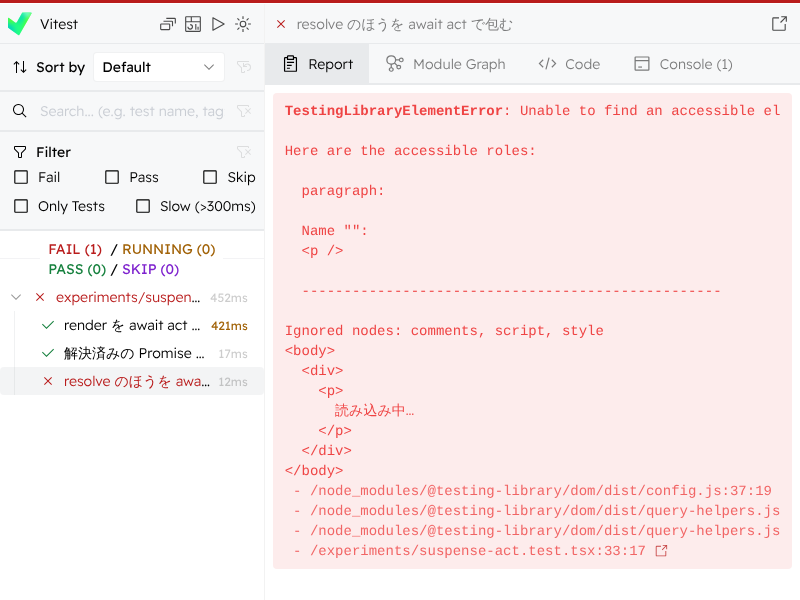
For a component that suspends, wrap the initial render() in await act(async () => { ... }). Wrapping resolve() in act afterward did not work as a substitute.
Also, according to the use reference's section on caching Promises for Client Components, the Promise passed to use must be the same one when rendering is retried. In this test, the Promise is created once in the test and passed as a prop.
Quick reference for the three pitfalls
| Symptom | Cause | Fix |
|---|---|---|
| "Found multiple elements" on the second test | globals is the default false, so cleanup does not run |
Call cleanup() in afterEach in the setup file, or set globals: true |
getBy for the submission result sometimes passes and sometimes fails |
It searches before the result appears | Wait with findBy |
The use and Suspense screen stays on the loading message |
render() is not wrapped in await act |
Use await act(async () => { render(...) }) |