
Preloading and Preinitializing Resources in React 19 with preload and preinit
This article was translated from the Japanese original with AI. 日本語の原文を読む
With preload and preinit from react-dom in React 19, you can start loading CSS, scripts, and fonts before the point where they are used. preload only downloads the file ahead of time, while preinit also executes or applies it after downloading. In the browser, you can call both from anywhere, such as during component rendering or in an event handler. Calling either one multiple times with the same URL has the effect of one call (with one exception for image preload).
In my test environment, I ran the two functions in both Chromium and server-side rendering (SSR). I checked the elements that end up in <head>, the CSS order set by precedence, and the timing difference when loading starts at the moment of a click.
The test environment was Ubuntu 24.04 and Node.js 22.22.0. I used react and react-dom 19.3.1, @types/react and @types/react-dom 19.3.0, typescript 7.0.2, and esbuild 0.28.2. I drove Chromium 141 with Playwright 1.56.1. I type-checked the .tsx files with tsc and then transformed them with esbuild. React was the development build. The CSS and other files were served from a small test server.
The difference between preload and preinit
The react-dom API list in the official reference includes six functions for loading resources in advance. Of these, the following four actually load the file itself. (prefetchDNS and preconnect only resolve DNS or set up a connection ahead of time.)
| Function | What it does | Targets |
|---|---|---|
preload |
Downloads only | CSS, fonts, images, scripts, etc. |
preinit |
Downloads, then executes or applies | Scripts, CSS |
preloadModule |
Downloads only | ES modules |
preinitModule |
Downloads, then executes | ES modules |
In this article I tested preload and preinit. I did not test preloadModule or preinitModule.
The arguments of preload specify the type with as. The as option accepts 12 values, including style, font, image, and script. The as option of the arguments of preinit accepts only script and style. Neither function has a return value.
Calling preload and preinit during rendering
Inside a component, you specify the files you want to load ahead of time. In the following code, CSS, a font, and a script are preloaded, and another script is preinited. Pressing the button re-renders the component, so the same calls run many times.
import { useState } from 'react';
import { createRoot } from 'react-dom/client';
import { preload, preinit } from 'react-dom';

function App() {
  const [count, setCount] = useState(0);
  // Called on every render, but the same href has the effect of one call
  preload('/assets/style.css', { as: 'style' });
  preload('/assets/font.woff2', { as: 'font', type: 'font/woff2', crossOrigin: 'anonymous' });
  preload('/assets/preloaded.js', { as: 'script' });
  preinit('/assets/run.js', { as: 'script' });
  return (
    <>
      <p className="sample">サンプル</p>
      <button id="rerender" onClick={() => setCount(count + 1)}>
        描画し直す({count})
      </button>
    </>
  );
}

createRoot(document.getElementById('root')!).render(<App />);
style.css is CSS that turns p.sample green. preloaded.js and run.js write a value to window so that it is clear whether they ran. I opened the page in Chromium, pressed the button three times, and inspected the elements React put into <head>. Here is part of the output.
--- after pressing "Re-render" three times ---
ボタン: 描画し直す(3)
<link rel="preload" href="/assets/style.css" as="style">
<link rel="preload" href="/assets/font.woff2" as="font" crossorigin="" type="font/woff2">
<link rel="preload" href="/assets/preloaded.js" as="script">
<script src="/assets/run.js" async=""></script>
--- /assets/ requests received by the server ---
/assets/style.css
/assets/font.woff2
/assets/preloaded.js
/assets/run.js
--- whether the scripts ran ---
{"runCount":1,"preloadedRan":null}
--- color of p.sample (style.css was only preloaded) ---
rgb(0, 0, 0)
The preload calls became <link rel="preload"> elements, and the preinited script became a <script> with async. Even after four renders there was one element of each kind, and the server received one request for each file. This matches the caveat in the preload reference that calls with the same href count as one.
The results also show the difference between only downloading and downloading plus running. run.js, which I preinited, ran, and runCount became 1. preloaded.js, which I preloaded, did not run. style.css was also only preloaded, so it was not applied, and the text stayed black.
Pay attention to precedence when preinit adds CSS
According to the preinit reference, CSS specified with preinit is added to the page (the HTML document) and takes effect immediately. In my test, it was added to <head> as a <link rel="stylesheet">. At this point, precedence determines the order relative to other CSS.
The explanation of preinit's arguments lists reset, low, medium, and high as possible values for precedence. So I prepared high.css (with precedence: 'high'), which makes p.sample red, and low.css (with precedence: 'low'), which makes it blue. I changed only the order of the calls and tested them. The output omits the lines that show whether a console warning appeared.
// With ?order=high-first, high is called first; with low-first, low is called first
const order = new URLSearchParams(location.search).get('order');

function App() {
  if (order === 'high-first') {
    preinit('/assets/high.css', { as: 'style', precedence: 'high' });
    preinit('/assets/low.css', { as: 'style', precedence: 'low' });
  } else {
    preinit('/assets/low.css', { as: 'style', precedence: 'low' });
    preinit('/assets/high.css', { as: 'style', precedence: 'high' });
  }
  return <p className="sample">どちらの色になるか</p>;
}--- order=low-first ---
<link rel="stylesheet" href="/assets/low.css" data-precedence="low">
<link rel="stylesheet" href="/assets/high.css" data-precedence="high">
p.sample の色: rgb(255, 0, 0)
--- order=high-first ---
<link rel="stylesheet" href="/assets/high.css" data-precedence="high">
<link rel="stylesheet" href="/assets/low.css" data-precedence="low">
p.sample の色: rgb(0, 0, 255)When high was called first, high.css was inserted first, and the blue from the later low.css won. The name high does not make the rule stronger. This matches the explanation of precedence in the <link> reference, which says that React treats a precedence value it finds first as "lower" and a value it finds later as "higher".
The name of a precedence value does not determine CSS priority. Values are ordered by the order in which they first appear. If you want to override some CSS, make sure the precedence of the stylesheet being overridden is used first.
The explanation of preinit's arguments says that precedence is required for CSS. When I omitted it in React 19.3.1 (development build) in my test environment, no warning appeared, a <link> with data-precedence="default" was inserted, and the CSS took effect. Since the reference says it is required, do not rely on this behavior when it is omitted. It is safer to always write precedence.
Starting preload on click
The usage example for preload shows calling preload in an event handler before navigating to another screen. This lets loading start earlier than waiting for the new screen to render.
I tested this with a wizard screen loaded later with lazy. The wizard component calls preinit for its own CSS when it renders.
// Wizard.tsx
import { preinit } from 'react-dom';

export default function Wizard() {
  preinit('/assets/wizard.css', { as: 'style', precedence: 'default' });
  return <section id="wizard">ウィザードの1ページ目</section>;
}
On the side that uses it, when the button is pressed, the same CSS is preloaded before the wizard is shown (only when ?preload=1).
const params = new URLSearchParams(location.search);
// With ?link=1, use the version that renders <link precedence> instead of preinit
const Wizard = params.get('link') === '1' ? lazy(() => import('./WizardLink')) : lazy(() => import('./Wizard'));
// Only with ?preload=1, start loading the CSS at the moment of the click
const early = params.get('preload') === '1';

function App() {
  const [open, setOpen] = useState(false);
  const onClick = () => {
    if (early) {
      preload('/assets/wizard.css', { as: 'style' });
    }
    setOpen(true);
  };
  return (
    <>
      <button id="start" onClick={onClick}>ウィザードを始める</button>
      {open && (
        <Suspense fallback={<p id="loading">読み込み中…</p>}>
          <Wizard />
        </Suspense>
      )}
    </>
  );
}
To make the difference visible, the test server delays the wizard code by 600 ms and wizard.css by 300 ms. Load times come from the browser's Resource Timing values. The times when the element entered the screen and when it got its color were recorded by checking the color on each frame of rendering. All values are measured from the time of the click.
--- preload=0 ---
Wizard のコード: クリックから 2ms で要求、606ms で届いた
wizard.css: クリックから 611ms で要求、914ms で届いた(要求 1 回)
#wizard が画面に入った: クリックから 623ms(そのときの色 rgb(0, 0, 0))
#wizard に wizard.css の色が付いた: クリックから 923ms
head: <link rel="stylesheet" href="/assets/wizard.css" data-precedence="default">
--- preload=1 ---
Wizard のコード: クリックから 4ms で要求、608ms で届いた
wizard.css: クリックから 2ms で要求、306ms で届いた(要求 1 回)
#wizard が画面に入った: クリックから 623ms(そのときの色 rgb(216, 88, 120))
#wizard に wizard.css の色が付いた: クリックから 623ms
head: <link rel="stylesheet" href="/assets/wizard.css" data-precedence="default"> <link rel="preload" href="/assets/wizard.css" as="style">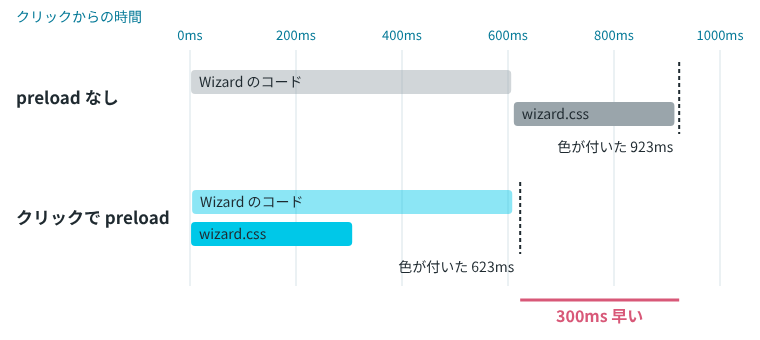
Without preload, the CSS request started 611 ms after the click. That was after the wizard code arrived and preinit was called. With preload on click, the CSS started loading at the same time as the wizard code, so the CSS had already arrived when the code did. In both cases the CSS was requested only once, and preinit used what preload had already downloaded.
preinit does not wait for the CSS to load
Look at the no-preload case in the results above again. #wizard entered the screen at 623 ms, and the text was black at that point. For the 300 ms until the color appeared at 923 ms, the screen was visible without the CSS applied. preinit only starts the load. It does not hold the component's display until the CSS arrives.
If you want the display to wait until the CSS arrives, render a <link> with precedence instead of calling preinit. The section on special behavior for stylesheets in the <link> reference says that a component that renders a <link> suspends while the stylesheet is loading.
// WizardLink.tsx
export default function WizardLink() {
  return (
    <section id="wizard">
      <link rel="stylesheet" href="/assets/wizard.css" precedence="default" />
      ウィザードの1ページ目
    </section>
  );
}
The head lines are omitted from the output below.
--- link=1 ---
Wizard のコード: クリックから 2ms で要求、605ms で届いた
wizard.css: クリックから 611ms で要求、914ms で届いた(要求 1 回)
#wizard が画面に入った: クリックから 924ms(そのときの色 rgb(216, 88, 120))
#wizard に wizard.css の色が付いた: クリックから 924ms
#wizard first entered the screen at 924 ms, after the CSS had arrived, already colored. While waiting, the Suspense fallback should appear, but I did not check whether it was shown. I did not test combining this <link> approach with preload on click.
preload starts loading earlier, and preinit loads the CSS and applies it. Neither one holds the screen until the CSS arrives. If you want to hold the display, use a <link> with precedence.
Output when rendering on the server
According to the caveats for preload, on the server, the calls only take effect when made during component rendering (or in asynchronous work started from it). I called preload and preinit in components of a page rendered from <html>, and checked the output of renderToReadableStream.
function App() {
  preload('/assets/font.woff2', { as: 'font', type: 'font/woff2', crossOrigin: 'anonymous' });
  preload('/assets/preloaded.js', { as: 'script' });
  preinit('/assets/style.css', { as: 'style', precedence: 'default' });
  preinit('/assets/run.js', { as: 'script' });
  return <p className="sample">本文</p>;
}
The output is a single line, but I show the contents of <head> with line breaks for readability.
<!DOCTYPE html><html><head>
<link rel="preload" href="/assets/font.woff2" as="font" crossorigin="" type="font/woff2"/>
<link rel="stylesheet" href="/assets/style.css" data-precedence="default"/>
<script src="/assets/run.js" async=""></script>
<link rel="preload" href="/assets/preloaded.js" as="script"/>
<title>ページ</title></head><body><p class="sample">本文</p></body></html>
Although the calls were made inside <body>, all the elements ended up in <head>. The order is not the order of the calls: it is the font preload, then the CSS, then the preinited script, then the script preload. renderToString produced the same elements in the same order.
I also tested calling them outside rendering. I called preload before and after renderToReadableStream, and in both cases nothing was added to the output.
<!DOCTYPE html><html><head></head><body><p>描画の外で呼ぶ</p></body></html>What I did not test
preloadModuleandpreinitModule, andpreloadusingimageSrcSetfor images- On the server, calls made inside asynchronous work started from rendering, and calls made in Server Components
- Behavior on top of frameworks such as Next.js. The
preloadreference notes that React frameworks often handle resource loading for you, so you may not need to call these functions yourself - Browsers other than Chromium, and production builds