
Rewriting React Form Submission with useActionState and useOptimistic
This article was translated from the Japanese original with AI. 日本語の原文を読む
With React 19's useActionState and <form action>, you no longer have to keep your own state for "pending" and "error" during form submission. Add useOptimistic, and you can show the submitted content on screen right away, without waiting for the server's response. This is a way to write these "optimistic updates" with nothing but React 19 features, for example in a post form.
In my test environment, I took a form for posting short messages and rewrote it step by step, starting from the traditional approach. For both the original version and the rewritten versions, I recorded what was on screen right after submitting and after the server responded. The rewrite introduced one difference: the input field was cleared on error. So I also checked how to avoid that.
In this article, I refer to the four versions as follows, matching the labels in the GIF shown later.
- ① onSubmit and useState (before the rewrite)
- ② useActionState (rewritten with
useActionStateand<form action>) - ③ ② plus useOptimistic
- ④ ③ plus a tweak to keep the input on error
The test environment was Ubuntu 24.04 with Node.js 22.22.0. I used react / react-dom 19.3.1, @types/react 19.3.0, typescript 7.0.2, esbuild 0.28.2, and jsdom 30.1.3. I type-checked the .tsx files with tsc, compiled them with esbuild, and ran them on jsdom. The GIF was recorded by running the same components in Chromium with Playwright 1.56.1. The server is a fake one I wrote for testing. It does not respond until I signal it, and it returns an error for any message longer than 20 characters.
- 1. ① Before the rewrite: onSubmit and four useState calls
- 2. ② Rewriting with useActionState and the form's action
- 3. After the rewrite, the input is cleared on error too
- 4. ③ Showing the submitted text in the list right away with useOptimistic
- 5. ④ Keeping the input on error
- 6. Submitting repeatedly: requests are processed one at a time, in order
① Before the rewrite: onSubmit and four useState calls
First, the traditional approach (①). The list, the text being typed, the error, and whether a submission is in progress are each kept in their own useState.
export function Board() {
  const [messages, setMessages] = useState<Message[]>([]);
  const [text, setText] = useState('');
  const [error, setError] = useState<string | null>(null);
  const [isPending, setIsPending] = useState(false);

  async function handleSubmit(e: FormEvent<HTMLFormElement>) {
    e.preventDefault();
    setIsPending(true);
    const result = await postMessage(text);
    setIsPending(false);
    if (!result.ok) {
      setError(result.error);
      return;
    }
    setError(null);
    setMessages((prev) => [...prev, result.message]);
    setText('');
  }

  return (
    <form onSubmit={handleSubmit}>
      <ul>{messages.map((m) => <li key={m.id}>{m.text}</li>)}</ul>
      <input name="text" value={text} onChange={(e) => setText(e.target.value)} />
      <button disabled={isPending}>{isPending ? '送信中…' : '送信'}</button>
      {error && <p role="alert">{error}</p>}
    </form>
  );
}
The section on Actions in the React 19 release post shows a similar example, with the pending state and the error kept in useState, as the way things were written before Actions. According to the post, you previously had to handle pending states, errors, optimistic updates, and the order of sequential requests yourself.
② Rewriting with useActionState and the form's action
Turn the submit logic into a function that takes the previous state and the submitted FormData, and returns the next state. The useActionState reference calls this function reducerAction. Unlike a useReducer reducer, it can be async and can perform side effects such as sending data to the server.
export type State = { messages: Message[]; error: string | null };
export const initialState: State = { messages: [], error: null };

export async function sendAction(prev: State, formData: FormData): Promise<State> {
  const text = String(formData.get('text') ?? '');
  const result = await postMessage(text);
  if (!result.ok) return { ...prev, error: result.error };
  return { messages: [...prev.messages, result.message], error: null };
}
The component just passes the function returned by useActionState to the <form>'s action.
export function Board() {
  const [state, formAction, isPending] = useActionState(sendAction, initialState);

  return (
    <form action={formAction}>
      <ul>{state.messages.map((m) => <li key={m.id}>{m.text}</li>)}</ul>
      <input name="text" />
      <button disabled={isPending}>{isPending ? '送信中…' : '送信'}</button>
      {state.error && <p role="alert">{state.error}</p>}
    </form>
  );
}
Not a single useState is left. According to the <form> reference's section on handling submission with an action, when you pass a function to a <form>'s action, the submission runs inside a Transition. You don't need e.preventDefault() either. The FormData is passed as the second argument of reducerAction, and the first argument is the previous state. This is explained in the useActionState reference's troubleshooting entry for when the action can't read form data.
In TypeScript, once sendAction was typed, tsc passed without my having to write type arguments for useActionState.
For ① and ②, I submitted a short greeting ("Hello" in Japanese) the first time and a 21-character message the second time, and recorded the screen before and after the server's response. I've trimmed the output to the lines that record the screen. The labels in the output are in Japanese; each line shows, in order, the list, the input field's value, the button label (and whether it can be clicked), and the error.
$ node run.mjs ./out/BoardOnSubmit.mjs
  1回目 送信直後: 一覧=[] 入力欄="こんにちは" ボタン="送信中…"(押せない) エラー=なし
  1回目 返事のあと: 一覧=[こんにちは] 入力欄="" ボタン="送信" エラー=なし
  2回目 送信直後: 一覧=[こんにちは] 入力欄="二十文字を超えるメッセージは保存されません" ボタン="送信中…"(押せない) エラー=なし
  2回目 返事のあと: 一覧=[こんにちは] 入力欄="二十文字を超えるメッセージは保存されません" ボタン="送信" エラー=20文字以内で入力してください

$ node run.mjs ./out/BoardActionState.mjs
  1回目 送信直後: 一覧=[] 入力欄="こんにちは" ボタン="送信中…"(押せない) エラー=なし
  1回目 返事のあと: 一覧=[こんにちは] 入力欄="" ボタン="送信" エラー=なし
  2回目 送信直後: 一覧=[こんにちは] 入力欄="二十文字を超えるメッセージは保存されません" ボタン="送信中…"(押せない) エラー=なし
  2回目 返事のあと: 一覧=[こんにちは] 入力欄="" ボタン="送信" エラー=20文字以内で入力してください
① and ② behave the same in what they show while sending (the button reads "Sending…" and can't be clicked) and in clearing the input after a successful submission. isPending was true from the moment of submission until the response arrived.
After the rewrite, the input is cleared on error too
The difference is in the last line. In ①, the text the user typed was still there after the error (the error message means "Please enter 20 characters or fewer"). In ②, the input field was empty even though an error was shown.
The <form> reference's section on handling submission with an action says that when the action function completes successfully, uncontrolled inputs in the form (inputs that are not given a value) are reset. sendAction doesn't throw the error; it returns it as part of the state. From React's point of view, this submission completed successfully, which is presumably why the input was reset.
If you switch to <form action> combined with inputs that are not given a value (the basic way of using useActionState), the text the user typed disappears even when the server returns an error. In a form for writing long text, the user has to type it all again.
Instead of returning the error as state, you could throw it. However, according to the useActionState reference's section on handling errors, a thrown error is shown by the nearest Error Boundary, and queued submissions are canceled. I did not test what happens to the input field when the error is thrown. The same section suggests including expected errors, such as "longer than 20 characters", in the state returned by reducerAction. So in a later section (④), I try keeping the input by using the state.
③ Showing the submitted text in the list right away with useOptimistic
In ① and ②, the list doesn't change until the server responds. In ③, which adds useOptimistic to ②, the submitted text can appear in the list as "sending" before the response arrives.
export function Board() {
  const [state, dispatch, isPending] = useActionState(sendAction, initialState);
  const [optimisticMessages, addOptimistic] = useOptimistic(
    state.messages,
    (current: Message[], text: string) => [...current, { id: -current.length - 1, text, sending: true }],
  );

  function formAction(formData: FormData) {
    addOptimistic(String(formData.get('text') ?? ''));
    dispatch(formData);
  }

  return (
    <form action={formAction}>
      <ul>
        {optimisticMessages.map((m) => (
          <li key={m.id}>{m.text}{m.sending && <small>(送信中)</small>}</li>
        ))}
      </ul>
      <input name="text" />
      <button>{isPending ? '送信(処理中)' : '送信'}</button>
      {state.error && <p role="alert">{state.error}</p>}
    </form>
  );
}
According to the parameters section of the useOptimistic reference, the first argument is the real value, which is shown when no submission is in progress. The function passed as the second argument builds the list that is shown only while submitting. I gave the temporary item sending: true, and the list shows a "(sending)" marker after that item. The example in the same reference that shows an item added to a list before the response arrives uses the name pending: true for a property with the same purpose.
As described in the useActionState reference's section on using it with a <form>, the function passed to action runs inside a Transition. That's why both addOptimistic and dispatch can be called without wrapping them in startTransition.
$ node run.mjs ./out/BoardOptimistic.mjs
  1回目 送信直後: 一覧=[こんにちは(送信中)] 入力欄="こんにちは" ボタン="送信(処理中)" エラー=なし
  1回目 返事のあと: 一覧=[こんにちは] 入力欄="" ボタン="送信" エラー=なし
  2回目 送信直後: 一覧=[こんにちは, 二十文字を超えるメッセージは保存されません(送信中)] 入力欄="二十文字を超えるメッセージは保存されません" ボタン="送信(処理中)" エラー=なし
  2回目 返事のあと: 一覧=[こんにちは] 入力欄="" ボタン="送信" エラー=20文字以内で入力してください
The submitted text appeared in the list with the "(sending)" marker immediately after submission. On success, the marker disappeared; on error, the temporary item was removed from the list. I didn't write any code to clean up the temporary item on error. According to the useOptimistic reference's explanation of how optimistic state works, once the submission finishes, the display goes back to the value of the first argument. On error, state.messages hasn't changed, so the list went back to what it was before the submission.
Inside formAction, I don't wait for dispatch to finish (its return type is void, too). Even so, the temporary item stayed visible until the server responded.
④ Keeping the input on error
I was able to avoid the input being cleared on error by keeping the text in the state and passing it to the input's defaultValue. Only two places changed from ③.
// sendAction: add draft to the state, and on error store the submitted text in it
if (!result.ok) return { ...prev, error: result.error, draft: text };
return { messages: [...prev.messages, result.message], error: null, draft: '' };

// Board: use draft as the input's initial value
<input name="text" defaultValue={state.draft} />
Here is the second-submission part of the output from running ④ with the same steps.
$ node run.mjs ./out/BoardKeepDraft.mjs
  2回目 送信直後: 一覧=[こんにちは, 二十文字を超えるメッセージは保存されません(送信中)] 入力欄="二十文字を超えるメッセージは保存されません" ボタン="送信(処理中)" エラー=なし
  2回目 返事のあと: 一覧=[こんにちは] 入力欄="二十文字を超えるメッセージは保存されません" ボタン="送信" エラー=20文字以内で入力してください
The text was still there after the error (the first submission succeeds, so the input is cleared as before). Presumably, the reset input picked up the new defaultValue. I confirmed this behavior in jsdom and Chromium. I did not test other browsers.
The following GIF shows forms ① to ④ stacked vertically in Chromium, submitted twice with the "Submit all four" button at the top. The first submission succeeds, and the second fails because the message is 21 characters long.
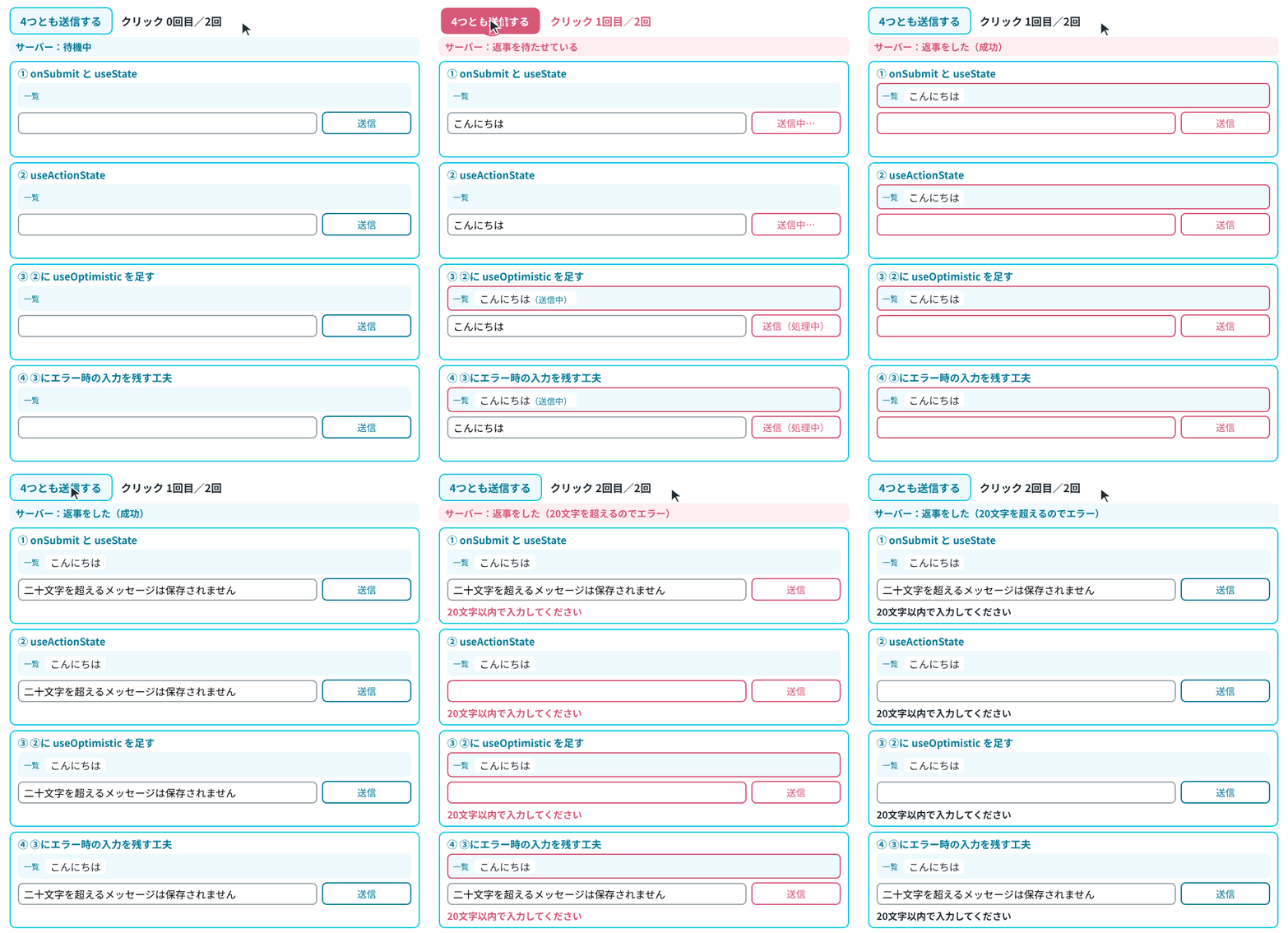
The labels in the GIF are in Japanese. At the top of the screen, a counter (meaning "Click 1 of 2") shows which submission it is, and the strip below it shows the server's status. When a field's value changes, it gets a pink outline or pink text only at that moment. Only ③ and ④ update their lists while waiting for the response. After the second response, the inputs in ② and ③ flash pink and become empty, while ① and ④ keep the text.
Submitting repeatedly: requests are processed one at a time, in order
In ③, the submit button stays clickable during submission. So I submitted twice in a row without waiting for a response. This is what happened (each line shows the list, the number of pending responses, and the server's log of received and saved messages):
$ node queue.mjs ./out/BoardOptimistic.mjs
  2回送信した直後: 一覧=[1つ目(送信中), 2つ目(送信中)] 返事待ち=1件 サーバーの記録=[受付:1つ目]
  1回目の返事のあと: 一覧=[1つ目(送信中), 2つ目(送信中)] 返事待ち=1件 サーバーの記録=[受付:1つ目 → 保存:1つ目 → 受付:2つ目]
  2回目の返事のあと: 一覧=[1つ目, 2つ目] 返事待ち=0件 サーバーの記録=[受付:1つ目 → 保存:1つ目 → 受付:2つ目 → 保存:2つ目]
Both items appeared in the list immediately, but the server only received the second one after it had responded to the first. According to the useActionState reference's explanation of how calls are queued, reducerAction receives the result of the previous call, so React processes calls one at a time, in order. If you want to send requests in parallel, the same reference's comparison with useReducer says to use useState and useTransition instead of useActionState.
Also, even after the response to the first submission arrived, the list still showed the first item with the "(sending)" marker. The caveats in the useActionState reference say that when multiple Actions are in progress, React batches them together. That is presumably why the list was finalized all at once when both had finished. The caveats also note that this is a limitation that may be removed in a future release.
Switching to useActionState means you no longer keep your own state for pending and error. With <form action>, inputs that are not given a value are cleared even when you return the error as state. If you want to keep the input, put the text in the state and pass it to defaultValue. The useOptimistic display goes back to the real value once the submission finishes, so you don't need to write cleanup code for failures.