
Lighthouseでidの重複を指摘されたときの直し方
Lighthouse のアクセシビリティの監査で「ARIA IDs are unique」(日本語のレポートでは「ARIA ID は一意です」)の欄に要素が出たら、aria-labelledby や label の for などから参照されている id が、ページの中で重複しています。重複している id を、要素ごとに別の値に書き換えれば直ります。同じお知らせの部品を2回置いたページや、ログインとメールマガジン登録のメールアドレス欄が1ページに並ぶフォームで起きやすい指摘です。
この指摘は点数に入らないため、出ていてもアクセシビリティの点数は100のままです。しかも、重複が何か所あっても、レポートには1か所しか出ません。私は検証環境で、id の重複を4か所(うち3か所は aria-labelledby などから参照されるもの)入れたページに Lighthouse を実行し、1か所ずつ直しながら指摘の出方と、ブラウザが計算する読み上げ用の名前の変わり方を確かめました。
検証環境は Ubuntu 24.04、Node.js 22.23.4、Lighthouse 13.6.0(npm で入れた CLI。中で使われている axe-core は 4.14.0)、ブラウザは Google Chrome for Testing 153 のヘッドレスです。axe-core を直接実行したときと、読み上げ用の名前を調べたときは、Playwright 1.63.0 で同じ版の Chromium を動かしました。アクセシビリティの項目だけ(--only-categories=accessibility)を実行しました。ページは手元で作り、127.0.0.1 から配信しました。Chrome の DevTools の Lighthouse パネルや PageSpeed Insights、実際のスクリーンリーダーでの読み上げは試していません。
id が重複したページと、Lighthouse の結果
検証に使ったのは、次の4か所で id が重複しているページです。
<!-- 1. 同じ部品を2回貼ったので、見出しの id と aria-labelledby が重なった -->
<section aria-labelledby="card-title">
  <h2 id="card-title">新機能のお知らせ</h2>
  <p>検索が速くなりました。</p>
</section>
<section aria-labelledby="card-title">
  <h2 id="card-title">メンテナンスのお知らせ</h2>
  <p>来週の夜に停止します。</p>
</section>
<!-- 2. ログインと、メールマガジンの登録で、入力欄の id が重なった -->
<form>
  <label for="email">ログイン用のメールアドレス</label>
  <input type="email" id="email">
  <button type="submit">ログイン</button>
</form>
<form>
  <label for="email">メールマガジンの登録先</label>
  <input type="email" id="email">
  <button type="submit">登録</button>
</form>
<!-- 3. 説明文の id が重なった -->
<label for="pw">パスワード</label>
<input type="password" id="pw" aria-describedby="hint">
<p id="hint">8文字以上で入力してください。</p>
<label for="nick">ニックネーム</label>
<input type="text" id="nick" aria-describedby="hint">
<p id="hint">あとから変更できます。</p>
<!-- 4. どこからも参照されていない id が重なった -->
<div id="banner">春のキャンペーン</div>
<div id="banner">夏のキャンペーン</div>
このページを python3 -m http.server で配信し、次のように Lighthouse を実行しました。
npx lighthouse http://127.0.0.1:8000/bad.html \
  --only-categories=accessibility \
  --output=json --output=html --output-path=./out/bad \
  --chrome-flags="--headless=new --no-sandbox" --quiet
アクセシビリティの点数は100でした。HTML のレポートでは、ARIA の欄に「ARIA IDs are unique」が出て、開くと「Unscored」(点数に入らない)の表示と、重複した2つの h2 が並びます。
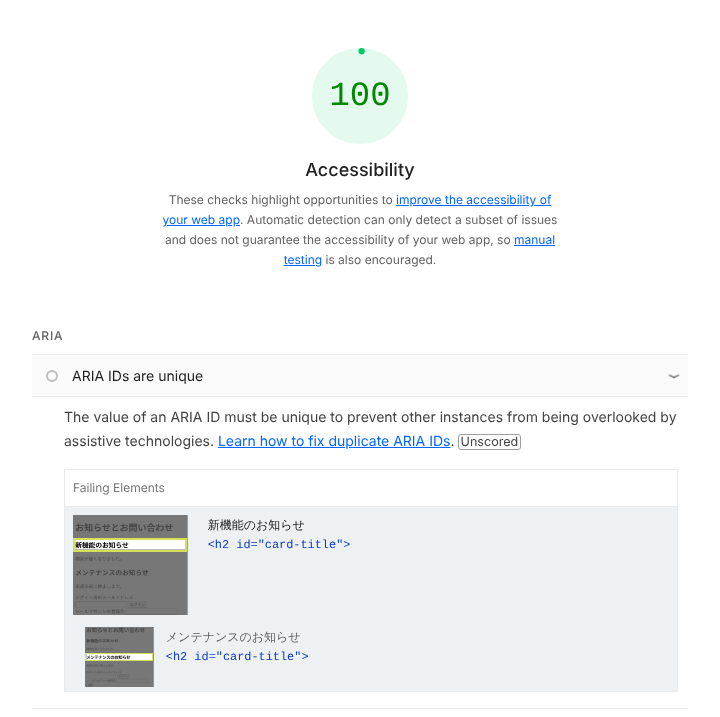
監査のタイトルは、合格したときと同じ「ARIA IDs are unique」のままです。不合格のときのタイトル「ARIA IDs are not unique」は表示されませんでした。点数とタイトルだけを見ていると、見落とします。
JSON のレポートから、点数と、指摘の出た監査を自作の小さなスクリプトで取り出すと次のとおりです(weight(used) は点数の計算に使われた重み)。
accessibility score: 100

[duplicate-id-aria] scoreDisplayMode=informative score=1 weight(used)=0
title: ARIA IDs are unique
- body > main > section > h2#card-title | <h2 id="card-title">
   Fix any of the following:
     Document has multiple elements referenced with ARIA with the same id attribute: card-title
   related: <h2 id="card-title"> "メンテナンスのお知らせ"

[form-field-multiple-labels] scoreDisplayMode=informative score=1 weight(used)=0
title: No form fields have multiple labels
- body > main > form > input#email | <input type="email" id="email">
   Fix all of the following:
     Multiple label elements is not widely supported in assistive technologies. Ensure the first label contains all necessary information.
   related: <label for="email"> "ログイン用のメールアドレス"
   related: <label for="email"> "メールマガジンの登録先"

failed (binary) audits: (none)
informative audits: duplicate-id-aria, form-field-multiple-labels
監査の ID は duplicate-id-aria です。メールアドレス欄の重複は、別の監査の form-field-multiple-labels(日本語のレポートでは「複数のラベルが設定されたフォーム フィールドはありません」)にも出ました。どちらも informative(参考情報)の扱いです。
点数が下がらず、指摘も1か所しか出ない理由
Lighthouse 13.6.0 の設定では duplicate-id-aria の重みは10ですが、監査の定義で表示の種類が INFORMATIVE になっています。点数を計算する処理は、この種類の監査の重みを0にして計算します。上の出力の weight(used)=0 がそれです。
指摘が1か所しか出ないのは、Lighthouse が axe-core を呼び出すときの設定のためです。axe-core は、id の重複を違反(violations)ではなく「要確認」(incomplete)として返します。検証のページに axe-core を直接実行すると、3か所すべてが「要確認」に入りました。次は、その出力のうち「要確認」の部分です。
--- incomplete
duplicate-id-aria | <h2 id="card-title">新機能のお知らせ</h2>
   Fix any of the following:
     Document has multiple elements referenced with ARIA with the same id attribute: card-title
duplicate-id-aria | <input type="email" id="email">
   Fix any of the following:
     Document has multiple elements referenced with ARIA with the same id attribute: email
duplicate-id-aria | <p id="hint">8文字以上で入力してください。</p>
   Fix any of the following:
Document has multiple elements referenced with ARIA with the same id attribute: hint一方、Lighthouse が axe-core を実行する処理は、resultTypes: ['violations', 'inapplicable'] を渡しています。axe-core の API の説明によると、resultTypes に入っていない種類の結果は、ルールごとに最大1つの要素しか返しません。そのため、「要確認」に入る id の重複は、最初の1か所だけがレポートに出ます。
実際に、お知らせの見出しだけを直して実行し直すと、次はメールアドレス欄が出ました。さらにメールアドレス欄も直すと、説明文の hint が出ました。どの回も点数は100です。
| 直した範囲 | レポートに出た重複 | 点数 |
|---|---|---|
| 直す前 | card-title |
100 |
| お知らせの見出し | email |
100 |
| 見出しとメールアドレス欄 | hint |
100 |
| 全部 | なし(「該当なし」) | 100 |
ページの中の重複をまとめて探す
1か所ずつ直して実行し直すより、先にページの中の重複をまとめて探すほうが早く済みます。次のコードは、ブラウザの DevTools のコンソールに貼って実行できます。検証では、同じコードを Playwright でページの中で実行しました。
const count = {};
for (const el of document.querySelectorAll('[id]')) count[el.id] = (count[el.id] ?? 0) + 1;
for (const [id, n] of Object.entries(count)) if (n > 1) console.log(`${id}: ${n}個`);
直す前のページでは、次のように4つ出ました。
card-title: 2個
email: 2個
hint: 2個
banner: 2個
最後の banner は、どこからも参照されていない id です。Lighthouse はこの重複を調べません。axe-core には、参照されていない id の重複を調べる duplicate-id というルールもありますが、axe-core 4.14.0 では非推奨(deprecated)で初期設定では無効です。Lighthouse が axe-core を実行する処理でも、このルールは無効にされています。検証で axe-core を直接実行し、このルールを指定したときだけ、banner が違反として出ました。
それでも、MDN の id 属性の説明にあるとおり、id はページ全体で一意でなければなりません。あとから aria-labelledby や label で参照すると、次の節で見るように先にある要素だけが使われるので、このコードで見つかったものは、まとめて直しておきます。
重複していると、読み上げ用の名前がどうずれるか
点数に入らない指摘でも、直さないと、スクリーンリーダーに伝わる名前や説明がずれます。Chromium が計算した名前と説明を、Chrome DevTools Protocol の Accessibility.getPartialAXTree で取り出すと、直す前のページは次のとおりでした。
<section aria-labelledby="card-title"> | role=region | name="新機能のお知らせ"
<section aria-labelledby="card-title"> | role=region | name="新機能のお知らせ"
<input type="email" id="email"> | role=textbox | name="ログイン用のメールアドレス メールマガジンの登録先"
<input type="email" id="email"> | role=textbox | name=""
<input type="password" id="pw" aria-describedby="hint"> | role=textbox | name="パスワード" | description="8文字以上で入力してください。"
<input type="text" id="nick" aria-describedby="hint"> | role=textbox | name="ニックネーム" | description="8文字以上で入力してください。"
3か所とも、ページの先にある要素だけが使われています。
- 2つ目のお知らせの名前が、1つ目の見出しの「新機能のお知らせ」になった
- 1つ目のメールアドレス欄に、2つのラベルの文字がつながって付き、2つ目の欄は名前が空になった
- ニックネームの欄の説明が、パスワードの説明の「8文字以上で入力してください。」になった
メールアドレス欄の動きは、MDN の label 要素の説明にあるとおりです。for の値と同じ id を持つ要素のうち、ページで最初のものだけがそのラベルの対象になり、後ろの要素は対象になりません。
2つ目のメールアドレス欄は名前が空なのに、入力欄のラベルを調べる Lighthouse の label の監査は合格でした。axe-core のラベルの判定が、自分の id と同じ for を持つ、文字のある label があれば合格にし、その label が実際にこの入力欄に結びついているかまでは見ていないためです。名前のない入力欄が、点数にも監査の不合格にも出ないまま残ります。
重複した id を、要素ごとに別の値にする
直し方は、重複している id を要素ごとに別の値にし、参照する側の aria-labelledby、aria-describedby、for もそれに合わせることです。検証では次のように直しました。
<!-- 1. 部品ごとに別の id にする -->
<section aria-labelledby="news-1-title">
  <h2 id="news-1-title">新機能のお知らせ</h2>
  <p>検索が速くなりました。</p>
</section>
<section aria-labelledby="news-2-title">
  <h2 id="news-2-title">メンテナンスのお知らせ</h2>
  <p>来週の夜に停止します。</p>
</section>
<!-- 2. 入力欄ごとに別の id にする -->
<form>
  <label for="login-email">ログイン用のメールアドレス</label>
  <input type="email" id="login-email">
  <button type="submit">ログイン</button>
</form>
<form>
  <label for="newsletter-email">メールマガジンの登録先</label>
  <input type="email" id="newsletter-email">
  <button type="submit">登録</button>
</form>
<!-- 3. 説明文ごとに別の id にする -->
<label for="pw">パスワード</label>
<input type="password" id="pw" aria-describedby="pw-hint">
<p id="pw-hint">8文字以上で入力してください。</p>
<label for="nick">ニックネーム</label>
<input type="text" id="nick" aria-describedby="nick-hint">
<p id="nick-hint">あとから変更できます。</p>
<!-- 4. 参照されていない id も、別の値にする -->
<div id="banner-spring">春のキャンペーン</div>
<div id="banner-summer">夏のキャンペーン</div>同じ部品を何度も置くページでは、news-1-title のように、部品ごとに変わる番号や名前を id に含めると重なりません。メールアドレス欄のように、別々のフォームに同じ種類の欄があるときは、login-email と newsletter-email のように、どのフォームの欄かが分かる値にします。
直したページで同じ条件の Lighthouse を実行すると、duplicate-id-aria と form-field-multiple-labels は「該当なし」(notApplicable)になり、点数は100のままでした。axe-core の id の重複のルールを直接実行しても、「要確認」と違反は0件でした。コンソールに貼ったコードを実行しても、何も表示されませんでした。
ブラウザが計算した名前と説明も、それぞれの要素のものになりました。
<section aria-labelledby="news-1-title"> | role=region | name="新機能のお知らせ"
<section aria-labelledby="news-2-title"> | role=region | name="メンテナンスのお知らせ"
<input type="email" id="login-email"> | role=textbox | name="ログイン用のメールアドレス"
<input type="email" id="newsletter-email"> | role=textbox | name="メールマガジンの登録先"
<input type="password" id="pw" aria-describedby="pw-hint"> | role=textbox | name="パスワード" | description="8文字以上で入力してください。"
<input type="text" id="nick" aria-describedby="nick-hint"> | role=textbox | name="ニックネーム" | description="あとから変更できます。"
点数が変わらない指摘なので、直したかどうかは点数では確かめられません。直した後は、レポートの「ARIA IDs are unique」が「Not applicable」(該当なし)の一覧に移ったことと、コンソールで実行したコードが何も表示しないことで確かめます。