
Lighthouseでdocument.writeの指摘を直す方法
Lighthouse の「Avoid document.write()」(日本語の表示では「document.write() を使用しない」)は、document.write() で入れているスクリプトを defer 付きの <script> 要素か document.createElement() に置き換え、HTML を書き出している部分を DOM の操作に変えると直せます。広告、アクセス解析、外部のウィジェットなど、ページに貼り付けるタグ(埋め込み用のコード)で document.write() が使われていることがあります。
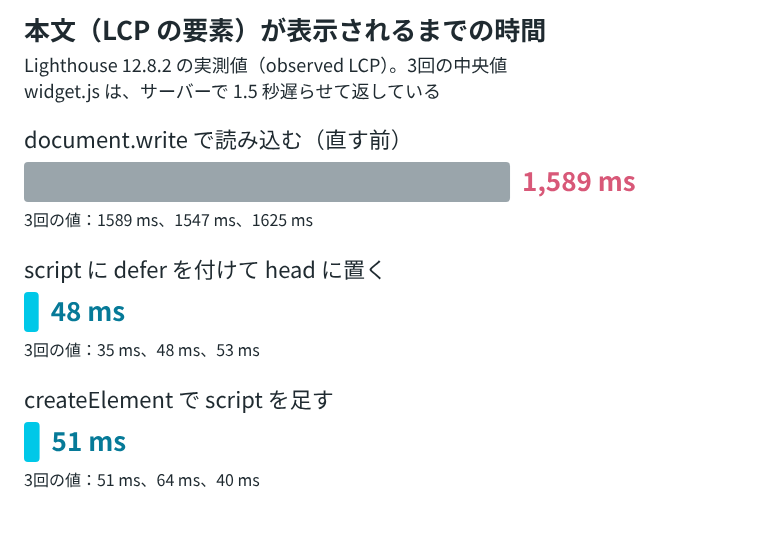
検証用のページでは、document.write() で読み込んだスクリプトの応答を待つあいだ、本文の表示が止まりました。本文が表示されるまでの実測値(3回の中央値)は、直す前が 1,589 ms、直したあとが 48 ms です。
ただし、この項目は Lighthouse 13 で削除されています。また検証環境の Chrome 153 では、Lighthouse 12.8.2 でも指摘が出ませんでした。そのため、使っている場所を自分で探す方法もあわせて書きます。
検証環境は Ubuntu 24.04、Node.js 22 です。Lighthouse は npm の 12.8.2 と 13.6.0 を、コマンドラインから既定の設定(モバイル)で実行しました。Chrome は、Playwright 1.63.0 に入っている Chrome for Testing 153 を、環境変数 CHROME_PATH で渡しました。サーバーは Node.js の http モジュールで書いた小さなもので、同じマシンの localhost で動かし、/widget.js だけは、返すまで 1.5 秒待たせました。古い Chrome で指摘が出るかどうか、DevTools の Lighthouse パネル、PageSpeed Insights は試していません。2G の回線で Chrome がスクリプトをブロックする動きは、起動オプションで Slow-2G の扱いにしても起きず、実際の 2G の回線では試していません。
指摘が出るのは Lighthouse 12 以前で、新しい Chrome では出ない
公式の解説の冒頭には、この監査は Lighthouse 13 で削除されたと書かれています。Lighthouse 13.0.0 のリリースノートにも「remove no-document-write audit」とあります。
Lighthouse 12.8.2 のコードを見ると、この監査は Chrome がコンソールに出す violation(違反)のログのうち、document.write を含むものを数えているだけです。公式の解説では、Chrome DevTools のコンソールに [Violation] Avoid using document.write(). が出ると説明されています。
ところが、検証環境の Chrome 153 では、このログが出ませんでした。Lighthouse 12.8.2 と同じ設定(Log.startViolationsReport の discouragedAPIUse)で、CDP(Chrome DevTools Protocol)からログを直接集める自作のスクリプト(violations.mjs)の結果です。出たのは、favicon を置いていないための 404 だけでした。
$ node violations.mjs http://localhost:8300/
browser: 153.0.8010.12  url: http://localhost:8300/
log entries: 1
  [network/error] Failed to load resource: the server responded with a status of 404 (Not Found) /favicon.ico:undefined
[console.error] Failed to load resource: the server responded with a status of 404 (Not Found)そのため、document.write() を2回呼ぶページでも、Lighthouse 12.8.2 の結果は合格の表示になりました。結果の JSON から主な値は、自作のスクリプト(summarize.mjs)で抜き出しています。
| Lighthouse | 結果 |
|---|---|
| 12.8.2 | 3回とも Avoids document.write()(合格の表示) |
| 13.6.0 | 項目がない |
$ node summarize.mjs out/broken-1.report.json
lighthouseVersion: 12.8.2  formFactor: mobile  throttling: simulate
performance score: 100
accessibility score: 100
best-practices score: 96
seo score: 90
first-contentful-paint: 0.6 s
largest-contentful-paint: 0.9 s
observed: FCP=60ms LCP=1589ms
no-document-write: score=1 title="Avoids `document.write()`"
  in performance: weight=0 group=diagnostics
Lighthouse 12.8.2 の設定では、この項目はパフォーマンスの「Diagnostics」に入り、重みは 0 です。指摘が出ても出なくても、点数は変わりません。レポートに出ていなくても、document.write() を使っていないとは限らないということです。
検証用のページで、本文の表示が 1.5 秒止まった
検証用のページは、外部のウィジェットを document.write() で読み込み、今日の日付も document.write() で書き出しています。
<body>
<h1>今週のお知らせ</h1>
<div id="widget"></div>
<script>
  // 外部のウィジェットを読み込む
  document.write('<script src="/widget.js"><\/script>');
  // 今日の日付を書き出す
  document.write('<p id="today">' + new Date().toLocaleDateString('ja-JP') + ' 更新</p>');
</script>
<p>店舗の営業時間が変わります。平日は 10 時から 19 時、土日は 10 時から 18 時までです。詳しくは各店舗のページをご覧ください。</p>
</body>
document.write() で書き出した <script src> は、そのスクリプトを読み込んで実行し終わるまで、そこから先の HTML の解析を止めます。上の結果の observed: ... LCP=1589ms が、実際に本文(LCP の要素)が表示されるまでの時間です。/widget.js をサーバーで 1.5 秒待たせた分が、そのまま表示の遅れになっています。
Lighthouse 13.6.0 のレポートでは、LCP の内訳(lcp-breakdown-insight)と、リクエストの連鎖(network-dependency-tree-insight)に、この遅れが出ました。この2つの項目は、自作のスクリプト(tree.mjs)で抜き出しました。
$ node tree.mjs out/lh13-broken.report.json
network-dependency-tree-insight: score=0 title="Network dependency tree"
  - /  33ms
    - /widget.js  1533ms
  longestChain: 1533ms
lcp-breakdown-insight:
  Time to first byte: 8ms
  Element render delay: 1536ms
  LCP element: <p>
本文の <p> は、サーバーの応答(Time to first byte)が 8 ms で届いたのに、表示までに 1,536 ms 待っています(Element render delay)。HTML のあとに /widget.js を待つ連鎖ができていることも分かります。
document.write を使っている場所を見つける
Lighthouse で見つからないときは、ブラウザでページを開き、document.write() を呼んだ場所を記録します。Playwright の addInitScript で、ページのスクリプトより先に document.write() と document.writeln() を包む関数を入れました。
await page.addInitScript(() => {
  window.__dw = [];
  for (const name of ['write', 'writeln']) {
    const orig = Document.prototype[name];
    Document.prototype[name] = function (...args) {
      const caller = new Error().stack.split('\n')[2]?.trim().replace(/^at /, '');
      window.__dw.push(`${name} at ${caller}: ${args.join('').slice(0, 60)}`);
      return orig.apply(this, args);
    };
  }
});直す前のページでは、2か所が見つかりました。/:17:12 は、/(index.html)の17行目、12文字目という意味です。
$ node finddw.mjs http://localhost:8300/
browser: 153.0.8010.12  url: http://localhost:8300/
calls: 2
  write at /:17:12: <script src="/widget.js"></script>
  write at /:19:12: <p id="today">2026/11/20 更新</p>
別のサイトのスクリプトを document.write() で読み込んでいる場合は、Chrome 153 でもコンソールに警告が出ました。http://localhost:8303/ のページから、http://127.0.0.1:8300/widget.js を読み込んだ結果です(同じ警告が2回出ました)。
[console.warning] A parser-blocking, cross site (i.e. different eTLD+1) script, http://127.0.0.1:8300/widget.js, is invoked via document.write. The network request for this script MAY be blocked by the browser in this or a future page load due to poor network connectivity. If blocked in this page load, it will be confirmed in a subsequent console message. See https://www.chromestatus.com/feature/5718547946799104 for more details.ただし、この警告も Lighthouse 12.8.2 の項目には数えられず、合格の表示のままでした。Lighthouse が数えるのは violation のログだけで、この警告は種類が違うためです。
スクリプトは defer を付けて head に置く
ウィジェットのスクリプトは、<head> に defer 付きの <script> 要素として書きました。日付は、空の <p> を置いておき、textContent に入れる形にしました。
 </style>
+<script src="/widget.js" defer></script>
 </head>
 <body>
 <h1>今週のお知らせ</h1>
 <div id="widget"></div>
+<p id="today"></p>
 <script>
-  // 外部のウィジェットを読み込む
-  document.write('<script src="/widget.js"><\/script>');
   // 今日の日付を書き出す
-  document.write('<p id="today">' + new Date().toLocaleDateString('ja-JP') + ' 更新</p>');
+  document.getElementById('today').textContent = new Date().toLocaleDateString('ja-JP') + ' 更新';
 </script>
MDN の script 要素の説明によると、defer のスクリプトは、文書の解析が終わったあと、DOMContentLoaded の前に実行されます。このウィジェットは #widget の要素に文字を入れるので、HTML を読み終えてから実行される defer にしました。async は取得でき次第すぐに実行され、順番も保証されないので、使いませんでした。
直したあとの本文の表示は、3回とも 35〜53 ms でした。読み込み後の #widget と #today の文字を読む自作のスクリプト(shotwidget.mjs)で、ウィジェットの表示と日付も、直す前と同じように出ていることを確かめました。
$ node summarize.mjs out/fixed-2.report.json
lighthouseVersion: 12.8.2  formFactor: mobile  throttling: simulate
performance score: 100
accessibility score: 100
best-practices score: 96
seo score: 90
first-contentful-paint: 0.6 s
largest-contentful-paint: 0.6 s
observed: FCP=48ms LCP=48ms
no-document-write: score=1 title="Avoids `document.write()`"
in performance: weight=0 group=diagnostics$ node shotwidget.mjs http://localhost:8301/
widget="ウィジェットを読み込みました" today="2026/11/20 更新"Lighthouse の推定値(シミュレーション)の LCP は 0.8〜0.9 s から 0.6 s になりました。Lighthouse 13.6.0 では、リクエストの連鎖の項目が合格(score=1)になり、Element render delay は 43 ms でした。
タグをそのまま使いたいときは createElement で script を足す
貼り付けるタグの形を大きく変えたくない場合は、document.write() の代わりに document.createElement() で <script> 要素を作り、ページに足します。document.write() への介入(ブロック)についての Chrome の解説でも、async 属性を付けることと、appendChild() や insertBefore() などの DOM の API で <script> 要素を入れることが、代わりの方法として挙げられています。
 <script>
   // 外部のウィジェットを読み込む
-  document.write('<script src="/widget.js"><\/script>');
+  const s = document.createElement('script');
+  s.src = '/widget.js';
+  document.body.append(s);
+</script>
+<p id="today"></p>
+<script>
   // 今日の日付を書き出す
-  document.write('<p id="today">' + new Date().toLocaleDateString('ja-JP') + ' 更新</p>');
+  document.getElementById('today').textContent = new Date().toLocaleDateString('ja-JP') + ' 更新';
 </script>
この書き方でも、本文の表示は 3回とも 40〜64 ms になりました。ウィジェットの表示と日付も出ています。
中で document.write を使うスクリプトは、defer を付けても直らない
読み込むスクリプトの中でも document.write() を使っている場合は、ページの書き方だけでは直りません。上の defer で直したページのまま、widget.js だけを次の中身に変えて読み込み、表示とコンソールを自作のスクリプト(inner.mjs)で確かめました。
// 中で document.write を使うウィジェット
document.write('<p id="banner">ウィジェットのバナー</p>');$ node inner.mjs http://localhost:8304/
browser: 153.0.8010.12
#banner: (ない)
h1: 今週のお知らせ
[console.warning] Failed to execute 'write' on 'Document': It isn't possible to write into a document from an asynchronously-loaded external script unless it is explicitly opened.
[console.error] Failed to load resource: the server responded with a status of 404 (Not Found)defer で読み込んだスクリプトの中で document.write() を呼ぶと、バナーの <p> は作られず、コンソールに警告が出ただけでした。ウィジェットは表示されません。
MDN の document.write() の説明には、非同期や defer のスクリプトからの呼び出しは無視されると書かれています。外部のタグを defer や async に変えたら、そのスクリプトの中身が document.write() を使っていないかを確かめます。使っている場合は、公式の解説にあるとおり、提供元に非同期の読み込みに対応した書き方がないかを確かめるか、対応を頼むことになります。