
git stash -pで、変更の一部だけを一時的によける方法
1つのファイルに不具合の修正と書きかけの機能が混ざっていて、修正だけを動かして確かめたいときは、git stash -p(--patch)で書きかけの部分だけを一時的によけられます(退避できます)。git stash -p は変更をひとまとまり(hunk)ずつ見せて、よけるかどうかを尋ねます。修正だけを残してテストし、コミットしてから、よけた書きかけを戻す、という流れで作業できます。
検証環境は Ubuntu 24.04、Git 2.43.0 です。コミットの作者の名前とメールアドレスには例示用の値(Neko <neko@example.com>)を設定しました。問いの行の末尾にある y や n は、答えとして入力した文字です。Windows・macOS と、e で hunk を手で書き換える使い方は試していません。
修正と書きかけの機能が、1つのファイルに混ざった例
例として使うのは、税抜き価格から税込み価格を出す tax.sh です。最初のコミットでは、消費税の計算が8%のままになっています。
$ ./tax.sh 1000
税込み: 1080円このファイルに、2つの変更を続けて入れました。1つは、8 を 10 に直す不具合の修正です。もう1つは、2つ目の引数で割引率を受け取る機能です。割引率を確かめる関数 check_rate は、まだ書いていません。
$ git diff
diff --git a/tax.sh b/tax.sh
index dba8d35..17f938f 100755
--- a/tax.sh
+++ b/tax.sh
@@ -1,6 +1,8 @@
 #!/bin/sh
-# 使い方: ./tax.sh 税抜き価格
+# 使い方: ./tax.sh 税抜き価格 [割引率]
 price=$1
+off=${2:-0}
+check_rate "$off"

 if [ -z "$price" ]; then
   echo "価格を指定してください" >&2
@@ -8,7 +10,7 @@ if [ -z "$price" ]; then
 fi

 # 消費税を足す
-tax=$((price * 8 / 100))
+tax=$((price * 10 / 100))
 total=$((price + tax))

 echo "税込み: ${total}円"

$ ./tax.sh 1000
./tax.sh: 5: check_rate: not found
税込み: 1100円
修正が効いて1100円になりましたが、書きかけの行のせいでエラーも出ています。このままでは、修正だけを確かめられません。引数なしの git stash は追跡しているファイルの変更をすべてよけるので、修正もいっしょによけてしまいます。
git stash -p で、書きかけの hunk だけをよける
git stash -p を実行すると、変更のある hunk が1つずつ表示され、その下に Stash this hunk で始まる問いが出ます。y と答えた hunk がよけられ、n と答えた hunk は作業中のファイルに残ります。ここでは、1つ目(割引率の書きかけ)に y、2つ目(8%を10%に直す行)に n と答えました。
$ git stash -p
diff --git a/tax.sh b/tax.sh
index dba8d35..17f938f 100755
--- a/tax.sh
+++ b/tax.sh
@@ -1,6 +1,8 @@
 #!/bin/sh
-# 使い方: ./tax.sh 税抜き価格
+# 使い方: ./tax.sh 税抜き価格 [割引率]
 price=$1
+off=${2:-0}
+check_rate "$off"

 if [ -z "$price" ]; then
   echo "価格を指定してください" >&2
(1/2) Stash this hunk [y,n,q,a,d,j,J,g,/,s,e,?]? y
@@ -8,7 +10,7 @@ if [ -z "$price" ]; then
 fi

 # 消費税を足す
-tax=$((price * 8 / 100))
+tax=$((price * 10 / 100))
 total=$((price + tax))

 echo "税込み: ${total}円"
(2/2) Stash this hunk [y,n,q,a,d,K,g,/,e,?]? n

Saved working directory and index state WIP on main: 580ceec 税込み価格を出すスクリプトを追加
作業中のファイルに残っているのは、10%に直した行だけです。よけた書きかけは stash@{0} に入り、git stash show -p で中身を確かめられます。
$ git diff
diff --git a/tax.sh b/tax.sh
index dba8d35..aefd249 100755
--- a/tax.sh
+++ b/tax.sh
@@ -8,7 +8,7 @@ if [ -z "$price" ]; then
 fi

 # 消費税を足す
-tax=$((price * 8 / 100))
+tax=$((price * 10 / 100))
 total=$((price + tax))

 echo "税込み: ${total}円"

$ git stash list
stash@{0}: WIP on main: 580ceec 税込み価格を出すスクリプトを追加

$ git stash show -p
diff --git a/tax.sh b/tax.sh
index dba8d35..70a1d46 100755
--- a/tax.sh
+++ b/tax.sh
@@ -1,6 +1,8 @@
 #!/bin/sh
-# 使い方: ./tax.sh 税抜き価格
+# 使い方: ./tax.sh 税抜き価格 [割引率]
 price=$1
+off=${2:-0}
+check_rate "$off"

 if [ -z "$price" ]; then
   echo "価格を指定してください" >&2

$ ./tax.sh 1000
税込み: 1100円
エラーが消え、修正だけの状態で1100円になることを確かめられました。
git stash の公式リファレンスによると、git stash -p は git stash push -p と同じです。問いの [ ] の中に並ぶ文字(答え方)は git add -p と共通で、git add の公式リファレンスの「INTERACTIVE MODE」の節に説明があります。たとえば s は hunk をもっと小さく分け、q はそこで終えて残りの hunk をよけません。
残した変更が同じファイルにあると、pop は止まる
確かめたあと、修正をコミットしないまま git stash pop で書きかけを戻そうとすると、pop は失敗します。
$ git stash pop
error: Your local changes to the following files would be overwritten by merge:
	tax.sh
Please commit your changes or stash them before you merge.
Aborting
On branch main
Changes not staged for commit:
  (use "git add <file>..." to update what will be committed)
  (use "git restore <file>..." to discard changes in working directory)
	modified:   tax.sh

no changes added to commit (use "git add" and/or "git commit -a")
The stash entry is kept in case you need it again.

$ git stash list
stash@{0}: WIP on main: 580ceec 税込み価格を出すスクリプトを追加
よけた hunk と残した hunk は、同じ tax.sh の中にあります。tax.sh にコミットしていない変更(10%に直した行)が残っているので、Git は pop を止めました。The stash entry is kept in case you need it again. のとおり、よけた書きかけは一覧に残っていて、作業中のファイルも変わっていません。
残した修正をコミットしてから pop する
止まったときは、残した修正を先にコミットします。tax.sh にコミットしていない変更がなくなれば、pop できます。
$ git commit -q -am "消費税を10%にする"

$ git log --oneline
8b151ad 消費税を10%にする
580ceec 税込み価格を出すスクリプトを追加

$ git stash pop
Auto-merging tax.sh
On branch main
Changes not staged for commit:
  (use "git add <file>..." to update what will be committed)
  (use "git restore <file>..." to discard changes in working directory)
	modified:   tax.sh

no changes added to commit (use "git add" and/or "git commit -a")
Dropped refs/stash@{0} (0bbba7bdfa4153054f35d8bf17157db3db600acd)

$ git diff
diff --git a/tax.sh b/tax.sh
index aefd249..17f938f 100755
--- a/tax.sh
+++ b/tax.sh
@@ -1,6 +1,8 @@
 #!/bin/sh
-# 使い方: ./tax.sh 税抜き価格
+# 使い方: ./tax.sh 税抜き価格 [割引率]
 price=$1
+off=${2:-0}
+check_rate "$off"

 if [ -z "$price" ]; then
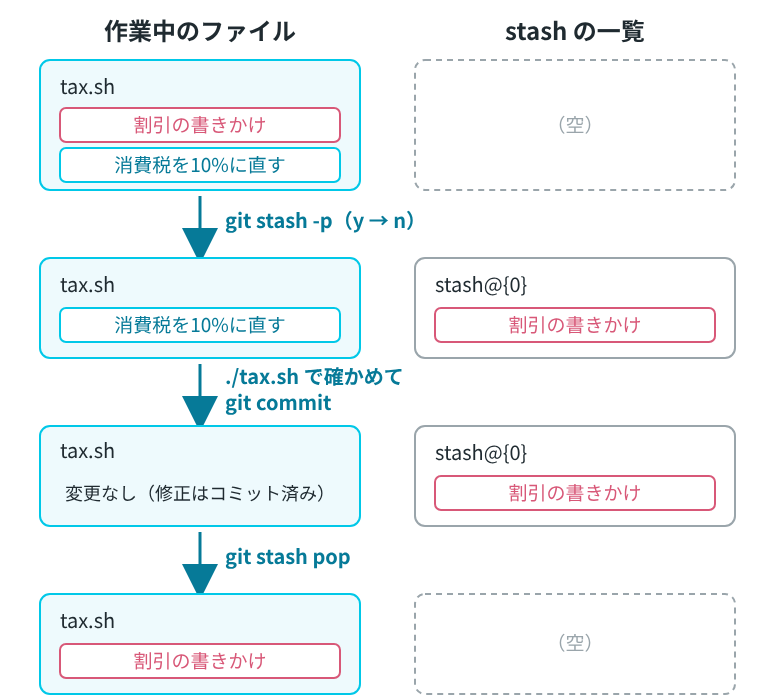
echo "価格を指定してください" >&2修正はコミットになり、作業中のファイルには割引率の書きかけだけが戻りました。git stash list は空になっています。ここまでの流れを図にすると、次のようになります。
ファイルが2つあると、ファイルごとに尋ねられる
変更のあるファイルが複数あると、git stash -p はファイルごとに順に尋ねます。README.md に1行足し、tax.sh の割引率の書きかけと合わせて2つのファイルに変更がある状態で試しました。git stash push -p -m とすると、よけた変更に説明を付けられます。README.md に n、tax.sh に y と答えました。
$ git status --short
 M README.md
 M tax.sh

$ git stash push -p -m "割引の書きかけ"
diff --git a/README.md b/README.md
index 5af2723..a5ef266 100644
--- a/README.md
+++ b/README.md
@@ -1 +1,2 @@
 # 税込み価格の計算
+割引率は 0〜100 で指定する
(1/1) Stash this hunk [y,n,q,a,d,e,?]? n

diff --git a/tax.sh b/tax.sh
index aefd249..17f938f 100755
--- a/tax.sh
+++ b/tax.sh
@@ -1,6 +1,8 @@
 #!/bin/sh
-# 使い方: ./tax.sh 税抜き価格
+# 使い方: ./tax.sh 税抜き価格 [割引率]
 price=$1
+off=${2:-0}
+check_rate "$off"

 if [ -z "$price" ]; then
   echo "価格を指定してください" >&2
(1/1) Stash this hunk [y,n,q,a,d,s,e,?]? y

Saved working directory and index state On main: 割引の書きかけ

$ git status --short
 M README.md

$ git stash list
stash@{0}: On main: 割引の書きかけ今度は、README.md にコミットしていない変更が残ったままでも、pop できました。最初に pop が止まったのは、よけた変更と同じ tax.sh に、コミットしていない変更が残っていたからです。
$ git stash pop
On branch main
Changes not staged for commit:
  (use "git add <file>..." to update what will be committed)
  (use "git restore <file>..." to discard changes in working directory)
	modified:   README.md
	modified:   tax.sh

no changes added to commit (use "git add" and/or "git commit -a")
Dropped refs/stash@{0} (01aede288efa9e353f341a45f5e6aa9edd90c2de)
何も選ばなかったときと、新しく作ったファイル
すべての hunk に n と答えると、No changes selected と表示され、一覧には何も増えません。
$ git stash -p
(README.md と tax.sh の hunk の表示は省略。どちらにも n と答えた)
No changes selected

$ git stash list
Git がまだ追跡していないファイル(一度も git add していないファイル)は、git stash -p の問いに出てきません。新しく memo.txt を作ってから git stash -p を実行すると、問いに出たのは README.md と tax.sh だけで、memo.txt はそのまま残りました。追跡していないファイルもよける -u(--include-untracked)は、-p と一緒には使えません。
$ git status --short
 M README.md
 M tax.sh
?? memo.txt

$ git stash -p -u
Can't use --patch and --include-untracked or --all at the same time
add した変更は、ステージしたまま残る
git add でステージした変更がある状態で git stash -p を実行すると、ステージした変更も問いに出てきます。ここでは README.md をステージしてから実行し、README.md に n、tax.sh に y と答えました。
$ git add README.md

$ git status --short
M  README.md
 M tax.sh

$ git stash -p
(hunk の表示は省略。README.md に n、tax.sh に y と答えた)
Saved working directory and index state WIP on main: 8b151ad 消費税を10%にする

$ git status --short
M  README.md

$ git stash show --stat
 tax.sh | 4 +++-
 1 file changed, 3 insertions(+), 1 deletion(-)
README.md はステージした状態のまま残り、よけたのは tax.sh の変更だけです。公式リファレンスによると、--patch を付けると --keep-index(ステージした変更をそのまま残す)も付けたことになります。この動きを止めたいときは --no-keep-index を付ける、とも書かれています。このあと git stash pop すると、tax.sh の変更が戻り、README.md はステージしたままでした。