
git revert -nで、複数コミットの取り消しを1つにする方法
プッシュ済みの複数のコミットをまとめて元に戻したいとき、git revert に範囲を渡すと、取り消しのコミットが件数分できます。-n(--no-commit)を付けると、取り消しの変更をステージするだけでコミットは作らないので、自分で1回 git commit すれば、取り消しを1件のコミットにまとめられます。リリースした機能をまるごと取り下げるときのように、関連する複数のコミットを、履歴を書き換えずに1回で取り消したい場面で使えます。
検証環境は Ubuntu 24.04、Git 2.43.0 です。作者の名前とメールアドレスには例示用の値(Neko <neko@example.com>)を設定しました。出力が毎回同じになるよう、コミットの日時は環境変数で固定しています。検証は1つのローカルのリポジトリで行い、リモートへのプッシュ、Windows・macOS、取り消しの途中で起きる競合(コンフリクト)は試していません。
取り消したい3件のコミット
例に使うのは、送料を0円にする、お知らせを出す、バナーを出す、という3件のコミットでセールを始め、そのあとに関係のない「問い合わせ先を追加」のコミットを積んだ履歴です。セールを終えるので、真ん中の3件だけを取り消します。
$ git log --oneline
04b3d53 問い合わせ先を追加
a984c33 セールのバナーを追加
ed3823a セールのお知らせを追加
5b4de5f セール中は送料を0円に変更
1a86817 料金表を追加

$ ls
banner.html
contact.txt
news.txt
price.txt

$ cat price.txt
送料: 0円
手数料: 200円

$ git status
On branch main
nothing to commit, working tree clean
取り消す3件は、範囲で HEAD~4..HEAD~1 と書けます。A..B は「B からたどれるコミットのうち、A からもたどれるものを除いたもの」なので、左端の HEAD~4(1a86817)は入らず、HEAD~3・HEAD~2・HEAD~1 の3件になります。範囲の書き方は、コミットの指定方法をまとめた公式リファレンス(gitrevisions)に載っています。
-n を付けないと、取り消しのコミットが3件できる
比べるために、まず -n を付けずに実行しました。--no-edit は、エディターを開かずに自動のメッセージでコミットする指定です。
$ git revert --no-edit HEAD~4..HEAD~1
[main 48cc932] Revert "セールのバナーを追加"
 Date: Sat Nov 14 10:00:00 2026 +0900
 1 file changed, 1 deletion(-)
 delete mode 100644 banner.html
[main bbe3b44] Revert "セールのお知らせを追加"
 Date: Sat Nov 14 10:00:00 2026 +0900
 1 file changed, 1 deletion(-)
 delete mode 100644 news.txt
[main 4ea5c3e] Revert "セール中は送料を0円に変更"
 Date: Sat Nov 14 10:00:00 2026 +0900
 1 file changed, 1 insertion(+), 1 deletion(-)

$ git log --oneline
4ea5c3e Revert "セール中は送料を0円に変更"
bbe3b44 Revert "セールのお知らせを追加"
48cc932 Revert "セールのバナーを追加"
04b3d53 問い合わせ先を追加
a984c33 セールのバナーを追加
ed3823a セールのお知らせを追加
5b4de5f セール中は送料を0円に変更
1a86817 料金表を追加新しいものから順に1件ずつ取り消され、Revert "…" のコミットが3件並びました。ここでは、このあとの検証のために git reset --hard HEAD~3 で3件の取り消しコミットを消し、元の履歴に戻しました。このあとの各節も、04b3d53 で作業ツリーがきれいな状態から始めています。
git revert -n で、取り消しの変更をステージする
同じ範囲を、-n を付けて取り消します。
$ git revert -n HEAD~4..HEAD~1

$ git log --oneline
04b3d53 問い合わせ先を追加
a984c33 セールのバナーを追加
ed3823a セールのお知らせを追加
5b4de5f セール中は送料を0円に変更
1a86817 料金表を追加何も表示されず、履歴も増えていません。git revert の公式リファレンスの -n の説明どおり、取り消しの変更を作業ツリーとインデックス(ステージ)に反映するだけで、コミットは作りません。git status で見ると、3件分の取り消しがまとめてステージされています。
$ git status
On branch main
You are currently reverting commit 5b4de5f.
  (all conflicts fixed: run "git revert --continue")
  (use "git revert --skip" to skip this patch)
  (use "git revert --abort" to cancel the revert operation)

Changes to be committed:
  (use "git restore --staged <file>..." to unstage)
	deleted:    banner.html
	deleted:    news.txt
	modified:   price.txt

$ git diff --cached --stat
 banner.html | 1 -
 news.txt    | 1 -
 price.txt   | 2 +-
 3 files changed, 1 insertion(+), 3 deletions(-)

$ ls
contact.txt
price.txt

$ cat price.txt
送料: 500円
手数料: 200円バナーとお知らせのファイルが消え、送料が500円に戻りました。git status には「all conflicts fixed: run "git revert –continue"」と出ますが、競合は起きていません。このあとは、ふつうに git commit すればコミットできます。
自分でメッセージを書いて、1件のコミットにする
git commit にメッセージを渡します。-m を2回書くと、2つのメッセージが空行をはさんで入り、1つ目が件名、2つ目が本文になります(git commit の公式リファレンス)。本文には、何を取り消したかが後から分かるよう、元のコミットを書いておきました。
$ git commit -m "セールを終了する" -m "次の3件のコミットをまとめて取り消す。
a984c33 セールのバナーを追加
ed3823a セールのお知らせを追加
5b4de5f セール中は送料を0円に変更"
[main 626d789] セールを終了する
 3 files changed, 1 insertion(+), 3 deletions(-)
 delete mode 100644 banner.html
 delete mode 100644 news.txt

$ git log --oneline
626d789 セールを終了する
04b3d53 問い合わせ先を追加
a984c33 セールのバナーを追加
ed3823a セールのお知らせを追加
5b4de5f セール中は送料を0円に変更
1a86817 料金表を追加

$ git status
On branch main
nothing to commit, working tree clean
取り消しのコミットは 626d789 の1件だけです。元の3件は履歴に残ったままで、履歴は書き換えていません。
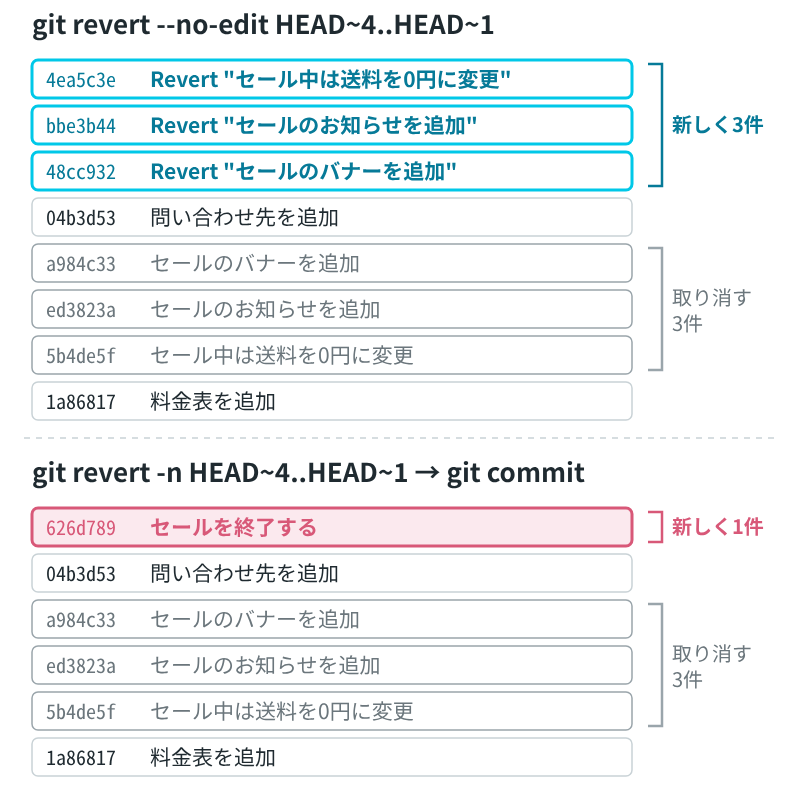
セールを始める前の 1a86817 と比べると、違いは、あとから足した contact.txt だけです。3件の変更がきれいに打ち消されていることが分かります。
$ git diff 1a86817 HEAD --stat
 contact.txt | 1 +
 1 file changed, 1 insertion(+)
メッセージを書かずにコミットすると、1件分の説明しか入らない
-n のあとに -m を付けずに git commit すると、エディターに最初から入っているメッセージは、最後に取り消した1件(ここでは一番古い 5b4de5f)のものだけでした。エディターに何が渡されるかを見るため、エディターの代わりに cat を使って中身を表示しています。
$ GIT_EDITOR=cat git commit
Revert "セール中は送料を0円に変更"

This reverts commit 5b4de5f1687de76fd4f333fc434b1cef5aed24a1.

# Please enter the commit message for your changes. Lines starting
# with '#' will be ignored, and an empty message aborts the commit.
#
# On branch main
# You are currently reverting commit 5b4de5f.
#
# Changes to be committed:
#	deleted:    banner.html
#	deleted:    news.txt
#	modified:   price.txt
#
[main 2f3060c] Revert "セール中は送料を0円に変更"
 3 files changed, 1 insertion(+), 3 deletions(-)
 delete mode 100644 banner.html
delete mode 100644 news.txt中身は3件分の取り消しなのに、件名は送料の1件だけを取り消したように読めます。エディターで書き直すか、-m でメッセージを渡します。公式リファレンスも、取り消す理由をメッセージに書くことを強く勧めています。
続いていないコミットは、1つずつ並べる
範囲ではなく、取り消したいコミットを並べても指定できます。送料とバナーの2件だけを取り消し、お知らせは残す例です。
$ git revert -n 5b4de5f a984c33

$ git status --short
D  banner.html
M  price.txt

$ cat price.txt
送料: 500円
手数料: 200円

$ git commit -q -m "送料とバナーをセール前に戻す"

$ git show --stat --format="%h %s" HEAD
9841f5a 送料とバナーをセール前に戻す

 banner.html | 1 -
 price.txt   | 2 +-
 2 files changed, 1 insertion(+), 2 deletions(-)
この場合も、2件の取り消しが1件のコミットになりました。
コミットする前にやめるときは –abort
-n で取り消しをステージしたあと、コミットせずにやめるときは git revert --abort を使います。実行する前の状態に戻りました。
$ git revert -n HEAD~4..HEAD~1

$ git status --short
D  banner.html
D  news.txt
M  price.txt

$ git revert --abort

$ git status
On branch main
nothing to commit, working tree clean
ステージ済みの変更は、取り消しと一緒に混ざる
公式リファレンスによると、-n を付けたときは、インデックスが HEAD と一致していなくてもかまいません。取り消しは、そのときのインデックスの状態に重ねて行われます。そのため、関係のない変更をステージしたまま実行すると、それも同じコミットに入ります。
$ echo "来月の予定" > memo.txt && git add memo.txt

$ git status --short
A  memo.txt

$ git revert -n HEAD~4..HEAD~1

$ git status --short
D  banner.html
A  memo.txt
D  news.txt
M  price.txt
memo.txt を入れたくないときは、コミットする前に git restore --staged でステージから外します。外したあとは、取り消しの3ファイルだけがコミットされました。
$ git restore --staged memo.txt

$ git status --short
D  banner.html
D  news.txt
M  price.txt
?? memo.txt

$ git commit -q -m "セールを終了する"

$ git show --stat --format="%h %s" HEAD
cb68e34 セールを終了する

 banner.html | 1 -
 news.txt    | 1 -
 price.txt   | 2 +-
3 files changed, 1 insertion(+), 3 deletions(-)ステージ済みの変更があるまま git revert -n を実行し、そのあと --abort すると、取り消しの変更と一緒に、ステージしてあった変更も消えました。検証環境では、新しく作って git add しただけの memo.txt が、ファイルごとなくなりました(上のコミットを git reset --hard HEAD~1 で消し、memo.txt をもう一度ステージしてから試しています)。
$ git add memo.txt

$ git status --short
A  memo.txt

$ git revert -n HEAD~4..HEAD~1

$ git revert --abort

$ git status --short

$ cat memo.txt
cat: memo.txt: No such file or directory
-n を使う前に、関係のない変更はステージに残さないようにします(--abort で消えたのは、ステージしてあった memo.txt でした)。
一方、-n を付けないときは、ステージ済みの変更があると取り消しが始まりませんでした。
$ echo "来月の予定" > memo.txt && git add memo.txt

$ git revert --no-edit HEAD~4..HEAD~1
error: your local changes would be overwritten by revert.
hint: commit your changes or stash them to proceed.
fatal: revert failedこのとき履歴は変わっていませんが、git status に「Revert currently in progress.」が残りました。git revert --quit で、この途中の状態を消せます。確かめたあとは、memo.txt をステージから外して消しています。
取り消すファイルにコミットしていない変更があると、途中で止まる
取り消すファイル(ここでは price.txt)を、ステージせずに書き換えたまま実行すると、途中でエラーになりました。
$ echo "送料無料キャンペーン" >> price.txt

$ git revert -n HEAD~4..HEAD~1
error: Your local changes to the following files would be overwritten by merge:
	price.txt
Please commit your changes or stash them before you merge.
Aborting
fatal: revert failed

$ git status
On branch main
You are currently reverting commit ed3823a.
  (all conflicts fixed: run "git revert --continue")
  (use "git revert --skip" to skip this patch)
  (use "git revert --abort" to cancel the revert operation)

Changes to be committed:
  (use "git restore --staged <file>..." to unstage)
	deleted:    banner.html
	deleted:    news.txt

Changes not staged for commit:
  (use "git add <file>..." to update what will be committed)
  (use "git restore <file>..." to discard changes in working directory)
modified: price.txtステージされているのは、バナーとお知らせの2件分の取り消しだけで、送料の取り消しは入っていません。新しい順に取り消していき、price.txt を書き換える送料のコミットのところで止まったためです。You are currently reverting commit ed3823a. の ed3823a は、お知らせのコミットです。
エラーの表示(Please commit your changes or stash them)のとおり、取り消すファイルに手を入れているときは、その変更を先にコミットするか退避してから git revert -n を実行します。
途中で止まったこの状態で git revert --abort を実行すると、ステージされていた2件分の取り消しはなくなり、price.txt に書き足した行は残りました。
$ git revert --abort

$ git status --short
 M price.txt

$ cat price.txt
送料: 0円
手数料: 200円
送料無料キャンペーン