
Gitのrebaseで、作業ブランチを最新のmainの上に積み直す方法
作業ブランチを切ったあとで main が先に進んだときは、作業ブランチで git rebase main を実行すると、自分のコミットを最新の main の先に積み直せます。プルリクエストを出す前に main の変更を取り込みたいときや、マージコミットを作らずに履歴を一本にしたいときに使う操作です。積み直す前と後の履歴、途中で競合したときの続け方とやめ方、push 済みのブランチの push し直し方を、検証環境で実際に打ったコマンドの出力とともに載せます。
検証環境は Ubuntu 24.04、Git 2.43.0 です。作者の名前とメールアドレスには例示用の値(Neko <neko@example.com>)を設定し、出力が毎回同じになるよう、コミットの日時を環境変数で決めました。リモートは同じ検証環境の中に作ったリポジトリで、手元のクローンからは相対パス ../remote.git で指しています。そのため、出力の From の行には ../remote、To の行には ../remote.git と表示されています。GitHub などのホスティングサービス、Windows・macOS、--onto を使った積み直しは試していません。
積み直す前の履歴
index.html だけの「最初のコミット」から作業ブランチ feature/profile を作り、プロフィールページのコミットを2つ積んで push しました。その間に、別のクローンから main に「ナビゲーションを追加」と「スタイルシートを追加」が push されています。
まず手元の main を最新にします。手元の main にはコミットを足していないので、git pull --ff-only で早送りするだけです。
$ git switch main
Switched to branch 'main'
Your branch is up to date with 'origin/main'.

$ git pull --ff-only
From ../remote
   eedf532..a991b24  main       -> origin/main
Updating eedf532..a991b24
Fast-forward
 nav.html  | 1 +
 style.css | 1 +
 2 files changed, 2 insertions(+)
 create mode 100644 nav.html
create mode 100644 style.css作業ブランチに戻って、git log --oneline --graph --all で全体を見ます。
$ git switch feature/profile
Switched to branch 'feature/profile'
Your branch is up to date with 'origin/feature/profile'.

$ git log --oneline --graph --all
* a991b24 スタイルシートを追加
* c0d102d ナビゲーションを追加
| * 7b5cf54 自己紹介を書く
| * 417905b プロフィールページを追加
|/
* eedf532 最初のコミット
作業ブランチ(右の列)は eedf532 から枝分かれしていて、main の2つのコミットを含んでいません。
git rebase main で積み直す
作業ブランチにいる状態で、積み直す先のブランチ名を渡します。
$ git rebase main
Successfully rebased and updated refs/heads/feature/profile.
途中で Rebasing (1/2) のような進み具合も表示されますが、同じ行に上書きされて消えるので、最後に残る行だけを載せています(このあとの git rebase の出力も同じです)。
積み直したあとの履歴です。
$ git log --oneline --graph --all
* 3940e51 自己紹介を書く
* d12dc01 プロフィールページを追加
* a991b24 スタイルシートを追加
* c0d102d ナビゲーションを追加
| * 7b5cf54 自己紹介を書く
| * 417905b プロフィールページを追加
|/
* eedf532 最初のコミット
作業ブランチの2つのコミットが、main の最新の a991b24 の先に来ました。作業ツリーにも、main で足された nav.html と style.css が入っています。右の列に残っている 7b5cf54 と 417905b は、まだ書き換えていないリモートの origin/feature/profile が指している、積み直す前のコミットです(--all を付けたので表示されています)。
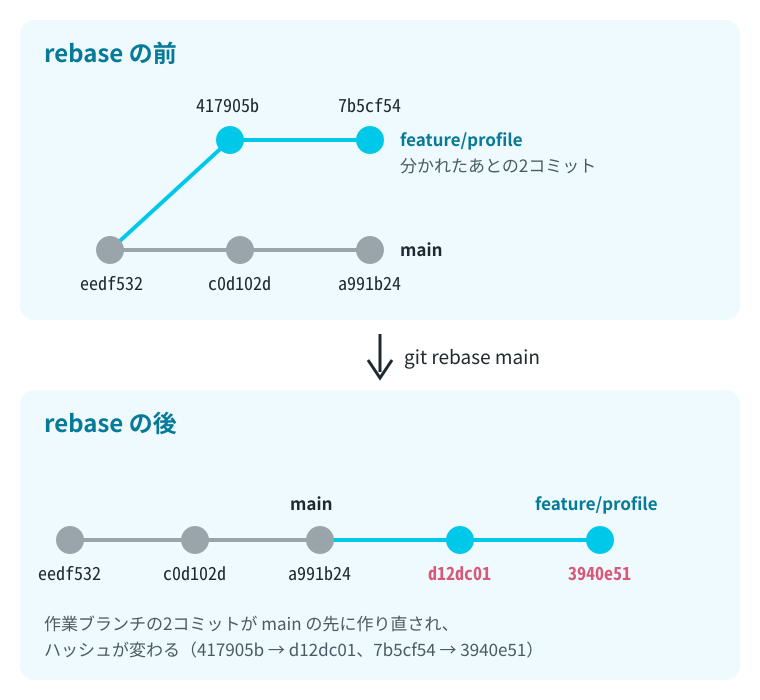
同じメッセージのコミットでも、ハッシュは 417905b から d12dc01、7b5cf54 から 3940e51 に変わっています。git rebase の公式リファレンスの説明にあるとおり、rebase は作業ブランチにしかないコミットをいったん脇に置き、ブランチを main の位置に移してから、そのコミットを1つずつ当て直しています。当て直したコミットは新しいコミットなので、ハッシュが変わります。
積み直す前の先頭は ORIG_HEAD で指せます。検証環境では、積み直した直後の ORIG_HEAD は元の 7b5cf54 でした。
$ git log --oneline -1 ORIG_HEAD
7b5cf54 自己紹介を書く
積み直したあとで、もう一度 git rebase main を実行すると、すでに main の先にあるので何もしません。
$ git rebase main
Current branch feature/profile is up to date.
ブランチ名を2つ渡す git rebase main feature/profile という書き方もあります。公式リファレンスには、2つ目のブランチ名を渡すと、先にそのブランチへ git switch してから積み直すと書かれています。
push 済みのブランチは –force-with-lease で push し直す
積み直したあとの git status は、手元とリモートの作業ブランチが分かれたと表示します。手元は main の2つと作り直した2つで4つ、リモートは積み直す前の2つを持っているからです。
$ git status
On branch feature/profile
Your branch and 'origin/feature/profile' have diverged,
and have 4 and 2 different commits each, respectively.
  (use "git pull" if you want to integrate the remote branch with yours)

nothing to commit, working tree clean
このまま git push すると、リモートの 7b5cf54 が手元の履歴に含まれていないので、拒否されます。
$ git push; echo "exit=$?"
To ../remote.git
 ! [rejected]        feature/profile -> feature/profile (non-fast-forward)
error: failed to push some refs to '../remote.git'
hint: Updates were rejected because the tip of your current branch is behind
hint: its remote counterpart. If you want to integrate the remote changes,
hint: use 'git pull' before pushing again.
hint: See the 'Note about fast-forwards' in 'git push --help' for details.
exit=1
hint には git pull とありますが、リモートにあるのは積み直す前の古いコミットで、取り込みたいものではありません。積み直したブランチは、--force-with-lease を付けて上書きします。
$ git push --force-with-lease; echo "exit=$?"
To ../remote.git
 + 7b5cf54...3940e51 feature/profile -> feature/profile (forced update)
exit=0

$ git status -sb | head -1
## feature/profile...origin/feature/profile
(forced update) と表示され、リモートの作業ブランチが 7b5cf54 から 3940e51 に置き換わりました。git push の公式リファレンスにある –force-with-lease の説明によると、このオプションは、リモートのブランチが、手元の origin/feature/profile(最後に取得したときの位置)と同じときだけ上書きします。--force だと、積み直している間にほかの人が push したコミットまで消してしまいます。
なお、git rebase の公式リファレンスの、上流が rebase されたときの直し方の節では、ほかの人が作業の土台にしているブランチを rebase すると、その人たちが履歴を手で直す羽目になると注意しています。積み直すのは、自分だけが使っている作業ブランチにとどめます。
ほかの人が同じブランチに push していたとき
3940e51 を push し直したあとで、別のクローンから feature/profile に「好きな猫を書く」を push しておき、手元では最後のコミットのメッセージを git commit --amend で書き直してから、もう一度 --force-with-lease で push しました。手元の origin/feature/profile はまだ古い位置なので、push は stale info で拒否されました。
$ git push --force-with-lease; echo "exit=$?"
To ../remote.git
 ! [rejected]        feature/profile -> feature/profile (stale info)
error: failed to push some refs to '../remote.git'
exit=1
ところが、ここで git fetch してから同じコマンドを実行すると、push は通りました。fetch で手元の origin/feature/profile がリモートと同じ位置になったからです。リモートからは「好きな猫を書く」の 0dd9a0e が消えました。
$ git fetch -q

$ git log --oneline HEAD..origin/feature/profile
0dd9a0e 好きな猫を書く
3940e51 自己紹介を書く

$ git push --force-with-lease; echo "exit=$?"
To ../remote.git
 + 0dd9a0e...89535aa feature/profile -> feature/profile (forced update)
exit=0

$ git log --oneline -3 origin/feature/profile
89535aa 自己紹介を書く(猫の話)
d12dc01 プロフィールページを追加
a991b24 スタイルシートを追加git fetch のあとの --force-with-lease は、ほかの人のコミットを守りません。fetch したら、push する前に git log --oneline HEAD..origin/feature/profile で、リモートにだけあるコミットを確かめます。この例では、書き直す前の自分のコミット 3940e51 に加えて、ほかの人の 0dd9a0e が出ていました。cron などで裏で git fetch が動いている場合も同じように守りが効かなくなると、git push の公式リファレンス(–force-with-lease の項)に書かれています。
origin/main の上に積み直して、競合を直す
手元の main を動かさなくても、git fetch でリモートの最新を取ってきて、origin/main を積み直す先に指定できます。この方法で、今度は競合する場合を試しました。作業ブランチ feature/footer でフッターを © 2025 ねこノート編集部 に変え、そのあと問い合わせページを足しています。その間に main では、同じ行が 2026 ねこノート に変わりました。
$ git fetch -q

$ git log --oneline --graph feature/footer origin/main
* ceeb859 フッターの年を2026にする
| * 610118b 問い合わせページを追加
| * bf69afc フッターに編集部を足す
|/
* a991b24 スタイルシートを追加
* c0d102d ナビゲーションを追加
* eedf532 最初のコミット
git rebase origin/main を実行すると、1つ目のコミットを当て直すところで止まりました。
$ git rebase origin/main; echo "exit=$?"
Auto-merging index.html
CONFLICT (content): Merge conflict in index.html
error: could not apply bf69afc... フッターに編集部を足す
hint: Resolve all conflicts manually, mark them as resolved with
hint: "git add/rm <conflicted_files>", then run "git rebase --continue".
hint: You can instead skip this commit: run "git rebase --skip".
hint: To abort and get back to the state before "git rebase", run "git rebase --abort".
Could not apply bf69afc... フッターに編集部を足す
exit=1
git status を見ると、2つのうち1つ目で止まっていて、残りが1つあることが分かります。git rebase -i を使っていなくても、1行目は interactive rebase in progress と表示されました。
$ git status
interactive rebase in progress; onto ceeb859
Last command done (1 command done):
   pick bf69afc フッターに編集部を足す
Next command to do (1 remaining command):
   pick 610118b 問い合わせページを追加
  (use "git rebase --edit-todo" to view and edit)
You are currently rebasing branch 'feature/footer' on 'ceeb859'.
  (fix conflicts and then run "git rebase --continue")
  (use "git rebase --skip" to skip this patch)
  (use "git rebase --abort" to check out the original branch)

Unmerged paths:
  (use "git restore --staged <file>..." to unstage)
  (use "git add <file>..." to mark resolution)
	both modified:   index.html

no changes added to commit (use "git add" and/or "git commit -a")
競合したファイルの中身です。
$ cat index.html
<h1>ねこノート</h1>
<<<<<<< HEAD
<footer>2026 ねこノート</footer>
=======
<footer>© 2025 ねこノート編集部</footer>
>>>>>>> bf69afc (フッターに編集部を足す)
HEAD の側が origin/main(ceeb859)の内容で、>>>>>>> の側が作業ブランチのコミットの内容です。rebase は ceeb859 の先にコミットを当て直している途中なので、HEAD は積み直す先の ceeb859 を指しています(git status の onto ceeb859)。git checkout の公式リファレンスにある –ours の説明でも、rebase の途中では ours(自分の側)と theirs(相手の側)が入れ替わって見えることがあり、--ours は積み直す先のブランチの側、--theirs は積み直している自分の作業の側だと書かれています。
やめて元に戻す(git rebase –abort)
いったんやめるなら git rebase --abort です。ブランチは rebase を始める前の状態に戻りました。
$ git rebase --abort

$ git status -sb | head -1
## feature/footer

$ git log --oneline --graph feature/footer origin/main
* ceeb859 フッターの年を2026にする
| * 610118b 問い合わせページを追加
| * bf69afc フッターに編集部を足す
|/
* a991b24 スタイルシートを追加
* c0d102d ナビゲーションを追加
* eedf532 最初のコミット
直して続ける(git rebase –continue)
もう一度 git rebase origin/main を実行し、同じところで止まったあと、index.html を両方の変更を合わせた内容に書き直しました。
$ cat index.html
<h1>ねこノート</h1>
<footer>© 2026 ねこノート編集部</footer>

$ git add index.html
git add すると、git status の表示が all conflicts fixed: run "git rebase --continue" に変わります。ここで git rebase --continue を実行すると、直した内容でコミットを作り、残りのコミットを当て直して終わりました。検証では、コミットメッセージを変えずに進めるため、環境変数 GIT_EDITOR=true を付けています。
$ GIT_EDITOR=true git rebase --continue; echo "exit=$?"
[detached HEAD b2c4134] フッターに編集部を足す
 1 file changed, 1 insertion(+), 1 deletion(-)
Successfully rebased and updated refs/heads/feature/footer.
exit=0
積み直したあとの履歴です。2つのコミットが ceeb859 の先に並び、競合を直したコミットは index.html の1行を変えるコミットになっています。
$ git log --oneline --graph feature/footer origin/main
* 7106d69 問い合わせページを追加
* b2c4134 フッターに編集部を足す
* ceeb859 フッターの年を2026にする
* a991b24 スタイルシートを追加
* c0d102d ナビゲーションを追加
* eedf532 最初のコミット

$ git show --stat --format="%h %s" HEAD~1 | head -4
b2c4134 フッターに編集部を足す

 index.html | 2 +-
 1 file changed, 1 insertion(+), 1 deletion(-)
git rebase の公式リファレンスの説明の節では、コミットを1つずつ当て直す途中で止まったら、直してから git rebase --continue を実行するよう書かれています。止まるたびに、この手順を繰り返します。積み直したあとの作業ブランチが push 済みなら、git push --force-with-lease で push し直します。この節でも先に git fetch しているので、上の「ほかの人が同じブランチに push していたとき」の囲みに書いた確認をしてから push します。