
How to Receive Form Submissions in a React Router Action
This article was translated from the Japanese original with AI. 日本語の原文を読む
In React Router's data mode, you define an action on a route, and when a Form from React Router is submitted, that function receives the input. Whatever the action returns decides whether an input error is shown on the page or the user is moved to another page after saving. After a save, the loader of the page being shown is called again automatically, so you don't need to write code to reload the list yourself.
In a test environment, I built a cat list and a cat registration form, and recorded the sequence from the input reaching the action to the times the loader was called again.
The test environment was Ubuntu 24.04, Node.js 22.22.0, and Chromium 141. I used react-router 8.5.0, react / react-dom 19.3.1, @types/react 19.3.0, and typescript 7.0.2. Instead of a server, the data came from functions that waited a fixed time (300 ms for loading, 500 ms for saving) before returning. For the browser checks, I ran the code converted with esbuild (a development build) in Chromium and operated it with Playwright.
The code in this article omits the parts of the test code that record timings. It only includes what each section needs for its explanation.
- 1. Define an action on a route and submit with Form
- 2. The action receives the input with request.formData()
- 3. Return input errors with status 400 and show them with useActionData
- 4. After a successful save, redirect to another page and the list loader is called again
- 5. Disable the button with useNavigation while submitting
- 6. Let the action receive the input and return the result
Define an action on a route and submit with Form
You define an action as action in the route definition. As described in the data mode actions guide, submitting a Form with method="post" calls the action. In the test, I created a registration page /new as a child of the list route /.
import { createRoot } from 'react-dom/client';
import { createBrowserRouter } from 'react-router';
import { RouterProvider } from 'react-router/dom';

const router = createBrowserRouter([
  {
    path: '/',
    loader: rootLoader,
    Component: Root,
    HydrateFallback: Loading,
    children: [
      { index: true, Component: Home },
      { path: 'new', action: newCatAction, Component: NewCat },
    ],
  },
]);

createRoot(document.getElementById('root')!).render(<RouterProvider router={router} />);
The form on the registration page is written with Form from react-router. As with an HTML <form>, give each input a name.
import { Form } from 'react-router';

export function NewCat() {
  return (
    <Form method="post">
      <label>
        名前 <input name="name" />
      </label>
      <label>
        毛の色
        <select name="color">
          <option>三毛</option>
          <option>黒</option>
          <option>白</option>
        </select>
      </label>
      <button type="submit">登録する</button>
    </Form>
  );
}
Since I did not specify action on Form, the submission goes to the route that renders this form (/new). The Form reference also says that if you omit action, the form submits to the nearest route.
The action receives the input with request.formData()
The action receives request as an argument. Calling await request.formData() retrieves the form input as FormData. You read each value by its input's name, such as formData.get('name').
import { type ActionFunctionArgs } from 'react-router';

export async function newCatAction({ request }: ActionFunctionArgs) {
  const formData = await request.formData();
  const name = String(formData.get('name') ?? '').trim();
  const color = String(formData.get('color') ?? '');
  // Validate the input here and save it (I'll add this in the next section)
}
In the test environment, I entered Shiro as the name, selected white as the color, and submitted. The action received these values. request.method was POST.
  440ms newCatAction: 開始(method=POST)
  444ms newCatAction: formData = {"name":"しろ","color":"白"}
No POST request was sent from the browser to a server at this point. In the test, I left the role of the server that delivers the HTML and JS to Playwright's page.route. It intercepted the requests the browser sent and returned the prepared HTML and JS as responses. When I recorded every request that reached page.route, except the JS file loads, the only one left was GET /new from opening the page at first. With a router created by createBrowserRouter, the action is a function that runs in the browser. If you want to save data to a server, you write the code in the action that sends it to the server yourself. In this article's test, the action called a function that waited 500 ms and then added to an array in place of a server, so I did not test sending to a real server.
Return input errors with status 400 and show them with useActionData
When the input has an error, the action returns the error details. Following the form validation guide, I returned them with data() and status code 400.
import { data, redirect, type ActionFunctionArgs } from 'react-router';

export async function newCatAction({ request }: ActionFunctionArgs) {
  const formData = await request.formData();
  const name = String(formData.get('name') ?? '').trim();
  const color = String(formData.get('color') ?? '');

  const errors: { name?: string } = {};
  if (name === '') errors.name = '名前を入れてください';
  else if (name.length > 10) errors.name = '名前は10文字までです';
  if (Object.keys(errors).length > 0) {
    return data({ errors }, { status: 400 });
  }

  await addCat(name, color);
  return redirect('/');
}
The component receives the returned value with useActionData. According to the useActionData reference, the value is undefined until the action has been called at least once.
import { Form, useActionData } from 'react-router';

export function NewCat() {
  const actionData = useActionData<typeof newCatAction>();
  return (
    <Form method="post">
      <label>
        名前 <input name="name" />
      </label>
      {actionData?.errors.name && <p role="alert">{actionData.errors.name}</p>}
      {/* The fur color and submit button are the same as before */}
    </Form>
  );
}
Writing useActionData<typeof newCatAction>() gives the return value a type. In the test, when I wrote actionData.errors.name without ?., the type check produced the following error. Before submission the value is undefined, so you need to check it before reading.
errors/NoCheck.tsx(6,14): error TS18048: 'actionData' is possibly 'undefined'.When I submitted with the name empty, the URL stayed /new, and the error "Please enter a name" appeared below the name field. Next, I entered an 11-character name, selected white for the color, and submitted; the message changed to "Names must be 10 characters or fewer". The name and color I had entered remained in the fields after submission.
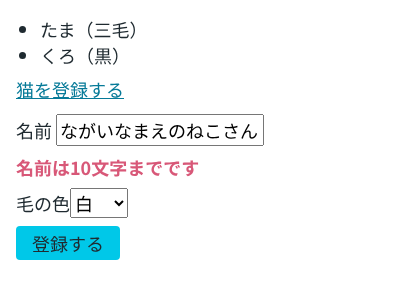
When the action returned 400, the list loader (rootLoader) was not called again. In the record, no loader start appears between the submission and the re-rendering of the screen.
  412ms router: navigation.state=submitting location=/new
  412ms newCatAction: 開始(method=POST)
  415ms newCatAction: formData = {"name":"","color":"三毛"}
  415ms newCatAction: 入力に誤りがあるので 400 で返す(名前を入れてください)
  416ms router: navigation.state=idle location=/new
  417ms NewCat を描画(navigation.state = idle、actionData = {"errors":{"name":"名前を入れてください"}})
The input validation guide also says that React Router reloads page data only for 2xx status codes, so returning 400 means no reload happens. When nothing is saved, you avoid making a request to reload the list.
After a successful save, redirect to another page and the list loader is called again
If the input has no errors, the action saves with addCat and then returns redirect('/'). According to the redirect reference, this is a response that carries a destination (Location). In the test as well, returning redirect('/') moved the page to /.
Below is the record from registering Shiro in the test.
  440ms router: navigation.state=submitting location=/new
  440ms newCatAction: 開始(method=POST)
  444ms newCatAction: formData = {"name":"しろ","color":"白"}
  445ms NewCat を描画(navigation.state = submitting、actionData = null)
  945ms addCat: しろ(白)を保存した
  945ms newCatAction: 一覧へリダイレクトする
  947ms router: navigation.state=loading location=/new
  947ms rootLoader: 開始
  951ms NewCat を描画(navigation.state = loading、actionData = null)
 1247ms rootLoader: 終了(3匹)
 1249ms router: navigation.state=idle location=/
As soon as the action finished, the list loader was called again. When the loader returned data for three cats, the URL became /, and the list included Shiro (white). I did not write any code to reload the list. The route object explanation also lists, as one case where loaders are called again, when an action has been called and returned a status code that is not an error.
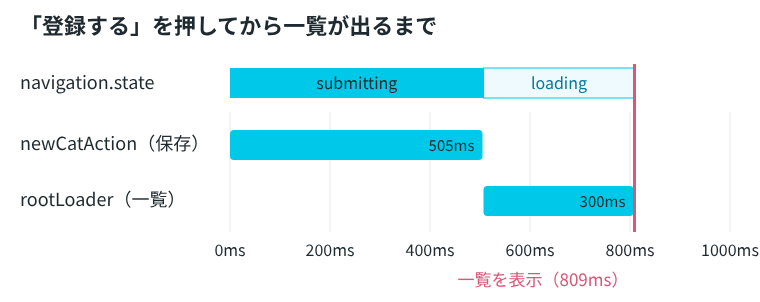
From the submission until the list appeared, navigation.state changed in the order submitting, loading, idle. It was submitting while the action ran, and loading while the loader was called again to reload the list.
Disable the button with useNavigation while submitting
When saving takes time, pressing the button can look like nothing happened. The pending UI guide explains that the state of a submission made with Form can be checked with useNavigation (the data mode page says the same applies in data mode). In the test, while navigation.state was submitting, I disabled the button and changed its label.
import { Form, useActionData, useNavigation } from 'react-router';

export function NewCat() {
  const actionData = useActionData<typeof newCatAction>();
  const navigation = useNavigation();
  const submitting = navigation.state === 'submitting';
  return (
    <Form method="post">
      {/* The name field, error display, and fur color field are the same as before */}
      <button type="submit" disabled={submitting}>
        {submitting ? '登録中…' : '登録する'}
      </button>
    </Form>
  );
}
About 200 ms after pressing the Register button, the label had changed to "Registering…". The URL was still /new.
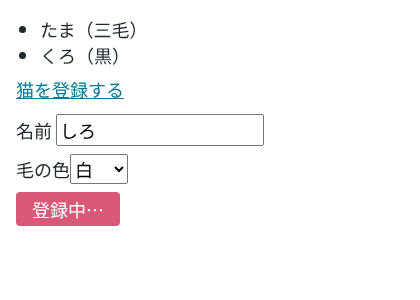
With this code, the button returns to its normal label, Register, during loading, while the loader is called again. In the test record, the roughly 300 ms between the end of the action and the list appearing was loading, and NewCat was re-rendered in the loading state. In that state, the submitting check is false. The state becomes idle only when the list appears, so if you want to keep the button disabled until then, you can check with navigation.state !== 'idle' (I did not test this).
Let the action receive the input and return the result
In React Router's data mode, you define action on a route, and when you submit with Form method="post", the action receives the input through request.formData(). In the test, returning an input error with status 400 via data() let useActionData show it on the screen, and the list loader was not called again. Returning redirect after saving caused the list loader to be called again automatically, and the list was shown with the new cat added. An action in createBrowserRouter is a function that runs in the browser, so if you want to save to a server, you write the code that sends the data to the server inside the action. The display during submission can be switched using the state from useNavigation. What the action returns decides both whether an error is shown and whether the user is moved to another page after saving.