
How to Hide Empty Elements with CSS :empty
This article was translated from the Japanese original with AI. 日本語の原文を読む
An error message box shows as an empty frame even when there is no message. This problem of an empty element being displayed can be solved with the CSS :empty selector and display: none, which hide the element only when its content is empty. However, if there is even one space or line break between the tags, :empty does not match. This article summarizes what kinds of content count as empty and how to handle the case where whitespace gets in, along with the results I confirmed in a test environment.
The test environment was Ubuntu 24.04, Node.js 22.23.4, Playwright 1.63.0, and headless Chromium 153. I opened HTML and CSS pages with Playwright and recorded the result of matches(":empty") and the values from getComputedStyle() for each element. I did not test Firefox or Safari. The browser version support is based on the compatibility data (@mdn/browser-compat-data 8.1.9).
Hiding an empty element with display: none
I'll use an error message box as an example. When there is no message, I output the box with nothing inside and hide it with :empty.
<div class="error"></div>
<div class="error">メールアドレスを入力してください</div>.error {
margin: 8px 0;
padding: 8px 12px;
border: 1px solid #d85878;
border-radius: 4px;
color: #d85878;
}
.error:empty {
display: none;
}:empty is a pseudo-class that matches elements with no children. In the test environment, an empty .error had display set to none and a height of 0. A .error containing a message stayed display: block and appeared as a box 39px high.
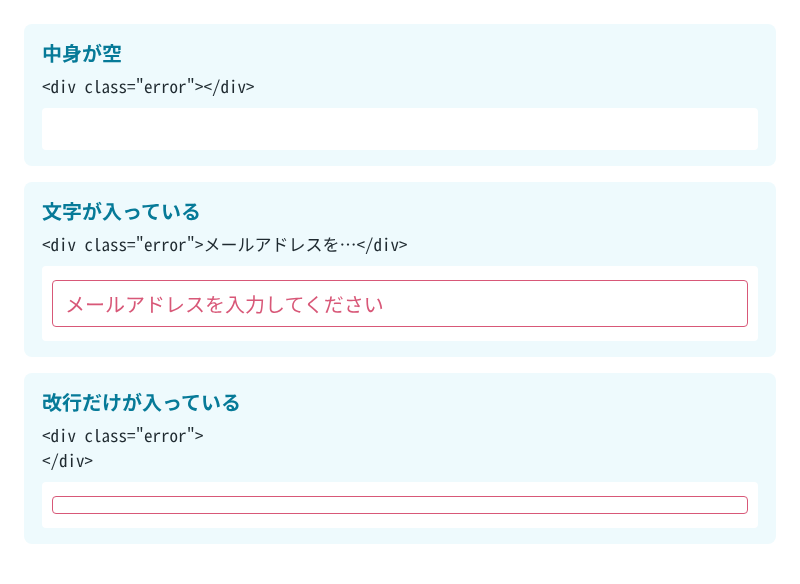
One space or line break is enough to stop an element from matching as empty
The third box is HTML that was formatted for readability, with the opening and closing tags on separate lines.
<div class="error">
</div>
Nothing visible is inside, but the line break between the tags remains as a text node. As stated on MDN's :empty page, text nodes that contain only whitespace count as children for :empty. In the test environment too, this box did not match :empty. It stayed display: block and appeared as a box 18px high, made up of only the padding and border.
When building HTML in templates or server-side code, output nothing between the opening and closing tags when the content is empty.
I also checked in the test environment whether other kinds of content match :empty.
| Element content | Matched :empty? |
|---|---|
Nothing: <div></div> |
Matched |
Only a comment: <div><!-- comment --></div> |
Matched |
Nothing, with text shown by ::before
content |
Matched |
<input> and <img> |
Matched |
| One half-width space | Did not match |
| One line break | Did not match |
| A line break and indentation followed by a comment | Did not match |
|
Did not match |
<br> |
Did not match |
Only an empty <span></span> |
Did not match (the inner span itself matched) |
Comments and text produced by the CSS content property do not affect whether an element is considered empty. This also matches what MDN's page describes. On the other hand, if you put a line break or indentation before or after a comment, the whitespace text becomes a child, so the element no longer matches.
<input> and <img> are elements that never have children, so they always match :empty. In the test environment, an <input> with value="入力済み" (Japanese for "already entered") also matched. This means :empty cannot be used to check whether an input field is empty.
Differences between the specification and current browser behavior
According to the compatibility data, :empty is available from Chrome 1, Edge 12, Firefox 1, and Safari 3.1.
The Selectors Level 4 specification defines :empty as "an element that has no children, except that it may have document white space characters." The examples in the specification also list <p> </p> as matching :empty.
However, MDN's :empty page notes that browsers do not yet support this change. In the test environment, Chromium 153 also did not match elements that contained only a half-width space or a line break. Rather than relying on the specification's definition, it is safest to make sure no whitespace is output.
MDN's page introduces the prefixed Firefox pseudo-class :-moz-only-whitespace as an implementation of this Selectors Level 4 change. According to the compatibility data, it is available from Firefox 1, and Chrome, Edge, and Safari do not support it.
The similarly named :blank does not select elements that contain only whitespace. MDN describes it as a pseudo-class that selects empty user input elements (<input> and <textarea>), and it carries a note that using it is risky because the specification is still changing.
How the behavior changes when you change content with JavaScript
When JavaScript rewrites a message, :empty also switched according to the content. In the test environment, I performed the following operations on an empty .error in order.
| Operation | :empty |
Display |
|---|---|---|
textContent = "メールアドレスを入力してください" |
Did not match | Shown as a box 39px high |
textContent = "" |
Matched | Disappeared |
textContent = " " (half-width space) |
Did not match | A box 18px high remained |
After removing children, add document.createTextNode("") (zero-length string) |
Matched | Disappeared |
To clear a message, setting textContent to an empty string makes :empty match. Setting it to a half-width space left the box visible, just like a line break in HTML. When the only child was a zero-length string, it matched. The specification also defines whether text counts as empty based on whether its length is 0.
If line breaks have gotten into the HTML sent from the server and you cannot fix the output, you can also remove whitespace-only content with JavaScript.
for (const el of document.querySelectorAll(".error")) {
  if (el.textContent.trim() === "") {
    el.replaceChildren();
  }
}
trim() removes the whitespace and line break characters at the start and end of a string. If the result is an empty string, replaceChildren() is called with no arguments to empty the child nodes. In the test environment, a .error that contained only a line break started matching :empty and disappeared. A .error with text was displayed as before.
replaceChildren() also removes child elements, not just text. Use this approach for boxes that contain only text, like .error.
The article "CSS: Adding a Round Number Badge to an Icon" on this blog also covers an example that hides a badge showing a notification count with :empty when the count is 0.