
How to Build a Copy-to-Clipboard Button in React
This article was translated from the Japanese original with AI. 日本語の原文を読む
A "Copy" button placed next to a command or URL can work the same way everywhere if you create one custom hook that calls navigator.clipboard.writeText(). The logic that shows "Copied" after a press and reverts it after 2 seconds, and the display for when copying fails, can also be kept inside the hook.
In a test environment, I built a small page with a copy button next to a command. I drove Google Chrome for Testing, a Chromium-based browser, with Playwright, and checked what ended up on the clipboard and how the display changed.
The test environment is Ubuntu 24.04 and Node.js 22.22.0. I used react / react-dom 19.3.1, @types/react 19.3.0, typescript 7.0.2, and esbuild 0.28.2. I type-checked the .tsx with tsc, transformed it with esbuild, and drove Google Chrome for Testing 153 with Playwright 1.56.1. I did not use StrictMode. I did not test Firefox, Safari, or mobile browsers.
Copying uses navigator.clipboard.writeText(), and the result of the returned Promise decides whether to show "Copied" or "Could not copy". On insecure http pages (other than localhost and 127.0.0.1), navigator.clipboard does not exist at all, so check for it before calling. Keep the timer that resets the display in a ref, and stop it when the button is pressed again and when the component unmounts.
Putting the copy logic in a custom hook
This is the hook I used for testing. Calling copy(text) writes to the clipboard and puts the result in status. status has three values: 'idle' for nothing done, 'copied' for success, and 'error' for failure.
import { useEffect, useRef, useState } from 'react';

export type CopyStatus = 'idle' | 'copied' | 'error';

export function useCopyToClipboard(resetMs = 2000) {
  const [status, setStatus] = useState<CopyStatus>('idle');
  const timerRef = useRef<number | undefined>(undefined);
  const mountedRef = useRef(false);

  // On unmount, stop the timer that resets the display
  useEffect(() => {
    mountedRef.current = true;
    return () => {
      mountedRef.current = false;
      window.clearTimeout(timerRef.current);
    };
  }, []);

  async function copy(text: string): Promise<boolean> {
    let ok = false;
    try {
      // On an insecure http page, navigator.clipboard does not exist at all
      if (!navigator.clipboard) throw new Error('Clipboard API が使えません');
      await navigator.clipboard.writeText(text);
      ok = true;
    } catch (e) {
      console.warn('コピーに失敗しました', e);
    }
    // If the button was removed from the screen while the write was pending, touch neither the display nor the timer
    if (!mountedRef.current) return ok;
    setStatus(ok ? 'copied' : 'error');
    // Stop the previous timer, then set a new one that resets the display after a set time
    window.clearTimeout(timerRef.current);
    timerRef.current = window.setTimeout(() => setStatus('idle'), resetMs);
    return ok;
  }

  return { status, copy };
}
writeText() returns a Promise that resolves when the write finishes, and it fails with NotAllowedError when writing is not allowed. So by using await and wrapping it in try / catch, you can separate success from failure.
The timer ID is not a value that affects the display, so I store it in useRef rather than useState. The official reference's example of holding a value in a ref also stores an interval ID in a ref and uses it to stop the interval later. Because the previous timer is stopped just before a new one is set, pressing the button again restarts the 2-second count from the last press.
Since writeText() returns a Promise, the button may be removed from the screen while the write is still pending. If the timer were set after that, the cleanup would already have run, so nothing would stop it. mountedRef records whether the button is still on screen; if it has been removed, the hook finishes without touching the display or the timer. I did not reproduce the case where the component is removed during the write.
In the TypeScript DOM type definitions, navigator.clipboard is written as readonly clipboard: Clipboard;, which says it always exists. Even so, the if (!navigator.clipboard) check did not cause a type error, and the type check passed. In real browsers, as shown in the section on cases where copying fails, it can be undefined.
Switching the button label and the text for screen readers
This is the button component that uses the hook. After a press, the button label changes to "Copied" and a message with the result appears below it.
import { useCopyToClipboard } from './useCopyToClipboard';

type Props = { text: string; label?: string };

export function CopyButton({ text, label = 'コピー' }: Props) {
  const { status, copy } = useCopyToClipboard();

  return (
    <>
      <button type="button" onClick={() => copy(text)}>
        {status === 'copied' ? 'コピーしました' : label}
      </button>
      {/* Also report the result to screen readers */}
      <span role="status" className="copy-status">
        {status === 'copied' && 'クリップボードにコピーしました'}
        {status === 'error' && 'コピーできませんでした。手動で選択してコピーしてください'}
      </span>
    </>
  );
}
The result message is placed in an element with role="status". According to MDN's status role description, this element behaves as if aria-live="polite" were set, even without specifying it. When the content changes, screen readers announce it after the user's activity settles. MDN's live regions guide recommends placing the element in the page empty from the start and changing its content later. So this component always renders the <span> and only switches the text inside it. In this test, I did not listen to the output of an actual screen reader.
The caller only needs to pass the string to copy, like <CopyButton text="npm install react" />.
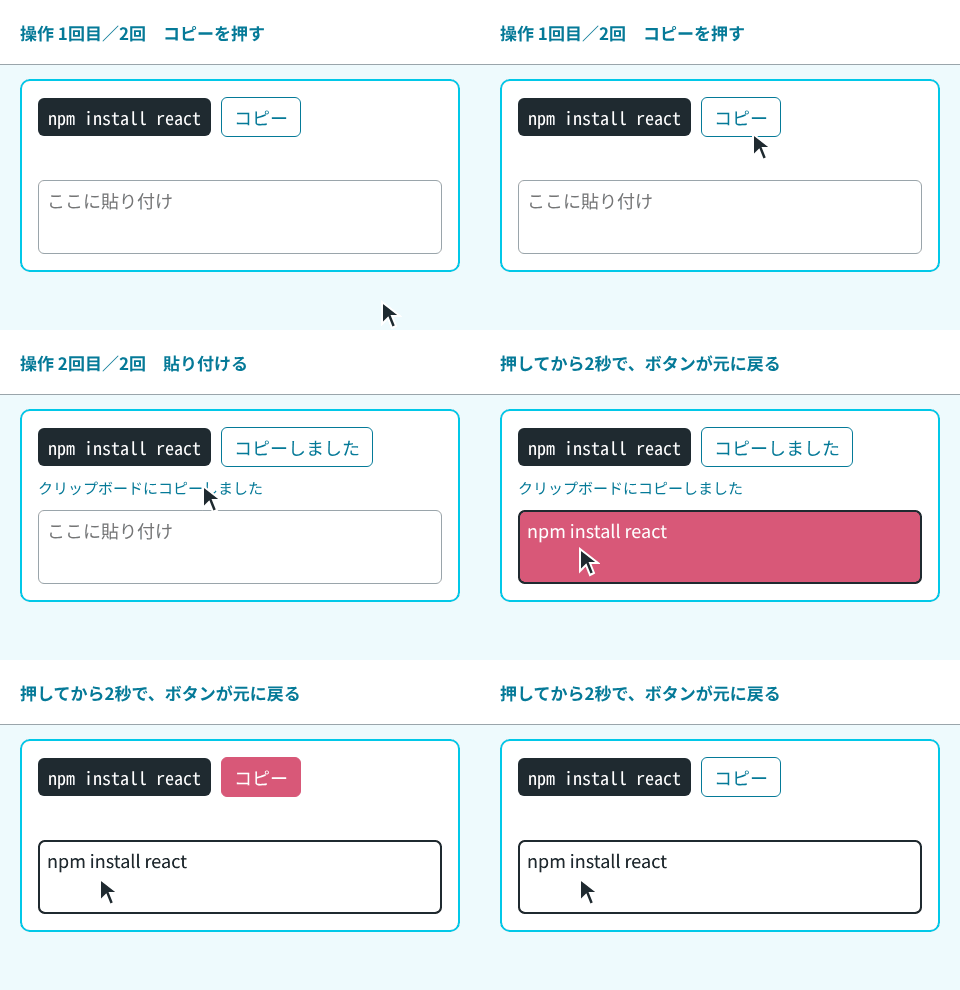
What I observed after pressing the button
After pressing the copy button, I recorded the content read back with readText() and the content pasted into an input field with Ctrl+V. Both matched the string passed to the button. The display still showed "Copied" at 1.5 seconds and returned to "Copy" by 2.3 seconds.
押した直後: ボタン「コピーしました」 状態「クリップボードにコピーしました」
readText: "npm install react"
textarea に Ctrl+V: "npm install react"
1.5秒後: ボタン「コピーしました」 状態「クリップボードにコピーしました」
2.3秒後: ボタン「コピー」 状態「」
I also tested pressing it again. I pressed once, then pressed again 1 second later. At 2.3 seconds after the first press it still showed "Copied", and at 3.3 seconds it had returned. The count restarted at the second press.
1回目から2.3秒後: ボタン「コピーしました」 状態「クリップボードにコピーしました」
1回目から3.3秒後: ボタン「コピー」 状態「」
Cases where copying fails and what is displayed
Writing to the clipboard is only possible in a secure context (a page served over https, or a page opened on localhost or 127.0.0.1). On a page for an ordinary domain opened over http, navigator.clipboard is undefined, so writeText() cannot be called as is. This is why the hook checks first.
In the test environment, I used a browser launch option to point the hostname insecure.example to a local server and opened that hostname over http. isSecureContext was false and navigator.clipboard was undefined. Pressing the button showed the failure message.
isSecureContext: false  typeof navigator.clipboard: undefined
  [console.warning] コピーに失敗しました Error: Clipboard API が使えません
押した直後: ボタン「コピー」 状態「コピーできませんでした。手動で選択してコピーしてください」
The other case is when the page is embedded in an iframe from a different origin. According to MDN's Clipboard API security considerations, in Chromium-based browsers, the clipboard-write Permissions Policy must be allowed for the clipboard to be used inside an iframe. In an iframe whose embedding page did not set the allow attribute, writeText() failed with NotAllowedError. In an iframe with allow="clipboard-write", the same button copied successfully.
  [console.warning] コピーに失敗しました NotAllowedError: Failed to execute 'writeText' on 'Clipboard': The Clipboard API has been blocked because of a permissions policy applied to the current document. See https://crbug.com/414348233 for more details.
allow なし: ボタン「コピー」 状態「コピーできませんでした。手動で選択してコピーしてください」
allow="clipboard-write" あり: ボタン「コピーしました」 状態「クリップボードにコピーしました」
Browsers also differ. The same MDN explanation says Chromium-based browsers require either the clipboard-write permission or that the call happen right after a user action, while Firefox and Safari require a user action right before the call. MDN's explanation of user activation gives a button click as a typical example. That is why copy is called inside the button's onClick. This test used only Google Chrome for Testing, a Chromium-based browser, and granted read and write permissions through Playwright. I have not checked how Firefox and Safari behave.
If nothing is shown when copying fails, the user may paste the content they copied earlier without noticing. Always show a failure message, and keep the string to be copied visible on the page so it can be selected and copied by hand.
For document.execCommand('copy'), which predates the Clipboard API: MDN's execCommand() reference marks this method as deprecated and recommends the Clipboard API for clipboard operations. This article's hook does not use it.
Stopping the timer on unmount
The button may be removed from the screen while "Copied" is still showing. React calls the cleanup function returned from the function passed to useEffect
when the component is removed from the screen, and the timer is stopped there.
In the test, I removed the button right after pressing it and waited 2.5 seconds. I counted the number of times a setTimeout callback with a delay of 1 second or more ran, and it was 0. The timer that resets the display stopped together with the button.
押した直後: ボタン「コピーしました」 状態「クリップボードにコピーしました」
ボタンの数: 0
2.5秒後に動いた、表示を戻すタイマーの数: 0
Key points for building a copy button
Copying itself takes one line with navigator.clipboard.writeText(). To make it usable as a button, split the result into 'copied' and 'error' for display, keep the timer that resets the display in a ref, and stop it when the button is pressed again and when the component unmounts. Putting the result text in an element with role="status" lets screen readers announce it too. Copying does not work on insecure http pages or inside an iframe without allow, so prepare a failure message and a string the user can select by hand.