
React useRef vs useState: Choosing by Render Count
This article was translated from the Japanese original with AI. 日本語の原文を読む
When you change a value from useState, React re-renders the component. When you change current on a useRef, no render happens. This difference gives a simple rule: put values that appear on screen in useState, and put values you only need to remember without showing them in useRef.
In a test environment, I made a component that writes one line to a log on every render. Using a click count and a timer ID as examples, I counted renders and compared them.
The test environment was Ubuntu 24.04 with Node.js 22.22.0. I used react and react-dom 19.3.1, @types/react 19.3.0, typescript 7.0.2, esbuild 0.28.2, and jsdom 29.1.1. I type-checked the .tsx files with tsc, transformed them with esbuild, and ran them on jsdom. I did not use StrictMode except in the last section. I ran the development build only and did not test the production build. The GIF was recorded by operating Chromium 141 with Playwright 1.56.1.
Put values that appear on screen in useState. Put values that event handlers only need, such as a timer ID, in useRef. A regular variable (let) is recreated on every render, so it cannot be used to remember a value across renders.
How to count renders
In the test, I called log at the top of the component function, which recorded one line per render. log is a test helper that just collects strings in an array. In a development build without StrictMode, the number of lines equals the number of renders.
// Keep the click count in state
export function StateCounter() {
  const [count, setCount] = useState(0);
  log(`描画 StateCounter count=${count}`);

  return (
    <div>
      <p className="value">表示:{count}回</p>
      <button className="plus" onClick={() => setCount(count + 1)}>+1</button>
    </div>
  );
}
Putting the count in useRef doesn't update the screen
The following RefCounter is the same counter written with useRef. This is a bad example: a value shown on screen is stored in a ref. It also has a second button that updates a different state, which is there only to trigger a render.
// Keep the click count in a ref (a bad example: a value shown on screen is in a ref)
export function RefCounter() {
  const countRef = useRef(0);
  const [, setTick] = useState(0);
  log(`描画 RefCounter countRef.current=${countRef.current}`);

  return (
    <div>
      <p className="value">表示:{countRef.current}回</p>
      <button
        className="plus"
        onClick={() => {
          countRef.current = countRef.current + 1;
          log(`クリック後 countRef.current=${countRef.current}`);
        }}
      >
        +1
      </button>
      <button className="rerender" onClick={() => setTick((t) => t + 1)}>
        別の state を更新
      </button>
    </div>
  );
}
In the test environment (jsdom), I pressed "+1" three times on each of the two components, then pressed the button that updates another state on RefCounter.
--- Initial render
描画 StateCounter count=0
描画 RefCounter countRef.current=0
--- Click +1 on StateCounter three times
描画 StateCounter count=1
描画 StateCounter count=2
描画 StateCounter count=3
画面 StateCounter: 表示:3回
--- Click +1 on RefCounter three times
クリック後 countRef.current=1
クリック後 countRef.current=2
クリック後 countRef.current=3
画面 RefCounter: 表示:0回
--- Click "Update another state" on RefCounter
描画 RefCounter countRef.current=3
画面 RefCounter: 表示:3回
StateCounter rendered once per click, and the screen showed 3. RefCounter raised countRef.current to 3, but it never rendered, and the screen stayed at 0. Only when the other state was updated did a render happen, and the screen finally showed 3.
The GIF below shows the same operations in Chromium. The render count and the countRef.current lines were written from outside React by the recording script, which counted them from the log.
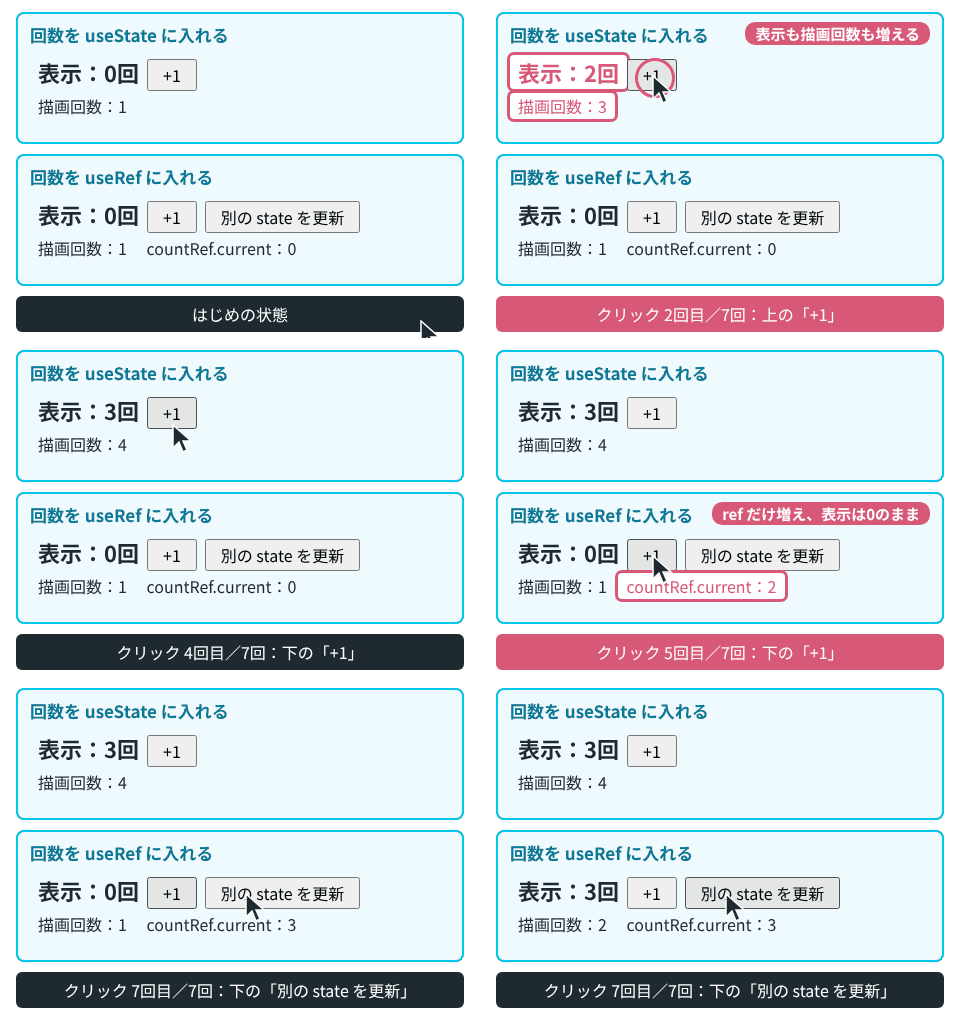
The official useRef reference, under caveats, also says that changing a ref does not trigger a render, because React does not know when ref.current changes. The same caveats say that, apart from initialization, you should not read or write ref.current during rendering. RefCounter reads countRef.current during rendering, so when the screen would show the new value depended on other state updates. Put values that appear on screen in useState.
Keep the timer ID in useRef
A ref is suited to values that event handlers need but that don't appear on screen. The official learning page on referencing values with refs, under when to use refs, lists a timer ID as the first example.
Here I wrote a stopwatch that increments a count every 100ms in three ways, changing only where the timer ID is stored. The elapsed count ticks is shown on screen, so it is useState in all three. The useRef version is below.
// Keep the timer ID in a ref
export function StopwatchRef() {
  const [ticks, setTicks] = useState(0);
  const intervalRef = useRef<ReturnType<typeof setInterval> | null>(null);
  log(`描画 ref ticks=${ticks}`);

  function handleStart() {
    intervalRef.current = setInterval(() => setTicks((t) => t + 1), TICK_MS);
  }
  function handleStop() {
    log(`停止 intervalRef.current=${intervalRef.current === null ? 'null' : 'ID あり'}`);
    if (intervalRef.current !== null) clearInterval(intervalRef.current);
    intervalRef.current = null;
  }

  return <Buttons ticks={ticks} onStart={handleStart} onStop={handleStop} />;
}
The other two versions store the ID in a regular variable (let intervalId) and in state (intervalId). In each case, I clicked the start button, waited 20ms, then waited another 450ms. Then I clicked the stop button, waited 20ms, and waited another 450ms. To count the renders caused by the timer one by one, this test does not use the test act helper, and it waits in real time.
=== タイマーの ID を let に入れる
はじめの描画: 描画 1回
開始をクリック: 描画 0回
450ms 待つ: 描画 4回 表示=4
停止をクリック: 停止 intervalId=undefined 描画 0回
さらに 450ms 待つ: 描画 5回 表示=9
=== タイマーの ID を state に入れる
はじめの描画: 描画 1回
開始をクリック: 描画 1回
450ms 待つ: 描画 4回 表示=4
停止をクリック: 停止 intervalId=ID あり 描画 1回
さらに 450ms 待つ: 描画 0回 表示=4
=== タイマーの ID を ref に入れる
はじめの描画: 描画 1回
開始をクリック: 描画 0回
450ms 待つ: 描画 4回 表示=4
停止をクリック: 停止 intervalRef.current=ID あり 描画 0回
さらに 450ms 待つ: 描画 0回 表示=4
The results are summarized in this table.
| Where the ID is stored | Renders on the start click | Renders on the stop click | Could it be stopped? |
|---|---|---|---|
let |
0 | 0 | No (the display went from 4 to 9) |
useState |
1 | 1 | Yes |
useRef |
0 | 0 | Yes |
The let version did not stop when I pressed stop. The intervalId that handleStop read was undefined. A regular variable is recreated on every render. When the timer triggers a re-render, the new handleStop created in that render reads a new intervalId that doesn't contain the ID.
The useState version does stop, but each of the start and stop clicks added one render that changed nothing on screen. The useRef version stops and has no extra renders. The official useRef reference, under referencing a value with a ref, also says that a ref's value persists across renders and that changing it does not trigger a render.
Reading right after an update gives different values for state and ref
Inside an event handler, reading a value right after updating it gave different results for state and ref. I pressed a button with the following handler once.
function handleClick() {
  setCount(count + 1);
  countRef.current = countRef.current + 1;
  log(`直後に読む count=${count} countRef.current=${countRef.current}`);
  setTimeout(() => {
    log(`500ms 後に読む count=${count} countRef.current=${countRef.current}`);
  }, 500);
}直後に読む count=0 countRef.current=1
500ms 後に読む count=0 countRef.current=1Even 500ms later, count was still 0. As the official learning page on state as a snapshot, under rendering takes a snapshot in time explains, a handler sees the state from the render in which it was created. countRef.current was 1 right after it was rewritten. If you only want to read the latest value inside a handler, a ref works. If the value appears on screen, put it in state.
StrictMode doubles the render log
When counting renders, be careful with StrictMode. I wrapped StateCounter in StrictMode and ran the development build. The log looked like this.
--- Initial render
描画 StateCounter count=0
描画 StateCounter count=0
--- Click +1 once
描画 StateCounter count=1
描画 StateCounter count=1
Both the initial render and the render from one click left two lines each. According to the official useRef reference, under caveats, StrictMode calls component functions twice, and this only happens in development. When you count renders to compare useState and useRef, turn off StrictMode. If you can't, remember that each render writes two lines and read the log with that in mind.