
Reset React Component State by Changing the key
This article was translated from the Japanese original with AI. 日本語の原文を読む
You switch chats, but the unsent draft for the previous contact is still in the input box. This happens because React carries over the state of the same component rendered at the same position in the tree. If you pass a key to the component and change it when the contact changes, React recreates the component and resets its state to the initial values.
In my test environment, I compared the behavior with and without a key in jsdom and Chromium. I also checked how this differs from clearing state in an effect, how to reset only some of the state, and which values must not be used as a key.
The test environment was Ubuntu 24.04 and Node.js 22.22.0. I used react / react-dom 19.3.1, @types/react 19.3.0, typescript 7.0.2, esbuild 0.28.2, and jsdom 29.1.1. I type-checked the .tsx files with tsc, transformed them with esbuild, and ran them on jsdom. I did not use StrictMode. The GIF was recorded with Chromium 141 operated through Playwright 1.56.1.
- 1. A component at the same position keeps its state
- 2. Passing a key recreates the component as a new one
- 3. How this differs from clearing state in an effect
- 4. When you want to reset only some of the state
- 5. Resetting a form to its initial state with a reset button
- 6. Do not use a value that changes on every render as a key
- 7. When you want to keep the draft of the previous contact
A component at the same position keeps its state
For the test, I used a Chat component where you write a message to each contact. The unsent draft (draft) is held in state, and the child SendOptions also holds the "urgent" checkbox in state. log is a helper function for the test that records rendering and effects.
// Chat.tsx
import { useEffect, useState } from 'react';
import type { Contact } from './contacts';
import { log } from './log';

export function Chat({ contact }: { contact: Contact }) {
  const [draft, setDraft] = useState('');
  log(`描画 Chat(${contact.name}) draft="${draft}"`);

  useEffect(() => {
    log(`エフェクト開始(${contact.name})`);
    return () => {
      log(`後片付け(${contact.name})`);
    };
  }, [contact.id]);

  return (
    <section className="chat">
      <textarea
        value={draft}
        placeholder={`${contact.name} へのメッセージ`}
        onChange={(e) => setDraft(e.target.value)}
      />
      <SendOptions />
      <button>{contact.name} に送る</button>
    </section>
  );
}

// Also give child components their own state.
function SendOptions() {
  const [urgent, setUrgent] = useState(false);
  return (
    <label>
      <input
        type="checkbox"
        checked={urgent}
        onChange={(e) => setUrgent(e.target.checked)}
      />
      急ぎ
    </label>
  );
}
On the parent side, the contact selected in the contact list (ContactList) is passed to Chat. At first, I did not add a key.
// Messenger.tsx (excerpt; imports and ContactList omitted)
// No key: when the contact changes, the same Chat is reused.
export function MessengerNoKey() {
  const [toId, setToId] = useState('alice');
  const to = contacts.find((c) => c.id === toId)!;
  return (
    <div>
      <ContactList onSelect={setToId} />
      <Chat contact={to} />
    </div>
  );
}
I typed "Hello" for Alice, checked "urgent", and then switched to Bob.
--- 1a. <Chat contact={to} /> (no key) ---
(中略)
  > Bob をクリック
  [描画 Chat(Bob) draft="こんにちは"]
  [後片付け(Alice)]
  [エフェクト開始(Bob)]
  画面: textarea="こんにちは" placeholder="Bob へのメッセージ" 急ぎ=true
  textarea の DOM は前と同じ要素か: true
The placeholder changed to "Message to Bob", but the "Hello" text and the checked "urgent" box for Alice remained. The textarea DOM was also the same element as before. If you sent this now, the text written to Alice would be sent to Bob.
According to the explanation of state and tree positions on the Preserving and Resetting State page, React holds state rather than the component itself, and it decides which component owns the state by its position in the render tree. As long as the same component keeps rendering at the same position, its state is kept even when its props change (explanation of the same component at the same position).
Note that the effect has contact.id in its dependency array, so even without a key, the cleanup and setup run again each time the contact changes.
Passing a key recreates the component as a new one
The only change is one line. I pass the contact ID as the key to Chat.
// Messenger.tsx (excerpt)
// With key: when the contact changes, Chat is recreated.
export function MessengerWithKey() {
  const [toId, setToId] = useState('alice');
  const to = contacts.find((c) => c.id === toId)!;
  return (
    <div>
      <ContactList onSelect={setToId} />
      <Chat key={to.id} contact={to} />
    </div>
  );
}
Here is the result of the same operation.
--- 1b. <Chat key={to.id} contact={to} /> ---
(中略)
  > Bob をクリック
  [描画 Chat(Bob) draft=""]
  [後片付け(Alice)]
  [エフェクト開始(Bob)]
  画面: textarea="" placeholder="Bob へのメッセージ" 急ぎ=false
  textarea の DOM は前と同じ要素か: false
  > Alice をクリック
  [描画 Chat(Alice) draft=""]
  [後片付け(Bob)]
  [エフェクト開始(Alice)]
  画面: textarea="" placeholder="Alice へのメッセージ" 急ぎ=false
After switching to Bob, the input box was empty, and the "urgent" checkbox in the child SendOptions was also unchecked. The textarea was replaced by a new DOM element. Even after switching back to Alice, "Hello" did not return and the box stayed empty. When the component was recreated, the previous state was discarded.
I recorded a GIF in Chromium with the Chat without key and the Chat with key placed one above the other. It shows typing into each input box and then switching the contact. Pressing the "send to" buttons at the top switches the contact for both Chat components. (The GIF does not check the "urgent" box.)
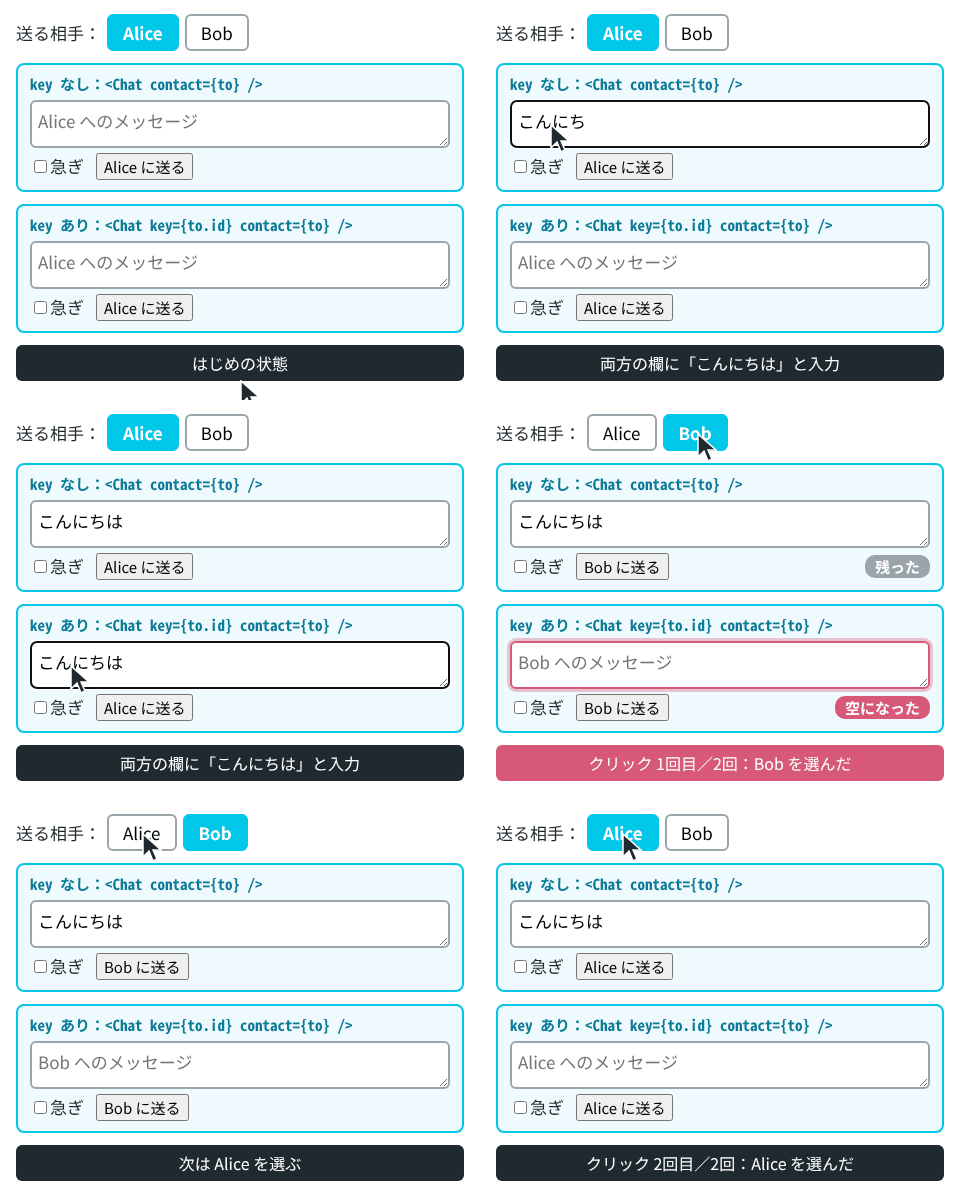
According to the explanation of resetting state with a key on the same page, when you specify a key, React uses the key itself as part of the position, not the order among the parent's children. So even Chat components written in the same place in JSX are treated as different components and do not share state when their key values differ.
A key only needs to be unique among siblings within the same parent. It does not need to be unique across the whole app (note after the same explanation). Also, a key is not passed to the component as a prop. If Chat needs the contact information, pass contact separately, as in the test code (note about keys on the Rendering Lists page).
How this differs from clearing state in an effect
You can also clear state in an effect when the ID changes, without using a key. Based on the example of resetting all state when a prop changes on the You Might Not Need an Effect page, I wrote both versions and compared them. CommentBox displays the received comment in an input box and logs every time it renders.
// EffectReset.tsx (excerpt; imports and CommentBox omitted)
// 🔴 When userId changes, clear comment in an effect.
export function ProfileEffect({ userId }: { userId: string }) {
  const [comment, setComment] = useState('');
  useEffect(() => {
    setComment('');
  }, [userId]);
  return <CommentBox userId={userId} comment={comment} onChange={setComment} />;
}

// ✅ Pass key from the outside. The consumer just passes userId normally.
export function ProfileKey({ userId }: { userId: string }) {
  return <Profile key={userId} userId={userId} />;
}

function Profile({ userId }: { userId: string }) {
  const [comment, setComment] = useState('');
  return <CommentBox userId={userId} comment={comment} onChange={setComment} />;
}
I typed "Nice photo" and then changed userId from alice to bob.
--- 2a. Clear in an effect (ProfileEffect) ---
(中略)
  > userId を alice から bob に変える
  [描画 CommentBox userId=bob comment="すてきな写真"]
  [描画 CommentBox userId=bob comment=""]
input の値: ""--- 2b. Recreate with key (ProfileKey) ---
(中略)
> userId を alice から bob に変える
[描画 CommentBox userId=bob comment=""]
input の値: ""Both ended with an empty box. However, with the effect version, the bob profile was first rendered with the comment typed for alice still in place. After that, the effect ran and rendering happened again, which emptied the box. With the key version, the box was empty from the first render.
The linked page also says the effect approach is inefficient because it renders with stale values and then renders again. Each time a component with state is added, you also need to write more code to clear it. With a key, all the state in the recreated component and its children goes back to the initial values at once.
If you put the key on an outer component like ProfileKey, users only need to write <ProfileKey userId={id} />. The recreation by key can be hidden as an internal detail that callers do not see (explanation following the same example).
When you want to reset only some of the state
Recreating a component with a key resets all of its state. If you want to clear the comment but keep the star rating (rating), this does not work. The example of adjusting some state when a prop changes on the same page shows a way to keep the previous value in state and compare it during rendering.
// AdjustDuringRender.tsx (excerpt; imports and Child omitted)
// To reset only some state: compare with the previous userId during render.
export function ProfileAdjust({ userId }: { userId: string }) {
  const [comment, setComment] = useState('');
  const [rating, setRating] = useState(0); // Keep this.
  const [prevUserId, setPrevUserId] = useState(userId);
  if (userId !== prevUserId) {
    setPrevUserId(userId);
    setComment('');
  }
  log(`描画 ProfileAdjust userId=${userId} comment="${comment}" rating=${rating}`);
  return (
    <>
      <Child label={`comment="${comment}"`} />
      <input value={comment} onChange={(e) => setComment(e.target.value)} />
      <button id="rate" onClick={() => setRating(rating + 1)}>★ {rating}</button>
    </>
  );
}
Child is a child component that only logs the label it receives. I entered a comment, gave one star, and then changed userId.
--- 2c. Compare with previous userId during render (ProfileAdjust) ---
(中略)
  > userId を alice から bob に変える
  [描画 ProfileAdjust userId=bob comment="すてきな写真" rating=1]
  [描画 ProfileAdjust userId=bob comment="" rating=1]
  [  描画 子 comment=""]
  input の値: ""
  rating のボタン: ★ 1
ProfileAdjust was first called with the old comment, but the child was not rendered with the old comment. It rendered once with an empty comment. The star rating stayed at 1. As the official example explains, when state is updated during rendering, React discards the returned JSX and renders again immediately, before rendering the children.
However, the same explanation also notes that most components should not need this approach. Adjusting state based on props makes the data flow harder to follow. First, consider whether a key can reset everything, or whether a calculation during rendering is enough.
Resetting a form to its initial state with a reset button
The value passed as a key does not have to be an ID. The example of resetting state with a key in the useState reference passes a number as the key and increments it with a button to recreate the form. Even for a form with many inputs, you do not have to write code that resets each piece of state one by one.
// ResetButton.tsx (excerpt; imports and SignupForm omitted)
// "Reset input" returns the whole form to its initial state.
export function SignupPage() {
  const [version, setVersion] = useState(0);
  return (
    <>
      <SignupForm key={version} />
      <button id="reset" onClick={() => setVersion(version + 1)}>
        入力をやり直す
      </button>
    </>
  );
}
SignupForm holds the name input and the "agree to terms" checkbox each in state.
--- 3. Use key={version} to return the form to its initial state ---
  入力後: name="neko" 同意=true
  > 「入力をやり直す」をクリック
  クリック後: name="" 同意=false
Do not use a value that changes on every render as a key
Use a value for the key that changes only when you want the component to be recreated. If you pass a value that changes on every render, the child is recreated each time the parent re-renders for an unrelated reason. I tested this with key={Math.random()}.
// RandomKey.tsx (excerpt; imports and Note omitted)
// 🔴 The key changes on every render.
export function RandomKeyPage() {
  const [count, setCount] = useState(0);
  return (
    <>
      <Note key={Math.random()} />
      <button id="other" onClick={() => setCount(count + 1)}>関係のないボタン({count})</button>
    </>
  );
}--- 4. key={Math.random()} ---
入力後: note="メモ"
> 「関係のないボタン」をクリック
クリック後: note=""Just clicking a button unrelated to Note erased the "memo" I had typed.
If you use a value that changes on every render (such as Math.random()) as a key, the child's state and DOM are recreated each time the parent re-renders, and the typed content is lost. The rules of keys on the Rendering Lists page also says not to create keys during rendering. The note on why React needs keys, on the next section of the same page, explains that such keys cause the component and DOM to be recreated every time, and input is lost. Use a value such as a data ID that changes only when you want to recreate the component.
When you want to keep the draft of the previous contact
When a component is recreated with a key, its previous state is discarded. In my test, "Hello" did not return when I switched back to Alice. To keep a draft for each contact, the explanation of preserving state for removed components on the Preserving and Resetting State page suggests options such as lifting the draft up to a parent's state or saving it to localStorage. It also notes that since each contact is a separate conversation, adding a key based on the contact makes sense. I did not test the ways to keep the draft in this article.
React carries over the state of the same component rendered at the same position. If you pass an ID such as the contact ID as a key, React recreates that component when the value changes and resets its state, including the state of its children and the DOM. This causes fewer renders than clearing state in an effect, and you do not need to write extra code as state is added. For the key, use a value that changes only when you want the component to be recreated.