
Reactのアクセシビリティをvitest-axeでテストする方法
画像の alt の付け忘れや、アイコンだけのボタンに名前がないといったアクセシビリティの問題は、vitest-axe を使うと Vitest のテストで見つけられます。vitest-axe は、アクセシビリティの検査エンジンである axe-core を、Vitest のマッチャー toHaveNoViolations() から呼べるようにするライブラリです。
私は検証環境で、問題のあるフォームのコンポーネントを React Testing Library で描画し、どの問題が見つかり、どの問題が見逃されるかを確かめました。
検証環境は Ubuntu 24.04、Node.js 22.23.4 です。使ったのは vitest-axe 0.1.0(axe-core 4.14.0)、vitest 5.1.0、jsdom 31.0.0、@testing-library/react 16.3.3、@testing-library/dom 10.4.2、react / react-dom 19.3.1、typescript 7.0.2 です。比べるために、vitest-axe 1.0.0-pre.5 と happy-dom 21.0.4 でも一部を動かしました。Vitest のブラウザーモード、Jest と jest-axe、スクリーンリーダーでの読み上げは試していません。
vitest-axe 0.1.0 では extend-expect を読み込んでもマッチャーが使えない
npm で vitest-axe を入れると、latest のタグが付いた 0.1.0 が入ります(2026年11月の時点。1.0.0-pre.5 は pre のタグです)。
npm i -D vitest-axe@0.1.0 vitest@5.1.0 jsdom@31.0.0 @testing-library/react@16.3.3 @testing-library/dom@10.4.2 react@19.3.1 react-dom@19.3.1vitest-axe の README では、いちばん簡単な設定として、setup ファイルで vitest-axe/extend-expect を読み込む書き方を紹介しています。ところが 0.1.0 では、この書き方でマッチャーが登録されませんでした。テストは次のエラーで落ちます。
 FAIL  src/NewsletterFormFixed.test.tsx > アクセシビリティの違反がない
Error: Invalid Chai property: toHaveNoViolations
0.1.0 のパッケージの中を見ると、extend-expect.js が読み込む dist/extend-expect.js は 0 バイトの空のファイルでした。型の宣言も、Vi というグローバルな名前空間を広げる書き方で、Vitest 5 では tsc が Property 'toHaveNoViolations' does not exist のエラーを出しました。
0.1.0 を使うなら、README にあるもう1つの書き方で、vitest-axe/matchers を自分で expect.extend() に渡します。
// vitest.setup.ts
import * as matchers from 'vitest-axe/matchers';
import { cleanup } from '@testing-library/react';
import { afterEach, expect } from 'vitest';

expect.extend(matchers);

afterEach(() => {
  cleanup();
});
型は、README の「With TypeScript」の節にあるとおり、vitest のモジュールの型を広げる宣言ファイルを置きます。
// src/vitest-axe.d.ts
import 'vitest';
import type { AxeMatchers } from 'vitest-axe/matchers';

declare module 'vitest' {
  interface Assertion extends AxeMatchers {}
  interface AsymmetricMatchersContaining extends AxeMatchers {}
}
Vitest の設定では、環境を jsdom にし、上の setup ファイルを setupFiles に指定します。setup ファイルと型の宣言ファイルを置いてこの設定にすると、テストは動き、tsc もエラーなしで通りました。
// vitest.config.ts
import { defineConfig } from 'vitest/config';

export default defineConfig({
  test: {
    environment: 'jsdom',
    setupFiles: ['./vitest.setup.ts'],
  },
});
なお、1.0.0-pre.5 を入れた別のプロジェクトでは、import 'vitest-axe/extend-expect' の1行だけで、マッチャーも型も使えました。こちらの dist/extend-expect.js には expect.extend() を呼ぶコードが入っており、型の宣言も declare module "vitest" の形になっています。
問題のあるフォームをテストすると、直し方つきで落ちる
試したのは、メールアドレスを登録するフォームです。ロゴの画像に alt がなく、入力欄にはラベルの代わりに placeholder だけがあり、送信ボタンは矢印のアイコンだけです。
// src/NewsletterForm.tsx(問題のある書き方)
export function NewsletterForm() {
  return (
    <form>
      <img src="/logo.png" />
      <input type="email" placeholder="メールアドレス" />
      <button type="submit">
        <svg width="16" height="16" viewBox="0 0 16 16">
          <path d="M1 8h14M9 2l6 6-6 6" />
        </svg>
      </button>
    </form>
  );
}テストでは、render() が返す container を axe() に渡し、結果に toHaveNoViolations() を使います。axe() は Promise を返すので、await で待ちます。
// src/NewsletterForm.test.tsx
import { render } from '@testing-library/react';
import { axe } from 'vitest-axe';
import { expect, test } from 'vitest';
import { NewsletterForm } from './NewsletterForm';

test('アクセシビリティの違反がない', async () => {
  const { container } = render(<NewsletterForm />);
  expect(await axe(container)).toHaveNoViolations();
});
実行すると、ボタンと画像の2か所が違反として出ました。違反ごとに、該当する HTML、ルールの名前(button-name、image-alt)、直し方の候補、ルールの説明ページの URL が並びます。
Error: expect(received).toHaveNoViolations(expected)

Expected the HTML found at $('button') to have no violations:

<button type="submit"><svg width="16" height="16" viewBox="0 0 16 16"><path d="M1 8h14M9 2l6 6-6 6"></path></svg></button>

Received:

"Buttons must have discernible text (button-name)"

Fix any of the following:
  Element does not have inner text that is visible to screen readers
  aria-label attribute does not exist or is empty
  aria-labelledby attribute does not exist, references elements that do not exist or references elements that are empty
  Element has no title attribute
  Element does not have an implicit (wrapped) <label>
  Element does not have an explicit <label>
  Element's default semantics were not overridden with role="none" or role="presentation"

You can find more information on this issue here:
https://dequeuniversity.com/rules/axe/4.14/button-name?application=axeAPI

────────

Expected the HTML found at $('img') to have no violations:

<img src="/logo.png">

Received:

"Images must have alternative text (image-alt)"

(以下略)
出力の見出し「Fix any of the following」のとおり、その下の条件のどれか1つを満たせば違反でなくなります。画像には alt を付け、ボタンには aria-label で名前を付けました。アイコンの svg は読み上げる必要がないので、aria-hidden="true" にしています。入力欄には、useId で作った id で label を結びつけました。
// src/NewsletterFormFixed.tsx(直した書き方)
import { useId } from 'react';

export function NewsletterForm() {
  const emailId = useId();
  return (
    <form>
      <img src="/logo.png" alt="週刊ニュースレター" />
      <label htmlFor={emailId}>メールアドレス</label>
      <input id={emailId} type="email" placeholder="you@example.com" />
      <button type="submit" aria-label="登録する">
        <svg width="16" height="16" viewBox="0 0 16 16" aria-hidden="true">
          <path d="M1 8h14M9 2l6 6-6 6" />
        </svg>
      </button>
    </form>
  );
}
同じテストを直したコンポーネントに向けると、通りました。このとき、テストが通っても jsdom の Not implemented: HTMLCanvasElement's getContext() method という文が出力に出ます。jsdom で canvas が使えないことを知らせる文です。@napi-rs/canvas を入れるとこの文は出なくなります(次の節)。
vitest-axe の README は、環境を happy-dom にすると動かないという注意を載せています。検証環境の happy-dom 21.0.4 では、上の2つのテストは jsdom と同じ結果(問題のあるほうは button-name と image-alt で失敗、直したほうは成功)になりました。
テストが通っても見逃している問題
placeholder だけの入力欄は違反にならない
上のフォームで、入力欄はラベルがないのに違反として出ませんでした。入力欄だけを描画して結果を調べると、label のルールは passes(合格)に入り、決め手になった条件は non-empty-placeholder(placeholder が空でない)でした。axe-core の label のルールの定義では、placeholder があることも、ラベルの条件の1つに入っています。ラベルも placeholder もない入力欄は、violations(違反)に入りました。
一方、HTML の仕様は、placeholder 属性をラベルの代わりに使うべきではないとしています。仕様の注記によると、label のヒントは常に表示されるのに対し、placeholder のヒントは値を入力する前にだけ表示されます。テストが通っても、ラベルは自分で付けます。
jsdom では色のコントラストを調べられない
背景が白で、文字色が #cccccc の段落を描画して調べました。color-contrast のルールは violations ではなく incomplete に入り、理由は「Axe encountered an error; test the page for this type of problem manually」でした。toHaveNoViolations() は violations だけを見るので、テストは通ります。
color-contrast: incomplete error-occurred: Axe encountered an error; test the page for this type of problem manuallyaxe-core の API の説明によると、incomplete は合格とも違反とも決められなかった項目で、技術的な制約や JavaScript のエラーで起きるものです。jsdom の出力が求める @napi-rs/canvas(1.1.0)を入れて試しても、Not implemented の文が消えただけで、結果は同じ incomplete でした。なお、jest-axe の README には、色のコントラストの検査は jsdom で動かないため jest-axe では止めてある、と書かれています。色のコントラストは、このテストでは確かめられません。
ポータルで出す要素は baseElement で調べる
createPortal で document.body の直下に出すダイアログは、render() が返す container の外にあります。名前のないダイアログ(role="dialog" に aria-label などがないもの)で試しました。
// src/IconDialog.tsx
import { createPortal } from 'react-dom';

export function IconDialog() {
  return (
    <>
      <p>本文</p>
      {createPortal(
        <div role="dialog">
          <button type="button">×</button>
        </div>,
        document.body,
      )}
    </>
  );
}
描画したあとの document.body は、次の図のようになっていました。container はコンポーネントを入れた div で、ダイアログはその隣にあります。
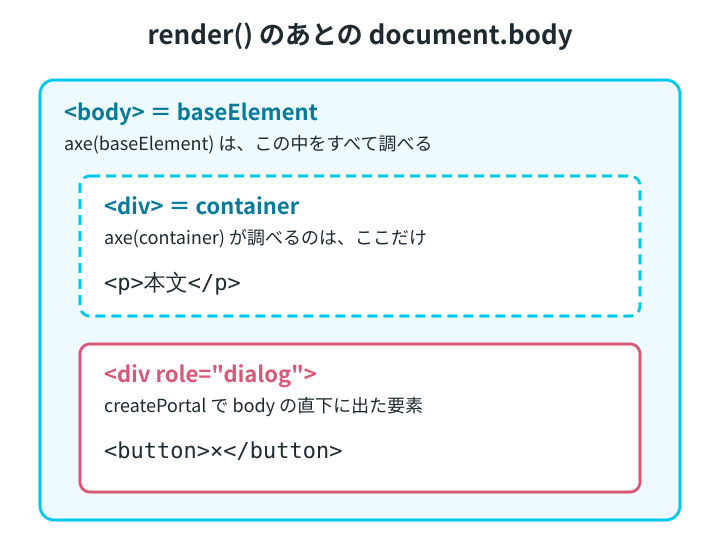
そのため、axe(container) の結果は違反なしでした。React Testing Library の render の説明にある baseElement(既定では document.body)を渡すと、ダイアログに名前がないこと(aria-dialog-name)が違反として出ました。ただし、このときは region も違反として出ます。
container の違反: なし
baseElement の違反: aria-dialog-name, region
region を止めた baseElement の違反: aria-dialog-name
region は、ページの内容がすべて main などのランドマークに入っているかを調べるルールです。コンポーネントだけを描画したテストでは、ランドマークがないので出てしまいます。jest-axe の README は、コンポーネント単体のテストでは region を止める書き方を紹介しています。そのとおりに止めると、ダイアログの違反だけが残りました。
import { configureAxe } from 'vitest-axe';

// region のルールだけを止めた axe
const axeComponent = configureAxe({
  rules: { region: { enabled: false } },
});

// テストの中で
const { baseElement } = render(<IconDialog />);
const results = await axeComponent(baseElement);
// results.violations は aria-dialog-name の1つだけ
残った aria-dialog-name は本当の問題なので、toHaveNoViolations() を使うテストは、ダイアログに名前を付けるまで落ちたままです。
configureAxe() に渡した設定は、axe-core の run のオプションとして使われます。ここで止めたのは region だけです。image-alt のような、直すべき違反のルールを止めるために使うものではありません。
調べるルールを WCAG のレベルで絞る
axe-core のルールには、wcag2a(WCAG 2.0 のレベル A)や best-practice(推奨される書き方)などのタグが付いています。axe-core の runOnly のオプションでタグを指定すると、そのタグのルールだけを使います。
const axeWcag2a = configureAxe({
  runOnly: { type: 'tag', values: ['wcag2a'] },
});
上のダイアログを描画した document.body で比べると、既定では 90 のルールで調べて aria-dialog-name と region が違反になりました。wcag2a だけにすると、調べたルールは 56 になり、違反はなくなりました。axe-core のルールの一覧を見ると、この2つはどちらも best-practice のルールで、wcag2a のタグは付いていません。
タグで絞ると、WCAG で求められていない問題は見逃します。ダイアログの名前の付け忘れのように、読み上げで困る問題も含まれるので、絞るかどうかは、何を確かめたいテストなのかで決めます。
偽のタイマーを使うテストでは、axe の前に本物に戻す
vi.useFakeTimers() で偽のタイマーにしたまま axe() を呼ぶと、結果が返らず、テストはタイムアウト(3秒に設定)で落ちました。
 FAIL  src/timers-fake.test.tsx > 偽のタイマーのまま axe を呼ぶ
Error: Test timed out in 3000ms.
axe() の直前で vi.useRealTimers() を呼ぶと、通りました。
test('axe の前だけ本物のタイマーに戻す', { timeout: 3000 }, async () => {
  vi.useFakeTimers();
  const { container } = render(<p>文</p>);
  vi.useRealTimers();
  expect(await axe(container)).toHaveNoViolations();
});
jest-axe の README にも、タイマーを偽物にすると axe-core が動かないので、axe の間だけ本物に戻す書き方が載っています。
同じファイルの中で、偽のタイマーのまま呼んだ axe() がタイムアウトすると、そのあとの本物のタイマーのテストまで「Axe is already running」というエラーで落ちました。エラーの文は、前の実行が終わるのを待ってから次を始めるように求めています。後ろのテストが落ちていても、先にタイムアウトしたテストから直します。
axe で見つかるのは問題の一部
jest-axe の README は冒頭で、このライブラリを使っても、作ったものがアクセシブルになるとは限らないと注意しています。英国政府のアクセシビリティのチーム(GDS)が、自動のテストではおよそ3割の問題を見逃したと報告していることも紹介しています。この記事の検証でも、placeholder だけの入力欄と、薄い文字色は、テストが通りました。
vitest-axe のテストは、alt や名前の付け忘れのような、HTML を見れば決められる問題を、コンポーネントを変えるたびに見つける用途に向いています。キーボードでの操作や、読み上げられる順番などは、別のテストや実際の操作で確かめます。