
Reactで件数に合わせて英語の複数形や1st・2ndを付ける方法
Intl.PluralRules を使うと、件数に合わせて 1 item と 2 items を出し分けられます。type: 'ordinal' を指定すれば、1st・2nd・3rd・11th・21st のような順番の接尾辞も、11 から 13 の例外を自分で書かずに選べます。
このオブジェクトは英単語そのものは返しません。select() が返すのは one や other のような区分の名前だけです。区分ごとの言葉は自分で用意します。React では、区分と言葉の対応表を props で渡すコンポーネントにすると扱いやすくなります。
検証環境は Ubuntu 24.04、Node.js 22.23.4(ICU 78.3)、Chromium 153 です。使ったのは react / react-dom 19.3.1、@types/react 19.3.0、typescript 7.0.2、esbuild 0.28.2、Playwright 1.63.0 です。.tsx を tsc で型チェックしてから esbuild で変換し、開発用ビルドで動かしました。ブラウザは Playwright で言語を日本語に設定して開いています。Firefox と Safari、本番用ビルド、2つの数の範囲に使う selectRange() は試していません。
select() は区分の名前を返す
new Intl.PluralRules('en-US') で作ったオブジェクトの select() に数を渡すと、英語では one か other が返ります(MDN の Intl.PluralRules の説明)。区分の名前は zero、one、two、few、many、other の6つで、言語によって使う区分が違います。
返った区分を見て、単数形と複数形を選びます。
// 英語の書式は、モジュールの中で1回だけ作って使い回す
const cardinal = new Intl.PluralRules('en-US');

// 単数形・複数形の言葉を、件数に合わせて選ぶ
export function itemLabel(count: number): string {
  return cardinal.select(count) === 'one' ? `${count} item` : `${count} items`;
}
Node.js で itemLabel() に数を渡した結果です。
| 渡した数 | 結果 |
|---|---|
0 |
0 items |
1 |
1 item |
2 |
2 items |
1.5 |
1.5 items |
-1 |
-1 item |
英語では 0 も複数形になり、-1 は単数形になりました。
「1st・2nd・3rd」は type: 'ordinal' で選ぶ
順番を表す数には、type: 'ordinal' を指定します。英語の ordinal では、select() が one(st)、two(nd)、few(rd)、other(th)の4つを返します(MDN の Intl.PluralRules の説明)。区分ごとの接尾辞を表にしておき、数の後ろに付けます。
const ordinal = new Intl.PluralRules('en-US', { type: 'ordinal' });

// 順番の接尾辞。英語の ordinal で返るのは one・two・few・other の4つ
const suffixes: Record<Intl.LDMLPluralRule, string> = {
  one: 'st',
  two: 'nd',
  few: 'rd',
  other: 'th',
  zero: 'th',
  many: 'th',
};

export function toOrdinal(n: number): string {
  return `${n}${suffixes[ordinal.select(n)]}`;
}
Record<Intl.LDMLPluralRule, string> にしているので、英語では返らない zero と many も書いておかないと型エラーになります。どちらも th にしておけば、表に抜けがなくなります。
1から25までを toOrdinal() に通すと、11th・12th・13th と 21st・22nd・23rd が正しく分かれました。
1st 2nd 3rd 4th 5th 6th 7th 8th 9th 10th 11th 12th 13th 14th 15th 16th 17th 18th 19th 20th 21st 22nd 23rd 24th 25th100台でも 101st・102nd・103rd と 111th・112th・113th になり、0 は 0th でした。この区分は、Unicode の CLDR にある英語の順序数の規則(10で割った余りと100で割った余りで決める)のとおりです。
件数と言葉の対応表を渡すコンポーネントにする
画面で言語を切り替えるなら、言語ごとに区分と言葉の対応表を用意し、コンポーネントに渡します。other は、CLDR の件数の規則でも順番の規則でも、すべての言語にある区分です。そこで、型で必ず書かせます。
import { usePluralRules } from './usePluralRules';

// other だけは必ず書かせ、ほかの区分は言語に合わせて足す
export type PluralForms = Partial<Record<Intl.LDMLPluralRule, string>> & {
  other: string;
};

type Props = {
  count: number;
  locale: string;
  forms: PluralForms;
};

// forms の中の「#」を、言語に合わせて区切った数に置き換える
export function Plural({ count, locale, forms }: Props) {
  const rules = usePluralRules(locale);
  const text = forms[rules.select(count)] ?? forms.other;
  return <>{text.replace('#', count.toLocaleString(locale))}</>;
}
other を書き忘れると、型チェックで次のエラーになりました。
typecheck/forms.ts(4,14): error TS2322: Type '{ one: string; }' is not assignable to type 'PluralForms'.
  Property 'other' is missing in type '{ one: string; }' but required in type '{ other: string; }'.
usePluralRules では useMemo を使い、言語か種類が変わったときだけ PluralRules を作り直します(公式リファレンスの useMemo の説明)。
import { useMemo } from 'react';

// 言語か種類が変わったときだけ、PluralRules を作り直す
export function usePluralRules(
  locale: string,
  type: Intl.PluralRuleType = 'cardinal',
): Intl.PluralRules {
  return useMemo(() => new Intl.PluralRules(locale, { type }), [locale, type]);
}
使う側では、言語ごとの対応表を渡します。日本語の区分は other だけなので、1つ書けば足ります。
const cartForms: Record<string, PluralForms> = {
  'en-US': { one: '# item in your cart', other: '# items in your cart' },
  'ja-JP': { other: 'カートに # 個の商品' },
};

<Plural count={count} locale={locale} forms={cartForms[locale]} />
検証では、件数を増減するボタンと、言語を切り替えるボタンを置いた画面を作りました。順位の列には toOrdinal() を使っています。
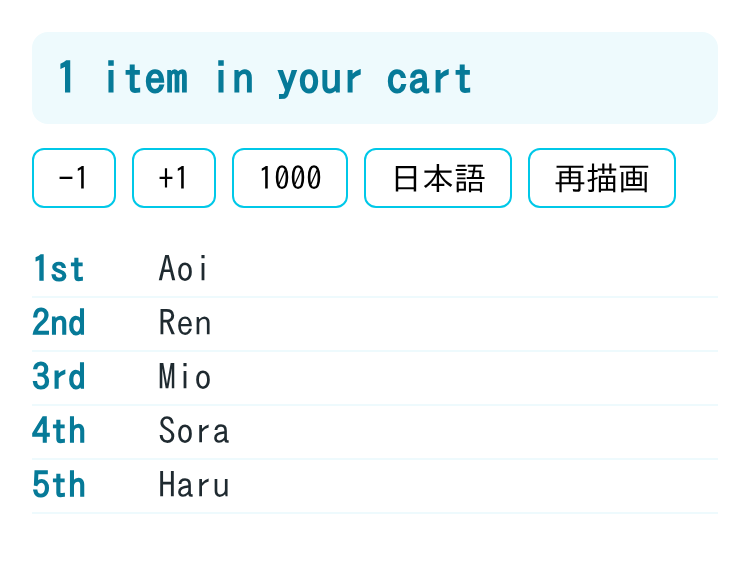
Chromium でボタンを押したときの表示は、次のとおりでした。
| 操作 | 表示 |
|---|---|
| 最初の表示(1件) | 1 item in your cart |
| 1つ減らす(0件) | 0 items in your cart |
| 2つ増やす(2件) | 2 items in your cart |
| 日本語に切り替える | カートに 2 個の商品 |
| 1000件にする | カートに 1,000 個の商品 |
| 英語に戻す | 1,000 items in your cart |
PluralRules を作った回数を数える処理を足して確かめたところ、最初の表示で1回、再描画を3回しても1回のままでした。日本語に切り替えると2回、英語に戻すと3回になり、言語が変わったときだけ作り直されていました。
日本語は区分が1つ、ロシア語は4つ
resolvedOptions().pluralCategories で、その言語が使う区分の一覧を取れます(MDN の resolvedOptions() の説明)。Node.js で出した結果です。
| 言語 | 件数(cardinal) |
順番(ordinal) |
|---|---|---|
en-US |
one, other |
few, one, two, other |
ja-JP |
other |
other |
fr-FR |
many, one, other |
one, other |
ru-RU |
few, many, one, other |
other |
ar-EG |
few, many, one, two, zero, other |
other |
日本語の select() は、0、1、2 のどれでも other を返しました。ロシア語では 1 と 21 が one、2 と 22 が few、5 と 25 が many でした。フランス語では 0 も one になり、英語とは違います。
英語のように === 'one' で分ける書き方は、ほかの言語ではそのまま使えません。複数の言語に対応するなら、Plural のように区分ごとの対応表を渡す形にし、言語ごとに pluralCategories の区分をすべて埋めます。
小数を「1.0」と表示するなら、桁の指定もそろえる
英語では、1.0 のように小数の桁を付けて表示した数は複数形になります。CLDR の英語の規則では、one は「整数部が1で、小数の桁がない」ときだけです。
Intl.NumberFormat で 1 を 1.0 と表示しても、PluralRules のほうに桁の指定がなければ、select(1) は one を返します。表示と区分がずれて、1.0 star になりました。
const nf = new Intl.NumberFormat('en-US', { minimumFractionDigits: 1 });
const plain = new Intl.PluralRules('en-US');
const same = new Intl.PluralRules('en-US', { minimumFractionDigits: 1 });
const word = (r: Intl.PluralRules, n: number) => (r.select(n) === 'one' ? 'star' : 'stars');

`${nf.format(1)} ${word(plain, 1)}`; // 1.0 star
`${nf.format(1)} ${word(same, 1)}`; // 1.0 stars
Intl.PluralRules は、minimumFractionDigits などの桁の指定を Intl.NumberFormat と同じように受け取ります(MDN の Intl.PluralRules() コンストラクターの説明)。表示に使う桁の指定を PluralRules にも渡すと、1.0 stars になりました。
サーバーで作る画面でも言語を省かない
言語を省いて new Intl.PluralRules() と書くと、実行している環境の既定の言語が使われます(MDN の Intl.PluralRules() コンストラクターの説明)。検証環境での既定の言語は、Node.js では en-US、日本語に設定した Chromium では ja-JP でした。
この記事のコードは言語を指定しているので、Node.js の renderToString でサーバー側に作った HTML と Chromium の最初の表示を比べたところ、件数の文(1 item in your cart)も順位の列も同じでした。サーバーでレンダリングする画面でも、言語は省かずに渡します。