
MSWでAPIをまねてReactのコンポーネントをテストする方法
MSW(Mock Service Worker)を使うと、アプリの fetch のコードには手を入れずに、API の答えをテストの側で用意できます。成功の答えを最初に決めておき、エラーの場合だけテストの中で上書きする、という書き方ができます。
ここでは、TODO の一覧を API から読み込むコンポーネントを、MSW 3.0 と Vitest、React Testing Library でテストします。一覧の表示、500 やネットワークエラー、1回目だけの失敗、追加の送信までを、TypeScript で書いて確かめました。上書きを戻し忘れたときや、ハンドラーの URL を打ち間違えたときに、テストがどう失敗するかも試しています。
検証環境は Ubuntu 24.04、Node.js 22.22.0 です。使ったのは msw 3.0.3、vitest 5.0.5、jsdom 30.1.3、@testing-library/react 16.3.3、@testing-library/user-event 14.6.8、@testing-library/jest-dom 7.0.1、react / react-dom 19.3.1、typescript 7.0.2 です。Vitest の環境は jsdom にしています。
テストするコンポーネント
API とやりとりする関数を、コンポーネントとは別のファイルにまとめました。一覧の取得(GET)と、追加(POST)の2つです。
// src/api.ts
export type Todo = { id: number; title: string };

export const API_BASE = 'https://api.example.com';

export async function fetchTodos(): Promise<Todo[]> {
  const res = await fetch(`${API_BASE}/todos`);
  if (!res.ok) throw new Error(`HTTP ${res.status}`);
  return res.json();
}

export async function addTodo(title: string): Promise<Todo> {
  const res = await fetch(`${API_BASE}/todos`, {
    method: 'POST',
    headers: { 'Content-Type': 'application/json' },
    body: JSON.stringify({ title }),
  });
  if (!res.ok) {
    const body: { message?: string } | null = await res.json().catch(() => null);
    throw new Error(body?.message ?? `HTTP ${res.status}`);
  }
  return res.json();
}
コンポーネントは、表示されたときに一覧を読み込みます。読み込みに失敗したら、エラーの文と「再読み込み」のボタンを出します。追加に失敗したときは、サーバーが返したエラーの文を出します。
// src/TodoList.tsx
import { useEffect, useState } from 'react';
import { addTodo, fetchTodos, type Todo } from './api';

export function TodoList() {
  const [todos, setTodos] = useState<Todo[] | null>(null);
  const [loadError, setLoadError] = useState<string | null>(null);
  const [reloadKey, setReloadKey] = useState(0);
  const [title, setTitle] = useState('');
  const [addError, setAddError] = useState<string | null>(null);

  useEffect(() => {
    let ignore = false;
    setLoadError(null);
    fetchTodos().then(
      (data) => {
        if (!ignore) setTodos(data);
      },
      (e: Error) => {
        if (!ignore) setLoadError(e.message);
      },
    );
    return () => {
      ignore = true;
    };
  }, [reloadKey]);

  async function handleAdd() {
    setAddError(null);
    try {
      const todo = await addTodo(title);
      setTodos((prev) => [...(prev ?? []), todo]);
      setTitle('');
    } catch (e) {
      setAddError((e as Error).message);
    }
  }

  if (loadError) {
    return (
      <div>
        <p role="alert">読み込みに失敗しました({loadError})</p>
        <button onClick={() => setReloadKey((k) => k + 1)}>再読み込み</button>
      </div>
    );
  }
  if (!todos) return <p>読み込み中…</p>;

  return (
    <div>
      <ul>
        {todos.map((t) => (
          <li key={t.id}>{t.title}</li>
        ))}
      </ul>
      <label>
        やること
        <input value={title} onChange={(e) => setTitle(e.target.value)} />
      </label>
      <button onClick={handleAdd}>追加</button>
      {addError && <p role="alert">{addError}</p>}
    </div>
  );
}
うまくいく場合の答えを、ハンドラーに書く
MSW では、どのリクエストにどう答えるかを「ハンドラー」に書きます。MSW 3.0 では、http と HttpResponse は msw/http から読み込みます(2.x から 3.x への移行ガイド)。MSW 3.0 の発表記事によると、2.x までのように msw から読み込む書き方も互換のために残されています。ただし次のメジャー版では、msw/http などから読み込めるものは、msw からは読み込めなくなる予定です。
// src/mocks/handlers.ts
import { http, HttpResponse } from 'msw/http';
import type { Todo } from '../api';

export const handlers = [
  http.get('https://api.example.com/todos', () => {
    return HttpResponse.json<Todo[]>([
      { id: 1, title: '牛乳を買う' },
      { id: 2, title: '本を返す' },
    ]);
  }),

  http.post<never, { title?: string }>('https://api.example.com/todos', async ({ request }) => {
    const { title } = await request.json();
    // 本物の API と同じように、空のタイトルは 400 で断る
    if (!title?.trim()) {
      return HttpResponse.json({ message: 'タイトルを入れてください' }, { status: 400 });
    }
    return HttpResponse.json<Todo>({ id: 3, title }, { status: 201 });
  }),
];
http.post の2つ目の型引数は、リクエストの本文の型です。MSW の TypeScript のページのとおり、これで request.json() の戻り値に型が付きます。
POST のハンドラーでは、空のタイトルを 400 で断るようにしました。MSW のドキュメントにある、送られたリクエストの中身をテストで確かめるのは避ける、という考え方にならっています。「正しい本文が送られたか」をテストで直接確かめるのではなく、本物の API と同じようにハンドラーでエラーを返します。送った本文がおかしければ画面にエラーが出るので、テストは画面を見るだけで済みます。
このハンドラーを、Node.js で動く setupServer に渡します。
// src/mocks/node.ts
import { setupServer } from 'msw/node';
import { handlers } from './handlers';

export const server = setupServer(...handlers);
setup ファイルで、始める・戻す・止める
MSW の Node.js 連携のページには、テストランナーで使うときの手順が3つ書かれています。すべてのテストの前に server.listen()、各テストのあとに server.resetHandlers()、すべてのテストのあとに server.close() を呼びます。Vitest の setup ファイルに、そのまま書きました。
// vitest.setup.ts
import '@testing-library/jest-dom/vitest';
import { cleanup } from '@testing-library/react';
import { afterAll, afterEach, beforeAll } from 'vitest';
import { server } from './src/mocks/node';

// ハンドラーのない通信があったら、エラーにする
beforeAll(() => server.listen({ onUnhandledFrame: 'error' }));
afterEach(() => {
  cleanup();
  // テストの中で server.use() した上書きを、次のテストに持ち越さない
  server.resetHandlers();
});
afterAll(() => server.close());// vitest.config.ts
import { defineConfig } from 'vitest/config';
export default defineConfig({
test: {
environment: 'jsdom',
include: ['src/**/*.test.tsx'],
setupFiles: ['./vitest.setup.ts'],
},
});onUnhandledFrame は、2.x の onUnhandledRequest が 3.0 で名前を変えたものです(移行ガイドの onUnhandledRequest の項)。listen() のリファレンスによると、既定の "warn" は警告を出したうえでリクエストをそのまま送り、"error" はエラーを出してリクエストを止めます。テストでは、思わぬ本物の通信が起きないように "error" にしています。
テストの中で、答えを上書きする
うまくいく場合のテストは、何も足さずに書けます。
// src/TodoList.test.tsx
import { render, screen } from '@testing-library/react';
import userEvent from '@testing-library/user-event';
import { http, HttpResponse } from 'msw/http';
import { expect, test } from 'vitest';
import { server } from './mocks/node';
import { TodoList } from './TodoList';

test('一覧を表示する', async () => {
  render(<TodoList />);
  expect(await screen.findByText('牛乳を買う')).toBeInTheDocument();
  expect(screen.getByText('本を返す')).toBeInTheDocument();
});
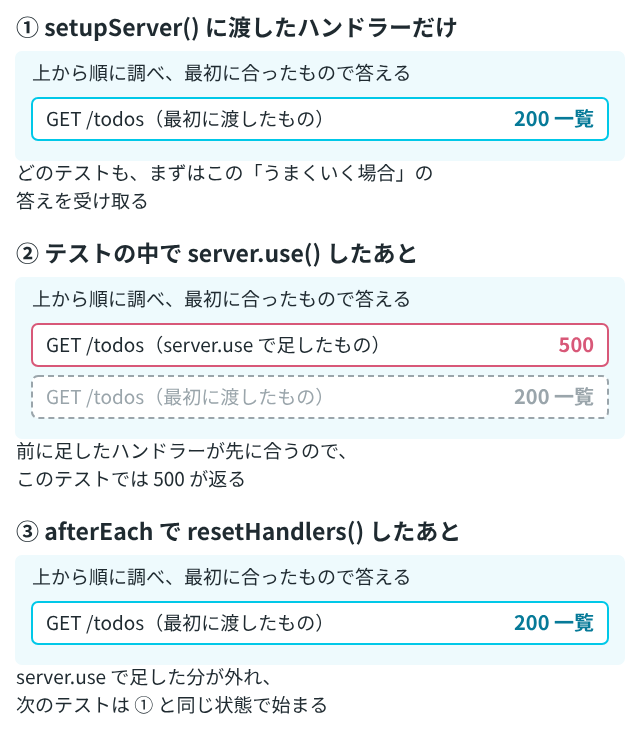
エラーの場合は、テストの中で server.use() を呼び、ハンドラーを足します。以下のテストも、同じ src/TodoList.test.tsx に続けて書きます。MSW のドキュメントにある、テストごとに通信の振る舞いを上書きする方法の説明によると、server.use() で足したハンドラーは、最初に setupServer() に渡したハンドラーより前に置かれ、優先されます。
サーバーが 500 を返す場合は、new HttpResponse(null, { status: 500 }) を返します(MSW のエラー応答のページ)。
test('サーバーが500を返すと、エラーを表示する', async () => {
  server.use(
    http.get('https://api.example.com/todos', () => {
      return new HttpResponse(null, { status: 500 });
    }),
  );
  render(<TodoList />);
  expect(await screen.findByRole('alert')).toHaveTextContent('読み込みに失敗しました(HTTP 500)');
});サーバーにつながらない場合は、HttpResponse.error() を返します。MSW のネットワークエラーのページによると、これはサーバーの応答ではなくネットワークエラーとして扱われ、fetch は失敗します。
test('つながらないときも、エラーを表示する', async () => {
  server.use(
    http.get('https://api.example.com/todos', () => {
      return HttpResponse.error();
    }),
  );
  render(<TodoList />);
  expect(await screen.findByRole('alert')).toHaveTextContent('読み込みに失敗しました');
  console.log('表示された文:', screen.getByRole('alert').textContent);
});
同じページには、クライアントは TypeError: Failed to fetch という決まったエラーを受け取ると書かれています。検証環境の Node.js(Vitest)で試したところ、エラーの文は「fetch failed」でした。エラーの文をそのままテストで確かめると、動かす環境によって結果が変わります。そのため、このテストでは「読み込みに失敗しました」の部分だけを確かめています。
表示された文: 読み込みに失敗しました(fetch failed)1回目だけ失敗させる
ハンドラーに { once: true } を付けると、その上書きは1回だけ使われます(上書きの方法の説明にある、1回だけの上書き)。2回目からは、最初に渡したハンドラーが答えます。再読み込みのボタンを試すのに使えます。
test('1回目だけ失敗し、再読み込みで一覧が出る', async () => {
  server.use(
    http.get(
      'https://api.example.com/todos',
      () => new HttpResponse(null, { status: 503 }),
      { once: true },
    ),
  );
  const user = userEvent.setup();
  render(<TodoList />);
  await user.click(await screen.findByRole('button', { name: '再読み込み' }));
  expect(await screen.findByText('牛乳を買う')).toBeInTheDocument();
});
追加の送信をテストする
追加のテストでは、入力してボタンを押し、画面に出たものを確かめます。空のタイトルを送ったときのエラーは、ハンドラーが返す 400 の答えで確かめられます。
test('追加すると、一覧の最後に加わる', async () => {
  const user = userEvent.setup();
  render(<TodoList />);
  await user.type(await screen.findByLabelText('やること'), '花に水をやる');
  await user.click(screen.getByRole('button', { name: '追加' }));
  expect(await screen.findByText('花に水をやる')).toBeInTheDocument();
  expect(screen.getAllByRole('listitem')).toHaveLength(3);
});

test('空のまま追加すると、サーバーのエラー文を表示する', async () => {
  const user = userEvent.setup();
  render(<TodoList />);
  await user.click(await screen.findByRole('button', { name: '追加' }));
  expect(await screen.findByRole('alert')).toHaveTextContent('タイトルを入れてください');
});
6つのテストを流すと、すべて通りました。結果の行だけを抜き出しています。
$ npx vitest run --reporter=verbose
 ✓ src/TodoList.test.tsx > 一覧を表示する 87ms
 ✓ src/TodoList.test.tsx > サーバーが500を返すと、エラーを表示する 100ms
 ✓ src/TodoList.test.tsx > つながらないときも、エラーを表示する 23ms
 ✓ src/TodoList.test.tsx > 1回目だけ失敗し、再読み込みで一覧が出る 60ms
 ✓ src/TodoList.test.tsx > 追加すると、一覧の最後に加わる 88ms
 ✓ src/TodoList.test.tsx > 空のまま追加すると、サーバーのエラー文を表示する 42ms

      Tests  6 passed (6)
resetHandlers を忘れると、上書きが次のテストに残る
use() のリファレンスによると、server.use() で足したハンドラーは、Node.js のプロセスが動いている間は、server に残ります。外すのは server.resetHandlers() の役目です。
試しに、setup ファイルの afterEach から server.resetHandlers() を消して、同じ6つのテストを流しました。DOM の出力が長いので、要点の行だけを残しています。
 ✓ src/TodoList.test.tsx > 一覧を表示する 97ms
 ✓ src/TodoList.test.tsx > サーバーが500を返すと、エラーを表示する 115ms
 ✓ src/TodoList.test.tsx > つながらないときも、エラーを表示する 19ms
 × src/TodoList.test.tsx > 1回目だけ失敗し、再読み込みで一覧が出る 1068ms
   → Unable to find an element with the text: 牛乳を買う. This could be because the text is broken up by multiple elements. In this case, you can provide a function for your text matcher to make your matcher more flexible.
 × src/TodoList.test.tsx > 追加すると、一覧の最後に加わる 1009ms
   → Unable to find a label with the text of: やること
 × src/TodoList.test.tsx > 空のまま追加すると、サーバーのエラー文を表示する 1007ms
   → Unable to find role="button" and name "追加"
      Tests  3 failed | 3 passed (6)
4つ目からの3つが失敗しました。失敗した3つのテストでは、どれも DOM の出力に、つながらないときのエラーの文「fetch failed」が出ていました。3つ目のテストで足した HttpResponse.error() のハンドラーが残り、そのあとのテストでも一覧の取得に答えたためです。失敗したのは、上書きを足した3つ目のテストではなく、そのあとのテストです。失敗したテストだけを見ても、原因はつかみにくくなります。
server.use() で足した上書きは、テストが終わっても自動では外れません。setup ファイルの afterEach で server.resetHandlers() を呼んでおきます。
URL を打ち間違えると、MSW がエラーを出す
ハンドラーの URL を https://api.example.com/todo(最後の s がない)に打ち間違えた setup ファイルで、一覧のテストを流しました。onUnhandledFrame: 'error' にしているので、MSW が次のエラーを出し、一覧が出ないままテストは失敗しました。要点の行だけを抜き出しています。
[MSW] Error: intercepted a request without a matching request handler:
  • GET https://api.example.com/todos
If you still wish to intercept this unhandled request, please create a request handler for it.
Read more: https://mswjs.io/docs/http/intercepting-requests
 × src/TodoList.test.tsx > 一覧を表示する 1040ms
   → Unable to find an element with the text: 牛乳を買う. This could be because the text is broken up by multiple elements. In this case, you can provide a function for your text matcher to make your matcher more flexible.
どのリクエストにハンドラーがなかったのかが、メソッドと URL で示されます。listen() のリファレンスによれば、既定の "warn" のままだと、リクエストは本物の api.example.com にそのまま送られます。検証環境から外へ通信しないように、"warn" の場合は試していません。
相対 URL は、Vitest の environment が jsdom か node かで結果が変わる
この記事では、API の URL を https://api.example.com から始まる絶対 URL にしました。MSW のリクエストの捕まえ方のページによると、相対 URL のハンドラーは、今のページの URL(location.href)をもとに解決されます。Node.js にはその考え方がないため、Node.js のテストでは元になる URL を設定する必要があると書かれています。
検証環境で、http.get('/todos', ...) のハンドラーを置き、fetch('/todos') を呼ぶテストを試しました。Vitest の環境を jsdom にしたときは、location.href が http://localhost:3000/ になっていて、テストは通りました。環境を node にしたときは、location がなく、fetch が次のエラーで失敗しました。
TypeError: Failed to parse URL from /todos相対 URL に fetch するコードを node の環境でテストすると、このエラーになります。この記事のように絶対 URL にしておけば、location があるかどうかに左右されません。
この記事で動かしたのは、Node.js の上の Vitest(jsdom の環境)だけです。ブラウザで動かす setupWorker や Vitest Browser Mode は試していません。