
ReactのComponentPropsで、HTML要素と同じpropsを受け取る方法
自作の Button に、<button> と同じ props(onClick、disabled、aria-label など)をすべて受け取らせたいときは、props の型を ComponentProps<'button'> から作ります。1つずつ型に書き足さなくても、<button> に渡せる props がそのまま使えるようになり、<button> にない props を渡すと型チェックで止まります。
筆者は検証環境で、ComponentProps を使った Button、TextField、IconButton を作り、型チェックの結果と、出力される HTML、Chromium での動きを確かめました。
検証環境は Ubuntu 24.04、Node.js 22.22.0、Chromium 141 です。使ったのは react / react-dom 19.3.1、@types/react 19.3.0、typescript 7.0.2 です。型チェックは tsc、HTML の確認は react-dom/server の renderToStaticMarkup、ブラウザでの確認は、esbuild で変換したコード(開発用のビルド)を Chromium で動かし、Playwright で操作して行いました。
ComponentProps<'button'> に、自分の props を足す
次のコードは、見た目の種類を選べる variant を足した Button です。
import type { ComponentProps } from 'react';

type ButtonProps = ComponentProps<'button'> & {
  variant?: 'primary' | 'danger';
};

export function Button({ variant = 'primary', type = 'button', className, ...rest }: ButtonProps) {
  const classes = ['btn', `btn-${variant}`, className].filter(Boolean).join(' ');
  return <button type={type} className={classes} {...rest} />;
}
ComponentProps は、@types/react にある型です。'button' のように HTML の要素の名前を渡すと、その要素が JSX で受け取る props の型になります。@types/react 19.3.0 の定義では、要素の名前を渡したときは JSX.IntrinsicElements[T] を返します。TypeScript の JSX の型チェックの説明にあるとおり、<button> のような小文字の要素の props は、この JSX.IntrinsicElements から調べられます。つまり、<button> を直接書いたときに型チェックで使われるのと同じ型です。
type ComponentProps<T extends keyof JSX.IntrinsicElements | JSXElementConstructor<any>> = T extends
    JSXElementConstructor<infer Props> ? Props
    : T extends keyof JSX.IntrinsicElements ? JSX.IntrinsicElements[T]
    : {};
Button の中では、自分で使う variant、type、className を取り出し、残り(rest)を JSX のスプレッド構文で <button> にまとめて渡しています。
使う側では、<button> と同じ props をそのまま書けます。
<Button id="count" onClick={() => setCount(count + 1)} aria-label="数える" data-testid="count">
  押した回数:{count}
</Button>
<Button variant="danger" className="wide" disabled>
  削除
</Button>
検証環境で tsc を通すと、エラーは出ませんでした。この部分を renderToStaticMarkup で HTML にすると、次のようになりました。id、aria-label、data-testid、disabled が、<button> の属性として出ています。
<button type="button" class="btn btn-primary" id="count" aria-label="数える" data-testid="count">押した回数:0</button>
<button type="button" class="btn btn-danger wide" disabled="">削除</button>
button にない props は、型チェックで止まる
わざと間違えた使い方を書いて、tsc を実行しました。
<Button href="/about">リンクのつもり</Button>
<Button type="link">種類の間違い</Button>
<Button variant="ghost">ない見た目</Button>
3行とも、型エラーになりました(1つ目は、エラーの続きの説明を省いています)。
errors/WrongUsage.tsx(7,15): error TS2322: Type '{ href: string; children: string; }' is not assignable to type 'IntrinsicAttributes & ClassAttributes<HTMLButtonElement> & ButtonHTMLAttributes<HTMLButtonElement> & { ...; }'.
errors/WrongUsage.tsx(8,15): error TS2322: Type '"link"' is not assignable to type '"button" | "reset" | "submit" | undefined'.
errors/WrongUsage.tsx(9,15): error TS2322: Type '"ghost"' is not assignable to type '"danger" | "primary" | undefined'.
href は <button> にない属性なので、受け取れません。type には、<button> と同じく "button"、"reset"、"submit" だけが渡せます。自分で足した variant も、決めた2つの値だけが通ります。
自分で決めたい props は、取り出してから残りを渡す
Button で className と type を取り出しているのには、理由があります。取り出さずに {...rest} を後ろに書くと、使う側が渡した値で、部品の中の値が上書きされるからです。
次の NaiveButton は、variant だけを取り出し、type と className を {...rest} の前に書いたものです。props の型(NaiveButtonProps)は、Button と同じく ComponentProps<'button'> & { variant?: 'primary' | 'danger' } です。
export function NaiveButton({ variant = 'primary', ...rest }: NaiveButtonProps) {
  return <button type="button" className={`btn btn-${variant}`} {...rest} />;
}
Button と NaiveButton に className="wide" を渡したときと、NaiveButton に type={undefined} を渡したときの HTML は、次のとおりでした。
<button type="button" class="btn btn-primary wide">保存</button>
<button type="button" class="wide">保存</button>
<button class="btn btn-primary">保存</button>
NaiveButton では、className="wide" が btn btn-primary を上書きしました。type={undefined} を渡すと、type="button" も消えました。MDN の button の説明にあるとおり、フォームの中の <button> は、type がないと送信のボタンになります。そのため、押しただけでフォームが送信されてしまいます。
Button のように取り出しておけば、className は部品のクラスとつなげられます。type は、props の既定値が undefined を渡されたときにも使われるので、type={undefined} でも "button" になります。
型を変えたい props は、Omit で外してから足す
入力欄の部品では、onChange で入力された文字列だけを受け取りたいことがあります。<input> の onChange はイベントを受け取る型です。そこに & で別の型を足すと、onChange は両方の型を同時に満たさなければならなくなります。
// Omit を使わずに、onChange の型だけを変えようとした場合
type TextFieldProps = ComponentProps<'input'> & {
  label: string;
  onChange?: (value: string) => void;
};
この型の TextField に onChange={(value: string) => console.log(value)} を渡すと、型エラーになりました。
errors/NoOmit.tsx(19,32): error TS2322: Type '(value: string) => void' is not assignable to type 'ChangeEventHandler<HTMLInputElement, HTMLInputElement> & ((value: string) => void)'.
  Type '(value: string) => void' is not assignable to type 'ChangeEventHandler<HTMLInputElement, HTMLInputElement>'.
    Types of parameters 'value' and 'event' are incompatible.
      Type 'ChangeEvent<HTMLInputElement, HTMLInputElement>' is not assignable to type 'string'.
型を変えたい props は、TypeScript の Omit で先に外してから、新しい型を足します。
import type { ComponentProps } from 'react';

type TextFieldProps = Omit<ComponentProps<'input'>, 'onChange'> & {
  label: string;
  onChange?: (value: string) => void;
};

export function TextField({ label, onChange, ...rest }: TextFieldProps) {
  return (
    <label>
      {label}
      <input {...rest} onChange={(e) => onChange?.(e.target.value)} />
    </label>
  );
}
こうすると、使う側は onChange={setName} のように、文字列を受け取る関数を渡せます。name、placeholder、maxLength など、<input> のほかの props はそのまま使えます。反対に、onChange={(e) => console.log(e.target.value)} のようにイベントを受け取るつもりで書くと、Property 'target' does not exist on type 'string'. という型エラーになりました。
ほかのコンポーネントと同じ props を受け取る
ComponentProps には、要素の名前の代わりにコンポーネントの型(typeof Button)も渡せます。次の IconButton は、Button が受け取る props に icon を足して、残りを Button に渡します。
import type { ComponentProps } from 'react';
import { Button } from './Button';

type IconButtonProps = ComponentProps<typeof Button> & {
  icon: string;
};

export function IconButton({ icon, children, ...rest }: IconButtonProps) {
  return (
    <Button {...rest}>
      <span aria-hidden="true">{icon}</span> {children}
    </Button>
  );
}

export type Variant = ComponentProps<typeof Button>['variant'];
Button の props の型を export していなくても、Button 本体から取り出せます。最後の行のように ['variant'] を付ければ、1つの props の型だけを取り出すこともできます。この使い方は、React TypeScript Cheatsheet の ComponentProps の説明にも載っています。
<IconButton icon="→" type="submit" variant="primary">送信</IconButton> は、tsc を通り、次の HTML になりました。
<button type="submit" class="btn btn-primary">
<span aria-hidden="true">→</span> 送信</button>
Chromium で動かした結果
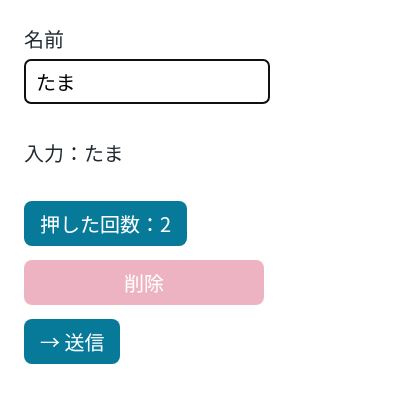
ここまでの部品を1つの画面に置き、Chromium で操作しました。
# aria-label で探したボタンを2回押した後: 押した回数:2
# 入力欄に「たま」と入れた後: 入力:たま
# 削除ボタンの disabled: true
# 入力欄の maxLength: 10
aria-label で探した Button を押すと、onClick が呼ばれて数が増えました。TextField では、onChange に渡した setName が文字列を受け取り、入力した「たま」が下に表示されました。disabled と maxLength も、ブラウザの要素に届いています。
ref も props に含まれる
React 19 では、関数コンポーネントが ref を普通の props として受け取れるようになりました。@types/react 19.3.0 の ComponentProps<'input'> にも、ref が入っています。React TypeScript Cheatsheet の説明では、スプレッドで渡す props から ref を外したいときは、ComponentPropsWithoutRef を使うとされています。
検証で、'ref' が型のキーに含まれるかを確かめたところ、ComponentProps<'input'> では含まれ、ComponentPropsWithoutRef<'input'> では含まれませんでした。同じ説明によれば、React 19 以降はたいてい ComponentProps で足ります。
ComponentProps<'要素名'> に自分の props を & で足し、自分で使う props を取り出してから、残りを {...rest} で要素に渡します。型を変えたい props は、Omit で外してから足します。
HTML の要素と同じ props は、ComponentProps から作る
ComponentProps<'button'> や ComponentProps<'input'> を使うと、自作の部品が HTML の要素と同じ props を受け取れるようになり、要素にない props や間違った値は型チェックで止まります。検証では、aria-label や data-testid、disabled が、型に何も書き足さずに <button> まで届きました。className や type のように部品の中でも決めたい props は、取り出してから残りを渡すと、使う側の値で上書きされずにすみます。