
Lighthouseで複数のリダイレクトを指摘されたときの直し方
Lighthouse 13 で「Had redirects (3 redirects, +15 ms)」のように複数のリダイレクトを指摘されたら、サーバーの設定を、どの入口からも最終の URL へ1回で送るように直します。そのうえで、リンクやテストする URL を最終の URL に書き換えると、指摘は消えます。この指摘は、Lighthouse 12 までの「Avoid multiple page redirects」(複数のページ リダイレクトの回避)にあたります。http から https へ、www なしから www ありへ、といった転送をサイトの移転や常時 SSL 化のたびに足していき、ページが開くまでに何度も転送されている場合に出ます。
検証したページでは、http://example.com/blog を開くと3回リダイレクトしていました。Lighthouse の通信制限を devtools にした実行では、リダイレクトだけで 1,157 ms かかっていました(3回の中央値)。nginx の設定を直し、末尾に / の付いた http://example.com/blog/ で調べると、リダイレクトは2回・580 ms になりました。最終の URL を直接開くと、0回・0 ms です。
検証環境は Ubuntu 24.04、Node.js 22、Lighthouse 13.6.0(npm のパッケージ)、nginx 1.24.0(Ubuntu のパッケージ)です。Chrome は Playwright 1.63.0 に入っている Chrome for Testing 153 を、環境変数 CHROME_PATH で指定しました。Lighthouse はコマンドラインから、既定のモバイルの設定で実行しています。example.com と www.example.com は、Chrome のフラグ --host-resolver-rules で同じ VM の nginx に向けました。HTTPS の証明書は、検証のために作った CA で発行しています。Chrome の DevTools にある Lighthouse パネル、PageSpeed Insights、デスクトップの設定、Apache や CDN でのリダイレクト、JavaScript や <meta http-equiv="refresh"> での転送は試していません。
Lighthouse 13では「Document request latency」の中に出る
直す前の nginx で http://example.com/blog を調べると、次のように出ました。結果の JSON から、小さなスクリプト(summarize.mjs)で必要なところを抜き出しています。
$ npx lighthouse http://example.com/blog --only-categories=performance,best-practices --output=json --output=html --output-path=./out/before-sim-1 --chrome-flags="..." --quiet
$ node summarize.mjs out/before-sim-1.report.json
lighthouseVersion: 13.6.0  formFactor: mobile  throttlingMethod: simulate
requestedUrl: http://example.com/blog
finalDisplayedUrl: https://www.example.com/blog/
performance score: 98  FCP: 2.0 s  LCP: 2.0 s
document-latency-insight: score=0.5 displayValue="Est savings of 20 ms" metricSavings={"FCP":0,"LCP":0}
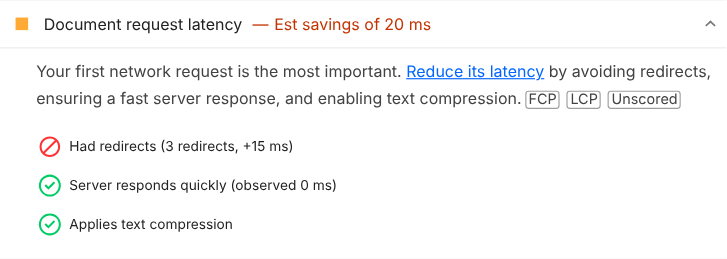
  checklist noRedirects: FAIL "Had redirects (3 redirects, +15 ms)"
  debugData: {"redirectDuration":15,"serverResponseTime":0,"uncompressedResponseBytes":0,"wastedBytes":0}
redirects (hidden): score=0 displayValue="Est savings of 1,530 ms" numericValue=1530.2340000000002 metricSavings={"LCP":1550,"FCP":1550}(実際には、CHROME_PATH を付けた小さなシェルスクリプトから実行しています。--chrome-flags の中身と、ほかの行は省いています。)
HTML のレポートでは、「Document request latency」(日本語の表示では「ドキュメント リクエストのレイテンシ」)を開くと、1行目に「Had redirects (3 redirects, +15 ms)」と出ます。
Lighthouse 12 までは、「Avoid multiple page redirects」(複数のページ リダイレクトの回避)という専用の項目がありました。この項目の公式の解説には、Lighthouse 13 で Document request latency に移ったと書かれています。13.6.0 でも、この項目は redirects という名前で JSON には残っています。ただし既定の設定ではグループが hidden になっていて、HTML のレポートには描かれていませんでした。
何回のリダイレクトから指摘されるかも変わっています。古い項目の解説には、リダイレクトが2回以上あると不合格になると書かれています。Document request latency の公式の解説では、ページのリクエストが1回以上リダイレクトされたことを指摘の条件に挙げています。
「+15 ms」は、検証環境で実際にかかった時間
表示の「+15 ms」は小さく見えます。これは、Lighthouse が実際に計った時間をそのまま出しているからです。今回は同じ VM の中の nginx につないだので、3回の転送が 15 ms で終わっていました。
一方で、FCP(ページを開き始めてから、最初に文字や画像が表示されるまでの時間)は、最終の URL を直接調べたときの 0.8 秒から 2.0 秒に延びています。既定の設定(throttlingMethod: simulate)では、FCP はモバイルの回線を想定した見積もりです。隠れている redirects の項目も、同じ見積もりで 1,530 ms を出していました。
実際に通信を遅くして確かめるため、--throttling-method=devtools を付けて3回ずつ実行しました。このときの設定では、リクエストごとに 562.5 ms の遅れが足されます(実行結果の configSettings.throttling の requestLatencyMs)。
| 調べた URL | リダイレクトの表示(3回分) | FCP(3回分) |
|---|---|---|
直す前の http://example.com/blog |
+1163 ms、+1148 ms、+1157 ms | 1.88 秒、1.85 秒、1.81 秒 |
最終の URL https://www.example.com/blog/ |
Avoids redirects | 0.68 秒、0.71 秒、0.69 秒 |
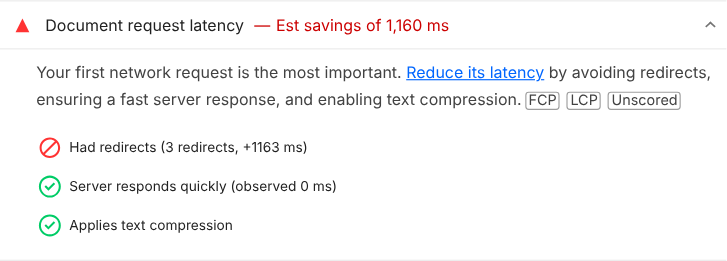
今回のように、Lighthouse を動かす Chrome と同じマシンのサーバーを調べると、表示の時間は小さく出ます。時間だけでなく、何回リダイレクトしているかを見て判断します。
どこで何回リダイレクトしているかを調べる
まず curl で、リダイレクトを1つずつたどります。-L で転送先をたどり、-D - で各レスポンスのヘッダーを出します。
$ curl -s -o /dev/null -L -D - -w 'redirects: %{num_redirects}  time_redirect: %{time_redirect}s\n' http://example.com/blog | grep -E '^(HTTP|Location|redirects)'
HTTP/1.1 301 Moved Permanently
Location: https://example.com/blog
HTTP/1.1 301 Moved Permanently
Location: https://www.example.com/blog
HTTP/1.1 301 Moved Permanently
Location: https://www.example.com/blog/
HTTP/1.1 200 OK
redirects: 3 time_redirect: 0.005269s(実際には、--resolve で example.com を検証用の nginx に向け、検証用の CA を --cacert で指定して実行しています。)
1回目が http から https、2回目が www なしから www あり、3回目が末尾の / を足す転送です。直す前の nginx の設定は、次のようになっていました。
server {
    listen 80;
    server_name example.com www.example.com;
    return 301 https://$host$request_uri;
}
server {
    listen 443 ssl;
    server_name example.com;
    return 301 https://www.example.com$request_uri;
}
server {
    listen 443 ssl;
    server_name www.example.com;
    root /path/to/site;
}(証明書の行は省いています。/path/to/site は、ページを置いたフォルダです。)
80番の設定は、$host をそのまま使って https に送っています。nginx の公式ドキュメントにある $host の説明のとおり、$host はリクエストのホスト名なので、example.com で来たリクエストは https://example.com に送られ、そこからもう一度 www に送られます。
3回目の転送は、return の行には書いていません。/blog は blog というフォルダなので、末尾に / のない URL で来たリクエストを、nginx が /blog/ に 301 で送っていました。
Lighthouse では、1回目の転送が Chrome の中で起きていた
Lighthouse の実行で nginx のアクセスログを見ると、80番(http)へのリクエストは届いていませんでした。Lighthouse に -GA を付けて保存した通信の記録(devtoolslog.json)を見ると、1回目の転送は Chrome が自分で返した 307 でした。
$ node redirect-headers.cjs artifacts-before/devtoolslog.json
307 Temporary Redirect http://example.com/blog -> https://example.com/blog
    Location: https://example.com/blog
    Non-Authoritative-Reason: HttpsUpgrades
301 Moved Permanently https://example.com/blog -> https://www.example.com/blog
    Location: https://www.example.com/blog
301 Moved Permanently https://www.example.com/blog -> https://www.example.com/blog/
    Location: https://www.example.com/blog/
この 307 は nginx が返したものではありません。ヘッダーに Non-Authoritative-Reason: HttpsUpgrades とあるとおり、Chrome の中で http が https に置き換えられていました。Chrome のフラグ --disable-features=HttpsUpgrades を足して Lighthouse を実行しても、この 307 は消えませんでした。devtools の通信制限での実行では、この 307 にかかった時間は 6〜7 ms で、nginx が返した 301 はそれぞれ 570〜580 ms でした。それでも、Lighthouse はこの 307 もリダイレクトの1回に数えます。
nginxで、最終のURLへ1回で送る
直した後の設定では、www なしの https と http(80番)のどちらも、$host を使わずに最終のホスト名を書きました。末尾に / を足す転送も、location に転送先の https://www.example.com/blog/ を書いて返します。
server {
    listen 80;
    server_name example.com www.example.com;
    return 301 https://www.example.com$request_uri;
}
server {
    listen 443 ssl;
    server_name example.com;
    return 301 https://www.example.com$request_uri;
}
server {
    listen 443 ssl;
    server_name www.example.com;
    root /path/to/site;
    location = /blog { return 301 https://www.example.com/blog/; }
}
nginx の return の解説にあるとおり、301 などのコードのあとに転送先の URL を書き、その中に変数を使えます。
直した後に curl でたどると、末尾に / の付いた入口からは1回で https://www.example.com/blog/ に着きました。ただし、末尾の / がない http://example.com/blog は、www への転送と / を足す転送で2回になります。
| curl で開いた URL | リダイレクトの回数 |
|---|---|
http://example.com/blog |
2 |
http://example.com/blog/ |
1 |
https://example.com/blog/ |
1 |
https://www.example.com/blog |
1 |
https://www.example.com/blog/ |
0 |
直した後の結果
サイトのリンクを、末尾に / の付いた URL にした場合を想定して、http://example.com/blog/ を Lighthouse で調べました。devtools の通信制限での表示は「Had redirects (2 redirects, +577 ms)」です。Chrome が http を https に置き換える 307 と、nginx の www への 301 の2回が残ります。なお、直した後も末尾に / のない http://example.com/blog を Lighthouse で調べると、Chrome の 307 が加わって「3 redirects」と出ました。
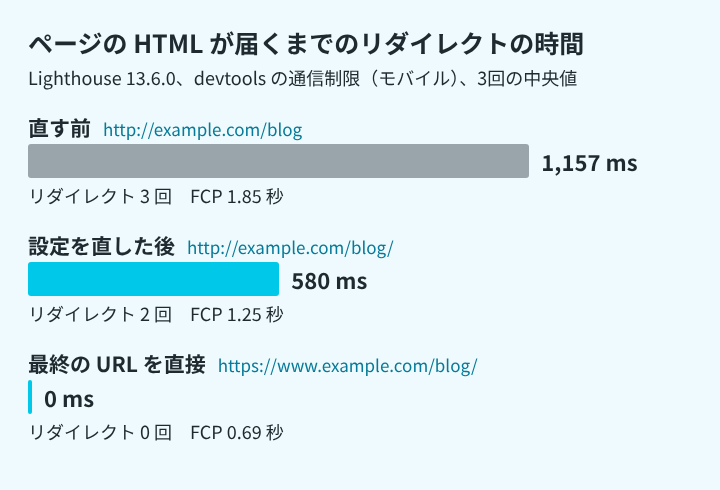
サーバーの設定だけでは、入口の URL が最終の URL と違う限り、リダイレクトは0回になりません。Document request latency の公式の解説でも、リンクがリソースの今の場所を指すようにすることを勧めています。サイトの中のリンク、サイトマップ、広告やSNSに載せる URL を https://www.example.com/blog/ のような最終の URL に書き換えると、そこから来た人はリダイレクトなしでページを開けます。
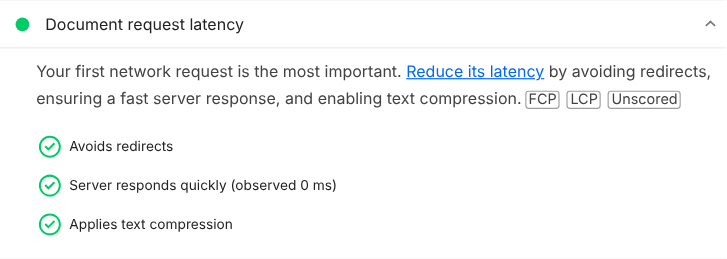
Lighthouse を実行するときも、最終の URL を指定します。リダイレクトのある URL を指定すると、Lighthouse は「The page may not be loading as expected because your test URL (…) was redirected to …. Try testing the second URL directly.」という警告を出していました。日本語の表示では「2 番目の URL を直接テストしてみてください。」で終わる文です。https://www.example.com/blog/ を指定すると、表示は「Avoids redirects」に変わりました。
http から https への転送そのものは、外さずに残します。ベストプラクティスのカテゴリーにある「Redirects HTTP traffic to HTTPS」は、http の URL で始めて https で終わったかを見る項目で、直す前も直した後も合格でした。