
LighthouseでARIA属性の誤りを指摘されたときの直し方
Lighthouse のアクセシビリティの監査で ARIA 属性の指摘(aria-valid-attr など)が出たときは、HTML に書いた aria- 属性のつづりや値、付けた要素、必要な属性の不足、aria-hidden で隠した範囲のどれかに誤りがあります。レポートの「Failing Elements」に出る要素の HTML を見れば、どの属性が対象かが分かります。なぜ不合格なのかを説明する理由の文は、JSON のレポートに入っています。メニューの開閉ボタン、自作のチェックボックス、アイコンに付けた読み上げ用の名前など、スクリーンリーダー向けに aria- 属性を書き足した部分が、指摘の対象になります。
私は検証環境で、6種類の誤りを入れたページに Lighthouse を実行し、それぞれの指摘の出方と、直すと消えることを確かめました。
検証環境は Ubuntu 24.04、Node.js 22.23.4、Lighthouse 13.6.0(npm で入れた CLI。中で使われている axe-core は 4.14.0)、ブラウザは Google Chrome for Testing 153 のヘッドレスです。axe-core を直接実行したときは、Playwright 1.63.0 で同じ版の Chromium を動かしました。アクセシビリティの項目だけ(--only-categories=accessibility)を、初期設定のモバイル向けの条件で実行しました。ページは手元で作り、127.0.0.1 から配信しました。Chrome の DevTools の Lighthouse パネルや PageSpeed Insights、実際のスクリーンリーダーでの読み上げは試していません。
6つの指摘が出たページ
検証に使ったのは、次の6か所に誤りを入れたページです。
<!-- 1. 属性名のつづりを間違えた(labelledby の l が1つ) -->
<h2 id="notice-title">お知らせ</h2>
<section aria-labeledby="notice-title"><p>新しい機能を追加しました。</p></section>
<!-- 2. 値が決まっている属性に、使えない値を入れた -->
<button type="button" aria-expanded="yes" aria-controls="menu-list">メニュー</button>
<ul id="menu-list"><li>プロフィール</li><li>ログアウト</li></ul>
<!-- 3. その要素では使えない属性を付けた -->
<button type="button" aria-checked="true">通知を受け取る</button>
<!-- 4. 役割に必要な属性が足りない -->
<div role="checkbox" tabindex="0">自動保存</div>
<!-- 5. 役割のない span に aria-label を付けた(中身は CSS で描いたアイコン) -->
<p>お気に入り <span class="icon-star" aria-label="登録済み"></span></p>
<!-- 6. aria-hidden の中に、フォーカスできるリンクがある -->
<div aria-hidden="true"><a href="#help">ヘルプ</a></div>
このページを python3 -m http.server で配信し、次のように Lighthouse を実行しました。
npx lighthouse http://127.0.0.1:8000/bad.html \
  --only-categories=accessibility \
  --output=json --output=html --output-path=./out/bad \
  --chrome-flags="--headless=new --no-sandbox" --quiet
アクセシビリティの点数は68で、6か所すべてが別々の監査で指摘されました。HTML のレポートでは、指摘ごとに、該当する要素の HTML と、その要素がページのどこにあるかを示す縮小画像が並びます。
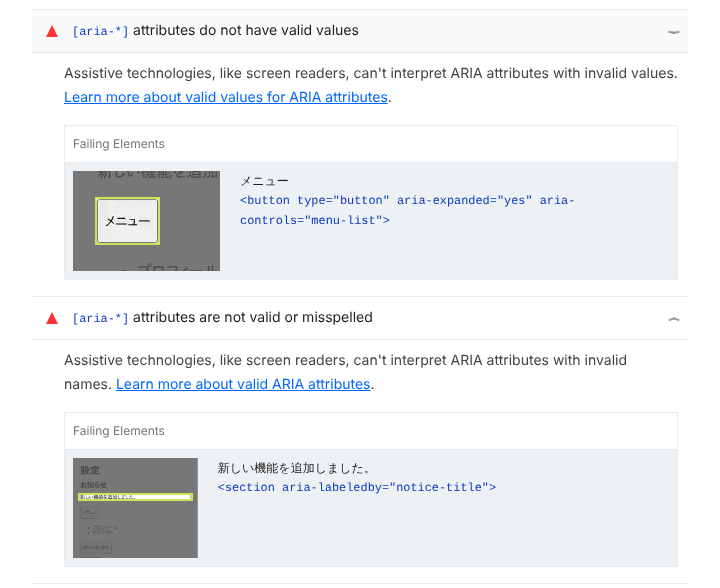
HTML のレポートには、なぜ不合格なのかの理由の文は出ません。理由の文は、JSON のレポートの audits の中で、要素ごとの explanation に入っています。点数と、指摘された要素、理由を、自作の小さなスクリプトで JSON のレポートから取り出すと次のとおりです(点数と指摘以外の行は省いています)。
accessibility score: 68

[aria-allowed-attr] (weight 10) `[aria-*]` attributes do not match their roles
- body > main > button | <button type="button" aria-checked="true">
   Fix all of the following:
     ARIA attribute is not allowed: aria-checked="true"

[aria-hidden-focus] (weight 7) `[aria-hidden="true"]` elements contain focusable descendents
- body > main > div | <div aria-hidden="true">
   Fix all of the following:
     Focusable content should have tabindex="-1", be removed from the DOM, or not be hidden with aria-hidden

[aria-prohibited-attr] (weight 7) Elements use prohibited ARIA attributes
- body > main > p > span.icon-star | <span class="icon-star" aria-label="登録済み">
   Fix all of the following:
     aria-label attribute cannot be used on "span" elements with no valid role attribute.

[aria-required-attr] (weight 10) `[role]`s do not have all required `[aria-*]` attributes
- body > main > div | <div role="checkbox" tabindex="0">
   Fix any of the following:
     Required ARIA attribute not present: aria-checked

[aria-valid-attr-value] (weight 10) `[aria-*]` attributes do not have valid values
- body > main > button | <button type="button" aria-expanded="yes" aria-controls="menu-list">
   Fix all of the following:
     Invalid ARIA attribute value: aria-expanded="yes"

[aria-valid-attr] (weight 10) `[aria-*]` attributes are not valid or misspelled
- body > main > section | <section aria-labeledby="notice-title">
   Fix any of the following:
     Invalid ARIA attribute name: aria-labeledby

failed accessibility audits: aria-allowed-attr, aria-hidden-focus, aria-prohibited-attr, aria-required-attr, aria-valid-attr-value, aria-valid-attr
日本語で Lighthouse を実行したとき(--locale=ja)の監査のタイトルも確かめました。レポートに出た文言から、どの監査かを探すときの目安にしてください。
| 監査の ID | 日本語のレポートでのタイトル |
|---|---|
aria-valid-attr |
[aria-*] 属性は無効か、スペルミスがあります |
aria-valid-attr-value |
[aria-*] 属性に有効な値が指定されていません |
aria-allowed-attr |
[aria-*] 属性は役割と一致していません |
aria-required-attr |
[role] に必須の [aria-*] 属性が一部指定されていません |
aria-prohibited-attr |
禁止されている ARIA 属性が要素で使用されています |
aria-hidden-focus |
[aria-hidden="true"] 要素にフォーカス可能な子要素が含まれています |
指摘ごとの直し方
6か所を次のように直しました。
<!-- 1. 正しいつづりにする -->
<h2 id="notice-title">お知らせ</h2>
<section aria-labelledby="notice-title"><p>新しい機能を追加しました。</p></section>
<!-- 2. true か false を入れる -->
<button type="button" aria-expanded="false" aria-controls="menu-list">メニュー</button>
<ul id="menu-list"><li>プロフィール</li><li>ログアウト</li></ul>
<!-- 3. button で使える aria-pressed にする -->
<button type="button" aria-pressed="true">通知を受け取る</button>
<!-- 4. checkbox に必要な aria-checked を付ける -->
<div role="checkbox" tabindex="0" aria-checked="false">自動保存</div>
<!-- 5. role="img" を付けて、aria-label を使える要素にする -->
<p>お気に入り <span class="icon-star" role="img" aria-label="登録済み"></span></p>
<!-- 6. aria-hidden を外す -->
<div><a href="#help">ヘルプ</a></div>
同じ条件で Lighthouse を実行し直すと、指摘はすべて消え、点数は100になりました(点数と指摘以外の行は省いています)。
accessibility score: 100

failed accessibility audits: (none)
つづりの誤り(aria-valid-attr)
指摘された要素の HTML にある属性名を、正しいつづりに書き直します。aria-labelledby は「labelled」と l が2つです。
値の誤り(aria-valid-attr-value)
その属性に入れてよい値に直します。axe-core の属性の定義では、aria-expanded に入れてよいのは true、false、undefined です。MDN の aria-expanded の説明にあるとおり、メニューが閉じているあいだは false、開いたら true にします。
要素で使えない属性(aria-allowed-attr)
その要素の役割(role)で使える属性に置き換えます。axe-core の役割の定義では、button で使える状態の属性は aria-expanded と aria-pressed です。押すたびにオンとオフが切り替わるボタンなら、MDN の aria-pressed の説明にあるとおり、aria-pressed を使います。
必要な属性の不足(aria-required-attr)
JSON のレポートの理由の文に出る属性(この例では aria-checked)を足します。role="checkbox" には aria-checked が必要です(MDN の checkbox ロールの説明)。同じページにあるとおり、足したあとは、チェックボックスが操作されるたびに、スクリプトで aria-checked の値を切り替えます。
禁止された属性(aria-prohibited-attr)
その要素の役割で禁止されている属性を付けたときに出ます。たとえば、span や div のように役割のない要素に aria-label を付けると、この指摘になります。こうした要素の役割は generic で、MDN の generic ロールの説明にも、aria-label と aria-labelledby は禁止と書かれています。アイコンに名前を付けたいなら、検証で直したページのように role="img" を付けると、aria-label を使える要素になります。
aria-hidden の中のフォーカス(aria-hidden-focus)
読み上げから隠した範囲に、キーボードで移れるリンクやボタンが残っているときに出ます。MDN の aria-hidden の説明にも、フォーカスできる要素やその親に aria-hidden="true" を付けないように書かれています。中身を読み上げてよいなら、検証で直したページのように aria-hidden を外します。直した後のページでは、隠れていたリンクが link-name(リンクの名前の監査)の対象に加わり、合格しました。
Lighthouse が指摘しない書き方
指摘の出方の境目を見るために、別のページで次の7つの書き方も試しました。
<!-- 1. 大文字の TRUE -->
<button type="button" aria-expanded="TRUE" aria-controls="menu-list">メニュー</button>
<!-- 2. checkbox の aria-checked に on -->
<div role="checkbox" tabindex="0" aria-checked="on">自動保存</div>
<!-- 3. 文字の入った span に aria-label -->
<p>メールアドレス <span class="required" aria-label="必須">*</span></p>
<!-- 4. 存在しない id を指す aria-labelledby -->
<section aria-labelledby="no-such-id"><p>新しい機能を追加しました。</p></section>
<!-- 5. aria-hidden の中のリンクに tabindex="-1" -->
<div aria-hidden="true"><a href="#help" tabindex="-1">ヘルプ</a></div>
<!-- 6. aria-hidden の代わりに inert -->
<div inert><a href="#faq">よくある質問</a></div>
<!-- 7. 存在しない id を指す aria-controls -->
<button type="button" aria-expanded="false" aria-controls="no-such-list">表示</button>
Lighthouse が指摘したのは、aria-checked="on" の1つだけでした(点数と指摘以外の行は省いています)。
accessibility score: 94

[aria-valid-attr-value] (weight 10) `[aria-*]` attributes do not have valid values
- body > main > div | <div role="checkbox" tabindex="0" aria-checked="on">
   Fix all of the following:
     Invalid ARIA attribute value: aria-checked="on"

failed accessibility audits: aria-valid-attr-value
このページに、ARIA 属性の6つのルールだけで axe-core を直接実行すると、Lighthouse が出さなかった2つが「要確認」(incomplete)として返ってきました(合格した要素の一覧の行は省いています)。
--- violations
aria-valid-attr-value | <div role="checkbox" tabindex="0" aria-checked="on">自動保存</div>
   Fix all of the following:
     Invalid ARIA attribute value: aria-checked="on"
--- incomplete
aria-prohibited-attr | <span class="required" aria-label="必須">*</span>
   Fix all of the following:
     aria-label attribute is not well supported on "span" elements with no valid role attribute.
aria-valid-attr-value | <section aria-labelledby="no-such-id"><p>新しい機能を追加しました。</p></section>
   Fix all of the following:
     ARIA attribute element ID does not exist on the page: aria-labelledby="no-such-id"
Lighthouse の axe-core の結果から監査の合否を決める処理では、点数の付く監査は axe-core の違反(violations)だけを見ます。「要確認」は点数にもレポートの指摘にも出ません。
文字の入った span に aria-label を付けた場合と、aria-labelledby が存在しない id を指している場合は、axe-core では「要確認」になり、Lighthouse の点数にも指摘にも出ません。点数だけでは見つけられないので、aria-labelledby の指す先の id が実際にあるかは、自分で確かめます。
文字の入った span が違反にならないのは、axe-core の aria-prohibited-attr の判定が、中に読み上げられる文字があれば「要確認」で止めるためです。直す前のページの span は、中に文字のないアイコンだったため、違反として指摘されました。
残りの4つのうち、inert を使ったもの以外の3つは、axe-core でも合格(passes)に入りました。大文字の TRUE が通ったのは、axe-core の属性の定義で aria-expanded が大文字と小文字を区別しない(caseInsensitive: true)とされているためです。aria-checked の値は true、false、mixed、undefined のどれかなので、on は違反になりました。
aria-hidden の中のリンクに tabindex="-1" を付けると、aria-hidden-focus は合格になりました。JSON のレポートの理由の文にある「Focusable content should have tabindex="-1"」のとおりです。ただし、MDN の tabindex の説明にあるとおり、tabindex が負の値の要素は、Tab キーで順に移る操作では移れなくなります。キーボードで操作してほしいリンクなら、aria-hidden を外すほうを選びます。
存在しない id を指す aria-controls は、aria-expanded="false" のボタンでは合格でした。axe-core の aria-valid-attr-value の判定は、aria-expanded が false のときは aria-controls の指す先を調べません。
aria-hidden の代わりに inert を付けた div は、ARIA 属性を使っていないので、この6つのルールの結果のどこにも出ませんでした。aria-hidden-focus の対象にもならず、Lighthouse の指摘も出ていません。
ARIA 属性の監査の重みと点数の計算
ARIA 属性の6つの監査の重みは、Lighthouse 13.6.0 の設定で、aria-valid-attr、aria-valid-attr-value、aria-allowed-attr、aria-required-attr が10、aria-prohibited-attr と aria-hidden-focus が7です。それぞれの監査は、axe-core の違反が1つでもあれば0点、なければ1点です。
検証のページの点数を、JSON のレポートの重みから計算し直すと次のようになりました。
| ページ | 落ちた監査 | 計算 | 点数 |
|---|---|---|---|
| 直す前 | ARIA 属性の6つ | 117 / 171 | 68 |
| 指摘が出ない書き方を試したページ | aria-valid-attr-value |
161 / 171 | 94 |
| 直した後 | なし | 171 / 171 | 100 |
3つのページで分母は同じ171になりました。直した後のページでは aria-hidden-focus(重み7)が「該当なし」で計算から外れ、代わりに link-name(重み7)が加わったためです。