
git worktreeで、別のブランチを別のフォルダーで同時に開く方法
作業の途中で、急ぎのバグ修正やレビューのために別のブランチを開きたくなることがあります。git worktree を使うと、いまのフォルダーの書きかけの変更はそのままにして、別のブランチを別のフォルダーで同時に開けます。ブランチを切り替えるために git stash やコミットをしなくて済みます。
検証環境は Ubuntu 24.04、Git 2.43.0 です。作者の名前とメールアドレスには例示用の値(Neko <neko@example.com>)を設定し、コミットの日時を環境変数で決めました。作業用のフォルダーは /path/to という名前で作ったので、出力に出るパスもこの値です。リポジトリは手元に作ったものだけで、リモートのブランチを使う操作、git worktree move・lock・repair、サブモジュールのあるリポジトリ、Windows・macOS は試していません。
操作の前の状態
app フォルダーにリポジトリを作り、次のように用意しました。main ブランチで最初のコミットをしてから、同じコミットを指す hotfix ブランチを作っています。.env は .gitignore に書いてあり、Git が追跡していないファイルです。最後に index.html に1行足し、まだコミットしていない状態にしました。
$ echo '<h1>ねこノート</h1>' > index.html

$ printf 'node_modules/\n.env\n' > .gitignore

$ git add .

$ git commit -q -m '最初のコミット'

$ git branch hotfix

$ echo 'API_KEY=dummy' > .env

$ echo '<p>書きかけの記事一覧</p>' >> index.html
この時点の状態です。フォルダーは app の1つだけです。
$ git status --short
 M index.html

$ git branch -v
  hotfix 43160d7 最初のコミット
* main   43160d7 最初のコミット

$ git worktree list
/path/to/app  43160d7 [main]
既存のブランチを別のフォルダーで開く
git worktree add <フォルダー> <ブランチ> で、指定したフォルダーを作り、そこにブランチをチェックアウトします。app の中から、隣の app-hotfix フォルダーに hotfix ブランチを開きました。
$ git worktree add ../app-hotfix hotfix
Preparing worktree (checking out 'hotfix')
HEAD is now at 43160d7 最初のコミット

$ git worktree list
/path/to/app         43160d7 [main]
/path/to/app-hotfix  43160d7 [hotfix]
git worktree list には、元の app(main)と、新しい app-hotfix(hotfix)が並びました。git worktree の公式リファレンスでは、元のフォルダーを「main worktree」、add で足したフォルダーを「linked worktree」と呼んでいます。
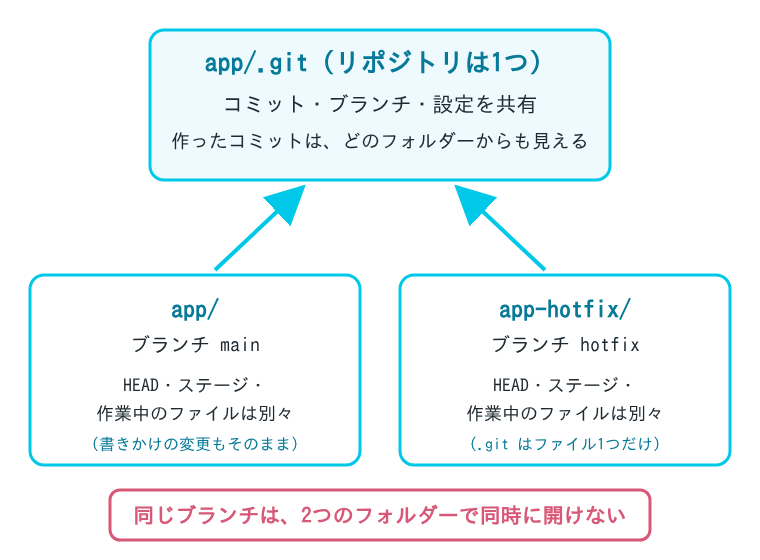
app-hotfix の中身を見ると、.git はフォルダーではなくファイルでした。中身は、元のリポジトリの中にある、このフォルダー用の管理フォルダーの場所です。追跡していない .env は、新しいフォルダーには入っていません。
$ ls -a ../app-hotfix
.
..
.git
.gitignore
index.html

$ cat ../app-hotfix/.git
gitdir: /path/to/app/.git/worktrees/app-hotfix

$ git -C ../app-hotfix status
On branch hotfix
nothing to commit, working tree clean

$ git status --short
 M index.html
新しいフォルダーには書きかけの変更がなく、元の app には index.html の変更が残ったままです。.env のように Git が管理していないファイルを新しいフォルダーでも使うときは、自分でコピーする必要があります。
それぞれのフォルダーでコミットする
app-hotfix に移って見出しを直し、コミットしました。
$ cd ../app-hotfix

$ sed -i 's/ねこノート/ねこノート(修正版)/' index.html

$ git commit -q -am '見出しを直す'

$ git log --oneline -1
e92026d 見出しを直す
app に戻って git log hotfix を見ると、app-hotfix で作ったコミットが入っていました。app の書きかけの変更は、何も変わっていません。
$ cd ../app

$ git log --oneline hotfix
e92026d 見出しを直す
43160d7 最初のコミット

$ git status --short
 M index.html

$ cat index.html
<h1>ねこノート</h1>
<p>書きかけの記事一覧</p>公式リファレンスによると、追加したフォルダーは元のリポジトリとつながっていて、HEAD やステージ(index)のようにフォルダーごとのものを除いて、すべてを共有します。ブランチやタグなど refs/ で始まるものは共有され、リポジトリの設定ファイル(config)も、ふだんはすべてのフォルダーで共通です。上の例でも、fetch や push をせずに、app-hotfix で作ったコミットが app から見えました。
新しいブランチを作って開く
まだないブランチで作業を始めるときは、-b <ブランチ名> を付けます。もとにするコミットを省くと、いまの HEAD から作られます。フォルダーだけを指定した場合は、フォルダー名と同じ名前のブランチが作られました。
$ git worktree add -b feature ../app-feature
Preparing worktree (new branch 'feature')
HEAD is now at 43160d7 最初のコミット

$ git worktree add ../app-try
Preparing worktree (new branch 'app-try')
HEAD is now at 43160d7 最初のコミット

$ git branch
+ app-try
+ feature
+ hotfix
* main

$ git worktree list
/path/to/app          43160d7 [main]
/path/to/app-feature  43160d7 [feature]
/path/to/app-hotfix   e92026d [hotfix]
/path/to/app-try      43160d7 [app-try]
git branch の * はいまのフォルダーのブランチ、+ はほかのフォルダーで開いているブランチです(git branch の公式リファレンス)。
同じブランチは2つのフォルダーで開けない
すでに app-hotfix で開いている hotfix を、別のフォルダーでも開こうとすると止められました。ほかのフォルダーで git switch しようとしても同じです。開いている間は、git branch -d で消すこともできません。
$ git worktree add ../app-hotfix2 hotfix
Preparing worktree (checking out 'hotfix')
fatal: 'hotfix' is already used by worktree at '/path/to/app-hotfix'

$ git -C ../app-feature switch hotfix
fatal: 'hotfix' is already used by worktree at '/path/to/app-hotfix'

$ git branch -d hotfix
error: cannot delete branch 'hotfix' used by worktree at '/path/to/app-hotfix'公式リファレンスによると、git worktree add に --force を付ければ、ほかのフォルダーで開いているブランチでも開けます。
使い終わったフォルダーを片付ける
使い終わったフォルダーは git worktree remove で消します。app-feature に、追跡していない memo.txt を置いた状態で試すと、消すのを断られました。
$ echo 'メモ' > ../app-feature/memo.txt

$ git worktree remove ../app-feature
fatal: '../app-feature' contains modified or untracked files, use --force to delete it

$ git worktree remove --force ../app-feature

$ git worktree remove app-try

$ git worktree list
/path/to/app         43160d7 [main]
/path/to/app-hotfix  e92026d [hotfix]

$ git branch
  app-try
  feature
+ hotfix
* main
変更のない app-try は、--force なしで消せました。公式リファレンスにあるとおり、パスの最後の部分がほかと重ならなければ、app-try のようにフォルダー名だけで指定できます。フォルダーを消しても、ブランチの feature と app-try は残りました。ブランチも要らないときは、別に git branch -d で消します(次の節の最後で、実際に消しています)。
git worktree remove --force は、まだコミットしていない変更や追跡していないファイルごとフォルダーを消します。上の例では memo.txt も消えました。付ける前に、そのフォルダーで git status を見て、残したいものがないか確かめてください。
フォルダーを直接消してしまったとき
git worktree remove を使わずに、rm -rf などでフォルダーを消すと、リポジトリの中に管理用の情報が残ります。git worktree list では prunable と表示されました。git worktree prune で、この情報を片付けられます。
$ rm -rf ../app-hotfix

$ git worktree list
/path/to/app         43160d7 [main]
/path/to/app-hotfix  e92026d [hotfix] prunable

$ git worktree prune -v
Removing worktrees/app-hotfix: gitdir file points to non-existent location

$ git worktree list
/path/to/app  43160d7 [main]

$ git branch
  app-try
  feature
  hotfix
* main

$ git branch -d feature app-try
Deleted branch feature (was 43160d7).
Deleted branch app-try (was 43160d7).

$ git branch
  hotfix
* main
prune のあとは、hotfix の前の + が消え、ほかのフォルダーで開いているブランチとして扱われなくなりました。残っていた feature と app-try のブランチも、ここで git branch -d で消しました。公式リファレンスによると、git worktree remove を使わずに消したフォルダーの管理用の情報は、そのままにしておいても、いずれ自動で消されます。消されるまでの期間は gc.worktreePruneExpire の設定で決まります。