
git add -pで、1つのファイルの変更を分けてコミットする方法
1つのファイルに、不具合の修正と機能の追加を続けて書いてしまったときは、git add -p(--patch)でコミットを分けられます。git add -p は変更をひとまとまり(hunk)ずつ見せて、ステージするかどうかを尋ねます。「この修正だけ先にコミットしたい」「デバッグ用の行はコミットに入れたくない」というときに、ファイルの一部だけをステージできます。
検証環境は Ubuntu 24.04、Git 2.43.0 です。コミットの作者(Author)の名前とメールアドレスには例示用の値(Neko <neko@example.com>)を設定しました。git add -p は、人が端末で打つのと同じ状態(疑似端末)で動かし、出力をそのまま載せています。問いの行の末尾にある ? や s、y、n は、私が入力した答えです。Windows・macOS と、e で hunk を手で書き換える使い方は試していません。
1つのファイルに2つの変更が混ざった例
例として使うのは、単価と個数から合計金額を出す shop.sh です。3000円以上なら送料無料、それより安ければ送料500円を足す、という決まりのスクリプトです。ただし、比べる演算子が -gt(より大きい)なので、ちょうど3000円のときに送料が付いてしまいます。
$ cat shop.sh
#!/bin/sh
# 使い方: ./shop.sh 単価 個数
price=$1
count=$2
sub=$((price * count))

if [ "$sub" -gt 3000 ]; then
  echo "$sub"
else
  echo $((sub + 500))
fi

$ ./shop.sh 1500 2
3500このファイルに、2つの変更を続けて入れました。1つは、-gt を -ge(以上)に直す不具合の修正です。もう1つは、3つ目の引数で値引き額を指定できるようにする機能の追加です。
$ git diff
diff --git a/shop.sh b/shop.sh
index cd4f47e..aff891e 100755
--- a/shop.sh
+++ b/shop.sh
@@ -1,10 +1,11 @@
 #!/bin/sh
-# 使い方: ./shop.sh 単価 個数
+# 使い方: ./shop.sh 単価 個数 [値引き額]
 price=$1
 count=$2
-sub=$((price * count))
+discount=${3:-0}
+sub=$((price * count - discount))

-if [ "$sub" -gt 3000 ]; then
+if [ "$sub" -ge 3000 ]; then
   echo "$sub"
 else
   echo $((sub + 500))

$ ./shop.sh 1500 2
3000

$ ./shop.sh 1500 2 200
3300どちらも動いています。ただ、git add shop.sh でファイルごとステージすると、2つの変更が1つのコミットに入ります。不具合の修正だけを先にコミットし、値引きの機能は別のコミットにします。
git add -p で、変更を1つずつステージするか答える
git add -p を実行すると、変更のある hunk が1つずつ表示され、その下に Stage this hunk [y,n,q,a,d,s,e,?]? と尋ねられます。答えを1文字入力して Enter を押します。ここでは、まず ? を入力して答え方の一覧を出しました。
$ git add -p
diff --git a/shop.sh b/shop.sh
index cd4f47e..aff891e 100755
--- a/shop.sh
+++ b/shop.sh
@@ -1,10 +1,11 @@
 #!/bin/sh
-# 使い方: ./shop.sh 単価 個数
+# 使い方: ./shop.sh 単価 個数 [値引き額]
 price=$1
 count=$2
-sub=$((price * count))
+discount=${3:-0}
+sub=$((price * count - discount))

-if [ "$sub" -gt 3000 ]; then
+if [ "$sub" -ge 3000 ]; then
   echo "$sub"
 else
   echo $((sub + 500))
(1/1) Stage this hunk [y,n,q,a,d,s,e,?]? ?
y - stage this hunk
n - do not stage this hunk
q - quit; do not stage this hunk or any of the remaining ones
a - stage this hunk and all later hunks in the file
d - do not stage this hunk or any of the later hunks in the file
s - split the current hunk into smaller hunks
e - manually edit the current hunk
? - print help
一覧の意味は次のとおりです。
| 答え | 何をするか |
|---|---|
y |
この hunk をステージする |
n |
この hunk をステージしない |
q |
ここで終える。この hunk と残りの hunk はステージしない |
a |
この hunk と、同じファイルの残りの hunk をすべてステージする |
d |
この hunk と、同じファイルの残りの hunk をすべてステージしない |
s |
この hunk を、もっと小さな hunk に分ける |
e |
この hunk をエディターで手で書き換える |
公式リファレンス(git add)の「INTERACTIVE MODE」の節には、このほかに、hunk の間を行き来する j・J・k・K、番号で選ぶ g、正規表現で探す / も載っています。問いの括弧の中の文字は、場面によって変わります。このあと hunk を分けると、問いから s が消え、j や g、/ が出てきます。公式リファレンスによると、設定 interactive.singleKey を true にすると、Enter を押さずに1文字で答えられます。
s で、1つの hunk を3つに分ける
この例では、Git は3か所の変更をまとめて1つの hunk として出しました((1/1) と出ています)。このまま y か n で答えると、不具合の修正と値引きの機能を分けられません。
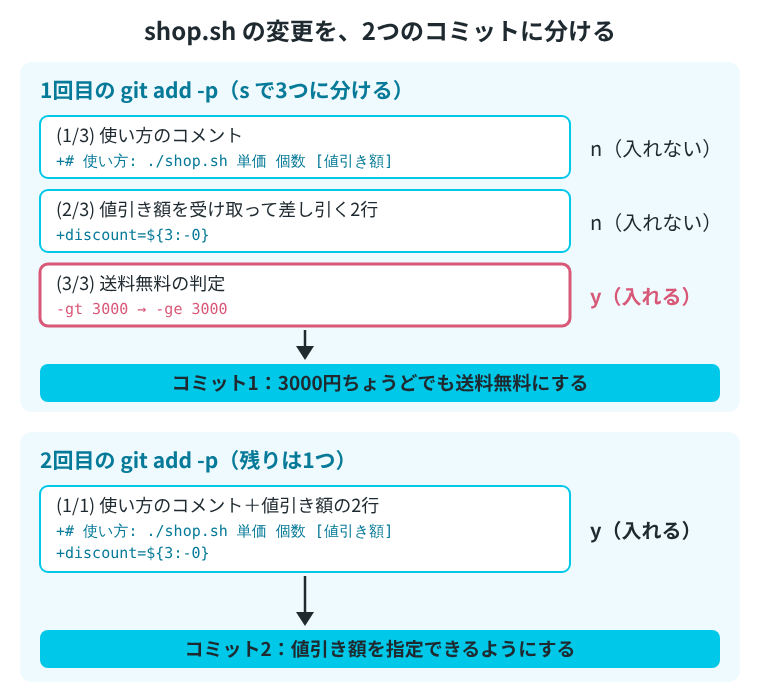
そこで s を入力します。変更していない行を境目にして、hunk が小さく分かれます。ここでは3つに分かれたので、1つ目(使い方のコメント)と2つ目(値引き額を受け取って差し引く2行)に n、3つ目(-gt を -ge に直す行)に y と答えました。
次の出力は、? の一覧のすぐあとの続きです。同じ hunk と問いがもう一度表示され、そこに s と入力しています。
@@ -1,10 +1,11 @@
 #!/bin/sh
-# 使い方: ./shop.sh 単価 個数
+# 使い方: ./shop.sh 単価 個数 [値引き額]
 price=$1
 count=$2
-sub=$((price * count))
+discount=${3:-0}
+sub=$((price * count - discount))

-if [ "$sub" -gt 3000 ]; then
+if [ "$sub" -ge 3000 ]; then
   echo "$sub"
 else
   echo $((sub + 500))
(1/1) Stage this hunk [y,n,q,a,d,s,e,?]? s
Split into 3 hunks.
@@ -1,4 +1,4 @@
 #!/bin/sh
-# 使い方: ./shop.sh 単価 個数
+# 使い方: ./shop.sh 単価 個数 [値引き額]
 price=$1
 count=$2
(1/3) Stage this hunk [y,n,q,a,d,j,J,g,/,e,?]? n
@@ -3,4 +3,5 @@
 price=$1
 count=$2
-sub=$((price * count))
+discount=${3:-0}
+sub=$((price * count - discount))

(2/3) Stage this hunk [y,n,q,a,d,K,j,J,g,/,e,?]? n
@@ -6,5 +7,5 @@

-if [ "$sub" -gt 3000 ]; then
+if [ "$sub" -ge 3000 ]; then
   echo "$sub"
 else
   echo $((sub + 500))
(3/3) Stage this hunk [y,n,q,a,d,K,g,/,e,?]? y
分かれた境目は、変更していない行のところです。1つ目と2つ目の間には price=$1 と count=$2 の2行が、2つ目と3つ目の間には空の行が1行ありました。
ステージした内容を確かめてから、コミットする
すべての hunk に答え終わると、git add -p は終わります。git status を見ると、同じ shop.sh が「Changes to be committed」(ステージ済み)と「Changes not staged for commit」(まだステージしていない)の両方に出ています。
$ git status
On branch main
Changes to be committed:
  (use "git restore --staged <file>..." to unstage)
	modified:   shop.sh

Changes not staged for commit:
  (use "git add <file>..." to update what will be committed)
  (use "git restore <file>..." to discard changes in working directory)
	modified:   shop.sh
次のコミットに入る中身は git diff --cached、まだステージしていない残りは git diff で確かめられます。git diff --cached には -gt を -ge に直した行だけが、git diff には値引きの機能の行だけが出ています。
$ git diff --cached
diff --git a/shop.sh b/shop.sh
index cd4f47e..3ebabf8 100755
--- a/shop.sh
+++ b/shop.sh
@@ -4,7 +4,7 @@ price=$1
 count=$2
 sub=$((price * count))

-if [ "$sub" -gt 3000 ]; then
+if [ "$sub" -ge 3000 ]; then
   echo "$sub"
 else
   echo $((sub + 500))

$ git diff
diff --git a/shop.sh b/shop.sh
index 3ebabf8..aff891e 100755
--- a/shop.sh
+++ b/shop.sh
@@ -1,8 +1,9 @@
 #!/bin/sh
-# 使い方: ./shop.sh 単価 個数
+# 使い方: ./shop.sh 単価 個数 [値引き額]
 price=$1
 count=$2
-sub=$((price * count))
+discount=${3:-0}
+sub=$((price * count - discount))

 if [ "$sub" -ge 3000 ]; then
   echo "$sub"
これでよければ、ファイル名を付けずに git commit を実行します。ステージした内容だけがコミットになります。
$ git commit -m "3000円ちょうどでも送料無料にする"
[main dcf64b0] 3000円ちょうどでも送料無料にする
 1 file changed, 1 insertion(+), 1 deletion(-)
残りの変更を、2つ目のコミットにする
もう一度 git add -p を実行すると、残っている値引きの機能の変更だけが出ます。2か所の変更は、いまは1つの hunk にまとまっています。今度は y でステージして、コミットします。
$ git add -p
diff --git a/shop.sh b/shop.sh
index 3ebabf8..aff891e 100755
--- a/shop.sh
+++ b/shop.sh
@@ -1,8 +1,9 @@
 #!/bin/sh
-# 使い方: ./shop.sh 単価 個数
+# 使い方: ./shop.sh 単価 個数 [値引き額]
 price=$1
 count=$2
-sub=$((price * count))
+discount=${3:-0}
+sub=$((price * count - discount))

 if [ "$sub" -ge 3000 ]; then
   echo "$sub"
(1/1) Stage this hunk [y,n,q,a,d,s,e,?]? y

$ git commit -m "値引き額を指定できるようにする"
[main 44923d6] 値引き額を指定できるようにする
 1 file changed, 3 insertions(+), 2 deletions(-)

$ git log --oneline
44923d6 値引き額を指定できるようにする
dcf64b0 3000円ちょうどでも送料無料にする
feeaed8 合計を計算するスクリプトを追加
1つのファイルの変更が、2つのコミットに分かれました。ここまでの流れを図にすると、次のようになります。
1つ目のコミットを git show で見ると、-gt を -ge に直した行だけが入っています。
$ git show --format="%h %s" HEAD~1
dcf64b0 3000円ちょうどでも送料無料にする

diff --git a/shop.sh b/shop.sh
index cd4f47e..3ebabf8 100755
--- a/shop.sh
+++ b/shop.sh
@@ -4,7 +4,7 @@ price=$1
 count=$2
 sub=$((price * count))

-if [ "$sub" -gt 3000 ]; then
+if [ "$sub" -ge 3000 ]; then
   echo "$sub"
 else
   echo $((sub + 500))
ステージしすぎた変更は git restore –staged -p で一部だけ戻す
反対に、git add でファイルごとステージしたあとで、一部だけをステージから外したいこともあります。ここでは shop.sh に、コメントを1行と、値を確かめるためのデバッグ出力(echo "debug: ...")を1行足しました。そのうえで、うっかり git add shop.sh でファイルごとステージしています。
$ git diff
diff --git a/shop.sh b/shop.sh
index aff891e..c9273d2 100755
--- a/shop.sh
+++ b/shop.sh
@@ -1,9 +1,11 @@
 #!/bin/sh
 # 使い方: ./shop.sh 単価 個数 [値引き額]
+# 値引き額は円で指定する
 price=$1
 count=$2
 discount=${3:-0}
 sub=$((price * count - discount))
+echo "debug: sub=$sub" >&2

 if [ "$sub" -ge 3000 ]; then
   echo "$sub"

$ git add shop.sh

$ git status --short
M  shop.sh
git restore --staged -p を実行すると、ステージ済みの変更が hunk ごとに表示され、Unstage this hunk と尋ねられます。今度は y が「ステージから外す」という意味です。s で2つに分け、コメントの行には n、デバッグ出力の行には y と答えました。
$ git restore --staged -p
diff --git a/shop.sh b/shop.sh
index aff891e..c9273d2 100755
--- a/shop.sh
+++ b/shop.sh
@@ -1,9 +1,11 @@
 #!/bin/sh
 # 使い方: ./shop.sh 単価 個数 [値引き額]
+# 値引き額は円で指定する
 price=$1
 count=$2
 discount=${3:-0}
 sub=$((price * count - discount))
+echo "debug: sub=$sub" >&2

 if [ "$sub" -ge 3000 ]; then
   echo "$sub"
(1/1) Unstage this hunk [y,n,q,a,d,s,e,?]? s
Split into 2 hunks.
@@ -1,6 +1,7 @@
 #!/bin/sh
 # 使い方: ./shop.sh 単価 個数 [値引き額]
+# 値引き額は円で指定する
 price=$1
 count=$2
 discount=${3:-0}
 sub=$((price * count - discount))
(1/2) Unstage this hunk [y,n,q,a,d,j,J,g,/,e,?]? n
@@ -3,7 +4,8 @@
 price=$1
 count=$2
 discount=${3:-0}
 sub=$((price * count - discount))
+echo "debug: sub=$sub" >&2

 if [ "$sub" -ge 3000 ]; then
   echo "$sub"
(2/2) Unstage this hunk [y,n,q,a,d,K,g,/,e,?]? y
git diff --cached にはコメントの行だけが残り、デバッグ出力の行は git diff(まだステージしていない側)に移りました。ファイルの中身はどちらも残っていて、ステージから外れただけです。
$ git diff --cached
diff --git a/shop.sh b/shop.sh
index aff891e..4fbb4fb 100755
--- a/shop.sh
+++ b/shop.sh
@@ -1,5 +1,6 @@
 #!/bin/sh
 # 使い方: ./shop.sh 単価 個数 [値引き額]
+# 値引き額は円で指定する
 price=$1
 count=$2
 discount=${3:-0}

$ git diff
diff --git a/shop.sh b/shop.sh
index 4fbb4fb..c9273d2 100755
--- a/shop.sh
+++ b/shop.sh
@@ -5,6 +5,7 @@ price=$1
 count=$2
 discount=${3:-0}
 sub=$((price * count - discount))
+echo "debug: sub=$sub" >&2

 if [ "$sub" -ge 3000 ]; then
echo "$sub"--staged を付けずに git restore -p を実行すると、ステージではなく作業中のファイルのほうが元に戻ります。公式リファレンス(git restore)のとおり、--staged も --worktree も付けないときは、作業中のファイルが戻す先になります。ステージしていない変更は、ステージ済みの内容に戻されます。ステージから外したいだけのときは、--staged を付けてください。
まだ Git が追跡していない新しいファイルは、git add -N のあとで使う
新しく作ったファイルに git add -p を使うと、No changes. と出て何もステージされません。公式リファレンス(git add)によると、-p で選べるのは、インデックス(ステージ)と作業中のファイルの差分です。まだ追跡していないファイルはインデックスに入っていないので、選ぶ対象として出てきません。
$ printf '送料は3000円以上で無料\n値引きは円で指定\n' > NOTES.txt

$ git status --short
MM shop.sh
?? NOTES.txt

$ git add -p NOTES.txt
No changes.
先に git add -N(--intent-to-add)を実行すると、「このファイルをあとで追加する」ことだけが中身なしで記録されます(公式リファレンスの -N の説明)。そのあとなら、git add -p で中身を選んでステージできます。新しいファイルのときは、問いが Stage addition に変わります。
$ git add -N NOTES.txt

$ git status --short
 A NOTES.txt
MM shop.sh

$ git add -p NOTES.txt
diff --git a/NOTES.txt b/NOTES.txt
new file mode 100644
index 0000000..c5498b1
--- /dev/null
+++ b/NOTES.txt
@@ -0,0 +1,2 @@
+送料は3000円以上で無料
+値引きは円で指定
(1/1) Stage addition [y,n,q,a,d,e,?]? y

$ git status --short
A  NOTES.txt
MM shop.sh
git status --short の NOTES.txt の行は、git add -N の直後の A から A に変わりました。