
GitのPlease tell me who you areの直し方
git commit が *** Please tell me who you are. と出して止まったときは、git config --global user.name と git config --global user.email で名前とメールアドレスを設定すると、もう一度 git commit したときにコミットできます。Git を入れたばかりの新しい PC や、作ったばかりのサーバー、コンテナの中など、名前とメールアドレスをまだ設定していない環境で初めてコミットしたときに出るエラーです。以下では、エラーを実際に起こしてから、設定して消えるまでを、検証環境の出力そのままで載せます。
検証環境は Ubuntu 24.04、Git 2.43.0 です。OS のユーザー名とホスト名は例示用の値(ユーザー neko、ホスト名 neko-pc)にしてあり、エラーの中にもその値が出ています。設定した名前とメールアドレスも例示用の値(Neko <neko@example.com>)です。ホームフォルダは毎回空の状態から始め、システム全体の Git 設定は読まない状態(GIT_CONFIG_NOSYSTEM=1)で試しました。出力をそろえるためにコミットの日時を固定しているので、別々の操作でもコミットのハッシュが同じ ff22d01 になっています。手元で試すとハッシュは変わります。Windows・macOS での動作や、GitHub などのホスティングサービスへのプッシュは試していません。
エラーの全文
名前もメールアドレスも設定していない状態です。git config --global で読んでも、何も表示されません。
$ git config --global user.name; git config --global user.email; echo "exit=$?"
exit=1
この状態で README.md を git add し、コミットすると、次のエラーが出ました。
$ git commit -m "最初のコミット"; echo "exit=$?"
Author identity unknown

*** Please tell me who you are.

Run

  git config --global user.email "you@example.com"
  git config --global user.name "Your Name"

to set your account's default identity.
Omit --global to set the identity only in this repository.

fatal: unable to auto-detect email address (got 'neko@neko-pc.(none)')
exit=128
1行目の Author identity unknown は、コミットの作者(author)が誰か分からない、という意味です。そのあとの英文は「次のコマンドで、このアカウントの既定の名前とメールアドレスを設定してください。--global を省くと、このリポジトリだけの設定になります」という案内です。最後の fatal: の行が、止まった直接の理由です。メールアドレスを自動で決めようとして neko@neko-pc.(none) という値になり、使えないと判断されました。
コミットは作られていません。git log はまだコミットがないと答え、git add した README.md はステージされたまま残っています。
$ git log; echo "exit=$?"
fatal: your current branch 'main' does not have any commits yet
exit=128

$ git status --short
A  README.md
git config –global で名前とメールアドレスを設定する
エラーの案内どおり、2つの値を設定します。自分の名前と、コミットに残してよいメールアドレスに置き換えて実行してください。
$ git config --global user.name "Neko"

$ git config --global user.email "neko@example.com"

$ cat ~/.gitconfig
[user]
	name = Neko
	email = neko@example.com
--global を付けると、ホームフォルダの ~/.gitconfig に書き込まれ、そのユーザーのすべてのリポジトリで使われます。設定したら、同じコミットをやり直します。git add はやり直さなくて構いません。
$ git commit -m "最初のコミット"; echo "exit=$?"
[main (root-commit) ff22d01] 最初のコミット
 1 file changed, 1 insertion(+)
 create mode 100644 README.md
exit=0

$ git log -1 --format="%h %an <%ae> / %cn <%ce>"
ff22d01 Neko <neko@example.com> / Neko <neko@example.com>エラーは出なくなり、作者(%an <%ae>)とコミッター(%cn <%ce>)の両方に、設定した名前とメールアドレスが入りました。git config の user.name と user.email の説明にあるとおり、この2つの値がコミットの author と committer の欄に入ります。
エラーの案内にある Omit --global の一文のとおり、--global を付けずにリポジトリの中で git config user.name と git config user.email を実行しても、同じようにコミットできました。この場合はそのリポジトリの .git/config に書き込まれ、ほかのリポジトリでは使われません。
$ git config user.name "Neko"

$ git config user.email "neko@example.com"

$ git commit -m "最初のコミット"; echo "exit=$?"
[main (root-commit) ff22d01] 最初のコミット
 1 file changed, 1 insertion(+)
 create mode 100644 README.md
exit=0

$ git config --show-scope --get user.email
local	neko@example.com
リポジトリごとに名前とメールアドレスを使い分けたいときの設定は、別の記事「Gitの名前とメールアドレスをリポジトリごとに変える方法」で詳しく扱っています。
片方だけ設定したときの fatal の行
名前とメールアドレスは、両方そろえる必要があります。片方だけ設定してコミットすると、同じ Please tell me who you are の案内が出て、fatal: の行だけが変わりました。
名前(user.name)だけ設定したときは、メールアドレスを決められず、最初と同じ行で止まります。
$ git config --global user.name "Neko"

$ git commit -m "最初のコミット"; echo "exit=$?"
Author identity unknown

*** Please tell me who you are.
(中略)
fatal: unable to auto-detect email address (got 'neko@neko-pc.(none)')
exit=128メールアドレス(user.email)だけ設定したときは、名前が空だという理由で止まりました。
$ git config --global user.email "neko@example.com"

$ git commit -m "最初のコミット"; echo "exit=$?"
Author identity unknown

*** Please tell me who you are.
(中略)
fatal: empty ident name (for <neko@example.com>) not allowed
exit=128どちらも、途中の案内の行は最初のエラーと同じなので省きました。fatal: の行に email address とあればメールアドレスが、ident name とあれば名前が足りていません。
設定していないのにエラーにならないこともある
Git は、設定がないときに名前とメールアドレスを自分で組み立てようとします。git commit の公式リファレンスの COMMIT INFORMATIONによると、探す順番は次の図のとおりです。最後の手段は、OS のユーザー名と、メールの送信に使うホスト名(/etc/mailname、なければ完全なホスト名)です。
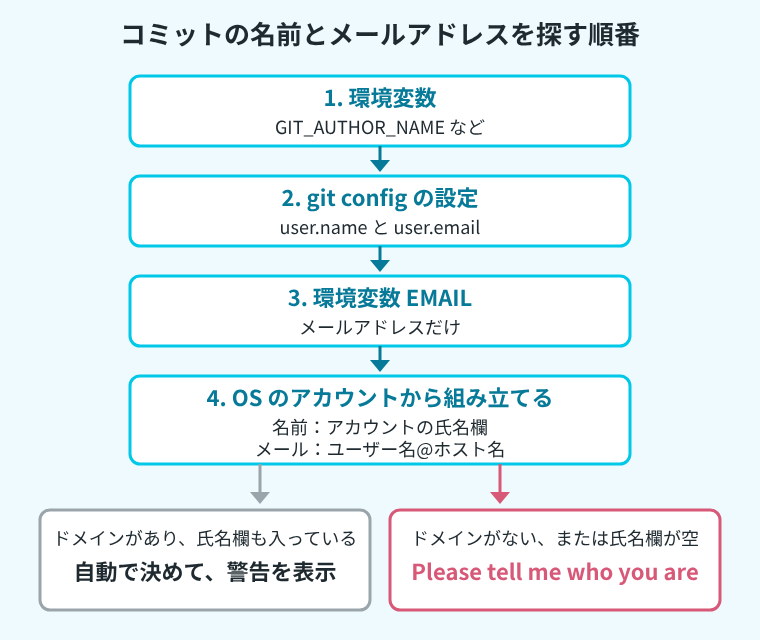
Git 2.43.0 のソース ident.c を読むと、名前は OS のアカウントの氏名欄(GECOS フィールド)から取っています。メールアドレスは「ユーザー名@ホスト名」で、ホスト名にドメインがなく、名前解決でも完全なホスト名が見つからないときは、末尾に .(none) を付けて使えない値として扱います。最初のエラーの neko@neko-pc.(none) はこれです。メールアドレスだけ設定したときに empty ident name で止まったのは、検証用のアカウント neko の氏名欄が空だったからです。
逆に、ホスト名にドメインがあり、氏名欄も入っているときは、エラーになりません。ホスト名を neko-pc.example.com にし、氏名欄に Tama と入れたアカウント tama で、何も設定せずにコミットすると、コミットはできたうえで次の警告が出ました。
$ git commit -m "最初のコミット"; echo "exit=$?"
[main (root-commit) 4185905] 最初のコミット
 Committer: Tama <tama@neko-pc.example.com>
Your name and email address were configured automatically based
on your username and hostname. Please check that they are accurate.
You can suppress this message by setting them explicitly. Run the
following command and follow the instructions in your editor to edit
your configuration file:

    git config --global --edit

After doing this, you may fix the identity used for this commit with:

    git commit --amend --reset-author

 1 file changed, 1 insertion(+)
 create mode 100644 README.md
exit=0

$ git log -1 --format="%h %an <%ae> / %cn <%ce>"
4185905 Tama <tama@neko-pc.example.com> / Tama <tama@neko-pc.example.com>
警告は「ユーザー名とホスト名から名前とメールアドレスを自動で決めたので、正しいか確かめてください」という内容です。コミットには、ユーザー名とホスト名から組み立てた tama@neko-pc.example.com というメールアドレスがそのまま残りました。
記録された作者を直す方法として、Git の警告は git commit --amend --reset-author を案内しています。警告が出たら、push する前に次の手順で直してください。
直し方は、Git が出した警告の案内どおりです。名前とメールアドレスを設定してから、git commit --amend --reset-author で直前のコミットを作り直します。git commit の公式リファレンスによると、--amend は今のブランチの先頭のコミットを新しいコミットで置き換え、--reset-author を付けると作者を今のコミッターに変えます。--no-edit は、コミットメッセージを変えずに使うためのオプションです。
$ git config --global user.name "Neko"

$ git config --global user.email "neko@example.com"

$ git commit --amend --reset-author --no-edit; echo "exit=$?"
[main ff22d01] 最初のコミット
 1 file changed, 1 insertion(+)
 create mode 100644 README.md
exit=0

$ git log --format="%h %an <%ae> / %cn <%ce>"
ff22d01 Neko <neko@example.com> / Neko <neko@example.com>
作者もコミッターも、設定した値に置き換わりました。コミットは作り直されたので、ハッシュも 4185905 から ff22d01 に変わっています。それより前のコミットがあっても、--amend で作り直されるのは先頭の1つだけです。