
Gitのpushがfetch firstで拒否されたときの直し方
git push が ! [rejected] main -> main (fetch first) と error: failed to push some refs で止まるのは、リモートのブランチに、手元にないコミットがあるときです。チーム開発などで、自分が push する前に、同じブランチへ別のクローンから先に push されていると起きます。git pull --rebase か git pull --no-rebase でその変更を取り込めば、同じ git push が通ります。検証環境でこのエラーを起こし、取り込んでエラーが消えるまでの出力を載せています。
検証環境は Ubuntu 24.04、Git 2.43.0 です。リモートは同じ環境に作ったローカルの bare リポジトリで、2つのクローン(手元と、別の作業場所)から相対パス ../remote.git で指しています。そのため、出力の To の行には ../remote.git、From の行には ../remote と出ます。GitHub などのホスティングサービスへの push、Windows・macOS での動作、取り込むときに競合が起きる場合は試していません。コミットの日時を固定していますが、場面ごとにリポジトリを作り直したので、場面によってハッシュが違います。
エラーの全文
index.html だけのリポジトリを、手元と別の作業場所の2か所にクローンしました。別の作業場所で紹介ページ about.html を足して push したあと、手元ではそれを取り込まないまま、フッターの年を直すコミットを作りました。
この時点で手元の git status を見ると、自分のコミットが1つ多いとだけ出ます。リモートが先に進んだことを、手元はまだ知らないからです。
$ git status
On branch main
Your branch is ahead of 'origin/main' by 1 commit.
  (use "git push" to publish your local commits)

nothing to commit, working tree clean
ここで git push すると、次のように拒否されました。
$ git push; echo "exit=$?"
To ../remote.git
 ! [rejected]        main -> main (fetch first)
error: failed to push some refs to '../remote.git'
hint: Updates were rejected because the remote contains work that you do not
hint: have locally. This is usually caused by another repository pushing to
hint: the same ref. If you want to integrate the remote changes, use
hint: 'git pull' before pushing again.
hint: See the 'Note about fast-forwards' in 'git push --help' for details.
exit=1
git push origin main とブランチ名を書いても、出力はまったく同じでした。
hint: の行は「リモートに、手元にない作業が含まれているので更新を拒否した。たいていは、別のリポジトリが同じ参照(ここでは同じブランチ)に push したのが原因。リモートの変更を取り込むなら、もう一度 push する前に git pull を実行する」という意味です。failed to push some refs は「いくつかの参照を push できなかった」という結果の報告で、理由はその上の (fetch first) の行にあります。
拒否されたので、リモートは何も変わっていません。手元の origin/main も、push の前と同じコミットを指したままでした(git status の表示も上と同じです)。
fetch first と non-fast-forward の違い
エラーの括弧の中は、git fetch をしたかどうかで変わります。push を拒否された手元のリポジトリで git fetch だけを実行し、取り込まずにもう一度 push してみました。
$ git fetch; echo "exit=$?"
From ../remote
   ceb621c..afa78a4  main       -> origin/main
exit=0

$ git status
On branch main
Your branch and 'origin/main' have diverged,
and have 1 and 1 different commits each, respectively.
  (use "git pull" if you want to integrate the remote branch with yours)

nothing to commit, working tree clean

$ git push; echo "exit=$?"
To ../remote.git
 ! [rejected]        main -> main (non-fast-forward)
error: failed to push some refs to '../remote.git'
hint: Updates were rejected because the tip of your current branch is behind
hint: its remote counterpart. If you want to integrate the remote changes,
hint: use 'git pull' before pushing again.
hint: See the 'Note about fast-forwards' in 'git push --help' for details.
exit=1
今度は (non-fast-forward) で拒否され、hint: の文も「手元のブランチの先端が、リモートより遅れている」に変わりました。
違いは、リモートの先端のコミットを手元が持っているかどうかです。Git 2.43.0 のソース remote.c を読むと、push しようとしたとき、リモートの今のコミットが手元のリポジトリにないと fetch first、手元にあっても、送ろうとしているコミットがその子孫でないと non-fast-forward として拒否しています。git fetch でリモートのコミットを取ってきたので、理由が fetch first から non-fast-forward に変わりました。どちらも、リモートの変更を取り込めば直る点は同じです。
git fetch のあとの git log で、2つの履歴が分かれているのが見えます。
$ git log --oneline --graph --all
* 56ac71f フッターの年を直す
| * afa78a4 紹介ページを足す
|/
* ceb621c トップページを作る
なぜ拒否されるのか
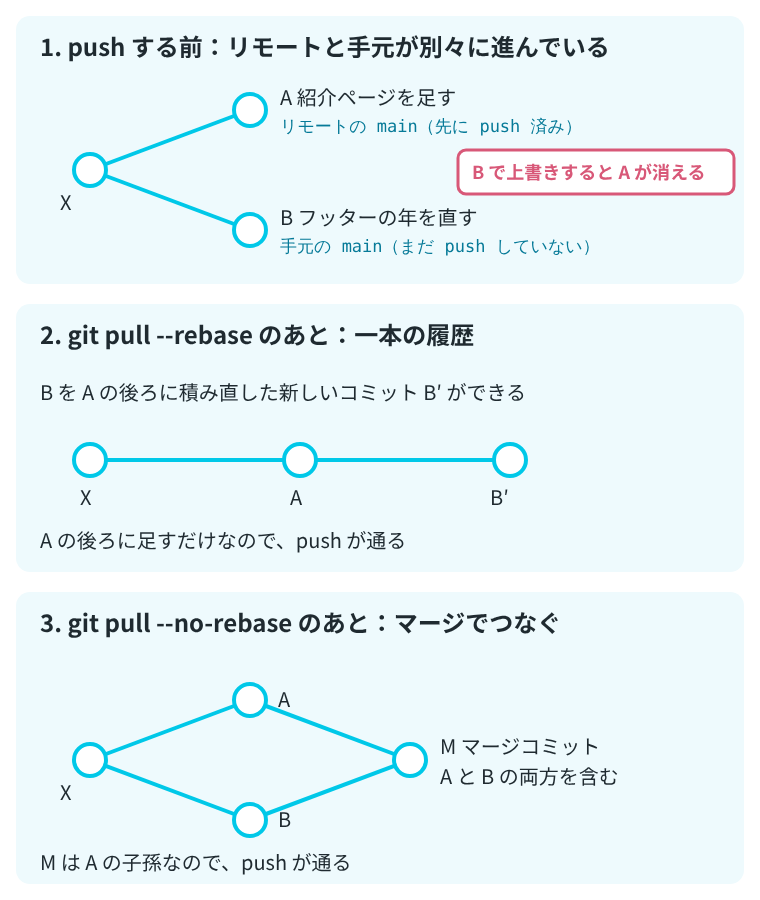
git push の公式リファレンスの「NOTE ABOUT FAST-FORWARDS」の節に、理由が図つきで書かれています。ブランチの更新が、元のコミットの子孫への更新(fast-forward)であれば、履歴は何も失われません。いまの場面で手元の「フッターの年を直す」をそのまま送ると、リモートの main は「紹介ページを足す」を含まない履歴に置き換わり、先に push された変更が消えてしまいます。git push は、こうした fast-forward でない更新を、何も指定しなければ拒否します。
リファレンスに書かれている直し方は、リモートの履歴を取ってきて、両方の変更を含む履歴を作ってから push し直すことです。その作り方として、git pull でマージコミットを作る方法と、git pull --rebase で自分のコミットを積み直す方法が挙がっています。
git pull –rebase で取り込んでから push する
自分のコミットを、リモートのコミットの後ろに積み直す方法です。履歴が一本のまま残ります。
$ git pull --rebase; echo "exit=$?"
Successfully rebased and updated refs/heads/main.
exit=0

$ git log --oneline --graph --all
* e6094e2 フッターの年を直す
* afa78a4 紹介ページを足す
* ceb621c トップページを作る実際の出力には、Rebasing (1/1) という途中経過も含まれていました。そのすぐあとに、行の頭に戻って行を消す制御文字(CR と ESC[K)が続くため、端末では最後の Successfully rebased and updated refs/heads/main. の行だけが残ります。
「フッターの年を直す」のハッシュが 56ac71f から e6094e2 に変わっています。「紹介ページを足す」の後ろに、新しいコミットとして作り直されたからです。これで手元の main はリモートの main の子孫になったので、同じ git push が通りました。
$ git push; echo "exit=$?"
To ../remote.git
   afa78a4..e6094e2  main -> main
exit=0

$ git status
On branch main
Your branch is up to date with 'origin/main'.

nothing to commit, working tree clean

$ git push; echo "exit=$?"
Everything up-to-date
exit=0
afa78a4..e6094e2 は、リモートの main を afa78a4 から e6094e2 へ進めた、という報告です。もう一度 push しても Everything up-to-date と出るだけで、エラーは出ません。リモート側の履歴にも、2つの変更がどちらも残っていました。
$ git -C ../remote.git log --oneline main
e6094e2 フッターの年を直す
afa78a4 紹介ページを足す
ceb621c トップページを作る
git pull –no-rebase で、マージしてから push する
自分のコミットはそのままにして、マージコミットでつなぐ方法です。同じ状態を作り直し、エラーが出るのを確かめてから試しました。
$ git pull --no-rebase; echo "exit=$?"
From ../remote
   e6e0fb6..8f6f2bb  main       -> origin/main
Merge made by the 'ort' strategy.
 about.html | 1 +
 1 file changed, 1 insertion(+)
 create mode 100644 about.html
exit=0

$ git log --oneline --graph --all
*   4082848 Merge branch 'main' of ../remote
|\
| * 8f6f2bb 紹介ページを足す
* | 43003d4 フッターの年を直す
|/
* e6e0fb6 トップページを作る

$ git push; echo "exit=$?"
To ../remote.git
   8f6f2bb..4082848  main -> main
exit=0
マージコミット 4082848 は、リモートの「紹介ページを足す」を親に持つので、これも fast-forward になり、push が通りました。
--rebase も --no-rebase も付けずに git pull すると、pull.rebase などを設定していない検証環境では、リモートの変更を取ってきたところで fatal: Need to specify how to reconcile divergent branches. と出て止まりました。この場合の直し方と、毎回の指定を設定で省く方法は、別の記事「git pullのdivergent branchesエラーを直す方法」で扱っています。
git push –force で消さない
push が通らないときに --force を付けるとどうなるかを、同じ状態を作り直して試しました。--force の前には --force-with-lease も試しています。
$ git -C ../remote.git log --oneline main
795894a 紹介ページを足す
e84ad52 トップページを作る

$ git push --force-with-lease; echo "exit=$?"
To ../remote.git
 ! [rejected]        main -> main (stale info)
error: failed to push some refs to '../remote.git'
exit=1

$ git push --force; echo "exit=$?"
To ../remote.git
 + 795894a...aaf2a23 main -> main (forced update)
exit=0

$ git -C ../remote.git log --oneline main
aaf2a23 フッターの年を直す
e84ad52 トップページを作る

$ git -C ../remote.git ls-tree --name-only main
index.htmlgit push --force で、リモートの main から「紹介ページを足す」のコミットが外れ、about.html もなくなりました。git push の公式リファレンスも、--force はリモートのコミットを失わせることがあるので注意して使うように、と書いています。fetch first のエラーは、取り込めば直ります。
先に試した --force-with-lease のほうは (stale info) で拒否され、リモートは変わりませんでした。公式リファレンスによると、--force-with-lease は、リモートのブランチが手元の origin/main と同じコミットを指しているときだけ上書きします。手元の origin/main は別の作業場所の push より前のままなので、上書きされずに済みました。とはいえ、fetch first で止まったときに必要なのは上書きではなく、リモートの変更の取り込みです。