
Bunのbun testで関数をモックする方法
テストで本物のメールを送ったり、外部 API を呼んだりしないように、関数を偽物(モック)に差し替える方法をまとめました。Bun の bun test では、引数で受け取る関数には mock()、オブジェクトのメソッドには spyOn()、import している関数には mock.module() を使います。どれも bun:test から import するだけで、追加のライブラリはいりません。
検証環境で動かしてみると、mock.module() の差し替えは、同じ bun test で後から動くほかのテストファイルにも残りました。その確かめ方と、防ぎ方も載せています。
検証環境は Ubuntu 24.04(x86_64)、Bun 1.4.4 です。フォルダには TypeScript のファイルだけを置き、package.json も設定ファイルもない状態で動かしました(型チェックの節だけ @types/bun を入れています)。タイマーを進める偽の時計(fake timers)、--parallel、Windows と macOS は試していません。Bun の公式ドキュメントは、検証に使った版(タグ bun-v1.4.4)の元ファイルを GitHub で確認し、リンクもそこに張っています。
mock() で作った関数は、呼ばれ方を覚えている
mock() に関数を渡すと、同じように動き、呼ばれた回数と引数を記録する関数が返ります。
import { expect, mock, test } from "bun:test";

test("呼ばれた回数と引数を確かめる", () => {
  const double = mock((x: number) => x * 2);

  double(5);
  double(10);

  expect(double).toHaveBeenCalledTimes(2);
  expect(double).toHaveBeenCalledWith(5);
  expect(double).toHaveBeenLastCalledWith(10);
  console.log("calls:", double.mock.calls);
  console.log("results:", double.mock.results);
});
toHaveBeenCalledWith は「一度でもこの引数で呼ばれたか」、toHaveBeenLastCalledWith は「最後の呼び出しがこの引数だったか」を確かめます。記録そのものは .mock.calls(呼び出しごとの引数)と .mock.results(呼び出しごとの戻り値)に入っています。bun test で動かしたときの出力はこうでした。
calls: [
  [ 5 ], [ 10 ]
]
results: [
  {
    type: "return",
    value: 10,
  }, {
    type: "return",
    value: 20,
  }
]
(pass) 呼ばれた回数と引数を確かめる [0.20ms]モック関数で使えるプロパティとメソッドの一覧は、公式ドキュメントのモックのページにあります。
呼ぶたびに戻り値やエラーを変える
失敗したときにやり直す処理は、本物の通信ではなかなか試せません。モックなら「2回失敗して3回目に成功する」状況を作れます。テストする関数は、渡された関数を決まった回数まで呼び直す withRetry です(src/retry.ts)。
// 失敗したら、決まった回数までやり直す
export async function withRetry<T>(fn: () => Promise<T>, times: number): Promise<T> {
  let lastError: unknown;
  for (let i = 0; i < times; i++) {
    try {
      return await fn();
    } catch (e) {
      lastError = e;
    }
  }
  throw lastError;
}
テストでは、ふだんは "ok" を返すモックを作り、mockRejectedValueOnce で「次の1回だけエラーにする」設定を2回分積みます。
import { expect, mock, test } from "bun:test";
import { withRetry } from "./retry";

test("2回失敗して3回目に成功する", async () => {
  const load = mock(async () => "ok");
  load
    .mockRejectedValueOnce(new Error("timeout 1"))
    .mockRejectedValueOnce(new Error("timeout 2"));

  const result = await withRetry(load, 3);

  expect(result).toBe("ok");
  expect(load).toHaveBeenCalledTimes(3);
});

test("やり直しの回数を使い切ったら、最後のエラーを投げる", async () => {
  const load = mock(async () => "ok");
  load.mockRejectedValue(new Error("timeout"));

  await expect(withRetry(load, 3)).rejects.toThrow("timeout");
  expect(load).toHaveBeenCalledTimes(3);
});

test("戻り値を呼ぶ順に変える", () => {
  const dice = mock(() => 6);
  dice.mockReturnValueOnce(1).mockReturnValueOnce(2);

  expect([dice(), dice(), dice(), dice()]).toEqual([1, 2, 6, 6]);
});
Once の付くメソッドは、積んだ順に1回ずつ使われ、使い切ると元の動き(ここでは "ok" や 6 を返す)に戻ります。3つ目のテストでは、4回呼んだ結果が [1, 2, 6, 6] になりました。Once の付かない mockRejectedValue は、毎回エラーにします。3件とも通りました。
src/retry.test.ts:
(pass) 2回失敗して3回目に成功する [0.24ms]
(pass) やり直しの回数を使い切ったら、最後のエラーを投げる [0.09ms]
(pass) 戻り値を呼ぶ順に変える [0.03ms]
戻り値を決めるメソッドには、ほかに mockReturnValue(毎回同じ値を返す)、mockResolvedValue(その値で成功する Promise を返す)、mockImplementation(中身の関数を丸ごと入れ替える)などがあります。
Jest や Vitest から移ってきたテストのために、jest.fn() と vi.fn() も bun:test から import できます。src/alias.test.ts で試したところ、mock() と同じように動き、toHaveBeenCalledTimes で回数を確かめるテストが通りました。
オブジェクトのメソッドは spyOn() で見張る
spyOn(オブジェクト, "メソッド名") を使うと、元の処理を動かしたまま、そのメソッドの呼ばれ方を記録できます。mockImplementation を付けると、中身が差し替わります。ここでは、どの環境にもある Math.max と Math.random で試しました。
import { afterEach, expect, mock, spyOn, test } from "bun:test";

afterEach(() => {
  mock.restore();
});

test("spyOn は、元の処理を動かしたまま呼ばれ方を記録する", () => {
  const spy = spyOn(Math, "max");

  expect(Math.max(1, 5, 3)).toBe(5);
  expect(spy).toHaveBeenCalledWith(1, 5, 3);
});

test("mockImplementation で中身を差し替える", () => {
  spyOn(Math, "random").mockImplementation(() => 0.5);

  expect(Math.random()).toBe(0.5);
});

test("mock.restore() の後は、元の Math.random に戻っている", () => {
  const values = [Math.random(), Math.random()];
  console.log("Math.random():", values);
  expect(values).not.toEqual([0.5, 0.5]);
});公式ドキュメントのモックのページでは、afterEach で mock.restore() を呼び、テストごとにすべてのモックを元に戻す書き方が案内されています。ここでもそうしています。3つ目のテストでは Math.random() が 0.5 ではなく、元の乱数を返しました。
src/spy.test.ts:
(pass) spyOn は、元の処理を動かしたまま呼ばれ方を記録する [0.09ms]
(pass) mockImplementation で中身を差し替える [0.02ms]
Math.random(): [ 0.7040688572935184, 0.7037867388974512 ]
(pass) mock.restore() の後は、元の Math.random に戻っている [0.03ms]
import している関数は mock.module() で差し替える
テストしたい関数が、別のファイルの関数を直接 import していることもよくあります。次の sendReminders(src/reminder.ts)は、./mailer の sendMail で全員にメールを送り、送れた数と送れなかった宛先を返します。
import { sendMail } from "./mailer";

// 全員に締め切りのお知らせを送り、送れた数と送れなかった宛先を返す
export async function sendReminders(emails: string[]) {
  let sent = 0;
  const failed: string[] = [];
  for (const to of emails) {
    try {
      await sendMail(to, "締め切りのお知らせ");
      sent++;
    } catch {
      failed.push(to);
    }
  }
  return { sent, failed };
}
本物の src/mailer.ts は、検証用に、いつもエラーを投げるようにしてあります。読み込まれたことが分かるように、ファイルの先頭で [mailer.ts を読み込んだ] と出力します。
// 本物のメール送信(テストでは動かしたくない)
console.log("[mailer.ts を読み込んだ]");

export async function sendMail(to: string, subject: string): Promise<{ id: string }> {
  throw new Error(`SMTP サーバーの設定がないので送れません: ${to} ${subject}`);
}テストでは、mock.module("./mailer", ...) で、./mailer を読み込んだときに返すものを決めます。返すオブジェクトの sendMail を mock() で作っておけば、呼ばれ方も確かめられます。
import { expect, mock, test } from "bun:test";

const sendMail = mock(async (to: string, subject: string) => ({ id: `id-${to}` }));

mock.module("./mailer", () => ({ sendMail }));

test("全員に送れたら sent が人数になる", async () => {
  const { sendReminders } = await import("./reminder");

  const result = await sendReminders(["a@example.com", "b@example.com"]);

  expect(result).toEqual({ sent: 2, failed: [] });
  expect(sendMail).toHaveBeenCalledTimes(2);
  expect(sendMail).toHaveBeenCalledWith("b@example.com", "締め切りのお知らせ");
});

test("送れなかった宛先を failed に入れる", async () => {
  const { sendReminders } = await import("./reminder");
  sendMail.mockClear();
  sendMail.mockRejectedValueOnce(new Error("rejected"));

  const result = await sendReminders(["a@example.com", "b@example.com"]);

  expect(result).toEqual({ sent: 1, failed: ["a@example.com"] });
});
./reminder は、mock.module の後に await import() で読み込んでいます。2つ目のテストの mockClear() は、1つ目のテストで記録された呼び出しを消すためのものです。
ここまでの4つと src/alias.test.ts の、合わせて5つのテストファイルを bun test src でまとめて動かしました。src は、パスに src を含むテストファイルだけを動かす指定です。
$ bun test src
bun test v1.4.4 (38afee6c8)
(途中は省略)
src/reminder.test.ts:
(pass) 全員に送れたら sent が人数になる [0.86ms]
(pass) 送れなかった宛先を failed に入れる [0.09ms]

 10 pass
 0 fail
 19 expect() calls
Ran 10 tests across 5 files. [6.00ms]
出力のどこにも [mailer.ts を読み込んだ] は出ていません。mock.module を先に呼んでから読み込んだので、本物の mailer.ts は一度も実行されませんでした。
先に import していても差し替わるが、本物も一度は動く
公式ドキュメントのモックのページによると、mock.module は、すでに import されたモジュールも差し替えます。ファイルの先頭で sendReminders を普通に import し、テストの中で mock.module を呼ぶ形でも試しました(order/mocked.test.ts)。パスは、テストファイルから見た ../src/mailer です。
import { expect, mock, test } from "bun:test";
import { sendReminders } from "../src/reminder";

test("import の後に mock.module しても差し替わる", async () => {
  const sendMail = mock(async () => ({ id: "x" }));
  mock.module("../src/mailer", () => ({ sendMail }));

  const result = await sendReminders(["a@example.com"]);

  expect(result).toEqual({ sent: 1, failed: [] });
  expect(sendMail).toHaveBeenCalledTimes(1);
});$ bun test ./order/mocked.test.ts
bun test v1.4.4 (38afee6c8)
order/mocked.test.ts:
[mailer.ts を読み込んだ]
(pass) import の後に mock.module しても差し替わる [0.47ms]
1 pass
0 fail
2 expect() calls
Ran 1 test across 1 file. [5.00ms]テストは通り、モックの sendMail が使われました。ただし、[mailer.ts を読み込んだ] が出ています。差し替える前に本物の mailer.ts が読み込まれ、先頭の処理が動いたということです。本物のモジュールが読み込まれたときに接続を始めるような作りだと、この時点で動いてしまいます。
これを避けるには、テストより前に読み込まれる preload のファイルで mock.module を呼びます。preload/mock-mailer.ts に差し替えを書きました。
import { mock } from "bun:test";

mock.module("../src/mailer", () => ({
  sendMail: mock(async (to: string) => ({ id: `id-${to}` })),
}));テストファイル(preload/reminder.test.ts)は、先頭で sendReminders を import して呼ぶだけです。--preload を付けずに動かすと、本物が読み込まれてテストは失敗しました。--preload ./preload/mock-mailer.ts を付けると、[mailer.ts を読み込んだ] は出ずに通りました。
$ bun test --preload ./preload/mock-mailer.ts ./preload/reminder.test.ts
bun test v1.4.4 (38afee6c8)

preload/reminder.test.ts:
(pass) preload で差し替えた sendMail が使われる [0.24ms]

 1 pass
 0 fail
 1 expect() calls
Ran 1 test across 1 file. [4.00ms]
毎回 --preload を打たずに済むように、bunfig.toml の [test] に preload を書く方法が、公式ドキュメントのモックのページで案内されています。
mock.module の差し替えは、ほかのテストファイルにも残る
本物の sendMail が失敗することを確かめる、もう1つのテストファイル order/real.test.ts を用意しました。
import { expect, test } from "bun:test";
import { sendReminders } from "../src/reminder";

test("本物の sendMail は SMTP の設定がないので失敗する", async () => {
  const result = await sendReminders(["a@example.com"]);
  expect(result).toEqual({ sent: 0, failed: ["a@example.com"] });
});
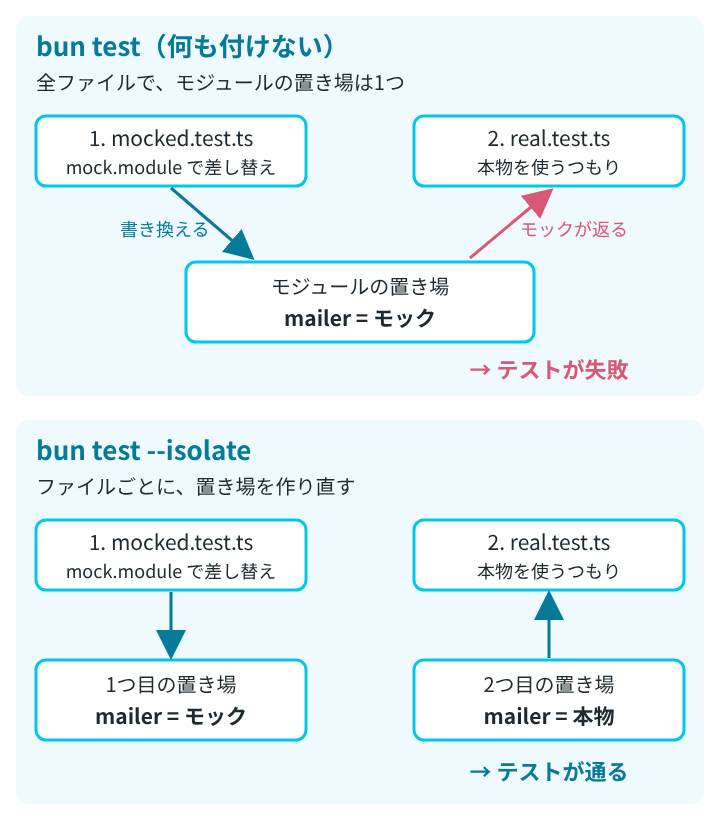
このファイルだけを動かすと通ります。ところが、前の節の order/mocked.test.ts を先にして、2つを続けて動かすと失敗しました。
$ bun test ./order/mocked.test.ts ./order/real.test.ts
bun test v1.4.4 (38afee6c8)

order/mocked.test.ts:
[mailer.ts を読み込んだ]
(pass) import の後に mock.module しても差し替わる [0.51ms]

order/real.test.ts:
(ソースコードの抜粋は省略)
error: expect(received).toEqual(expected)

  {
-   "failed": [
-     "a@example.com",
-   ],
-   "sent": 0,
+   "failed": [],
+   "sent": 1,
  }

- Expected  - 4
+ Received  + 2

      at <anonymous> (/path/to/mock-app/order/real.test.ts:6:18)
(fail) 本物の sendMail は SMTP の設定がないので失敗する [0.33ms]

 1 pass
 1 fail
 3 expect() calls
Ran 2 tests across 2 files. [5.00ms](at の行のフォルダのパスは、検証環境のものを /path/to/ に置き換えています)
real.test.ts では、送信が成功した(sent: 1)ことになっています。mocked.test.ts で差し替えた sendMail が、そのまま使われたためです。順番を逆にして real.test.ts を先にすると、2件とも通りました。
1つずつなら通るのに、まとめて動かすと順番しだいで落ちるという、原因を探しにくい失敗です。Bun の並列実行と分離のページによると、何も付けない bun test では、すべてのテストファイルが1つのグローバルと、1つのモジュールのレジストリ(読み込んだモジュールの置き場)を共有します。mock.module はこの置き場を書き換えるので、後のファイルにも影響します。
mock.restore() では戻らない
spyOn のスパイを元に戻すのに使った mock.restore() でも、mock.module の差し替えは戻りません。order/restore.test.ts で、mock.module の直後に mock.restore() を呼んでから sendReminders を動かしたところ、結果は { sent: 1, failed: [] } で、差し替えた sendMail のままでした。モックのページにも、mock.restore() は mock.module() で上書きしたモジュールを元に戻さないと書かれています。
–isolate を付けると、ファイルごとに分かれる
bun test に --isolate を付けると、テストファイルごとに新しいグローバルを作り、モジュールのレジストリも空にしてから動かします。失敗した組み合わせを、同じ順番で --isolate を付けて動かしました。
$ bun test --isolate ./order/mocked.test.ts ./order/real.test.ts
bun test v1.4.4 (38afee6c8)

order/mocked.test.ts:
[mailer.ts を読み込んだ]
(pass) import の後に mock.module しても差し替わる [0.40ms]

order/real.test.ts:
[mailer.ts を読み込んだ]
(pass) 本物の sendMail は SMTP の設定がないので失敗する [0.12ms]

 2 pass
 0 fail
 3 expect() calls
Ran 2 tests across 2 files. [4.00ms]
[mailer.ts を読み込んだ] が2回出ています。2つ目のファイルで本物の mailer.ts があらためて読み込まれ、テストは2件とも通りました。並列実行と分離のページでは、ファイルごとに分けるのは Jest と Vitest が標準でしている動き方で、その代わりにファイルごとに import を評価し直す分だけ時間がかかる、としています。
モックの戻り値の型は、–check で確かめられる
mock(async () => "ok") で作ったモックは、「文字列で成功する Promise を返す関数」という型を持ちます。そこへ mockResolvedValue(123) と数を渡すテストを書きました。
import { mock, test } from "bun:test";

test("型が合わない戻り値", () => {
  const load = mock(async () => "ok");
  load.mockResolvedValue(123);
});
bun test は型をチェックしないので、このテストは通ります(1 pass)。@types/bun を入れてから bun test --check で動かすと、テストを動かす前に型のエラーで止まりました。
$ bun test --check ./types/wrong-type.test.ts
bun test v1.4.4 (38afee6c8)
types/wrong-type.test.ts(5,26): error TS2345: Argument of type 'number' is not assignable to parameter of type 'string'.
Found 1 error in 1 file, checked 1 file [21.90ms]モックの戻り値が本物と食い違っていると、テストは通っても本物では動かないことがあります。--check の詳しい動きは、公式ドキュメントの bun check のページにあります。