
BunのBun.Globで、ファイルを探す方法
Bun には、**/*.ts のようなパターンでファイルを探す Bun.Glob が組み込まれています。パッケージを入れなくても、ビルドやテストのスクリプトで「src の中の .ts をすべて集める」「テストのファイルだけを一覧にする」といった処理が書けます。
以下では、scan() で探したときに何が結果に入り何が入らないか、node_modules やテストのファイルを除く書き方、match() でパスを判定するときの動きを、検証環境の出力のまま載せます。後半では、5万5千ファイルあるフォルダで探す時間を測り、探す範囲の絞り方で時間がどれだけ変わるかを比べました。
検証環境は Ubuntu 24.04(x86_64、4 CPU、ext4)、Bun 1.4.4 です。コードは TypeScript で書き、bun ファイル名.ts で実行しました。時間は使い捨ての検証用VMで測った値で、同じ測り方でも1回ごとに大きくばらつきました(最も大きいもので約4倍)。Windows と macOS、ほかの版の Bun は試していません。公式ドキュメントは、検証に使った版(タグ bun-v1.4.4)のドキュメントのファイルを GitHub で確認し、リンクもそこに張っています。
検証に使ったフォルダ
次のような小さなプロジェクトを作って試しました。.cache は名前が . で始まるフォルダ、linked-src は src を指すシンボリックリンク、broken-link は存在しないフォルダを指す、壊れたシンボリックリンクです。
demo
├── .cache/tmp.ts
├── .env
├── app/(marketing)/page.tsx
├── broken-link -> missing-dir
├── docs/README.md
├── index.ts
├── linked-src -> src
├── node_modules/some-lib/index.ts
├── node_modules/some-lib/dist/index.d.ts
├── src/main.ts
├── src/components/Button.tsx
├── src/components/Button.test.tsx
├── src/utils/format.ts
├── src/utils/format.test.ts
├── src/utils/legacy.js
└── tests/e2e.test.ts
scan() で .ts のファイルを探す
new Glob(パターン) で Glob を作り、scan() に探し始めるフォルダを渡すと、合ったファイルのパスが1つずつ返ってきます。scan() は for await で回す非同期のイテレーターで、同期で受け取りたいときは scanSync() を使います(公式ドキュメントの Glob の使い方)。
// demo フォルダの中から .ts のファイルを探す
import { Glob } from "bun";

const glob = new Glob("**/*.ts");
for await (const file of glob.scan("demo")) {
  console.log(file);
}$ bun basic.ts
index.ts
node_modules/some-lib/index.ts
node_modules/some-lib/dist/index.d.ts
tests/e2e.test.ts
src/main.ts
src/utils/format.ts
src/utils/format.test.ts結果を見ると、次の3つが分かります。
- パスは、
scan()に渡したフォルダから見た相対パスで返ってくる - 何も指定しないと、node_modules の中も探す
- 並び順はアルファベット順ではない。順番が要るときは、受け取ってから並べ替える
*.ts は .d.ts で終わるファイルにも合います。型定義のファイルを外したいときは、後で説明する、match() で結果から外す書き方が使えます。
配列でまとめて受け取りたいときは、Array.fromAsync(glob.scan(...)) または Array.from(glob.scanSync(...)) と書けます。
scan() のオプションで変わる結果
scan() には、フォルダの名前の代わりにオプションのオブジェクトを渡せます。使えるのは cwd、dot、absolute、followSymlinks、throwErrorOnBrokenSymlink、onlyFiles の6つです(型定義の GlobScanOptions)。それぞれを demo で試した結果は次のとおりです。
| オプション | 既定値 | 試した結果 |
|---|---|---|
cwd |
プロセスのカレントディレクトリ(process.cwd()) |
"demo/src/components" にして *.{ts,tsx} で探すと、Button.test.tsx と Button.tsx の2件 |
dot |
false |
true にすると .cache/tmp.ts が加わり、7件が8件になった |
absolute |
false |
true にすると /path/to/demo/index.ts のような絶対パスで返った(パスは置き換えています) |
onlyFiles |
true |
false にして src/* で探すと、src/components と src/utils のフォルダも返った |
followSymlinks |
false |
true にすると、**/*.ts の結果に linked-src/ の中の3件が加わり、10件になった |
throwErrorOnBrokenSymlink |
false |
followSymlinks: true と一緒に指定して **/* で探すと、ENOENT のエラーで止まった |
dot が既定で false なので、.cache や .github のような . で始まるフォルダの中身は、指定しないと探しません。
followSymlinks には、気づきにくい動きがありました。false のままでも、パターンに linked-src/**/*.ts のようにシンボリックリンクの名前を書くと、その中の3件が返ってきます。試したパターンでは、false で中に入らなかったのは、** でたどっていく途中にシンボリックリンクがあったときだけでした。
throwErrorOnBrokenSymlink も、onlyFiles: false を付けて * で demo の直下だけを探したときは、true にしてもエラーにならず、broken-link が結果に入りました。エラーになったのは、followSymlinks: true で **/* を探したときです。次のコードで試すと、false では18件が返って broken-link は入らず、true では ENOENT で止まりました。
// 壊れたシンボリックリンク:followSymlinks: true で ** を使うとき
import { Glob } from "bun";

const glob = new Glob("**/*");
for (const throwErrorOnBrokenSymlink of [false, true]) {
  try {
    const r = await Array.fromAsync(glob.scan({ cwd: "demo", followSymlinks: true, throwErrorOnBrokenSymlink }));
    console.log(throwErrorOnBrokenSymlink, r.length, "件", r.includes("broken-link"));
  } catch (e) {
    console.log(throwErrorOnBrokenSymlink, "error:", (e as Error).message, (e as any).code);
  }
}$ bun broken2.ts
false 18 件 false
true error: ENOENT: no such file or directory, open 'broken-link' ENOENTnode_modules やテストのファイルを除く
Bun.Glob の scan() には、除くパターンを渡すオプションがありません。そこで、除きたいパターンの Glob を別に作り、match() で判定して結果から外します。
// node_modules とテストのファイルを除く
import { Glob } from "bun";

const target = new Glob("**/*.{ts,tsx}");
const ignore = [new Glob("node_modules/**"), new Glob("**/*.test.*")];

const files: string[] = [];
for await (const file of target.scan("demo")) {
  if (ignore.some((g) => g.match(file))) continue;
  files.push(file);
}
console.log(files.sort());$ bun exclude.ts
[ "app/(marketing)/page.tsx", "index.ts", "src/components/Button.tsx", "src/main.ts", "src/utils/format.ts" ]app/(marketing) のように、前に ! や @ などの記号が付いていないかっこは、フォルダの名前の一部としてそのまま扱われます(公式ドキュメントの拡張パターンの説明)。
1つのパターンの中で除く書き方も試しました。!(*.test) は「*.test に合わないもの」という意味で、src/**/!(*.test).{ts,tsx} で探すと、テストのファイルを除いた3件が返りました。先頭に ! を付ける書き方と並べて試したコードと出力です。
const ext = await Array.fromAsync(new Glob("src/**/!(*.test).{ts,tsx}").scan("demo"));
console.log("!(*.test):", ext.sort());
const neg = await Array.fromAsync(new Glob("!**/*.test.ts").scan("demo"));
console.log("先頭の ! :", neg.length, "件", neg.sort().slice(0, 5));!(*.test): [ "src/components/Button.tsx", "src/main.ts", "src/utils/format.ts" ]
先頭の ! : 0 件 []一方、パターンの先頭に ! を付けた !**/*.test.ts は、scan() では1件も返りませんでした。公式ドキュメントには、先頭の ! で判定の結果が反対になる例が match() で載っています(公式ドキュメントにある、先頭の ! の説明)。検証環境では、この書き方で scan() からファイルを集めることはできませんでした。
node:fs の glob なら exclude が使える
Bun は Node.js の fs.glob()、fs.globSync()、fs.promises.glob() も備えていて、こちらはパターンの配列と exclude オプションを受け付けます(公式ドキュメントにある、Node.js の fs.glob() 互換の説明)。同じ条件で試すと、Bun.Glob と match() で除いたときと同じ5件が返りました。
// node:fs の glob の exclude で除く
import { promises } from "node:fs";

const files = await Array.fromAsync(
  promises.glob(["**/*.ts", "**/*.tsx"], {
    cwd: "demo",
    exclude: ["node_modules/**", "**/*.test.*"],
  }),
);
console.log(files.sort());$ bun fsglob.ts
[ "app/(marketing)/page.tsx", "index.ts", "src/components/Button.tsx", "src/main.ts", "src/utils/format.ts" ]match() でパスを判定する
match() はファイルを探さず、渡した文字列がパターンに合うかを true か false で返します。ファイルの一覧をすでに持っているときや、変更されたファイルのパスを振り分けるときに使えます。パターンの書き方は、公式ドキュメントのパターンの一覧にあります。
$ bun match.ts
*.ts                     index.ts=true  src/index.ts=false
**/*.ts                  index.ts=true  src/index.ts=true  src/index.js=false
src/**/*.test.{ts,tsx}   src/a.test.ts=true  src/ui/b.test.tsx=true  tests/c.test.ts=false
v{1..3}.ts               v1.ts=true  v3.ts=true  v4.ts=false
!(*.test).ts             index.ts=true  index.test.ts=false
*.ts                     ./index.ts=false  .env.ts=true
src/*.ts                 src\index.ts=false
*.TS                     index.ts=false
* は / をまたがないので、*.ts は src/index.ts に合いません。フォルダの下までたどるときは **/ を付けます。
下の3行には、思いどおりにならないことがある例が4つあります。出力の順に並べます。
./index.tsのように./で始まる文字列は、*.tsに合わなかった。scan()が返すパスには./が付かないので、scan()の結果を渡すときは問題にならないmatch()にはdotオプションがなく、*.tsは.env.tsに合った。scan()が既定で.で始まるものを返さないのとは動きが違う- Linux で
\を区切りに使ったsrc\index.tsは、src/*.tsに合わなかった - 大文字と小文字は区別され、
*.TSはindex.tsに合わなかった
探す時間はパターンの絞り方で変わる
src に 5,000、node_modules に 50,000、合わせて 55,000 個の空のファイルを置いたフォルダで、.ts のファイルを探す時間を測りました。.ts は src に 1,000 個、node_modules に 10,000 個あります。1回の実行で各5回測り、それを3回実行しました。
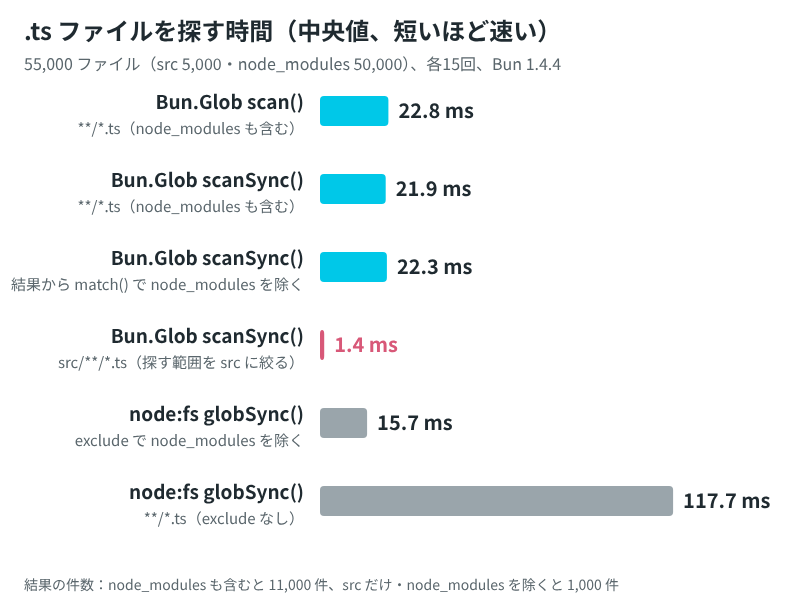
| 探し方 | 結果の件数 | 中央値 | 最小〜最大 |
|---|---|---|---|
scan() で **/*.ts |
11,000 | 22.8 ms | 18.5〜31.4 ms |
scanSync() で **/*.ts |
11,000 | 21.9 ms | 18.6〜35.3 ms |
scanSync() で **/*.ts、結果から match() で node_modules を除く |
1,000 | 22.3 ms | 16.1〜31.5 ms |
scanSync() で src/**/*.ts |
1,000 | 1.4 ms | 1.1〜2.4 ms |
node:fs の globSync() で **/*.ts、exclude で node_modules を除く |
1,000 | 15.7 ms | 9.3〜39.4 ms |
node:fs の globSync() で **/*.ts、exclude なし |
11,000 | 117.7 ms | 92.3〜188.7 ms |
scan() と scanSync() の差は、実行ごとのばらつきの中に収まりました。
結果から match() で node_modules を除いても、時間は除かないときとほとんど同じでした。match() で外すのは探し終わった後の結果なので、減ったのは結果の件数だけでした。
探す時間を短くするには、パターンの先頭を src/**/*.ts のようにフォルダの名前から書き、探す範囲そのものを絞ります。この測定では、**/*.ts を探してから除くより、16倍ほど短くなりました(22.3 ms と 1.4 ms)。
計測に使ったコードは次のとおりです。
// ファイルを探す時間を測る(各5回、ミリ秒)
import { Glob } from "bun";
import { globSync } from "node:fs";

const cwd = "bench";
const nm = new Glob("node_modules/**");
const cases: [string, () => Promise<number> | number][] = [
  ["Glob.scan **/*.ts(node_modules も含む)", async () => (await Array.fromAsync(new Glob("**/*.ts").scan(cwd))).length],
  ["Glob.scanSync **/*.ts(node_modules も含む)", () => Array.from(new Glob("**/*.ts").scanSync(cwd)).length],
  ["Glob.scanSync **/*.ts から match() で node_modules を除く", () => Array.from(new Glob("**/*.ts").scanSync(cwd)).filter((f) => !nm.match(f)).length],
  ["Glob.scanSync src/**/*.ts(探す範囲を src に絞る)", () => Array.from(new Glob("src/**/*.ts").scanSync(cwd)).length],
  ["node:fs globSync **/*.ts(exclude で node_modules を除く)", () => globSync("**/*.ts", { cwd, exclude: ["node_modules/**"] }).length],
  ["node:fs globSync **/*.ts(exclude なし)", () => globSync("**/*.ts", { cwd }).length],
];

for (const [label, fn] of cases) {
  const times: string[] = [];
  let n = 0;
  for (let i = 0; i < 5; i++) {
    const t = performance.now();
    n = await fn();
    times.push((performance.now() - t).toFixed(1));
  }
  console.log(`${label}: ${n}件  ${times.join(" / ")} ms`);
}