
AWS EmulatorでDynamoDBをGSIで検索する方法
DynamoDB のテーブルを、キーではない属性で検索したいときは、グローバルセカンダリインデックス(GSI)を作って、そのインデックスに query を送ります。たとえば「猫のIDがキーのテーブルから、毛の色が白い猫を年齢順に取り出す」ような検索を、テーブル全体を読む scan を使わずに書けます。GSI 付きのテーブルの作り方、GSI への query、あとから GSI を足す・消す手順を、AWS のアカウントを使わずに AWS Emulator で試したコマンドと出力のまま載せます。
検証環境は Ubuntu 24.04(x86_64)、AWS Emulator 1.0.531(2026年11月19日リリース)、AWS CLI 2.41.2 です。AWS のアカウントと認証情報は使っていません。本物の DynamoDB での動き(GSI への反映の遅れ、GSI の作成や削除にかかる時間、料金、容量の消費)は確かめていません。本物の DynamoDB について書いたところは、公式ドキュメントを出どころにしています。ローカルセカンダリインデックス(LSI)、INCLUDE の射影、プロビジョニングモードのテーブルは試していません。
GSI でできること
DynamoDB の query は、キーの値を指定して項目を探す操作です。テーブルのキーが id なら、id を知らないと query は使えません。公式ドキュメントの GSI の説明によると、GSI はテーブルの属性の一部を、テーブルとは別のキーで並べ直したものです。GSI のキーはテーブルのキーと関係がなくてよく、同じキーの値を持つ項目がいくつあってもかまいません。
この記事では、id をキーにした Cats テーブルに、毛の色 color をパーティションキー、年齢 age をソートキーにした GSI ByColor を作ります。
AWS Emulator を起動して、AWS CLI を向ける
AWS Emulator は、AWS の API を手元で受け付けるエミュレーターです。AWS のアカウントは要らず、リクエストは AWS に送られません。Ubuntu では、Linux 向けのインストール手順にある Debian パッケージを使います。私は、手順にあるとおり gpg で署名を確かめてから入れました。下のコマンドは公式の手順どおり sudo を付けていますが、私は root で作業したので、sudo を付けずに実行しました。
curl -fsSLo aws-emulator_amd64.deb https://downloads.aws.com/aws-emulator/packages/aws-emulator/LTS/latest/aws-emulator_amd64.deb
sudo apt-get install -y ./aws-emulator_amd64.deb
aws-emulator -t off
-t off は、利用状況のデータ(テレメトリー)を送らない指定です。エミュレーターはその端末で動き続けるので、別の端末で 公式ドキュメントにある環境変数を設定します。
export AWS_ENDPOINT_URL=https://127.0.0.1:9297
export AWS_SHARED_CREDENTIALS_FILE=~/.aws/emulator/9297/emulator_credentials
export AWS_CONFIG_FILE=~/.aws/emulator/9297/config
export AWS_CA_BUNDLE=~/.aws/emulator/9297/ca.pem
export AWS_EC2_METADATA_DISABLED=true
export AWS_DISABLE_HOST_PREFIX_INJECTION=true
export AWS_REGION=us-east-1
export AWS_DEFAULT_REGION=us-east-1
unset AWS_ACCESS_KEY_ID AWS_SECRET_ACCESS_KEY AWS_SESSION_TOKEN AWS_PROFILE公式ドキュメントによると、AWS_ENDPOINT_URL が設定されていないシェルでは、見つかった認証情報を使って本物の AWS にリクエストが送られます。本物の AWS の認証情報があるマシンでは、上の環境変数がそろっていることを確かめてから実行してください。
エミュレーターにつながっていれば、aws sts get-caller-identity のユーザー名が emulator になります(12桁のアカウントIDは置き換えています)。
$ aws sts get-caller-identity --query Arn --output text
arn:aws:iam::<12桁のアカウントID>:user/emulator
GSI 付きのテーブルを作る
create-table の --global-secondary-indexes で GSI を指定します。GSI のキーに使う color と age も、テーブルのキーの id と同じように --attribute-definitions に型を書きます。Projection={ProjectionType=ALL} は、項目のすべての属性を GSI にもコピーする指定です。
$ aws dynamodb create-table --table-name Cats \
    --attribute-definitions AttributeName=id,AttributeType=S AttributeName=color,AttributeType=S AttributeName=age,AttributeType=N \
    --key-schema AttributeName=id,KeyType=HASH \
    --global-secondary-indexes 'IndexName=ByColor,KeySchema=[{AttributeName=color,KeyType=HASH},{AttributeName=age,KeyType=RANGE}],Projection={ProjectionType=ALL}' \
    --billing-mode PAY_PER_REQUEST \
    --query 'TableDescription.{TableStatus: TableStatus, GSI: GlobalSecondaryIndexes[].{IndexName: IndexName, IndexStatus: IndexStatus, KeySchema: KeySchema, Projection: Projection}}'
{
    "TableStatus": "CREATING",
    "GSI": [
        {
            "IndexName": "ByColor",
            "IndexStatus": "CREATING",
            "KeySchema": [
                {
                    "AttributeName": "color",
                    "KeyType": "HASH"
                },
                {
                    "AttributeName": "age",
                    "KeyType": "RANGE"
                }
            ],
            "Projection": {
                "ProjectionType": "ALL"
            }
        }
    ]
}
テーブルも GSI も、作った直後は CREATING でした。aws dynamodb wait table-exists で待つと、検証環境では3秒ほどで戻り、GSI の IndexStatus も ACTIVE になっていました。
$ aws dynamodb wait table-exists --table-name Cats
$ aws dynamodb describe-table --table-name Cats --query 'Table.{TableStatus: TableStatus, GSI: GlobalSecondaryIndexes[].{IndexName: IndexName, IndexStatus: IndexStatus, ItemCount: ItemCount, IndexArn: IndexArn}}'
{
    "TableStatus": "ACTIVE",
    "GSI": [
        {
            "IndexName": "ByColor",
            "IndexStatus": "ACTIVE",
            "ItemCount": 0,
            "IndexArn": "arn:aws:dynamodb:us-east-1:<12桁のアカウントID>:table/Cats/index/ByColor"
        }
    ]
}項目を5件書き込みます。kuro にだけは color を入れていません。GSI に項目を書き込む操作はなく、テーブルに書き込むと DynamoDB が GSI にもコピーします。
aws dynamodb put-item --table-name Cats --item '{"id": {"S": "tama"}, "name": {"S": "タマ"}, "color": {"S": "white"}, "age": {"N": "3"}, "food": {"S": "かつお"}}'
aws dynamodb put-item --table-name Cats --item '{"id": {"S": "shiro"}, "name": {"S": "シロ"}, "color": {"S": "white"}, "age": {"N": "7"}, "food": {"S": "ささみ"}}'
aws dynamodb put-item --table-name Cats --item '{"id": {"S": "yuki"}, "name": {"S": "ユキ"}, "color": {"S": "white"}, "age": {"N": "1"}, "food": {"S": "かつお"}}'
aws dynamodb put-item --table-name Cats --item '{"id": {"S": "mike"}, "name": {"S": "ミケ"}, "color": {"S": "calico"}, "age": {"N": "5"}, "food": {"S": "まぐろ"}}'
aws dynamodb put-item --table-name Cats --item '{"id": {"S": "kuro"}, "name": {"S": "クロ"}, "age": {"N": "2"}, "food": {"S": "ささみ"}}'
GSI に query を送る
query に --index-name を付けると、テーブルではなく GSI を検索します。--key-condition-expression には、GSI のパーティションキー(ここでは color)の条件を書きます。白い猫は3匹で、ソートキーの age の小さい順に返りました。出力は --query で、id・名前・年齢・好物だけにしています。
$ aws dynamodb query --table-name Cats --index-name ByColor \
    --key-condition-expression 'color = :c' \
    --expression-attribute-values '{":c": {"S": "white"}}' \
    --query '{Count: Count, Items: Items[].[id.S, name.S, age.N, food.S]}' --output json
{
    "Count": 3,
    "Items": [
        [
            "yuki",
            "ユキ",
            "1",
            "かつお"
        ],
        [
            "tama",
            "タマ",
            "3",
            "かつお"
        ],
        [
            "shiro",
            "シロ",
            "7",
            "ささみ"
        ]
    ]
}ソートキーには、>= や BETWEEN などの条件を付けられます。--no-scan-index-forward を付けると、Query の API リファレンスにあるとおり、ソートキーの大きい順になります。3歳以上の白い猫を、年上から並べました。
$ aws dynamodb query --table-name Cats --index-name ByColor \
    --key-condition-expression 'color = :c AND age >= :a' \
    --expression-attribute-values '{":c": {"S": "white"}, ":a": {"N": "3"}}' \
    --no-scan-index-forward \
    --query 'Items[].[id.S, age.N]' --output json
[
    [
        "shiro",
        "7"
    ],
    [
        "tama",
        "3"
    ]
]
$ aws dynamodb query --table-name Cats --index-name ByColor \
    --key-condition-expression 'color = :c AND age BETWEEN :lo AND :hi' \
    --expression-attribute-values '{":c": {"S": "white"}, ":lo": {"N": "2"}, ":hi": {"N": "5"}}' \
    --query 'Items[].[id.S, age.N]' --output json
[
    [
        "tama",
        "3"
    ]
]キーではない属性の条件は、--filter-expression に書きます。白い猫のうち好物が「かつお」の猫を探すと、返ったのは2件で、ScannedCount は3でした。API リファレンスによると、ScannedCount は絞り込む前に読んだ件数です。絞り込みはキーの条件で読んだあとに行われるので、消費する読み込みキャパシティは減りません。
$ aws dynamodb query --table-name Cats --index-name ByColor \
    --key-condition-expression 'color = :c' \
    --filter-expression 'food = :f' \
    --expression-attribute-values '{":c": {"S": "white"}, ":f": {"S": "かつお"}}' \
    --query '{Count: Count, ScannedCount: ScannedCount, Ids: Items[].id.S}' --output json
{
    "Count": 2,
    "ScannedCount": 3,
    "Ids": [
        "yuki",
        "tama"
    ]
}
GSI のキーではない food を --key-condition-expression に書くと、ValidationException で断られました。エラーメッセージで、足りないキー(color)が分かります。
$ aws dynamodb query --table-name Cats --index-name ByColor \
    --key-condition-expression 'food = :f' \
    --expression-attribute-values '{":f": {"S": "かつお"}}'

aws: [ERROR]: An error occurred (ValidationException) when calling the Query operation: Query condition missed key schema element: color
color のない項目は GSI に入らない
scan に --index-name を付けると、GSI の中身を全部読めます。テーブルの項目は5件ですが、GSI の ByColor には4件しかなく、color を持たない kuro が入っていませんでした。
$ aws dynamodb scan --table-name Cats --query '{Count: Count, Ids: Items[].id.S}' --output json
{
    "Count": 5,
    "Ids": [
        "yuki",
        "mike",
        "tama",
        "shiro",
        "kuro"
    ]
}
$ aws dynamodb scan --table-name Cats --index-name ByColor --query '{Count: Count, Ids: Items[].id.S}' --output json
{
    "Count": 4,
    "Ids": [
        "yuki",
        "tama",
        "shiro",
        "mike"
    ]
}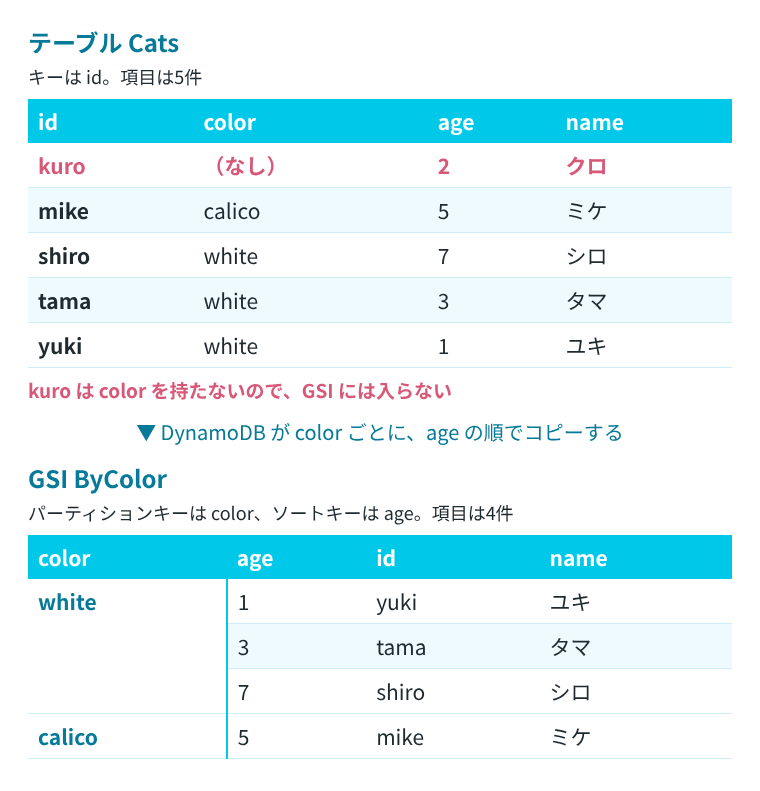
GSI についての公式ドキュメントにも、GSI のキーの属性を持たない項目は GSI に書き込まれないとあります。
あとから kuro に color を付けると、GSI で見つかるようになりました。yuki の color を black に変えると、white の検索からは外れ、black の検索で見つかりました。
$ aws dynamodb update-item --table-name Cats --key '{"id": {"S": "kuro"}}' \
    --update-expression 'SET color = :c' --expression-attribute-values '{":c": {"S": "black"}}'
$ aws dynamodb update-item --table-name Cats --key '{"id": {"S": "yuki"}}' \
    --update-expression 'SET color = :c' --expression-attribute-values '{":c": {"S": "black"}}'
$ aws dynamodb query --table-name Cats --index-name ByColor \
    --key-condition-expression 'color = :c' \
    --expression-attribute-values '{":c": {"S": "black"}}' \
    --query 'Items[].[id.S, age.N]' --output json
[
    [
        "yuki",
        "1"
    ],
    [
        "kuro",
        "2"
    ]
]
$ aws dynamodb query --table-name Cats --index-name ByColor \
    --key-condition-expression 'color = :c' \
    --expression-attribute-values '{":c": {"S": "white"}}' \
    --query 'Items[].[id.S, age.N]' --output json
[
    [
        "tama",
        "3"
    ],
    [
        "shiro",
        "7"
    ]
]
エミュレーターでは、書き込んだ直後の query にもう新しい値が出ていました。本物の DynamoDB では、公式ドキュメントによると、GSI への反映は結果整合性で、ふつうは1秒もかからずに反映されますが、まれに起きる障害のときは、もっと遅れることがあります。GSI の検索結果が古いことがある前提で、アプリを作るように書かれています。
GSI があると断られる操作
GSI の query に --consistent-read を付けると、ValidationException になりました。API リファレンスにも、GSI は結果整合性のある読み込みだけに対応していて、強い整合性の読み込みを指定すると ValidationException になると書かれています。
$ aws dynamodb query --table-name Cats --index-name ByColor --consistent-read \
    --key-condition-expression 'color = :c' \
    --expression-attribute-values '{":c": {"S": "white"}}'

aws: [ERROR]: An error occurred (ValidationException) when calling the Query operation: Consistent reads are not supported on global secondary indexes
GSI のキーの属性に、決めた型と違う値を書き込むこともできません。文字列(S)と決めた color に数値(N)を入れると、テーブルへの書き込みそのものが断られ、get-item で読んでも項目はできていませんでした。
$ aws dynamodb put-item --table-name Cats --item '{"id": {"S": "hachi"}, "color": {"N": "8"}, "age": {"N": "4"}}'

aws: [ERROR]: An error occurred (ValidationException) when calling the PutItem operation: One or more parameter values were invalid: Type mismatch for Index Key color Expected: S Actual: N IndexName: ByColor
$ aws dynamodb get-item --table-name Cats --key '{"id": {"S": "hachi"}}'
あとから GSI を足す
すでにあるテーブルには、update-table の --global-secondary-index-updates に Create を書いて GSI を足します。既存のテーブルに GSI を追加・削除する方法の公式ドキュメントによると、1回の update-table で足せる GSI は1つです。好物 food をキーにした ByFood を、キーだけを持つ KEYS_ONLY の射影で足しました。
$ aws dynamodb update-table --table-name Cats \
    --attribute-definitions AttributeName=food,AttributeType=S \
    --global-secondary-index-updates '[{"Create": {"IndexName": "ByFood", "KeySchema": [{"AttributeName": "food", "KeyType": "HASH"}], "Projection": {"ProjectionType": "KEYS_ONLY"}}}]' \
    --query 'TableDescription.{TableStatus: TableStatus, GSI: GlobalSecondaryIndexes[].{IndexName: IndexName, IndexStatus: IndexStatus, Backfilling: Backfilling}}'
{
    "TableStatus": "UPDATING",
    "GSI": [
        {
            "IndexName": "ByColor",
            "IndexStatus": "ACTIVE",
            "Backfilling": null
        },
        {
            "IndexName": "ByFood",
            "IndexStatus": "CREATING",
            "Backfilling": true
        }
    ]
}
ByFood は CREATING で、Backfilling が true でした。公式ドキュメントによると、これはテーブルにすでにある項目を GSI に書き写している段階です。AWS CLI には GSI ができるのを待つ wait がないので、describe-table で IndexStatus を1秒おきに確かめるループを書きました。下は、検証で使ったループから経過時間を記録する行を除いたものです。検証環境では、1秒後・3秒後・4秒後は CREATING のままで、6秒後に ACTIVE になりました。
for i in $(seq 60); do
  S=$(aws dynamodb describe-table --table-name Cats \
      --query "Table.GlobalSecondaryIndexes[?IndexName=='ByFood'].IndexStatus" --output text)
  [ "$S" = "ACTIVE" ] && break
  sleep 1
done本物の DynamoDB では、GSI が ACTIVE になるまで、その GSI に query や scan は送れないと公式ドキュメントに書かれています。エミュレーターでは、CREATING の間に送った query にも、すでにある2件(kuro と shiro)が返りました。エミュレーターで動いたからといって、作成中の GSI を使うコードにはしないでください。
KEYS_ONLY の GSI から取れるもの
ACTIVE になった ByFood に query を送ると、返ったのはテーブルのキー id と GSI のキー food だけでした。
$ aws dynamodb query --table-name Cats --index-name ByFood \
    --key-condition-expression 'food = :f' \
    --expression-attribute-values '{":f": {"S": "ささみ"}}'
{
    "Items": [
        {
            "id": {
                "S": "kuro"
            },
            "food": {
                "S": "ささみ"
            }
        },
        {
            "id": {
                "S": "shiro"
            },
            "food": {
                "S": "ささみ"
            }
        }
    ],
    "Count": 2,
    "ScannedCount": 2,
    "ConsumedCapacity": null
}
GSI にない name を --projection-expression で指定したり、--select ALL_ATTRIBUTES を付けたりすると、どちらも ValidationException で断られました。API リファレンスにも、GSI の検索ではテーブルから属性を取ってこられず、GSI にコピーされた属性しか指定できないと書かれています。
$ aws dynamodb query --table-name Cats --index-name ByFood \
    --key-condition-expression 'food = :f' \
    --expression-attribute-values '{":f": {"S": "ささみ"}}' \
    --projection-expression 'id, #n' --expression-attribute-names '{"#n": "name"}'

aws: [ERROR]: An error occurred (ValidationException) when calling the Query operation: One or more parameter values were invalid: Global secondary index ByFood does not project [name]
$ aws dynamodb query --table-name Cats --index-name ByFood --select ALL_ATTRIBUTES \
    --key-condition-expression 'food = :f' \
    --expression-attribute-values '{":f": {"S": "ささみ"}}'

aws: [ERROR]: An error occurred (ValidationException) when calling the Query operation: One or more parameter values were invalid: Select type ALL_ATTRIBUTES is not supported for global secondary index ByFood because its projection type is not ALL
ほかの属性が要るときは、GSI で見つけた id を使って、テーブルから読み直します。公式ドキュメントでも、GSI にない属性はテーブルにもう一度問い合わせて取ると説明しています。ここでは batch-get-item で2件をまとめて読みました。
$ aws dynamodb batch-get-item --request-items '{"Cats": {"Keys": [{"id": {"S": "shiro"}}, {"id": {"S": "kuro"}}], "ProjectionExpression": "id, #n, age", "ExpressionAttributeNames": {"#n": "name"}}}' \
    --query 'sort_by(Responses.Cats, &id.S)[].[id.S, name.S, age.N]' --output json
[
    [
        "kuro",
        "クロ",
        "2"
    ],
    [
        "shiro",
        "シロ",
        "7"
    ]
]
読み直しの手間を省きたいなら、よく使う属性を GSI にもコピーしておきます(ALL、または属性を選ぶ INCLUDE)。公式ドキュメントによると、そのぶん GSI の保存と書き込みの費用が増えます。
GSI を消す
GSI を消すときは、update-table に Delete を書きます。
$ aws dynamodb update-table --table-name Cats \
    --global-secondary-index-updates '[{"Delete": {"IndexName": "ByFood"}}]' \
    --query 'TableDescription.GlobalSecondaryIndexes[].{IndexName: IndexName, IndexStatus: IndexStatus}'
[
    {
        "IndexName": "ByColor",
        "IndexStatus": "ACTIVE"
    }
]エミュレーターでは、update-table の応答の時点で ByFood はもう一覧になく、直後の describe-table でも ByColor だけでした。公式ドキュメントには、削除中の GSI の IndexStatus として DELETING が載っています。
エミュレーターがどこまで本物と同じように動くかは、サービスや機能ごとに違います。本物との一致度(fidelity)についての公式ドキュメントに測り方があり、サービスごとのスコアは GitHub のリリースページに載っています。