
React lazy and Suspense: Loading Components On Demand
This article was translated from the Japanese original with AI. 日本語の原文を読む
A component wrapped in React's lazy does not load its code until it is first shown. Combined with bundler code splitting, you can move part of the screen into a separate file and load it when it is needed. For a part that some users never open, such as a settings panel, splitting it out reduces the JavaScript loaded at startup. The loading state shown while waiting is set with Suspense.
In my test environment, I ran components loaded with lazy in Chromium and in jsdom. I checked when the file is loaded, how to load a non-default export, how to start loading early, and what happens when loading fails.
The test environment was Ubuntu 24.04 with Node.js 22.22.0. I used react and react-dom 19.3.1, @types/react 19.3.0, typescript 7.0.2, esbuild 0.28.2, and jsdom 29.1.1. I drove Chromium 141 with Playwright 1.56.1. I type-checked the .tsx files with tsc and then transformed them with esbuild. React was the development build. A small test server served the JavaScript that the browser loaded.
How to write lazy and Suspense
Put a component you want to load later in its own file and export it as the default. Here, I use Settings, which toggles notification settings.
// Settings.tsx
import { useState } from 'react';

export default function Settings() {
  const [notify, setNotify] = useState(false);
  return (
    <section id="settings">
      <h2>設定</h2>
      <label>
        <input
          id="notify"
          type="checkbox"
          checked={notify}
          onChange={(e) => setNotify(e.target.checked)}
        />
        通知を受け取る
      </label>
    </section>
  );
}
In the parent, instead of writing import Settings from './Settings', pass a function that returns import() to lazy. Wrap the place where the component is shown in Suspense, and pass what to display while loading as fallback.
import { lazy, Suspense, useState } from 'react';
import { createRoot } from 'react-dom/client';

const Settings = lazy(() => import('../Settings'));

function App() {
  const [open, setOpen] = useState(false);
  return (
    <>
      <button id="toggle" onClick={() => setOpen(!open)}>
        {open ? '閉じる' : '設定を開く'}
      </button>
      {open && (
        <Suspense fallback={<p id="loading">読み込み中…</p>}>
          <Settings />
        </Suspense>
      )}
    </>
  );
}

createRoot(document.getElementById('root')!).render(<App />);
According to the lazy reference on the parameters, React calls the function passed to lazy (load) the first time it tries to render that component. It remembers the returned Promise and its result, so load is never called more than once. The .default of the Promise result is rendered as the component.
To split the file that import() loads into a separate file, your bundler or framework may need to support it (the lazy reference on usage). In my test, I used esbuild's --splitting option. As esbuild --help says, "currently only for esm", so I combined it with --format=esm. After the build, Settings became a separate file, chunks/Settings-CDNPFV2N.js. The react package that basic.js and Settings both use was split into chunks/chunk-2TCA6HDD.js (react-dom is included in basic.js).
Load the file the first time the button is clicked
I opened the page built from the code above in Chromium and recorded when each file was loaded. To make the difference visible, the server delayed the response for the Settings file only, by 800 milliseconds.
--- B1. The Settings file isn't loaded until the button is pressed (response delayed by 800ms) ---
     22ms 要求: basic.js
     46ms 応答: basic.js(200)
     48ms 要求: chunks/chunk-2TCA6HDD.js
     53ms 応答: chunks/chunk-2TCA6HDD.js(200)
   1156ms (開いてから 1 秒たっても、Settings は要求されていない)
   1156ms > 「設定を開く」をクリック
   1188ms 要求: chunks/Settings-CDNPFV2N.js
   1988ms 応答: chunks/Settings-CDNPFV2N.js(200)
   2496ms 設定が表示された(読み込み中…: 出た、クリックから 810ms)
   2500ms > 「閉じる」をクリック
   2513ms > 「設定を開く」をクリック
   2855ms 設定が表示された(読み込み中…: 出なかった、クリックから 1ms)
The times on the left are when the measuring script wrote each line. They include the time spent checking the display, so the differences between these times do not match the "ms from click" values. The "ms from click" values are measured inside the page, from the click until the settings appear.
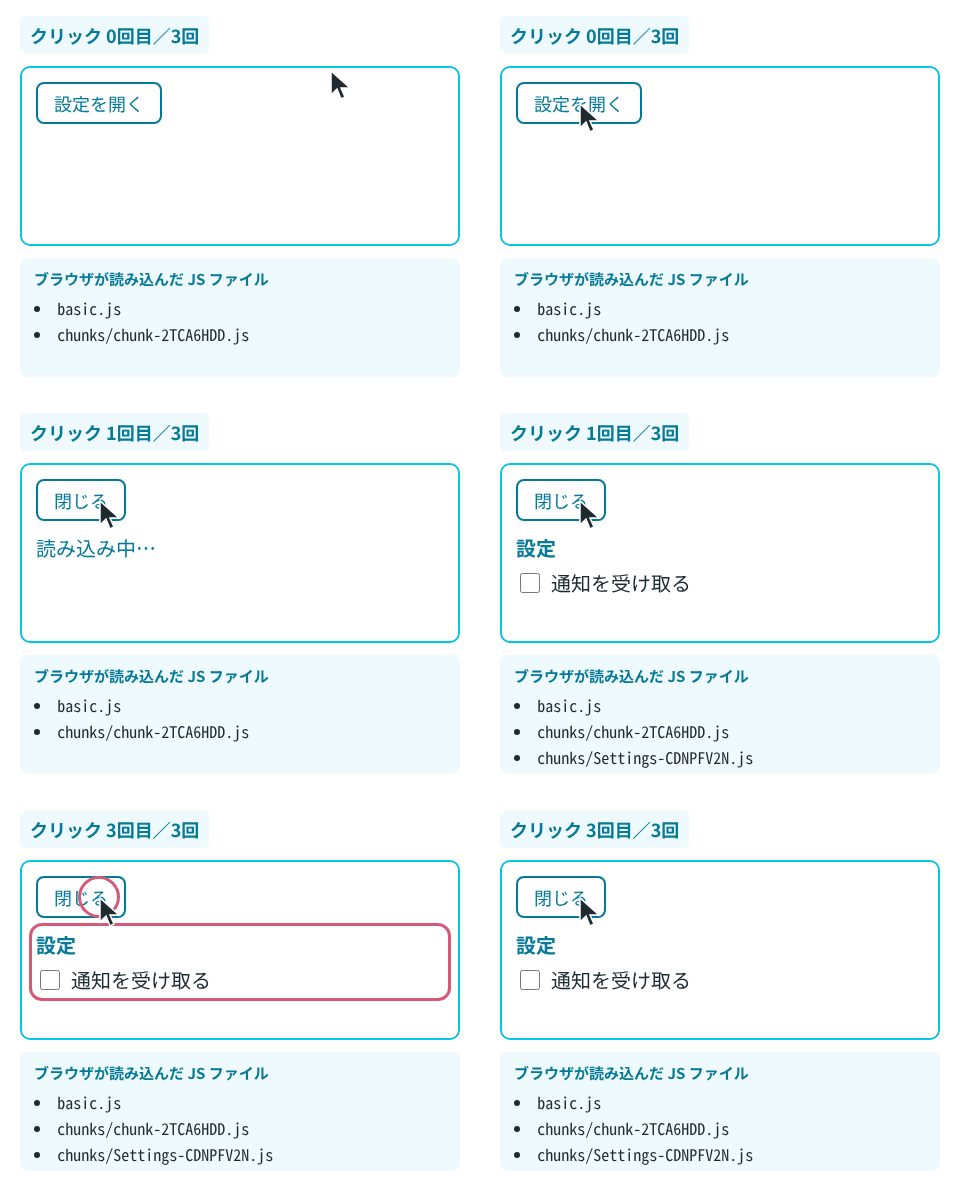
When the page opened, only basic.js and the shared file with react were loaded. The Settings file was requested after the button was clicked, and the "Loading…" message was shown until it arrived. When I closed the panel and opened it again, there was no file request and no "Loading…" message, and the settings appeared immediately.
The following GIF shows the same operation, with the browser's loaded JS files listed at the bottom of the screen. In this GIF, the Settings file is delayed by 1.2 seconds so the loading state is visible.
Load a component exported with a name other than default
The Promise returned by load must resolve to an object whose .default is the component (the lazy reference on what load returns). For a component exported with a name, wrap the result in { default: component } using then.
// Profile.tsx writes export function Profile() { ... }
const Profile = lazy(() =>
  import('./Profile').then((m) => ({ default: m.Profile })),
);
In my test, I added a line that counts the number of calls, and confirmed that Profile renders with this form. When I wrote lazy(() => import('../src/Profile')) without this change, the type check failed with the following error. If you write in TypeScript, you can catch this before running the code.
bad/NoDefault.tsx(4,28): error TS2322: Type 'Promise<typeof import("./src/Profile")>' is not assignable to type 'Promise<{ default: ComponentType<any>; }>'.
  Property 'default' is missing in type 'typeof import("./src/Profile")' but required in type '{ default: ComponentType<any>; }'.
Declare lazy outside the component
The troubleshooting section of the lazy reference says not to declare lazy inside a component, because its state is reset on every re-render. Instead, it says to declare it at the top level of the module.
In jsdom, I tested a version that calls lazy inside the component. I checked a settings checkbox, then re-rendered the parent.
export function LazyInside() {
  const [n, setN] = useState(0);
  // 🔴 A new lazy component is created on every render
  const InsideSettings = lazy(loadSettings);
  return (
    <>
      <button id="rerender" onClick={() => setN(n + 1)}>親を再描画({n})</button>
      <Suspense fallback={<p>読み込み中…</p>}>
        <InsideSettings />
      </Suspense>
    </>
  );
}
loadSettings is a test function that counts its calls, waits 100 milliseconds, and then returns import('./Settings'). The results were as follows.
--- 3b. Declare lazy inside the component ---
(中略)
  > #rerender をクリック
  [load を呼んだ(2回目)]
  画面: <button id="rerender">親を再描画(1)</button><section id="settings" style="display: none !important;"><h2>設定</h2><label><input id="notify" type="checkbox">通知を受け取る</label></section><p>読み込み中…</p>
  (「読み込み中…」が消えるまで 300 ミリ秒)
  画面: <button id="rerender">親を再描画(1)</button><section id="settings" style=""><h2>設定</h2><label><input id="notify" type="checkbox">通知を受け取る</label></section>
  チェック: true
  load の呼び出し: 2回
Just re-rendering the parent called load again. The visible settings were hidden and the Loading… message was shown again. In the version that declared lazy outside the component (at the top level of the module), re-rendering the parent did not call load, and the display stayed the same.
On the other hand, the checkbox stayed checked, so in this test the state was not reset. This may be because the loaded component was the same function as the one already shown. The development build of react-dom has a condition that reuses the shown component and its state when the new lazy renders the same content as the current component (in the process that compares the previous and current elements in react-dom-client.development.js). However, the documentation says the state is reset, so I cannot rely on it being kept. Even if only the Loading… message came back on every re-render, that would be a problem, so declare lazy outside the component.
Start loading early to reduce waiting time
According to the MDN explanation of import(), in the section on the module namespace object, the browser remembers modules that loaded successfully. Calling import() for the same module again does not send an HTTP request. So I separated the function that calls import() and also called it when the cursor moved onto the button or when the button received focus.
// Keep the function that calls import separate, and use it from both lazy and the button
const loadSettings = () => import('../Settings');
const Settings = lazy(loadSettings);

function App() {
  const [open, setOpen] = useState(false);
  return (
    <>
      <button
        id="toggle"
        onPointerEnter={() => { loadSettings(); }}
        onFocus={() => { loadSettings(); }}
        onClick={() => setOpen(!open)}
      >
        {open ? '閉じる' : '設定を開く'}
      </button>
      {open && (
        <Suspense fallback={<p id="loading">読み込み中…</p>}>
          <Settings />
        </Suspense>
      )}
    </>
  );
}
These are the results in Chromium when I clicked 300 milliseconds after moving the cursor onto the button.
--- B2b. Clicking after hovering for 300ms (response delayed by 800ms) ---
(中略)
    647ms > 「設定を開く」にカーソルを乗せる
    692ms 要求: chunks/Settings-CDNPFV2N.js
    994ms > 「設定を開く」をクリック
   1496ms 応答: chunks/Settings-CDNPFV2N.js(200)
   1814ms 設定が表示された(読み込み中…: 出た、クリックから 490ms)
The request was sent when the cursor moved onto the button, and clicking did not add another request. From the click until the settings appeared took 490 milliseconds, which is shorter than the 810 milliseconds when nothing was preloaded.
However, when I waited 1 second after moving the cursor, let the file arrive, and then clicked, the Loading… message still appeared briefly, and it took 305 milliseconds for the settings to show. When a component is first shown, lazy calls load itself. Even when the module is already loaded, import() returns a new Promise. React waits for that result, so I think the Suspense fallback is shown once. The caveats in the Suspense reference say that React delays the next reveal until 300 milliseconds have passed since the Suspense content was last shown. The development build of react-dom uses the same interval, FALLBACK_THROTTLE_MS = 300. I think the 305 milliseconds relates to this interval. However, I did not check from which point the interval is counted.
If you also want to avoid this short Loading… message, wrap the button, which is shown from the start, in Suspense, and wrap setOpen in startTransition. As the same caveats say, an update wrapped in startTransition waits without falling back to the fallback for content that is already shown.
I also moved the Suspense boundary. Even inside a transition, a newly shown Suspense boundary shows its fallback right away without waiting for its content (the explanation of how to prevent already-revealed content from being hidden). In the earlier code, Suspense was inside {open && ...}, so it was newly shown when the panel opened. If the above is correct, the fallback would still appear even with a transition. I did not test this combination.
function App() {
  const [open, setOpen] = useState(false);
  return (
    // Place Suspense outside the part that is shown from the start
    <Suspense fallback={<p id="loading">読み込み中…</p>}>
      <button
        id="toggle"
        onPointerEnter={() => { loadSettings(); }}
        onFocus={() => { loadSettings(); }}
        onClick={() => startTransition(() => setOpen(!open))}
      >
        {open ? '閉じる' : '設定を開く'}
      </button>
      {open && <Settings />}
    </Suspense>
  );
}--- B2c. Suspense placed outside and setOpen wrapped in startTransition (response delayed by 800ms) ---
(中略)
1702ms > 「設定を開く」をクリック
2050ms 設定が表示された(読み込み中…: 出なかった、クリックから 17ms)When I waited 1 second after moving the cursor and then clicked, the Loading… message did not appear, and the settings showed in 17 milliseconds. When I clicked 300 milliseconds after moving the cursor, before the file had arrived, the Loading… message also did not appear. Until the file arrived, the previous screen, with the Open settings button, stayed on the screen.
--- B2d. Suspense placed outside, screen wrapped in startTransition, clicked before it arrives (response delayed by 800ms) ---
(中略)
    706ms > 「設定を開く」にカーソルを乗せる
    749ms 要求: chunks/Settings-CDNPFV2N.js
   1050ms > 「設定を開く」をクリック
   1291ms 画面: 設定を開く
   1553ms 応答: chunks/Settings-CDNPFV2N.js(200)
   1613ms 画面: 閉じる設定通知を受け取る
  読み込み中…: 出なかった
If you want to show that the click was registered while the file is still arriving, use isPending from useTransition (the useTransition reference).
When loading fails
When the Promise returned by load fails, React throws the reason to the nearest Error Boundary (the lazy reference on parameters). For example, if the network is down and the file cannot be fetched, you can show a fallback UI.
The problem is reloading after a failure. In jsdom, I created a load that fails only the first time and tested it. Simply resetting the Error Boundary showed the same error immediately, and load was not called. The reference says that lazy remembers the returned Promise, and the test results show that it also remembers the Promise that failed.
--- 4a. After a failure, restore the Error Boundary while keeping the same lazy ---
(中略)
  > #retry をクリック
  [onCaughtError] 読み込みに失敗
  画面: <div role="alert"><p>読み込めませんでした(読み込みに失敗)</p><button id="retry">もう一度</button></div>
(中略)
  load の呼び出し: 1回
So I stored lazy in state and recreated it when the Try again button was clicked. Because the initial value is created by passing an initializer function to useState, it is not recreated on every render (the useState reference on avoiding recreation of the initial state).
const loadSettings = () => import('../Settings');

function SettingsArea() {
  const [Settings, setSettings] = useState<ComponentType>(() => lazy(loadSettings));
  return (
    <ErrorBoundary
      fallback={({ reset }) => (
        <div id="failed" role="alert">
          <p>読み込めませんでした</p>
          <button
            id="retry"
            onClick={() => {
              setSettings(() => lazy(loadSettings));
              reset();
            }}
          >
            もう一度
          </button>
        </div>
      )}
    >
      <Suspense fallback={<p id="loading">読み込み中…</p>}>
        <Settings />
      </Suspense>
    </ErrorBoundary>
  );
}
ErrorBoundary is a class component I wrote, with a reset that restores its state. In the jsdom test, which used a load that fails only the first time, with code nearly the same as above and with the load and the fallback display changed, the recreated lazy called load again, and the settings were shown.
In Chromium, however, when I made the server return 500 for the first request and then clicked the Try again button, the display did not recover.
--- B3. Make the first request fail, recreate lazy, and reload ---
(中略)
    104ms 要求: chunks/Settings-CDNPFV2N.js
    113ms 応答: chunks/Settings-CDNPFV2N.js(500)
    443ms 画面: 読み込めませんでしたもう一度
    446ms > 「もう一度」をクリック
   2079ms 画面: 読み込めませんでしたもう一度
   2083ms > ページを読み込み直す
(中略)
   2135ms 要求: chunks/Settings-CDNPFV2N.js
   2237ms 応答: chunks/Settings-CDNPFV2N.js(200)
   2943ms 画面: 設定通知を受け取る
After the Try again button was clicked, no request for the Settings file was sent. I think the import() of the same file failed again without sending a new request. (In the jsdom test, I confirmed that the recreated lazy does call load.) When I reloaded the page, the file was requested and the settings appeared.
The same MDN section says that a module that failed to load may be loaded again by the next import(). At least in Chromium 141, which I used for testing, no reload happened.
In Chromium 141, a file that failed once because the server returned 500 was not fetched again even after lazy was recreated. Recreating lazy alone does not fix this, so it is safer to include guidance or a button for "reload the page" in the failure UI. I did not test other browsers.
Declare lazy at the top level of the module, and wrap the place where the component is shown in Suspense. Loading starts the first time the component is shown, and once loaded it is remembered. Calling import() in advance reduces waiting time. Errors can be caught by an Error Boundary. However, in Chromium 141, recreating lazy did not allow a retry, and reloading the page was what made the component show.