
Lighthouseでiframeのtitleがないと出たときの直し方
Lighthouse のアクセシビリティの監査で「<frame> or <iframe> elements do not have a title」(日本語のレポートでは「<frame> または <iframe> の要素にタイトルが指定されていません」)と出たら、ページの中の iframe に名前がありません。指摘された iframe に、埋め込んだ中身が分かる title 属性を付ければ直ります。Google マップの地図や YouTube の動画、問い合わせのチャットなど、外部のサービスを iframe で埋め込んだページで出る指摘です。
私は検証環境で、名前のない iframe を3つ置いたページに Lighthouse を実行し、点数と指摘の出方、ブラウザが計算する読み上げ用の名前が、直す前と後でどう変わるかを確かめました。
検証環境は Ubuntu 24.04、Node.js 22.23.4、Lighthouse 13.6.0(npm で入れた CLI。中で使われている axe-core は 4.14.0)、ブラウザは Google Chrome for Testing 153 のヘッドレスです。axe-core を直接実行したときと、読み上げ用の名前を調べたときは、Playwright 1.63.0 に付属する、同じ版(153.0.8010.12)の Chromium を動かしました。アクセシビリティの項目だけ(--only-categories=accessibility)を実行しました。ページと、iframe の中身のページは手元で作り、127.0.0.1 から配信しました。本物の地図や動画のサービスの埋め込み、Chrome の DevTools の Lighthouse パネル、実際のスクリーンリーダーでの読み上げは試していません。
名前のない iframe を置いたページと、Lighthouse の結果
検証に使ったのは、地図、動画、チャットの3つを iframe で埋め込んだページです。1つ目は title がなく、2つ目は title が空で、3つ目は name 属性だけが付いています。
<h1>店舗のご案内</h1>
<!-- 1. 地図の埋め込み。title がない -->
<iframe src="/embed/map.html" width="320" height="120"></iframe>
<!-- 2. 動画の埋め込み。title が空 -->
<iframe src="/embed/video.html" width="320" height="120" title=""></iframe>
<!-- 3. チャットの埋め込み。name だけ付いている -->
<iframe src="/embed/chat.html" width="320" height="120" name="chat"></iframe>
このページを python3 -m http.server で配信し、次のように Lighthouse を実行しました。
npx lighthouse http://127.0.0.1:8000/bad.html \
  --only-categories=accessibility \
  --output=json --output=html --output-path=./out/bad \
  --chrome-flags="--headless=new --no-sandbox" --quiet
アクセシビリティの点数は89でした。HTML のレポートでは、「NAMES AND LABELS」(名前とラベル)の欄に指摘が出て、開くと3つの iframe がすべて並びます。
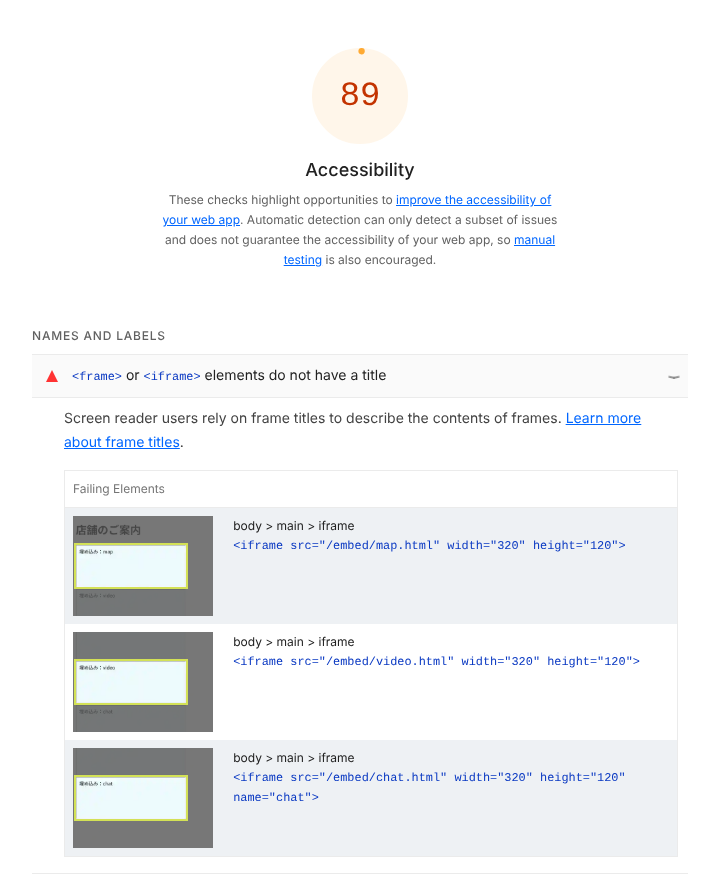
JSON のレポートから、点数とこの監査の結果を自作の小さなスクリプトで取り出すと、次のとおりです(weight は点数の計算での重み)。
accessibility score: 89

[frame-title] scoreDisplayMode=binary score=0 weight=7
title: Lighthouseでiframeのtitleがないと出たときの直し方
- body > main > iframe | <iframe src="/embed/map.html" width="320" height="120">
   Fix any of the following:
     Element has no title attribute
     aria-label attribute does not exist or is empty
     aria-labelledby attribute does not exist, references elements that do not exist or references elements that are empty
     Element's default semantics were not overridden with role="none" or role="presentation"
- body > main > iframe | <iframe src="/embed/video.html" width="320" height="120">
   Fix any of the following:
     Element has an empty title attribute
     aria-label attribute does not exist or is empty
     aria-labelledby attribute does not exist, references elements that do not exist or references elements that are empty
     Element's default semantics were not overridden with role="none" or role="presentation"
- body > main > iframe | <iframe src="/embed/chat.html" width="320" height="120" name="chat">
   Fix any of the following:
     Element has no title attribute
     aria-label attribute does not exist or is empty
     aria-labelledby attribute does not exist, references elements that do not exist or references elements that are empty
     Element's default semantics were not overridden with role="none" or role="presentation"

failed (binary) audits: frame-title
監査の ID は frame-title です。name="chat" を付けたチャットの iframe も指摘に出ています。MDN の iframe 要素の説明にあるとおり、name はリンクやフォームの target で送り先として指定するための名前で、この監査では iframe の名前として数えられません。
Chromium が計算した iframe の名前を、Chrome DevTools Protocol の Accessibility.getPartialAXTree で取り出すと、3つとも空でした。
<iframe src="/embed/map.html" width="320" height="120"> | ignored=false | role=Iframe | name=""
<iframe src="/embed/video.html" width="320" height="120" title=""> | ignored=false | role=Iframe | name=""
<iframe src="/embed/chat.html" width="320" height="120" name="chat"> | ignored=false | role=Iframe | name=""
同じ MDN の説明には、スクリーンリーダーの利用者は title で iframe の中身を知ることができ、title がないと、iframe の中に入ってみないと何が埋め込まれているか分からないと書かれています。
レポートの HTML では、空の title が見えない
上の出力で、動画の iframe には title="" を書いたのに、レポートに出た HTML には title がありません。スクリーンショットのレポートでも、動画の iframe に title は出ていません。
これは、Lighthouse がレポート用に要素の HTML を作る処理が、すべての要素から title 属性を取り除いているためです。そのため、title がないのか、空の title があるのかは、レポートの HTML からは見分けられません。
見分けるには、指摘の説明の文を見ます。title がないときは「Element has no title attribute」、空のときは「Element has an empty title attribute」と出ます。空白だけの title=" " を付けた iframe も、空の title として指摘されました。
中身が分かる title を付ける
直し方は、iframe ごとに、何が埋め込まれているかが分かる title を付けることです。検証では次のように直しました。
<h1>店舗のご案内</h1>
<!-- 1. 地図の埋め込み -->
<iframe src="/embed/map.html" width="320" height="120" title="店舗の地図"></iframe>
<!-- 2. 動画の埋め込み -->
<iframe src="/embed/video.html" width="320" height="120" title="店内の紹介動画"></iframe>
<!-- 3. チャットの埋め込み -->
<iframe src="/embed/chat.html" width="320" height="120" name="chat" title="問い合わせのチャット"></iframe>
同じ条件で Lighthouse を実行すると、点数は100になり、監査は合格(score=1)になりました。日本語のレポート(--locale=ja)では「<frame> または <iframe> の要素にタイトルが指定されています」と表示されます。Chromium が計算した名前も、それぞれの title になりました。
<iframe src="/embed/map.html" width="320" height="120" title="店舗の地図"> | ignored=false | role=Iframe | name="店舗の地図"
<iframe src="/embed/video.html" width="320" height="120" title="店内の紹介動画"> | ignored=false | role=Iframe | name="店内の紹介動画"
<iframe src="/embed/chat.html" width="320" height="120" name="chat" title="問い合わせのチャット"> | ignored=false | role=Iframe | name="問い合わせのチャット"この監査は、合格か不合格かの2択(binary)です。地図と動画にだけ title を付け、チャットを残したページでは、指摘はチャットの1つに減りましたが、点数は89のままでした。点数が100になるのは、指摘されたすべての iframe を直したときです。
title 以外の書き方と、Lighthouse が見ないもの
axe-core の frame-title のルールは、空でない title のほかに、aria-label、aria-labelledby、role="none" または role="presentation" のどれかがあれば合格にします。そこで、いくつかの書き方を1つのページに並べて、axe-core を直接実行し、Chromium が計算した名前も調べました。
| iframe の書き方 | axe-core の判定 | Chromium が計算した名前 |
|---|---|---|
title=" "(空白だけ) |
違反 | (空) |
aria-label="店舗の地図" |
合格 | 店舗の地図 |
見出しを aria-labelledby で指す |
合格 | 店内の紹介動画(見出しの文字) |
2つの iframe に同じ title="埋め込み" |
合格(同じ名前は要確認) | 埋め込み |
style="display:none" |
対象外 | (アクセシビリティツリーで無視される) |
tabindex="-1" で title なし |
対象外 | (空) |
aria-label や aria-labelledby でも名前は付きます。MDN の iframe の説明も、名前の付け方として title を案内しているので、ふだんは title を付ければ足ります。ページの中に見出しがあり、その文字をそのまま名前にしたいときは、aria-labelledby が使えます。
このページに Lighthouse を実行すると、指摘に出たのは空白だけの title の1つでした。Lighthouse の指摘に出ないものの、気をつけたい書き方が2つあります。
1つ目は、同じ title の iframe です。axe-core には、名前の重複を調べる frame-title-unique というルールがあり、直接実行すると2つの iframe が「要確認」に入りました。しかし、Lighthouse が axe-core を実行する処理では、このルールが無効にされています。Chromium が計算した名前も、2つとも「埋め込み」で、名前だけではどれが地図でどれが動画か区別できません。iframe ごとに違う名前にします。
2つ目は、tabindex="-1" を付けた iframe です。axe-core のルールは、tabindex が負の値の iframe を、はじめから調べる対象に入れません。そのため、名前が空のままでも指摘は出ませんでした。MDN の tabindex の説明にあるとおり、負の値の tabindex は、Tab キーで順に移る対象から外す指定です。Chromium のアクセシビリティツリーでは、この iframe は無視されず(ignored=false)、名前は空でした。Lighthouse で指摘されなくても、こうした iframe には title を付けておきます。
display:none で隠した計測用の iframe は、Chromium のアクセシビリティツリーで無視され(ignored=true)、axe-core も調べませんでした。このように隠した iframe なら、title がなくても指摘されません。