
Playwrightで、iframeの中の要素を操作する方法
Playwright で iframe の中の入力欄やボタンを操作するには、page.frameLocator() か locator.contentFrame() で iframe に入ってから、いつもの getByRole() や getByLabel() で探します。決済サービスのカード入力欄や、問い合わせフォーム・動画プレーヤーの埋め込みのように、別のページを iframe で表示している画面の E2E テストで使う書き方です。
私は検証環境で、カード番号の入力欄を別オリジンの iframe に置いた注文画面を作りました。そのうえで、iframe に入らずに探した場合や、iframe が2つ・入れ子・あとから入る・作り直される場合の動きを確かめました。
検証環境は Ubuntu 24.04、Node.js 22.23.4、@playwright/test 1.63.0 です。ブラウザは Playwright 用の Chromium だけで、ページは Node.js の http モジュールで書いた小さなサーバーから配信しました。Firefox・WebKit、Windows・macOS、実在の決済サービスや動画サービスの埋め込みは試していません。
- 1. 試した注文画面
- 2. frameLocator() で iframe に入ってから探す
- 3. page から直接探すと、待ったあとでタイムアウトする
- 4. iframe が2つあるときは title などで絞る
- 5. 別オリジンの iframe でも Playwright からは操作できる
- 6. 入れ子の iframe は frameLocator をつなげる
- 7. あとから入る iframe も、出るまで待つ
- 8. Frame オブジェクトは、その時点の iframe を指す
- 9. Playwright 1.63 からは、iframe を指さずに探せる
- 10. iframe の要素そのものに戻るときは owner()
試した注文画面
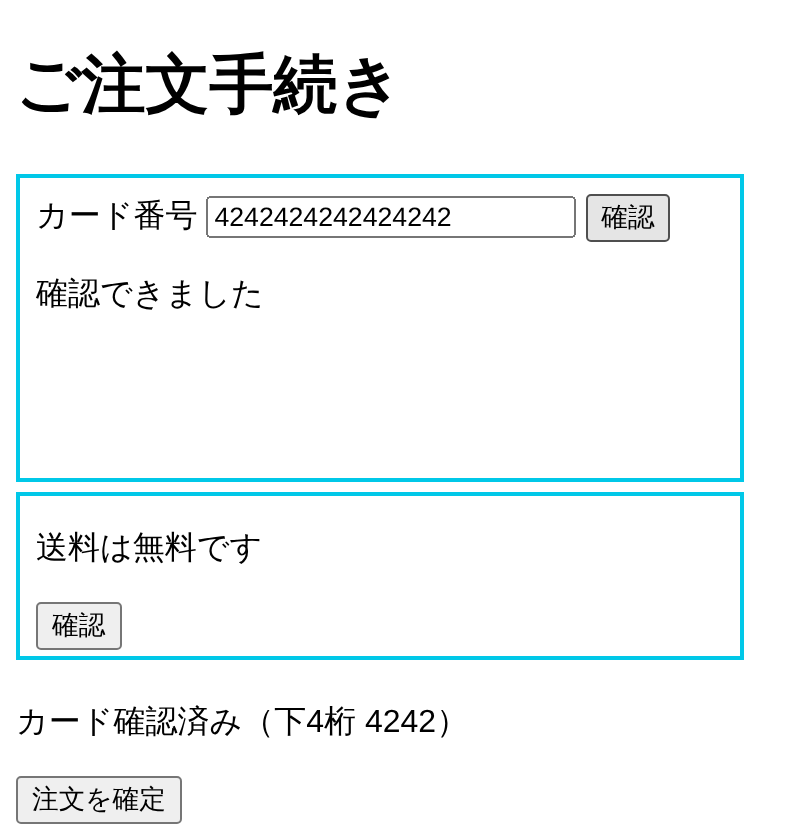
http://localhost:4173/ の注文画面に、iframe を2つ置きました。1つ目はカード番号を入れる iframe で、中身は別オリジン(http://127.0.0.1:4174/card)から読み込みます。2つ目は同じオリジンのお知らせです。どちらの iframe にも「確認」ボタンがあります。
<iframe title="カード情報の入力" src="http://127.0.0.1:4174/card" width="360" height="150"></iframe>
<iframe title="お知らせ" src="/notice" width="360" height="80"></iframe>
<p id="status">カード未確認</p>
<button>注文を確定</button>
カード番号の iframe で16桁の数字を入れて「確認」を押すと、iframe の中に「確認できました」と出ます。同時に postMessage で親のページに知らせ、親のページの「カード未確認」が「カード確認済み(下4桁 4242)」に変わります。16桁でなければ、iframe の中に「16桁の数字を入れてください」と出ます。
frameLocator() で iframe に入ってから探す
公式ドキュメントのフレームの説明にあるとおり、page.frameLocator() に iframe 要素のセレクターを渡すと、その iframe の中を探す FrameLocator が返ります。あとは page と同じように getByLabel() や getByRole() をつなげます。
import { test, expect } from '@playwright/test';

test('frameLocator でカード番号を入れる', async ({ page }) => {
  await page.goto('/');
  const card = page.frameLocator('iframe[title="カード情報の入力"]');
  await card.getByLabel('カード番号').fill('4242424242424242');
  await card.getByRole('button', { name: '確認' }).click();
  await expect(card.getByText('確認できました')).toBeVisible();
  await expect(page.locator('#status')).toHaveText('カード確認済み(下4桁 4242)');
});
iframe の中の表示は card から、親のページの表示は page から確かめます。このテストは通りました。
iframe 要素を getByTitle() などのロケーターで先に探してあるなら、contentFrame() で中に入れます。返るのは、frameLocator() と同じく、その iframe を指す FrameLocator です。
test('contentFrame() でも同じことができる', async ({ page }) => {
  await page.goto('/');
  const card = page.getByTitle('カード情報の入力').contentFrame();
  await card.getByLabel('カード番号').fill('1234');
  await card.getByRole('button', { name: '確認' }).click();
  await expect(card.locator('#msg')).toHaveText('16桁の数字を入れてください');
  await expect(page.locator('#status')).toHaveText('カード未確認');
});
こちらも通りました。カード番号の iframe は、親のページとはホストもポートも違う別オリジンです。それでも、同じオリジンの iframe と書き方は変わりませんでした。
page から直接探すと、待ったあとでタイムアウトする
iframe に入らずに page.getByLabel('カード番号') で探すと、見つかりません。数を出すと、page からは0、iframe に入ってからは1でした。
page.getByLabel の数 0
frame 内の数 1
そのまま fill() すると、エラーの文面は「見つからない」ではなく、タイムアウトです(上限を3秒にして実行しました)。
TimeoutError: locator.fill: Timeout 3000ms exceeded.
Call log:
- waiting for getByLabel('カード番号')画面には入力欄が見えているのに、waiting for のまま時間切れになるときは、その要素が iframe の中にないかを確かめます。
iframe が2つあるときは title などで絞る
page.locator('iframe') のように、どの iframe かを絞らずに中に入ろうとすると、strict mode の違反で落ちました。
await page.locator('iframe').contentFrame().getByRole('button', { name: '確認' }).click();Error: locator.click: Error: strict mode violation: locator('iframe') resolved to 2 elements:
1) <iframe width="360" height="150" title="カード情報の入力" src="http://127.0.0.1:4174/card"></iframe> aka locator('iframe[title="カード情報の入力"]')
2) <iframe width="360" height="80" title="お知らせ" src="/notice"></iframe> aka locator('iframe[title="お知らせ"]')FrameLocator の API リファレンスにも、iframe が複数当てはまると、操作のときにエラーになると書かれています。エラーの文面には、それぞれの iframe を title で指すロケーターが出ているので、それを使って絞ります。
別オリジンの iframe でも Playwright からは操作できる
page.evaluate() で、親のページのスクリプトから、別オリジンのカード番号の iframe の contentDocument を出してみました。
await expect(page.getByTitle('カード情報の入力').contentFrame().getByLabel('カード番号')).toBeVisible();
const r = await page.evaluate(() => {
  const f = document.querySelector('iframe') as HTMLIFrameElement;
  try { return String(f.contentDocument); } catch (e) { return 'エラー: ' + (e as Error).name; }
});
console.log('contentDocument', r);
console.log('frames', page.frames().map((f) => f.url()));contentDocument null
frames [
'http://localhost:4173/',
'http://127.0.0.1:4174/card',
'http://localhost:4173/notice'
]contentDocument は null で、親のページのスクリプトからは中に入れません。一方、page.frames() には別オリジンのカードのフレームも並んでいて、前の節のとおり frameLocator() で入力もクリックもできました。別オリジンの iframe では、evaluate() で contentDocument をたどって中を操作する書き方は使えません。
入れ子の iframe は frameLocator をつなげる
iframe の中にさらに iframe がある場合は、frameLocator() を外側から順につなげます。/nested のページに「外側」の iframe を置き、その中に「内側」の iframe を置いて試しました。
test('入れ子の iframe はつないでたどる', async ({ page }) => {
  await page.goto('/nested');
  const inner = page
    .frameLocator('iframe[title="外側"]')
    .frameLocator('iframe[title="内側"]');
  await inner.getByRole('button', { name: '内側のボタン' }).click();
  await expect(inner.getByRole('button')).toHaveText('押されました');
});このテストは通りました。page.frames() には、親のページ、外側、内側の3つのフレームが並びました。
あとから入る iframe も、出るまで待つ
ページを開いてから1.5秒後に、スクリプトで iframe を足すページを作りました。goto() の直後に、contentFrame() から中のボタンを click() しました。click() は、iframe が出るのを待ってから押しました。
test('あとから入る iframe も自動で待つ', async ({ page }) => {
  await page.goto('/late');
  const t0 = Date.now();
  await page.getByTitle('遅れて出るフレーム').contentFrame()
    .getByRole('button', { name: '内側のボタン' }).click();
  console.log('クリックまで', Date.now() - t0, 'ms');
});クリックまで 1903 mswaitForTimeout() などで iframe が出るのを待つ必要はありませんでした。
Frame オブジェクトは、その時点の iframe を指す
iframe の中を操作するもう1つの方法に、page.frame() で Frame オブジェクトを受け取る書き方があります。公式ドキュメントのフレームの説明でも、name 属性や URL で Frame を探す例が紹介されています。ただし、FrameLocator とは動きが違いました。
まず、page.frame() は待ちません。さきほどの1.5秒後に iframe が入るページで、goto() の直後に呼ぶと null が返りました。
console.log('すぐに呼んだ frame()', page.frame({ url: /\/inner$/ }));すぐに呼んだ frame() null次に、iframe 要素が作り直されると、前に受け取った Frame は使えなくなります。ボタンを押すと innerHTML で iframe を入れ直すページで、作り直す前に受け取った Frame と、contentFrame() で作った FrameLocator を比べました。
test('作り直された iframe: Frame は古いまま、FrameLocator は追いつく', async ({ page }) => {
  await page.goto('/replace');
  const frame = page.frame({ url: /\/inner$/ })!;
  const locator = page.getByTitle('作り直すフレーム').contentFrame();
  await page.getByRole('button', { name: 'フレームを作り直す' }).click();
  console.log('古い Frame の isDetached()', frame.isDetached());
  await locator.getByRole('button', { name: '内側のボタン' }).click();
  await expect(locator.getByRole('button')).toHaveText('押されました');
  console.log('FrameLocator は通った');
  await frame.getByRole('button', { name: '内側のボタン' }).click({ timeout: 3000 });
});古い Frame の isDetached() true
FrameLocator は通った
Error: locator.click: Frame was detachedFrameLocator では、作り直されたあとの新しい iframe の中のボタンを押せました。古い Frame は isDetached() が true になり、そこからの click() は Frame was detached で落ちました。このテストを20回くり返しても、20回とも同じ結果でした。iframe 要素がスクリプトで入れ替わる画面でも通るように、テストでは FrameLocator を使います。
Playwright 1.63 からは、iframe を指さずに探せる
Playwright 1.63 のリリースノートによると、page.frameLocator() をセレクターなしで呼ぶと、ページのどのフレームからでも探すようになりました。試したところ、カード番号の入力欄も、入れ子の奥の内側のボタンも、iframe を指さずに操作できました。
await page.frameLocator().getByLabel('カード番号').fill('4242424242424242');

await page.goto('/nested');
await page.frameLocator().getByRole('button', { name: '内側のボタン' }).click();親のページにある「注文を確定」ボタンも、page.frameLocator().getByRole('button', { name: '注文を確定' }) で1つ見つかりました。親のページも探す範囲に入ります。
ただし、2つの iframe の両方にある「確認」ボタンを探すと、次のエラーで落ちました。
Error: locator.click: frameLocator() matched elements in multiple frames.当てはまる要素がどれか1つのフレームにしかないときに使える書き方です。同じ名前のボタンが別の iframe にもある画面では、これまでどおり iframe を指定します。
iframe の要素そのものに戻るときは owner()
FrameLocator から iframe 要素のほうを確かめたいときは、owner() で Locator に戻せます。
const card = page.getByTitle('カード情報の入力').contentFrame();
const iframe = card.owner();
await expect(iframe).toHaveAttribute('src', 'http://127.0.0.1:4174/card');
console.log('iframe の大きさ', await iframe.boundingBox());iframe の大きさ { x: 8, y: 86.875, width: 364, height: 154 }src の確認は通りました。大きさは、width="360" height="150" に、上下左右に2pxずつの枠線を足した 364×154 でした。埋め込みの読み込み先や、iframe の大きさ・位置を確かめるときに使えます。