
git restoreで、消したファイルや変更を元に戻す方法
間違えて消したファイルや、書き換えたけれど要らなくなった変更は、git restore で最後のコミットの状態に戻せます。git add を取り消したいとき(ステージから下ろしたいとき)や、1つ前のコミットにあったファイルを取り出したいときも、同じ git restore にオプションを付けて使います。どの操作で何が戻るのかを、検証環境で git status とファイルの中身を見ながら確かめました。
検証環境は Ubuntu 24.04、Git 2.43.0 です。作者の名前とメールアドレスには例示用の値(Neko <neko@example.com>)を設定し、コミットの日時は環境変数 GIT_AUTHOR_DATE と GIT_COMMITTER_DATE で決めました。git restore は Git 2.23.0 で入ったコマンドで、それより古い Git にはありません。Windows・macOS では試していません。
どこからどこへ戻すのか
git restore を使い分けるには、ファイルの内容が置かれている3つの場所を意識すると分かりやすくなります。最新のコミット(HEAD)、git add した内容が入るステージ(インデックス)、手元で編集している作業ツリーの3つです。
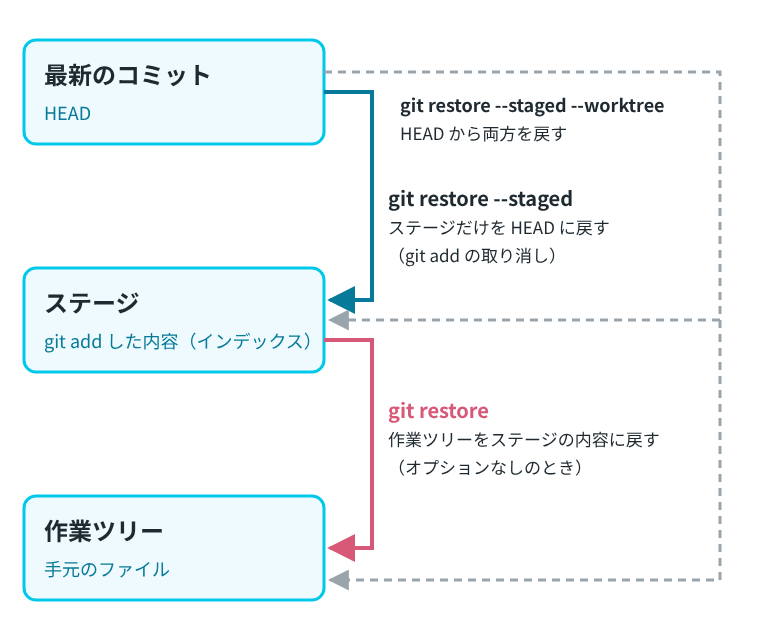
git restore の公式リファレンスによると、オプションを付けなければ作業ツリーを戻し、--staged を付けるとステージだけを戻し、両方を付けると両方を戻します。戻す元は、--staged を付けたときは HEAD、付けないときはステージです。つまり、オプションなしの git restore は、作業ツリーを最後のコミットではなくステージの内容に戻します。この違いは、あとで出てくる「add したあとにさらに書き換えた」場面で、結果の違いとして表れます。
以下の例は、README.md、price.txt、news.txt の3つのファイルがあるリポジトリで試しました。最後のコミットでは、price.txt の送料は400円です。
$ git log --oneline
64db4ca 送料を400円に変更
54cce3b 最初のコミット
書き換えたファイルを、最後のコミットの状態に戻す
price.txt の送料を0円に書き換えたあとで、この変更は要らなかったと分かった場面です。git status を見ると、戻し方まで表示されています。
$ git status
On branch main
Changes not staged for commit:
  (use "git add <file>..." to update what will be committed)
  (use "git restore <file>..." to discard changes in working directory)
	modified:   price.txt

no changes added to commit (use "git add" and/or "git commit -a")

$ git diff
diff --git a/price.txt b/price.txt
index ea0fb19..eb91650 100644
--- a/price.txt
+++ b/price.txt
@@ -1,2 +1,2 @@
-送料: 400円
+送料: 0円
 手数料: 200円
表示どおりに git restore にファイル名を渡します。何も表示されずに終わりますが、ファイルは戻っています。
$ git restore price.txt

$ git status
On branch main
nothing to commit, working tree clean

$ cat price.txt
送料: 400円
手数料: 200円git restore を実行すると、そのファイルへの手元の変更は失われます。Pro Git(英語版)の「Undoing Things」の節は、git restore <file> を危険なコマンドとし、その変更が要らないと確信できるときだけ使うよう勧めています。同じ節には、コミットしていなかったものを失うと、二度と取り戻せない可能性が高いとも書かれています。
消したファイルを戻す
rm で news.txt を消してしまった場合も、同じ操作で戻せます。git status には deleted: と出ます。
$ rm news.txt

$ git status
On branch main
Changes not staged for commit:
  (use "git add/rm <file>..." to update what will be committed)
  (use "git restore <file>..." to discard changes in working directory)
	deleted:    news.txt

no changes added to commit (use "git add" and/or "git commit -a")

$ git restore news.txt

$ ls
README.md
news.txt
price.txt

$ cat news.txt
営業時間: 10時から18時
git rm で消したときは、先に –staged で戻す
rm ではなく git rm で消すと、ステージからもファイルが消えます。この状態で git restore news.txt を実行すると、エラーになりました。
$ git rm -q news.txt

$ git status
On branch main
Changes to be committed:
  (use "git restore --staged <file>..." to unstage)
	deleted:    news.txt


$ git restore news.txt
error: pathspec 'news.txt' did not match any file(s) known to git
オプションなしの git restore はステージから作業ツリーに戻すので、ステージから news.txt が消えていると、戻す元がありません。先に --staged でステージに戻し、それから作業ツリーに戻すと、元どおりになりました。
$ git restore --staged news.txt

$ git status
On branch main
Changes not staged for commit:
  (use "git add/rm <file>..." to update what will be committed)
  (use "git restore <file>..." to discard changes in working directory)
	deleted:    news.txt

no changes added to commit (use "git add" and/or "git commit -a")

$ git restore news.txt

$ git status
On branch main
nothing to commit, working tree clean
git add を取り消す
git add したけれど、まだコミットに入れたくないときは --staged を付けます。手数料を0円にした変更を git add したあとで取り消します。
$ git add price.txt

$ git status
On branch main
Changes to be committed:
  (use "git restore --staged <file>..." to unstage)
	modified:   price.txt


$ git restore --staged price.txt

$ git status
On branch main
Changes not staged for commit:
  (use "git add <file>..." to update what will be committed)
  (use "git restore <file>..." to discard changes in working directory)
	modified:   price.txt

no changes added to commit (use "git add" and/or "git commit -a")

$ cat price.txt
送料: 400円
手数料: 0円
price.txt は「コミットする予定の変更」から「まだ add していない変更」に移りました。ファイルの中身(手数料: 0円)はそのままです。--staged はステージだけを戻し、作業ツリーには触りません。
まだ一度もコミットしていない新しいファイルを git add した場合も、--staged で add を取り消せます。検証環境では、ファイルは消えずに、まだ Git が管理していないファイル(??)に戻りました。
$ git add memo.txt

$ git restore --staged memo.txt

$ git status --short
?? memo.txt

$ cat memo.txt
メモ
add した変更ごと捨てる
git add した変更を、ファイルの中身も含めてまとめて捨てたいときは、--staged と --worktree を両方付けます。戻す元は HEAD なので、最後のコミットの状態になります。
$ git add price.txt

$ git restore --staged --worktree price.txt

$ git status
On branch main
nothing to commit, working tree clean

$ cat price.txt
送料: 400円
手数料: 200円
add したあとに書き換えた変更は、add した時点の内容に戻る
手数料を100円にして git add し、そのあとさらに50円に書き換えた場面です。git diff で作業ツリーとステージの差、git diff --staged でステージと最後のコミットの差を見ると、2段階の変更があることが分かります。
$ git diff
diff --git a/price.txt b/price.txt
index fbe82df..a94015d 100644
--- a/price.txt
+++ b/price.txt
@@ -1,2 +1,2 @@
 送料: 400円
-手数料: 100円
+手数料: 50円

$ git diff --staged
diff --git a/price.txt b/price.txt
index ea0fb19..fbe82df 100644
--- a/price.txt
+++ b/price.txt
@@ -1,2 +1,2 @@
 送料: 400円
-手数料: 200円
+手数料: 100円
ここでオプションなしの git restore を実行すると、ファイルは最後のコミット(200円)ではなく、git add した時点の100円に戻りました。
$ git restore price.txt

$ cat price.txt
送料: 400円
手数料: 100円

$ git status --short
M  price.txt
git status --short の左の列はステージの状態、右の列は作業ツリーの状態を表します(git status の公式リファレンス)。M が左の列にあるので、ステージにはまだ100円の変更が残っています。最後のコミットまで戻したいときは、--staged --worktree を使います。
$ git restore --staged --worktree price.txt

$ cat price.txt
送料: 400円
手数料: 200円

$ git status --short
前のコミットにあった内容を取り出す
--source に戻す元のコミットを渡すと、そのコミットにあった内容でファイルを戻せます。HEAD~1 は、最新のコミットの1つ前(1つ目の親)を指します(リビジョンの指定方法の公式リファレンス)。
$ git restore --source=HEAD~1 price.txt

$ cat price.txt
送料: 500円
手数料: 200円

$ git status
On branch main
Changes not staged for commit:
  (use "git add <file>..." to update what will be committed)
  (use "git restore <file>..." to discard changes in working directory)
	modified:   price.txt

no changes added to commit (use "git add" and/or "git commit -a")送料が、1つ前のコミットの500円になりました。ブランチやコミットは動かず、作業ツリーのファイルが書き換わっただけです。git コマンドの公式リファレンスの「Reset, restore and revert」の項でも、git restore はブランチを更新しないと説明されています。このあと git restore price.txt を実行すると、400円に戻りました。
コミットしてしまった削除を取り消す
ファイルを消すコミットをしたあとで、そのファイルが必要だったと分かった場面です。ステージにも最新のコミットにも news.txt がないので、オプションなしの git restore ではエラーになります。
$ git log --oneline
19dacae お知らせを削除
64db4ca 送料を400円に変更
54cce3b 最初のコミット

$ git restore news.txt
error: pathspec 'news.txt' did not match any file(s) known to gitどのコミットで消したかは、git log にファイル名を渡すと分かります。--source には、消したコミットの1つ前を渡します。ここでは消したコミット(19dacae)が最新なので、その1つ前は HEAD~1 です。
$ git log --oneline -1 -- news.txt
19dacae お知らせを削除

$ git restore --source=HEAD~1 news.txt

$ git status --short
?? news.txt

$ cat news.txt
営業時間: 10時から18時ファイルは戻りましたが、git status --short では ??(Git が管理していないファイル)と表示されました。--source だけでは作業ツリーにファイルを置くだけで、ステージには入らないからです。もう一度コミットに含めるには、git add してからコミットします。
$ git add news.txt && git commit -q -m "お知らせを戻す"

$ git status --short
変更をまとめて戻す、一部だけ戻す
リポジトリの一番上のフォルダで、ファイル名の代わりに . を渡すと、変更をまとめて戻せます。書き換えたファイルも、消したファイルも、一度に戻りました。
$ git status --short
 D README.md
 M news.txt
 M price.txt

$ git restore .

$ git status --short
逆に、変更の一部だけを捨てたいときは -p を付けます。変更のかたまりごとに、捨てる(y)か残す(n)かを聞かれます。ふだんはキーボードで答えますが、ここでは出力を残すため、printf で news.txt の変更には y、price.txt の変更には n を順に渡しました(そのため、答えた文字は画面に出ていません)。
$ printf "y\nn\n" | git restore -p
diff --git a/news.txt b/news.txt
index a91b5d8..d6da573 100644
--- a/news.txt
+++ b/news.txt
@@ -1 +1,2 @@
 営業時間: 10時から18時
+臨時休業のお知らせ
(1/1) Discard this hunk from worktree [y,n,q,a,d,e,?]?
diff --git a/price.txt b/price.txt
index ea0fb19..eb91650 100644
--- a/price.txt
+++ b/price.txt
@@ -1,2 +1,2 @@
-送料: 400円
+送料: 0円
 手数料: 200円
(1/1) Discard this hunk from worktree [y,n,q,a,d,e,?]?

$ git status --short
 M price.txt

$ cat price.txt
送料: 0円
手数料: 200円
news.txt の変更だけが捨てられ、price.txt の変更は残りました。
一度も add していないファイルは、git restore の対象にならない
作ったばかりで、一度も git add していないファイルは、Git が中身を持っていません。git restore に渡すとエラーになります。
$ git status --short
?? memo.txt

$ git restore memo.txt
error: pathspec 'memo.txt' did not match any file(s) known to git
同じ理由で、一度も add もコミットもしていないファイルを消したり書き換えたりした場合は、git restore では元に戻せません。
git checkout — との関係
古い記事などでは、変更を捨てる操作に git checkout -- ファイル名 が使われていることがあります。Git 2.23.0 のリリースノートによると、git checkout が受け持っていた「ブランチの切り替え」と「ファイルの取り出し」の2つの役目を分けるために、git switch と git restore が加わりました。検証環境では、git checkout -- price.txt でも、git restore price.txt と同じように書き換えが捨てられました。
$ git checkout -- price.txt

$ cat price.txt
送料: 400円
手数料: 200円

$ git status --short